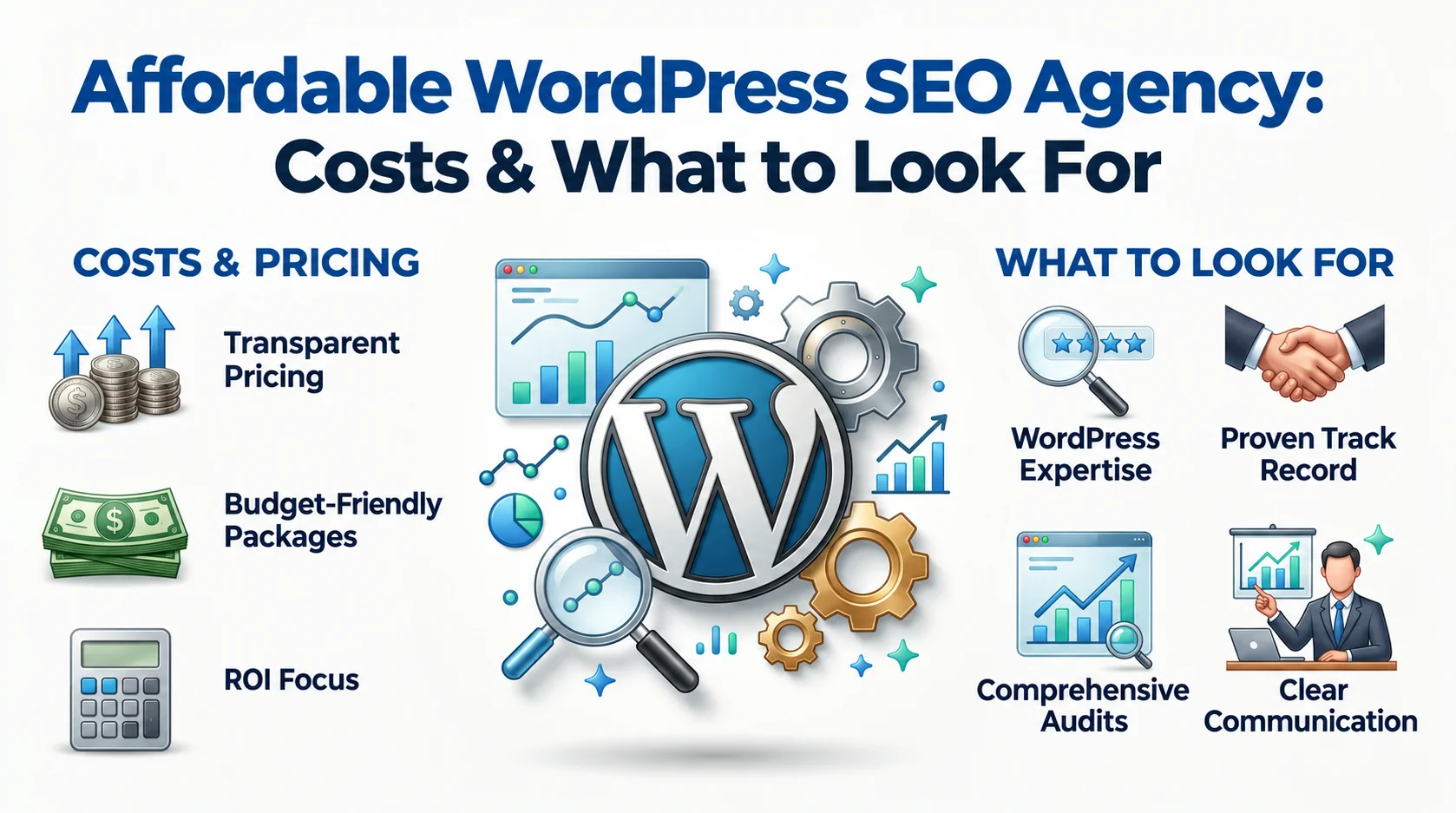
A low-cost SEO package can be a smart investment, or a monthly bill for work that never had a chance to improve your rankings. The difference isn’t the price itself. It’s what the agency does with your WordPress site.
For a small business, you don’t need 50 deliverables, hundreds of backlinks, or a giant content calendar on day one. You need the right technical fixes, pages targeting the right searches, a site Google can crawl and understand, and a way to measure whether the work produces business value.
What Makes a WordPress SEO Agency “Affordable”?
An affordable WordPress SEO agency isn’t the one with the lowest monthly price. Affordable means the scope matches the website. A five-page local plumbing website doesn’t need the same SEO campaign as a 5,000-product WooCommerce store. Paying for services you don’t need isn’t cost-effective, even if the package is labelled “budget friendly.”
A useful way to think about it is:
SEO value = relevant work completed ÷ total investment
That changes the question from “How cheap is this package?” to “What problems will this budget actually solve?”
Affordable vs. Cheap WordPress SEO
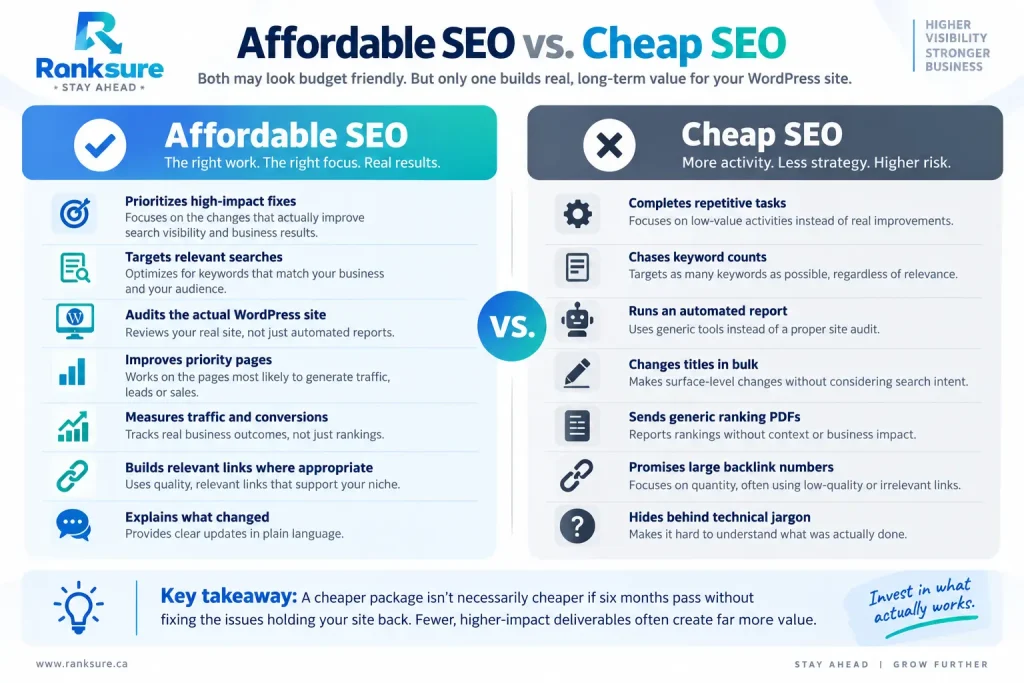
A cheaper package isn’t feasible if it takes six months to fix the issues holding the site back. Fewer deliverables focused on those actual problems could create far more value.
What Should an Affordable WordPress SEO Package Include?
A sensible package covers the fundamentals before adding expensive extras. A WordPress SEO audit shouldn’t produce a list of green, yellow, and red scores. The useful question is:
Which technical problems are preventing important pages from being crawled, indexed, understood, or ranked?
That means checking areas such as:
- Indexable URLs
- Noindex directives
- Canonicals
- XML sitemaps
- Robots.txt
- Redirects and 404s
- Internal links
- Duplicate URLs
- Category and tag archives
- Mobile rendering
- Structured data
- Core Web Vitals
WordPress makes SEO tasks easier, but plugins, themes, page builders, taxonomies, and URL structures also create pages you never intended Google to index.
On-Page SEO and Keyword Mapping
Every page needs a clear purpose. For example:
- “emergency plumber Toronto”: emergency plumbing service page
- “plumber near me”: local/service landing page
- “how to stop a leaking pipe”: informational article
- “plumbing maintenance cost Toronto”: commercial research content
The agency should map search intent to the right URL instead of forcing the same keyword across multiple pages.
Yoast, Rank Math and WordPress Configuration
Yoast SEO and Rank Math make WordPress SEO easier, but installing a plugin isn’t an SEO strategy.
An agency needs to configure:
- XML sitemaps
- Search appearance
- Title templates
- Canonicals
- Taxonomy indexing
- Archives
- Breadcrumbs
- Schema settings
- Redirect functionality
You don’t need multiple SEO plugins doing the same job. And a green plugin score isn’t a Google ranking score.
Schema and AI Search
Structured data helps search engines understand page information and makes pages eligible for certain search features when they meet the applicable requirements.
But schema isn’t a magic ranking button.
Google’s current guidance says websites don’t need special schema.org markup or separate technical requirements to appear in AI Overviews or AI Mode. Existing SEO fundamentals matter: crawlability, indexability, internal linking, useful content, page experience, and structured data that reflects visible content.
If an agency’s main AI-search pitch is a “secret AI schema,” ask what it actually does.
WordPress Speed and Core Web Vitals
A heavy page builder, oversized images, unnecessary plugins, third-party scripts, weak caching, and poor hosting all slow a site down. Useful performance work includes:
- Compressing and properly sizing images
- Using modern image formats where appropriate
- Lazy-loading non-critical images
- Removing unnecessary scripts
- Improving caching
- Optimizing CSS delivery
- Reducing excessive plugin overhead
- Reviewing hosting performance
Google’s current Core Web Vitals focus on three metrics:
| Metric | Good Performance | Measures |
| LCP | ≤ 2.5 seconds | Loading |
| INP | ≤ 200 ms | Responsiveness |
| CLS | ≤ 0.1 | Visual stability |
Don’t chase a perfect PageSpeed Insights score because it looks impressive. The objective is a faster, more stable experience for real users.
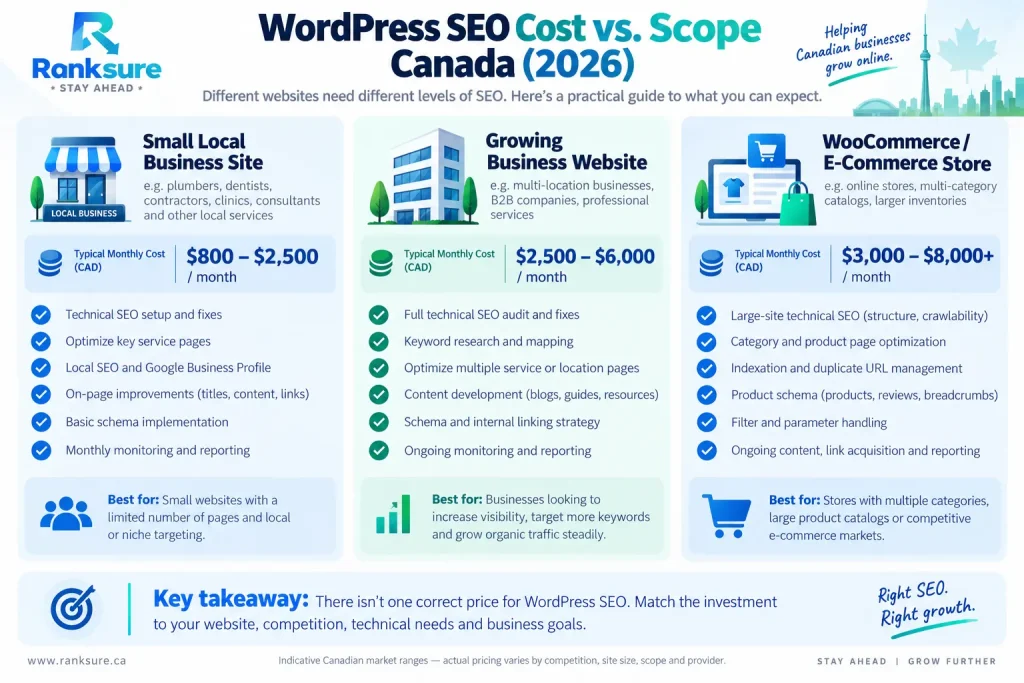
How Much Does Affordable WordPress SEO Cost?
There is no universal “correct” WordPress SEO price. Cost depends on factors such as:
- Website size
- Competition
- Geographic targeting
- Number of priority pages
- Technical condition
- Content requirements
- Link-building requirements
- WooCommerce complexity
- Existing authority
- Whether implementation is included
Published packages vary between markets and providers. Those figures should be treated as market examples, not standard SEO rates.
Which Pricing Model Makes Sense?
With a limited budget, prioritize the work closest to revenue. For a five-page local business site, I’d rather see the budget spent on strong commercial pages, technical cleanup, local SEO, internal links, and measurement than spread across dozens of low-value activities.
Who Benefits Most From Affordable WordPress SEO?
Different WordPress sites need different priorities.
| Business Type | Primary SEO Priorities |
| Local service business | Service pages, local relevance, Google Business Profile, reviews and internal links |
| Startup/new website | Architecture, search intent, technical foundations and conversion pages |
| Blog/content website | Topic strategy, useful content, internal linking and content maintenance |
| Small WooCommerce store | Categories, products, schema, filters and indexation |
New sites don’t need an enormous backlink campaign on day one. Build the foundation first. Authority becomes useful when the pages receiving it are technically healthy and worth ranking.
WooCommerce SEO: Where Budget SEO Falls Short
WooCommerce introduces problems that smaller brochure websites never encounter. A store with 20 products and one with 20,000 products don’t have the same SEO problem.
Product and Category Pages
Category pages can target broader commercial searches, while product pages target specific products. For example:
Category: running shoes for women
Product: Nike women’s trail running shoes
Those pages need distinct intent rather than competing with each other.
Filters, Duplicate URLs and Indexation
Filters generate URLs such as:
/shoes/?size=10&color=black
Across a large catalog, combinations of sizes, colors, brands, sorting options, and other parameters can create a huge URL space. A WooCommerce SEO agency should understand:
- Filter URLs
- Sorting parameters
- Duplicate product URLs
- Thin category pages
- Canonical conflicts
- Out-of-stock products
- Discontinued products
- Product structured data
On a limited budget, prioritize categories and products with search demand, healthy margins, reliable inventory, and realistic conversion potential.
How to Choose a WordPress SEO Agency
Don’t begin with the package name. Begin with the process. Ask:
- Will you audit my current website?
- Who implements the fixes?
- How do you decide which pages to optimize?
- How do you handle schema?
- How do you approach Core Web Vitals?
- Do you work directly inside WordPress?
- Do you understand WooCommerce?
- What will I receive each month?
- How will you measure leads or sales from organic search?
A useful audit should also prioritize problems.
Weak:
“There are 37 SEO issues.”
Useful:
“These three issues are preventing important service pages from being indexed correctly. Fix these first.”
Prioritization is part of SEO strategy.
What Should SEO Reporting Show?
A useful report should tell you:
- What changed
- Which pages were optimized
- How search visibility changed
- What happened to organic traffic
- What leads or sales came from organic search
- Which technical issues remain
- What happens next
Rankings matter, but rankings without business context are misleading.
Red Flags in Cheap WordPress SEO Services
Cheap SEO becomes a problem when the lower price comes from shortcuts, generic execution, or work that isn’t tied to business outcomes.
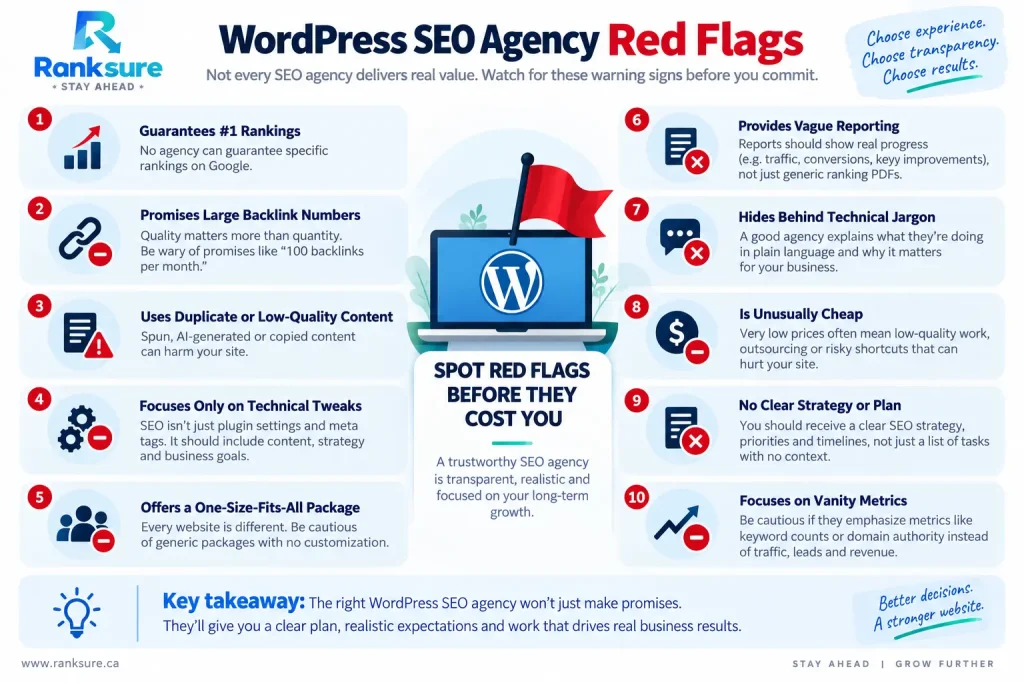
A credible agency should be able to explain what it will do, why it matters, and how the work will be measured.
A Practical 3-Month WordPress SEO Plan
You don’t need a giant campaign from day one. A focused three-month roadmap prioritizes the foundation first, then commercial pages, supporting content, and authority.
The exact content strategy depends on the business. A roofing company, for example, might build supporting content around roof repair costs, replacement vs. repair, warning signs, emergency repairs, and maintenance. Those articles can support and internally link to relevant commercial service pages.
The order changes based on the website, competition, and existing problems. The point is to prioritize the work that matters rather than buying every service on an SEO menu.
Affordable WordPress SEO vs. DIY SEO
If your WordPress site is small and technically healthy, you can handle some SEO yourself.
Yoast or Rank Math help manage titles, meta descriptions, sitemaps, breadcrumbs, basic schema, and other settings. What a plugin can’t decide is:
- Which keyword deserves its own page
- Whether two pages are competing
- Which pages deserve priority
- Whether your architecture makes sense
- Why traffic dropped
- Whether your content satisfies search intent
Technical help becomes valuable when migrations, unexplained traffic drops, indexation problems, large WooCommerce catalogs, major performance problems or complicated plugin/theme conflicts.
That’s where specialist time saves more than it costs.
WordPress SEO in 2026: What Has Changed?
AI-powered search has created plenty of new terminology, but it hasn’t eliminated SEO fundamentals.
Google says its existing SEO best practices remain relevant for AI features such as AI Overviews and AI Mode. It doesn’t require a special schema type or separate AI markup to become eligible.
Google’s 2026 guidance on generative AI search also emphasizes valuable, unique, non-commodity content alongside strong technical foundations.
WordPress itself continues to evolve. WordPress 6.9 introduced frontend performance improvements, including workarounds for LCP, script and style handling, queries, and caching. WordPress 7 followed in 2026, with security releases reinforcing another basic WordPress responsibility: keeping the platform updated.
The practical takeaway for small businesses is straightforward:
Don’t buy a trendy “AI SEO” add-on while basic crawling, content, performance or architecture problems remain unresolved.
Checklist Before Hiring a WordPress SEO Agency
Before signing a contract, ask:
- Does the agency audit the actual WordPress site?
- Are technical fixes included?
- Is keyword research connected to search intent?
- Will important pages actually be optimized?
- Are sitemap, robots.txt, canonicals and indexation reviewed?
- Is schema implemented only where appropriate?
- Are Core Web Vitals measured?
- Does the agency understand WooCommerce if you sell online?
- Is local SEO included when relevant?
- Are backlinks judged by relevance and quality?
- Do reports include business outcomes?
- Is the monthly scope clear?
- Are ranking guarantees avoided?
If an agency can’t explain what happens to your website after you pay, don’t buy the package.
Conclusion: Pay for Priorities, Not Deliverables
Affordable WordPress SEO isn’t about finding the smallest number on a pricing page. It’s about finding the smallest useful scope.
Fix the technical foundation. Improve the pages capable of generating business. Build supporting content with a purpose. Measure what happens. Expand when the data justifies it.
That’s what makes WordPress SEO affordable: not doing less work, but avoiding work that doesn’t deserve your budget.
Frequently Asked Questions
How much does WordPress SEO cost for a small business?
Costs vary significantly by market, competition, website size, and scope. Compare what will actually be implemented rather than choosing a package based only on its monthly price.
Is cheap WordPress SEO worth it?
Sometimes. A small, focused package can work for a simple website. It becomes risky when automated tasks, low-quality links, and generic reports replace technical and strategic work.
Which is better for WordPress SEO, Yoast or Rank Math?
Neither is universally better. Both support important WordPress SEO functions. Correct configuration and the strategy behind the settings matter more than the plugin name.
Can a small business do WordPress SEO without an agency?
Yes. Basic on-page changes and plugin settings can be handled internally. Complex technical problems, migrations, large sites, and persistent visibility issues may justify specialist help.
How long should I hire a WordPress SEO agency for?
It depends on the problem. A technical cleanup may be project-based, while competitive SEO, content development, and authority building usually require ongoing work and measurement.