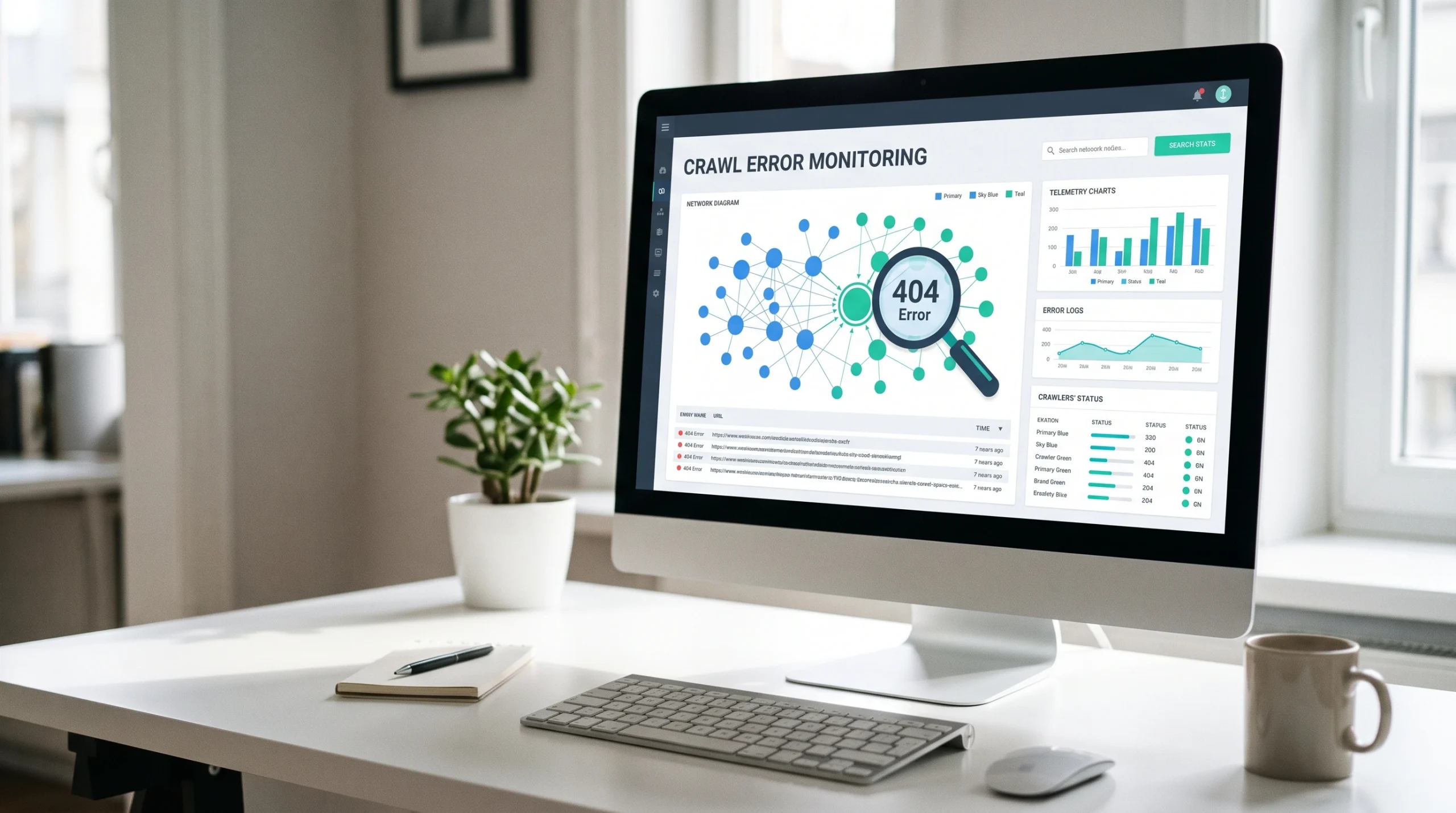
Crawl error monitoring is the process of detecting, diagnosing, and resolving issues that prevent search engine bots from accessing website URLs as intended. Common issues include HTTP errors, blocked resources, redirect failures, DNS problems, and server timeouts. Effective monitoring combines Google Search Console, scheduled SEO crawls, and server logs to identify crawling issues, analyse server responses, and determine their root causes.
Not every error requires fixing. A 404 may be intentional, while a 301 redirect may be correctly configured. The goal is to identify unexpected crawl errors, prioritize affected URLs, verify fixes, and prevent recurring issues that could affect search visibility.
What Is Crawl Error Monitoring in SEO?
Crawl error monitoring tracks whether website URLs return their expected responses to search engine crawlers. A live page should typically return HTTP 200, a permanently removed page may return 404 or 410, and a moved URL may use a 301 redirect. Errors require attention when actual responses differ from expected behaviour. For example, a product category returning 503 may need urgent fixing, while an outdated campaign URL returning 404 may be intentional.
Monitoring evaluates URL importance, HTTP status codes, error frequency, duration, affected pages, and recurrence. Unlike a one-time crawl, continuous monitoring helps distinguish temporary failures from persistent issues.
How Crawl Errors Occur During Website Crawling
Search engine crawlers resolve a domain, establish a connection, request a URL, and process the server response. Errors can occur at any stage due to DNS failures, connection timeouts, TLS errors, firewall restrictions, rate limiting, server failures, or redirect loops.
HTTP 429 indicates too many requests, while 5xx responses signal server-side failures that may temporarily reduce Google’s crawling activity. Robots.txt restrictions can also prevent access without indicating a technical error.
Crawl error monitoring identifies where these failures occur, which URLs are affected, and whether corrective action is needed.
Why Crawl Error Monitoring Matters for SEO
Crawl error monitoring helps search engines access important website pages consistently. It supports technical SEO by identifying issues that can disrupt crawling, content discovery, and search visibility.
Key benefits include:
- Improved Crawl Accessibility: Ensures search engine bots can access important URLs without unexpected errors.
- Faster Error Detection: Identifies HTTP errors, server failures, and connection issues before they become persistent.
- Better Crawl Efficiency: Helps resolve recurring 5xx and 429 responses that may temporarily reduce Google’s crawling activity.
- Protection of Important Pages: Prioritizes crawl errors affecting high-value product, category, and service pages.
- Faster Troubleshooting: Helps SEO, development, and server teams identify root causes and implement fixes.
- Prevention of Recurring Issues: Tracks error frequency and duration to detect repeated crawling failures.
The goal is not zero crawl errors but reliable access to priority URLs and timely resolution of unexpected crawling issues.
Common Types of Crawl Errors to Monitor
Crawl errors arise from missing resources, access restrictions, server failures, network issues, redirects, and crawler configuration problems. Identifying their causes and monitoring the right signals helps maintain reliable search engine access.
404, 410 & Soft 404 Errors
Common Causes
- Deleted or moved pages
- Broken internal links
- Outdated sitemap URLs
- Missing-content pages returning 200
Examples: 404 Not Found · 410 Gone · Soft 404
What to Monitor: Affected URLs, internal links, expected responses, recurrence.
403 & 429 Crawler Access Errors
Common Causes
- WAF or firewall restrictions
- IP blocking and bot protection
- Authentication requirements
- Excessive request rates
Examples: 403 Forbidden · 429 Too Many Requests
What to Monitor: Blocked requests, rate limits, CDN rules, verified crawler identity.
5xx Server Errors & Timeouts
Common Causes
- Application or server failures
- Upstream service issues
- Server overload
- Gateway timeouts
Examples: 500 · 502 · 503 · 504
What to Monitor: Error frequency, affected URLs, response times, outage duration.
DNS, Connection & TLS Failures
Common Causes
- DNS resolution failures
- Unreachable servers
- Connection timeouts
- TLS certificate or handshake errors
Examples: DNS Failure · Connection Timeout · TLS Failure
What to Monitor: DNS availability, server connectivity, TLS validity, host status.
Redirect Errors
Common Causes
- Redirect loops
- Excessive redirect chains
- Broken destination URLs
- Incorrect redirect rules
Examples: Redirect Loop · Too Many Redirects · Invalid Destination
What to Monitor: Redirect paths, destination responses, redirect chains.
Robots.txt & Crawl Restrictions
Common Causes
- Unintended Disallow rules
- Misconfigured robots.txt
- Restricted important directories
- Inaccessible robots.txt
Examples: Blocked by robots.txt · Robots.txt Fetch Failure
What to Monitor: Blocked URLs, robots.txt availability, intended crawl permissions.
Other Technical SEO Issues
Common Causes
- Incorrect canonical tags
- Unintended noindex directives
- URL parameter misconfiguration
- Inconsistent server responses
Examples: Canonical Mismatch · Unexpected Noindex · Response Inconsistency
What to Monitor: Canonical targets, indexing directives, URL variations, response consistency.
Bottom Strip: Crawl Error Monitoring Essentials
- Expected vs. Unexpected: Not every 404, 410, or crawl restriction requires fixing.
- Crawler Verification: Validate Googlebot using published IP ranges or reverse DNS.
- Crawl Rate Impact: Repeated 429 and 5xx responses can temporarily reduce Google crawling.
- Fix Prioritization: Evaluate URL importance, error frequency, duration, scope, and recurrence.
Not every unusual response requires fixing. Intentional 404, 410, and robots.txt restrictions may be valid. Prioritize unexpected or recurring failures affecting important indexable URLs, and verify crawler identity when investigating access restrictions.
How to Monitor Crawl Errors in Google Search Console
Google Search Console helps identify crawl errors Google encounters when accessing your website. Three key reports support crawl error monitoring: Crawl Stats, Page Indexing, and URL Inspection.
Identify Crawl Failures in the Crawl Stats Report
The Crawl Stats report reveals Google’s crawling activity and potential server issues.
- Host Status: Check DNS, server connectivity, and robots.txt availability.
- HTTP Responses: Identify spikes in 404, 429, and 5xx responses.
- Average Response Time: Detect slow server responses and potential performance issues.
- Crawl Requests: Review crawling patterns by response type, file type, and Googlebot type.
Crawl Stats provides representative URL examples, not complete request logs. Use server or CDN logs for detailed request-level analysis.
Find Crawl-Related Errors in the Page Indexing Report
The Page Indexing report identifies URLs affected by server errors, soft 404s, redirect problems, robots.txt restrictions, and other indexing conditions. Review affected URLs, compare historical reports with current responses, and distinguish intentional exclusions from unexpected failures.
Inspect Individual URLs to Verify Crawl Problems
Use URL Inspection to review Google’s recorded crawl information and perform a live URL test. Compare historical errors with current accessibility to verify fixes. A successful live test confirms accessibility under the tested conditions but does not guarantee indexing.
How to Monitor Crawl Errors Using SEO Crawling Tools
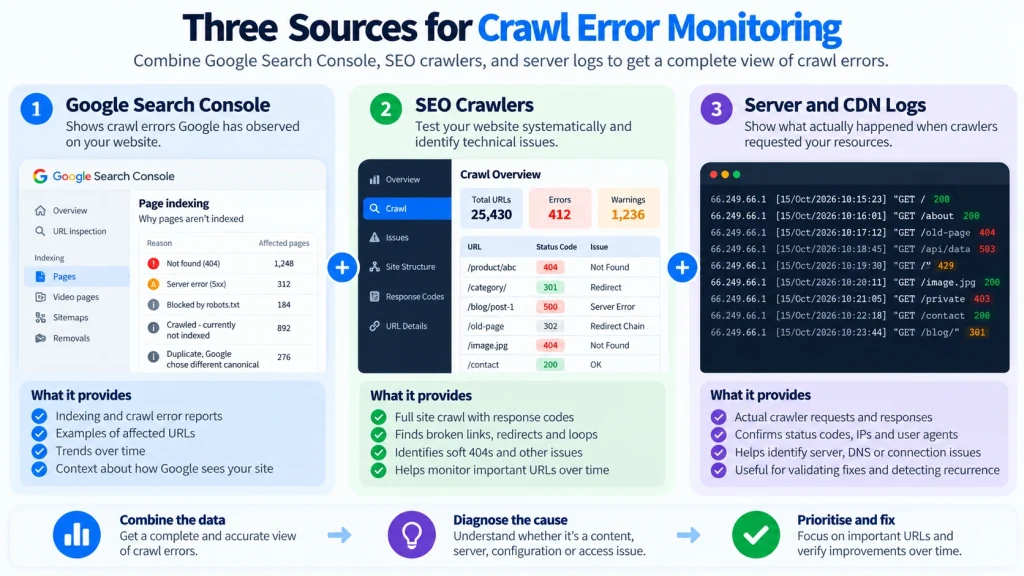
SEO crawling tools such as Screaming Frog, Semrush Site Audit, Ahrefs Site Audit, and Sitebulb help detect broken URLs, redirect problems, and recurring technical issues through scheduled website crawls.
Configure Scheduled Crawls for Error Detection
- Define crawl scope, including important URLs, directories, and subdomains.
- Schedule crawls according to website size, update frequency, and operational risk.
- Adjust crawl speed to avoid server overload or rate limiting.
- Record crawl dates, configurations, and crawler identity for consistent comparisons.
Track Broken URLs, Redirect Failures, and Recurring Errors
Monitor essential attributes to identify and diagnose crawl errors:
- URL Data: Affected URL, source page, and redirect destination.
- Response Data: Previous and current HTTP status codes.
- Error History: First detection, last detection, frequency, and recurrence.
- Resolution Tracking: URL priority, assigned owner, and fix status.
Compare Crawl Results to Identify New and Resolved Issues
Classify crawl errors into four monitoring states:
| Error Status | Meaning |
| New | Error detected since the previous crawl |
| Persistent | Error remains across multiple crawls |
| Resolved | URL now returns its expected response |
| Recurring | Previously resolved error has returned |
Comparing crawl results helps identify emerging problems, verify technical fixes, and prevent recurring crawl errors.
How to Detect Googlebot Crawl Errors Using Server Logs
Server and CDN logs provide request-level data to identify crawl errors experienced by Googlebot. Key fields include requested URL, timestamp, HTTP status code, source IP, user agent, and response time.
Identify Verified Googlebot Requests
Googlebot user agents can be spoofed. Verify genuine Googlebot requests using Google’s published IP ranges or reverse DNS verification. Separate verified Googlebot traffic from SEO crawlers, AI bots, browsers, and other automated requests for accurate analysis.
Analyze Failed Requests and Error Patterns
Filter verified Googlebot requests to identify recurring HTTP 403, 429, and 5xx errors.
- Post-deployment errors: May indicate application or configuration regressions.
- Hostname-specific failures: May reveal infrastructure problems.
- Frequent 429 responses: May indicate rate limiting or server capacity issues.
- Template-specific 500 errors: May indicate application failures.
Compare error timestamps with deployments, server incidents, CDN updates, and configuration changes to identify potential root causes.
Investigate WAF, CDN, and Rate Limiting Blocks
Review security logs for blocked Googlebot requests. Examine source IPs, HTTP responses, WAF rule IDs, security actions, and request timestamps. Verify crawler identity before adjusting security controls. Modify only the rules responsible for unintended blocking rather than broadly disabling bot protection.
How to Diagnose and Fix Crawl Errors
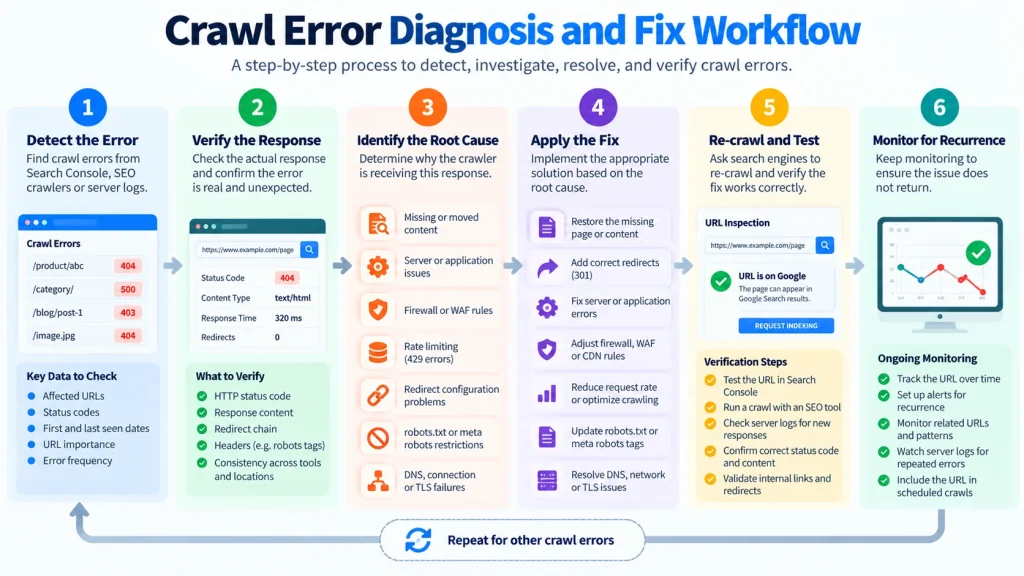
Effective crawl error troubleshooting involves reproducing the failure, identifying its root cause, applying the appropriate fix, and verifying the corrected response.
Fix Unexpected 404 Errors and Broken Internal Links
- Restore pages that were accidentally deleted.
- Update internal links pointing to incorrect or outdated URLs.
- Implement 301 redirects when content has permanently moved to a relevant replacement.
- Keep 404 or 410 responses for intentionally removed pages without suitable replacements.
Resolve 403 and 429 Errors Affecting Crawlers
- 403 Errors: Check WAF policies, authentication requirements, CDN rules, and IP restrictions.
- 429 Errors: Review rate limits, crawler request frequency, server capacity, and bot protection settings.
Verify Googlebot identity before changing access controls, and confirm successful requests through server logs.
Troubleshoot 5xx Errors and Server Availability
Investigate application logs, server resource usage, database performance, upstream dependencies, and recent deployments. Determine whether failures affect individual URLs, page templates, services, or entire hostnames. Prioritize widespread and recurring errors affecting important pages.
Correct Redirect Failures and Accidental Crawl Blocks
- Redirect Loops: Correct conflicting redirect rules.
- Redirect Chains: Remove unnecessary intermediate redirects.
- Broken Destinations: Update redirects to valid, relevant URLs.
- Robots.txt Restrictions: Remove unintended crawl blocks while preserving intentional restrictions.
After implementing fixes, validate HTTP responses using SEO crawlers, Google Search Console URL Inspection, and server logs.
How to Build a Continuous Crawl Error Monitoring System
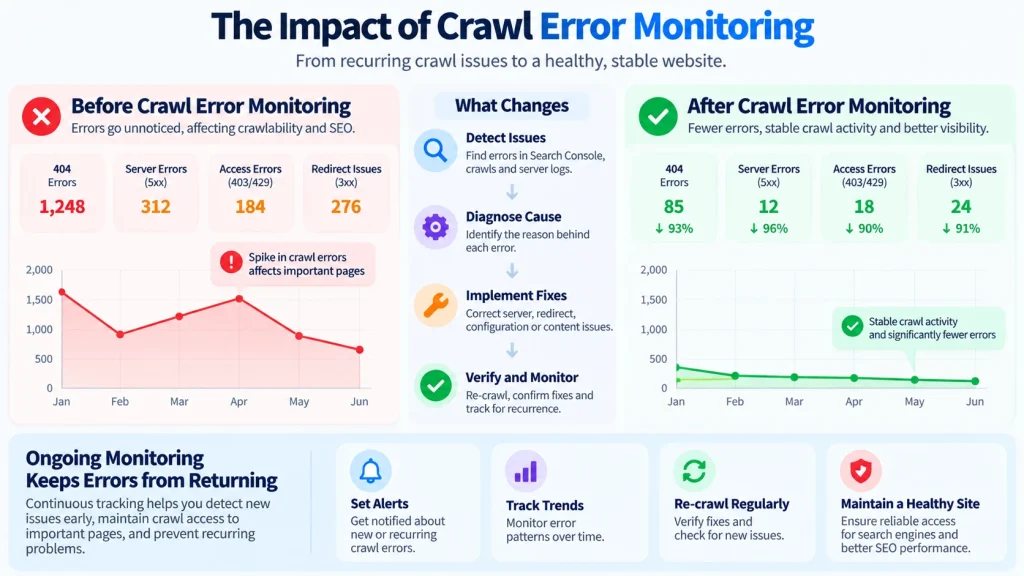
Continuous crawl error monitoring combines baseline tracking, severity assessment, automated alerts, and issue ownership to detect and resolve crawling problems efficiently.
Establish a Crawl Error Baseline
Define normal crawler activity using historical data from Google Search Console, SEO crawlers, and server logs.
Track:
- HTTP Responses: Expected status codes, intentional 404s, and redirects.
- Server Performance: Normal response times and error rates.
- Priority URLs: Important product, category, and service pages.
- Crawler Activity: Typical Googlebot request patterns and frequency.
Update baselines after website migrations, hosting changes, or major deployments.
Prioritize Crawl Errors by Severity and SEO Impact
| Priority | Typical Condition | Required Action |
| P1 – Critical | DNS outages, widespread 5xx errors, Googlebot blocked from critical pages | Immediate investigation and escalation |
| P2 – High | Recurring errors affecting important pages or templates | Rapid diagnosis and assigned ownership |
| P3 – Moderate | Isolated broken links, redirect failures, or intermittent errors | Scheduled fixes and verification |
| P4 – Low | Intentional 404s, obsolete URLs, expected restrictions | Document and monitor if conditions change |
Prioritize issues based on URL importance, affected scope, error duration, recurrence, and crawler impact.
Configure Crawl Error Alerts and Thresholds
Set automated alerts for:
- Sudden increases in HTTP 5xx errors.
- Verified Googlebot receiving unexpected 403 or repeated 429 responses.
- DNS failures and server connectivity issues.
- Significant increases in response times.
- Growing numbers of broken priority URLs.
Compare error rates and affected URLs against established baselines to reduce false alerts. Include severity, affected hostname, detection time, and evidence source in each alert.
Track Error Resolution and Assign Ownership
Maintain a centralized crawl error log containing:
- Issue Details: Affected URLs, error type, severity, and detection date.
- Root Cause: Confirmed technical problem and supporting evidence.
- Ownership: Responsible SEO, development, infrastructure, or security team.
- Resolution: Corrective action, verification results, and closure date.
Clear ownership helps prevent unresolved crawl errors from accumulating.
How to Verify Crawl Error Fixes and Prevent Recurrence
Crawl error resolution requires confirming that affected URLs return their intended responses and remain accessible across subsequent crawls.
Re-Crawl Affected URLs and Confirm Expected Responses
- Reproduce the Error: Confirm the original failure and affected URL scope.
- Apply the Fix: Correct the underlying server, routing, access, or configuration issue.
- Re-Crawl URLs: Verify expected HTTP responses using SEO crawling tools.
- Validate with Google: Use URL Inspection for important Google-specific checks.
- Check Server Logs: Confirm successful crawler requests where available.
Monitor Error Trends After Fixes and Website Changes
Compare error rates before and after repairs, and continue monitoring across multiple crawl cycles. Pay particular attention following CMS updates, website migrations, deployments, hosting changes, and CDN or WAF configuration updates. A crawl error should be considered resolved when the intended response is verified, with continued monitoring used to detect recurrence.
Common Crawl Error Monitoring Mistakes
Avoiding common monitoring mistakes helps improve crawl error detection, troubleshooting accuracy, and technical SEO performance.
| Common Mistake | Why It’s a Problem | Best Practice |
| Treating Every 404 as an Error | Intentional removals create unnecessary alerts. | Fix unexpected 404s and broken internal links. |
| Confusing SEO Crawlers with Googlebot | Third-party crawlers may receive different responses. | Verify Googlebot identity and compare server logs. |
| Ignoring Intermittent Errors | Temporary failures may go unnoticed during manual checks. | Track historical crawl data and recurring failures. |
| Excessive Crawl Requests | Aggressive crawling can trigger rate limits or server overload. | Configure controlled crawl speeds and request limits. |
| Relying Only on Search Console | GSC doesn’t provide complete request-level data. | Combine GSC, scheduled SEO crawls, and server logs. |
| Skipping Fix Verification | Configuration changes don’t guarantee resolution. | Re-crawl affected URLs and verify expected responses. |
Key takeaway: Effective crawl error monitoring requires accurate crawler identification, historical tracking, controlled testing, and verified fixes, not simply reducing the total error count.
Final Takeaways: Maintain Reliable Crawl Error Monitoring
Effective crawl error monitoring combines Google Search Console, automated SEO crawlers, and server logs to detect, diagnose, and resolve crawling issues. Prioritize errors based on URL importance, severity, frequency, duration, and SEO impact. Assign responsibility, fix underlying causes, verify HTTP responses, and monitor for recurrence. The goal is not to eliminate every crawl error but to maintain reliable search engine access, protect important URLs, and prevent recurring technical SEO problems.
Frequently Asked Questions
How Often Should You Monitor Crawl Errors?
Monitoring frequency depends on website size, update frequency, and technical risk. Large ecommerce sites and publishers benefit from daily or recurring automated crawls, while smaller websites may require weekly checks. Monitor critical server and crawler access failures continuously where possible.
Do All 404 Crawl Errors Need to Be Fixed?
No. HTTP 404 is appropriate for intentionally removed pages without relevant replacements. Fix unexpected 404 errors, broken internal links, and moved URLs that should redirect to valid destinations.
Why Does Screaming Frog Show 403 or 429 Errors?
Screaming Frog may encounter 403 or 429 responses due to WAF restrictions, CDN security rules, rate limits, or aggressive crawl settings. Adjust crawl speed, inspect security logs, and verify whether Googlebot experiences similar restrictions.
Can Google Search Console Detect Every Crawl Error?
No. Google Search Console reports crawling issues observed by Google but does not provide complete request-level logs. Combine Crawl Stats, scheduled SEO crawls, and server or CDN logs for more comprehensive monitoring.