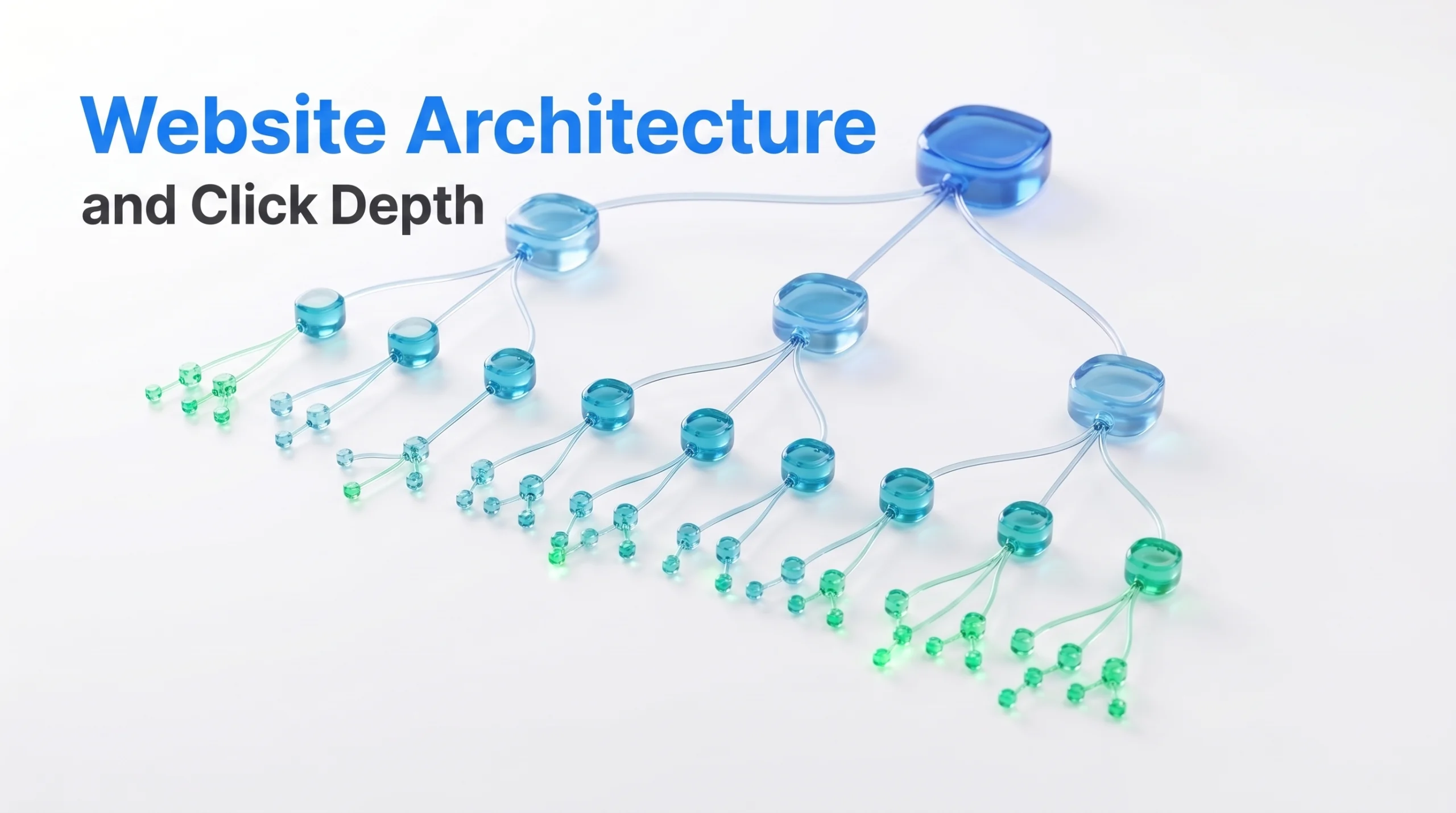
Website architecture SEO is the organization and internal connection of webpages across a site. It determines how categories, products, services, articles, and other pages relate to one another and how easily users and search engine crawlers can reach them.
Click depth measures how many internal link clicks separate a page from a chosen starting point, the homepage during an SEO audit. Strong website architecture does not make every page equally shallow. It creates a logical hierarchy, keeps priority pages accessible, and connects related content through useful internal links.
This guide explains how website architecture, click depth, crawl depth, navigation, taxonomy, and internal linking work together. It also shows how to plan, audit, improve, and measure site structure without confusing navigation depth with URL folder depth.
What Is Website Architecture in SEO?
Website architecture in SEO is the way webpages are organized and connected across a website.
It combines two systems:
- Information architecture defines how pages are grouped by topic, product type, service, or purpose.
- Internal link architecture defines how users and search engine crawlers move between those pages.
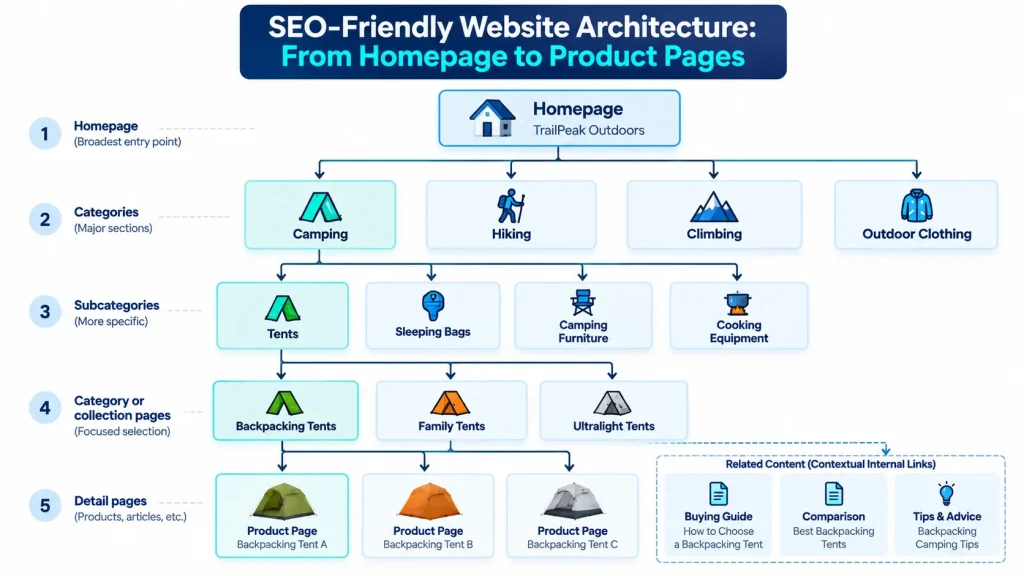
Consider a fictional ecommerce website called TrailPeak Outdoors:
Homepage
↓
Camping
↓
Tents
↓
Backpacking Tents
↓
Product Page
Camping is the broadest category in this path. Tents narrows the product type. Backpacking Tents adds a more specific use case. The product page represents an individual item. A strong SEO structure keeps these relationships clear while making important pages easy to reach.
Key Components of an SEO Friendly Website Structure
An SEO friendly website structure combines page hierarchy, navigation, categorization, and internal linking.
Homepage
The homepage provides access to the website’s main sections. TrailPeak Outdoors might link to Camping, Hiking, Climbing, and Outdoor Clothing from its homepage.
Category Pages
Category pages group related products, services, articles, or resources around a broader subject. Camping could contain tents, sleeping equipment, camping furniture, and cooking equipment.
Subcategories
Subcategories divide broad categories into more specific groups. Tents could contain Backpacking Tents, Family Tents, and Four Season Tents. This level helps users narrow their choices without moving directly from a broad category to individual products.
Detail Pages
Detail pages address a specific need or entity. Examples include product pages, service pages, articles, guides, comparison pages, and resource pages. A Backpacking Tents category could contain individual tent product pages.
Primary Navigation
Primary navigation gives users consistent access to major website sections. It includes important categories and destinations rather than every available page.
Breadcrumbs
Breadcrumbs show a page’s position within the website hierarchy and link back to broader parent levels.
A product page could use this path:
Homepage
↓
Camping
↓
Tents
↓
Backpacking Tents
↓
Product
This helps users understand where they are and move back to broader categories.
Contextual Internal Links
Contextual internal links connect related pages from within the main page content. A guide about choosing a backpacking tent could link to the Backpacking Tents category, a tent size guide, and relevant product pages. Each component serves a separate function. Navigation creates major access routes. Category pages organize related entities. Breadcrumbs show hierarchical position. Contextual links connect pages based on topical relevance.
Flat vs. Hierarchical Website Architecture
Flat and hierarchical website architecture differ mainly in how many organizational levels separate important pages from major entry points.
| Factor | Flat Website Architecture | Hierarchical Website Architecture |
| Structure | Uses relatively few levels | Uses broader parent categories and more specific child pages |
| Best suited for | Small websites with limited content | Large websites with many products, services, or resources |
| Navigation | Important pages are reached through shorter paths | Users move through categories and subcategories |
| Organization | Simple and direct | More detailed and scalable |
| Example | Homepage → Services → Service Page | Homepage → Camping → Tents → Backpacking Tents → Product Page |
| Main risk | Too little grouping can weaken content organization | Too many levels can make important pages harder to reach |
A small service website may work well with a flatter structure because it has fewer services, locations, and supporting pages. A large ecommerce website usually needs more hierarchy to organize extensive product inventories. The goal is not maximum flatness. The goal is to use only the levels needed to organize content clearly.
TrailPeak Outdoors could keep Camping, Tents, and Backpacking Tents as separate hierarchy levels while also linking directly from Camping to Backpacking Tents when that category is especially important. This preserves logical organization while creating a shorter access path.
What Is Website Depth in SEO?
Website depth measures how many internal link steps separate a page from a defined starting point. SEO audits use the homepage as that starting point. Consider this TrailPeak Outdoors path:
Homepage
↓
Camping
↓
Tents
↓
Backpacking Tents
Backpacking Tents sits three clicks from the homepage. Its depth can change without changing its URL. TrailPeak Outdoors could link directly from the Camping page to Backpacking Tents, reducing the shortest path to two clicks. Website depth therefore depends on internal linking rather than URL appearance.
Click Depth vs. Crawl Depth vs. URL Directory Depth
Click depth, crawl depth, and URL directory depth describe different properties of website structure.
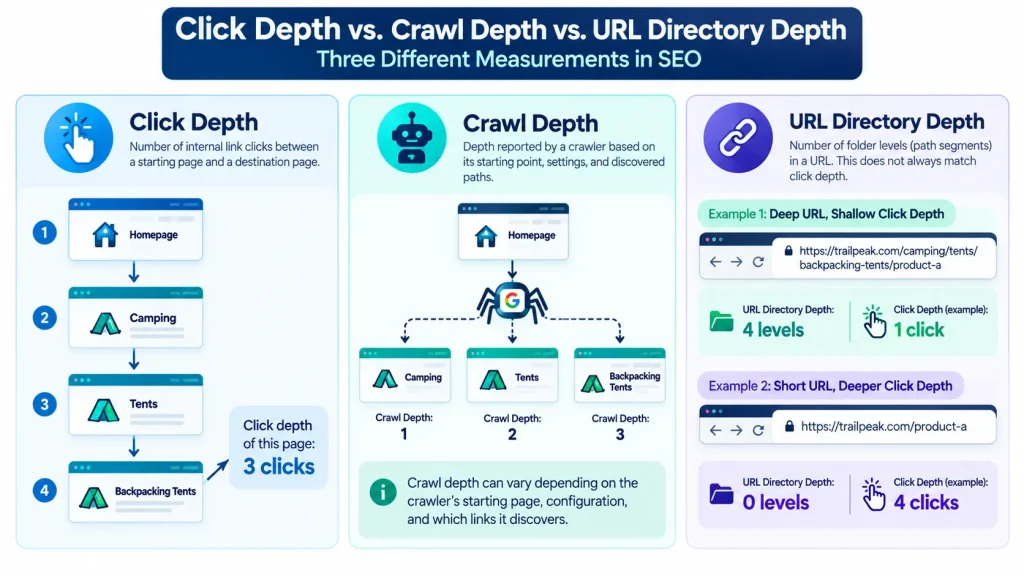
A deeply nested URL can be linked directly from the homepage. A short URL can sit several clicks deep when the internal link structure makes it difficult to reach. URL directory depth and click depth should therefore be evaluated separately.
What Is the Ideal Click Depth for SEO?
Google does not require every important page to sit within three clicks of the homepage. The three-click guideline is treated as an architectural heuristic for identifying important pages that may be difficult to reach. Appropriate click depth depends on four main factors.
1. Page Importance
Revenue pages, major product categories, core service pages, and strategic resources usually deserve shorter access paths. A major TrailPeak Outdoors category such as Tents may warrant direct access from a prominent navigation area.
2. Website Size
A small website can usually keep most pages relatively shallow. Large ecommerce, marketplace, publishing, and directory websites often require additional levels to organize large numbers of pages logically.
3. User Journey
Navigation depth should reflect how users browse and narrow their choices. Forcing every page close to the homepage can weaken useful categorization on large websites.
4. Content Relationships
Important pages should receive internal links from relevant categories, hubs, parent pages, guides, and supporting content. A Backpacking Tents page may receive links from Camping, Tents, buying guides, and related product content. The objective is not to assign the same depth target to every URL. It is to keep important pages accessible through clear, relevant, and reasonably short internal link paths.
How Website Architecture and Click Depth Affect SEO
Website architecture affects SEO through URL discovery, internal connectivity, topical relationships, page importance, and navigation. Search engines discover URLs through internal links, external links, and XML sitemaps. Internal links also help establish relationships between broader categories and more specific pages.
A clear website structure helps users and search engines understand:
- Which pages are important
- Which pages belong to the same topic
- Which pages act as broader categories or hubs
- Which pages support related topics
Architecture does not guarantee rankings. It creates a clearer system through which content can be discovered, understood, and navigated.
Crawl Discovery and Indexing Accessibility
Discovery, crawling, and indexing are separate stages of search engine processing.
| Stage | What It Means |
| Discovery | The search engine becomes aware that a URL exists. |
| Crawling | The search engine requests and processes the page. |
| Indexing | The search engine evaluates the page for possible inclusion in its search index. |
A discovered URL is not necessarily crawled. A crawled URL is not automatically indexed. Google Search Central distinguishes these stages in its documentation about how Google Search works. Suppose TrailPeak Outdoors publishes a guide called How to Choose a Backpacking Tent.
The guide appears in the XML sitemap but receives no internal links from category pages, articles, content hubs, or navigation. The sitemap may help search engines discover the URL, but the website itself provides no normal internal path to it. This makes the guide a candidate orphan page.
An architecture audit should answer four separate questions:
- Can the URL be discovered?
- Can crawlers reach it through internal links?
- Is the page technically eligible for indexing?
- Does the page provide enough distinct value to justify indexing?
Separating these questions helps identify whether a problem relates to discovery, crawling, indexability, or content value.
Internal Linking, Page Importance, and Topical Relationships
Internal links connect source pages with destination pages and establish relationships across the website.
Their usefulness depends on several factors:
- Source page relevance
- Destination page relevance
- Descriptive anchor text
- Surrounding context
- Link placement
- Alternative internal paths
- The role of each page within the topic hierarchy
Suppose TrailPeak Outdoors publishes a camping equipment guide.
A contextual link from that guide to the Backpacking Tents category creates a relevant relationship because both pages address related user needs. A link from an unrelated return policy page provides much less topical context. Internal links can also connect broader hubs with supporting pages.
A Camping hub could link to:
- Tents
- Sleeping Bags
- Cooking Equipment
The Backpacking Tents category could link to buying guides that help users compare tent sizes, capacities, materials, and use cases. Supporting guides can link back to the relevant product category where that connection helps users continue their journey.
This creates a connected internal link structure rather than a collection of isolated pages. Google Search Central recommends descriptive anchor text that helps users and Google understand the destination of a link.
Website Navigation and User Experience
Navigation turns website architecture into usable paths. A clear navigation system should help users answer three questions:
- Where am I?
- What broader section does this page belong to?
- Where can I go next?
Different navigation elements serve different functions.
| Navigation Element | Primary Function |
| Primary Navigation | Provides access to major website sections and important destinations. |
| Breadcrumbs | Show the current page’s position within the website hierarchy. |
| Category Pages | Group related products, services, articles, or resources. |
| Contextual Links | Connect relevant pages from within the main content. |
Navigation becomes less effective when category labels overlap, menus contain excessive choices, important pages lack clear pathways, or users must move through unnecessary levels. Good website architecture reduces navigation friction while preserving meaningful hierarchy. The objective is not to make every page equally shallow. It is to ensure that important pages have clear, relevant, and efficient paths from appropriate parts of the website.
How to Plan an SEO Friendly Website Architecture
Planning an SEO friendly website architecture should begin with page classification rather than menu design or URL folders. Create an inventory of required pages and assign each page:
- A primary topic
- A main entity
- A search intent
- A page type
- A parent relationship
This creates a taxonomy that can scale as the website grows.
Group Pages by Topics, Entities, and Search Intent
Pages should be grouped according to subject, entity, and user intent. TrailPeak Outdoors could use broad categories such as:
- Camping
- Hiking
- Climbing
- Outdoor Clothing
Camping could contain:
- Tents
- Sleeping Bags
- Camping Furniture
- Cooking Equipment
Search intent should refine this classification.
| Page | Primary Intent | Main Function |
| What Is a Backpacking Tent | Informational | Explains the product type |
| Backpacking Tents | Commercial browsing | Helps users compare available products |
| Individual Tent Product Page | Product evaluation and purchase | Provides details about a specific product |
These pages concern the same broader entity but serve different purposes. Architecture should preserve those differences rather than creating multiple overlapping pages for minor keyword variations. A useful classification system should answer four questions:
- What is the primary entity?
- What does the user want?
- What type of page should satisfy that need?
- Which broader page should contain or support it?
Define Parent Pages, Subcategories, and Supporting Content
Parent pages should represent broader concepts than their child pages.
For TrailPeak Outdoors:
Camping
↓
Tents
↓
Backpacking Tents
↓
Specific Product
Each level narrows the subject. Supporting content can sit alongside this commercial taxonomy. A guide about choosing a backpacking tent can support the Backpacking Tents category without replacing it. The two pages serve different intents:
| Page Type | Purpose |
| Backpacking Tents Category | Supports product discovery and comparison |
| Backpacking Tent Guide | Supports research and informational intent |
Internal links connect these page types according to user need. This creates a clear relationship between parent pages, child pages, and supporting content without mixing their purposes.
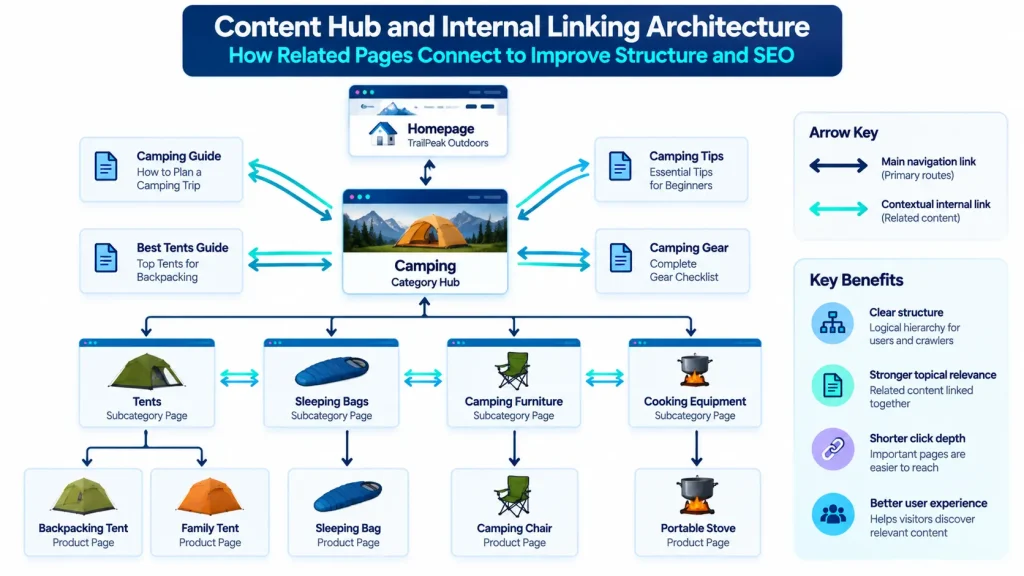
Build Navigation Paths With Menus, Breadcrumbs, and Internal Links
Each navigation mechanism should solve a different problem.
| Navigation Element | Primary Role |
| Primary Menu | Provides access to major website sections |
| Breadcrumbs | Communicate hierarchical position |
| Category Pages | Group related products, services, or content |
| Content Hubs | Organize related informational resources |
| Contextual Links | Connect specific pages based on relevance |
A page does not need to appear in global navigation to remain accessible. Adding every product, article, or resource to the primary menu would create unnecessary complexity. Category pages and content hubs provide more scalable access. Important navigation links should use crawlable destinations so users and search engine crawlers can follow them reliably.
Keep URL Structure Logical Without Confusing It With Click Depth
URL structure and click depth describe different aspects of a website. URLs should be readable, descriptive, consistent, and stable. Google Search Central recommends simple URL structures that help users and search engines understand page context. URL folders may reflect site organization, but they do not determine how many clicks are required to reach a page.
A shorter URL does not automatically create a shorter navigation path. Changing established URLs only to make them appear flatter can create redirects, broken references, canonical inconsistencies, and migration risk.
Website Architecture Best Practices by Website Type
Website architecture principles stay consistent, but implementation changes with site size, content type, and user behavior.
Architecture for Blogs and Content-Heavy Websites
Content-heavy websites benefit from clear topic hubs, controlled categories, and strong links between broader subjects and supporting articles.
A technical SEO publication might organize content around:
- Technical SEO
- Content Optimization
- Keyword Research
- Analytics
The Technical SEO hub could connect articles about crawling, internal linking, canonicalization, JavaScript, site architecture, and structured data. Categories should represent meaningful topic groups rather than minor keyword variations. Too many overlapping categories can create weak archives and unclear classification. A good taxonomy should make it easy to place new content and move from broad topics to specific resources.
Architecture for Ecommerce Websites
Ecommerce websites usually need deeper classification because users browse through categories, subcategories, products, filters, and paginated listings.
TrailPeak Outdoors could use:
Homepage
↓
Camping
↓
Tents
↓
Backpacking Tents
↓
Product
Category hierarchy should reflect how customers browse while keeping major commercial pages easy to reach. Faceted navigation needs careful control because filters such as brand, price, capacity, season, and availability can create many URL combinations. Google Search Central warns that uncontrolled faceted navigation can create very large crawl spaces.
Pagination also matters when products beyond the first listing page depend on paginated links for discovery. The goal is to keep important category and product paths clear without allowing excessive filter combinations to consume crawler attention.
Architecture for Service-Based Websites
Service websites should organize pages around genuine differences in customer need.
A structure might use:
Services
↓
SEO Services
↓
Technical SEO
↓
Website Architecture Consulting
Broad service hubs should represent major offers, while specific service pages should address distinct needs. Location and industry pages should exist only when geography or sector meaningfully changes the page purpose.
For example, technical SEO for ecommerce websites may differ from technical SEO for publishers because the underlying architecture, crawling, and indexing challenges are different.
How to Audit Website Architecture and Click Depth
A website architecture audit compares the intended hierarchy with the paths users and search engine crawlers can actually access. Use crawl data, XML sitemaps, Google Search Console, analytics, and business priorities together. The goal is not to make every page shallower. It is to identify important pages that are unnecessarily difficult to reach.
Step 1: Crawl the Website and Map Internal Links
Start the crawl from the homepage unless the audit requires another starting point. Collect the following data:
- URL
- HTTP status
- Indexability
- Crawl depth
- Internal inlinks
- Internal outlinks
- Canonical destination
- Page type
Tools such as Screaming Frog can report crawl depth and internal link connections.
Crawler configuration affects the results. Crawl scope, rendering settings, blocked sections, and depth limits can change which URLs are discovered. Interpret audit findings according to the crawl configuration used.
Step 2: Find Deep Pages, Orphan URLs, and Weak Connections
Sort priority URLs by crawl depth and internal inlink count. Compare crawler data with:
- XML sitemaps
- Google Search Console
- Analytics
- Content inventories
- Product or service databases
A URL found in another source but absent from the normal crawl is a candidate orphan page. Confirm the cause before treating it as orphaned. Missing discovery can result from weak internal linking, crawl restrictions, JavaScript navigation, authentication, or another technical condition. Also review pages that are technically connected but poorly supported. A valuable category with one obscure internal link may still need stronger links from relevant hubs, categories, or supporting content.
Step 3: Compare Click Depth With Page Importance
Depth becomes meaningful when it is compared with page importance. Evaluate priority using:
- Revenue potential
- Organic search opportunity
- Conversion value
- Strategic importance
- User demand
- Current performance
Suppose the Backpacking Tents category sits at depth four even though it generates strong revenue and search demand.
That page deserves attention. Architecture optimization should prioritize valuable pages rather than treating every deep URL as a problem.
Step 4: Prioritize Architecture Fixes by Impact, Effort, and Risk
Assess each proposed change using four criteria.
- Impact: How much will the change improve accessibility, clarity, or internal connectivity?
- Effort: How much development, content, or navigation work is required?
- Risk: Could the change create redirects, broken links, duplicate paths, or canonical problems?
- Business Priority: How valuable is the affected page?
| Issue | Impact | Effort | Risk | Recommended Action |
| Backpacking Tents sits at depth four | High | Low | Low | Add links from the Camping hub and relevant buying guides |
| A backpacking tent buying guide is orphaned | Medium | Low | Low | Link from the Tents hub and related articles |
| Two tent categories overlap heavily | Medium | Medium | Medium | Consolidate the taxonomy after confirming search intent and user need |
| Old product links pass through redirects | Medium | Low | Low | Update internal links to point directly to the final destination |
This prioritization helps teams focus on architecture changes that improve access to valuable pages without spending resources on low-impact structural work.
How to Optimize Click Depth and Internal Linking
Click depth optimization should make priority pages easier to reach without removing useful hierarchy.
Add Contextual Internal Links to Important Deep Pages
Start with high-priority pages identified during the architecture audit. Find source pages that are both relevant and already well connected. A project management software website could link to its Time Tracking feature page from:
- Productivity guides
- Project planning articles
- Team management resources
- Relevant feature overview pages
Use descriptive anchor text that clearly explains the destination. Source selection matters. A link from a prominent Features hub or frequently accessed guide usually creates a stronger pathway than a link from another obscure page. The goal is to create useful routes to important pages rather than simply increase the number of internal links.
Use Content Hubs and Category Pages to Improve Discoverability
Content hubs and category pages provide scalable access to related resources. A strong hub supports:
- Classification
- Discovery
- Navigation
- Context
- Internal connectivity
A project management software website could use a Features hub that links to:
- Task Management
- Time Tracking
- Team Collaboration
- Reporting
- Workflow Automation
This structure improves access without placing every destination in the primary menu. Hubs also provide stable locations for linking new supporting content as the website grows.
Fix Orphan Pages and Remove Unnecessary Navigation Layers
Evaluate an orphan page before adding new links. Ask:
- Does the page still deserve to exist?
- Does it serve a distinct purpose?
- Which pages should logically link to it?
- Does another page already satisfy the same intent?
Restore internal links to valuable pages. Consolidate or remove obsolete pages where appropriate. Also review hierarchy levels that add extra clicks without improving classification.
For example:
Homepage
↓
Product
↓
Work Management
↓
Productivity Tools
↓
Time Management
↓
Time Tracking
Several middle levels may overlap without adding meaningful navigational value. A clearer structure could be:
Homepage
↓
Features
↓
Time Tracking
Every hierarchy level should serve a clear purpose. Remove layers that increase depth without helping users understand or explore the website.
Advanced Website Architecture Issues
Large websites often face architecture challenges involving faceted navigation, pagination, JavaScript navigation, redirects, and duplicate URL paths.
Faceted Navigation, URL Parameters, and Pagination
Faceted navigation lets users filter products or content by attributes such as size, color, price, brand, rating, capacity, and weight. On a large ecommerce website, combining several filters can create thousands of URL variations even when only a small number have meaningful search value.
For example, an electronics retailer might let users filter laptops by:
- Brand
- Screen size
- Processor
- Memory
- Storage
- Price
- Availability
Each combination can create another URL state. Google Search Central warns that faceted navigation can create extremely large crawl spaces. Websites should decide which filtered pages deserve search visibility and which should exist only to support browsing. Crawl controls, indexing decisions, canonical signals, and internal link exposure should support that strategy consistently.
Canonicalization alone does not solve unlimited crawl paths because search engines may still need to discover and process those URLs before interpreting canonical signals. Pagination also affects discovery. Where products or articles beyond the first listing page depend on pagination, paginated pages should provide crawlable links to subsequent pages. The goal is to preserve access to deeper content without creating uncontrolled URL expansion.
JavaScript Navigation and Crawlable Internal Links
JavaScript is not inherently problematic for SEO. The main architecture concern is whether important destinations are exposed through reliable crawlable links.
Google Search Central recommends standard anchor elements with valid href destinations for links intended for discovery. Navigation that depends entirely on script-triggered actions can provide a less reliable discovery path. Important pages should therefore remain accessible through clear URL-based links in the rendered page.
Redirect Chains, Duplicate Paths, and Architecture Changes
Architecture changes can weaken internal connectivity when old and new URL paths are not aligned. Common issues include:
- Internal links pointing through redirects
- Multiple paths resolving to equivalent pages
- Navigation linking to obsolete URLs
- Canonical signals conflicting with internal links
- Old routes remaining active after structural changes
Repeated restructuring can also create redirect chains. After an architecture change, internal links should normally point directly to the current destination. Canonical targets, XML sitemap URLs, navigation links, and contextual internal links should also align wherever possible.
Common Website Architecture Mistakes and How to Fix Them
| Mistake | Cause | SEO Implication | Fix |
| Excessive depth on priority pages | Too many navigation levels | Important pages become harder to reach | Add relevant links from categories, hubs, navigation, or supporting content |
| Orphan pages | Pages are published without integration into the internal structure | The website provides no normal internal discovery path | Confirm the page still has value and add relevant internal links |
| Overlapping categories | Taxonomy follows similar keyword variations instead of distinct user needs | Classification becomes unclear, and pages may serve overlapping purposes | Consolidate categories around meaningful differences in topic or intent |
| Bloated navigation | Too many pages are treated as globally important | Navigation becomes harder to use and maintain | Reserve global navigation for major destinations |
| Broken internal links | Pages are moved or removed without updating source links | Users and crawlers encounter failed paths | Update internal links to the correct active destination |
| Noncrawlable navigation | Important destinations depend entirely on script interactions | URL discovery becomes less reliable | Expose important destinations through crawlable links |
| Unnecessary URL restructuring | URL directory depth is confused with click depth | Migration risk increases without necessarily improving accessibility | Improve internal navigation before changing stable URLs |
The main objective is structural consistency. Internal links, canonical targets, XML sitemaps, navigation, pagination, and crawl controls should all support the same intended website structure.
How to Measure Website Architecture Improvements
Measure architecture changes with structural evidence first and search performance second. A crawler confirms whether click depth, internal links, orphan pages, and redirect paths improved. Google Search Console shows what happened to impressions and clicks afterward.
These are different forms of evidence. Architecture metrics confirm structural change. Search performance metrics show later visibility trends. Performance changes should not automatically be attributed to architecture because content updates, competition, seasonality, search demand, and search system changes can also affect results.
Track Click Depth, Orphan Pages, and Internal Linking KPIs
Useful architecture KPIs include:
- Median depth of priority pages
- Number of priority URLs above the chosen depth threshold
- Number of confirmed orphan pages
- Number of broken internal links
- Number of redirecting internal links
- Distribution of URLs across depth levels
- Percentage of priority pages with weak internal link coverage
A before-and-after comparison makes structural improvements easier to verify.
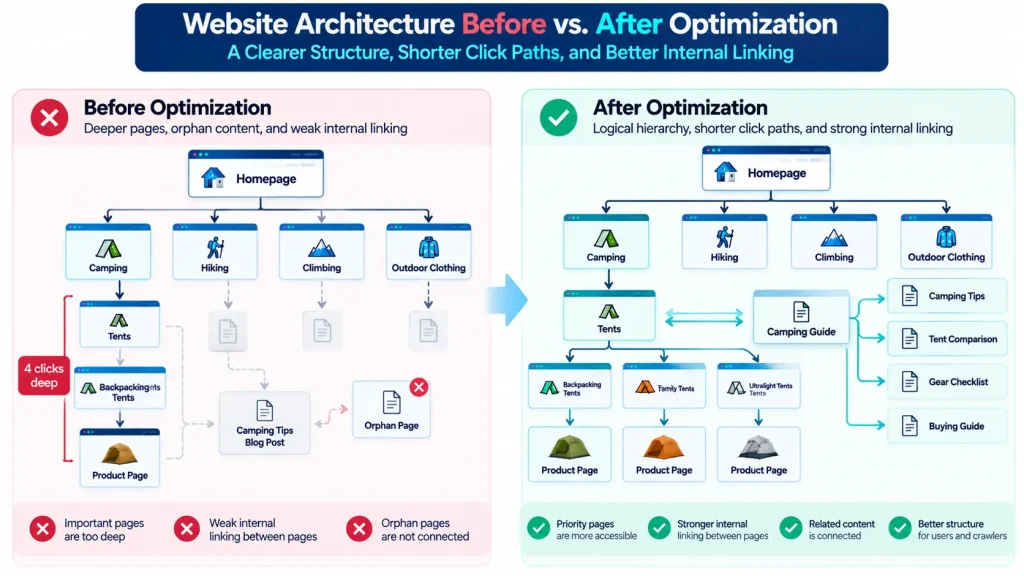
| Metric | Before Optimization | After Optimization |
| Backpacking Tents depth | Four clicks | Two clicks |
| Meaningful internal links to category | One | Links from the Camping hub and three relevant guides |
| Orphan buying guides | One | Connected to the Tents hub and related articles |
| Redirecting internal links | Several | Updated to final destinations |
These changes confirm that the internal structure improved. They do not prove that rankings, impressions, or clicks will increase.
Validate Changes With Crawling and Google Search Console
Re-crawl the website after implementation. Verify that:
- Priority pages appear at the intended depth
- New internal links resolve correctly
- Broken links are fixed
- Redirecting internal links point directly to final destinations where appropriate
- Orphan pages are connected where intended
- Navigation remains crawlable
- Canonical targets remain consistent
Use Google Search Console afterward to monitor indexing information, impressions, and clicks for the affected page group. Evaluate the URLs changed by the project rather than relying only on site-wide totals.
For example, a category architecture project should be measured against the affected category pages and supporting content.
How Often Should You Audit Website Architecture?
Audit frequency should reflect how quickly the website changes.
- A small, stable service website may need architecture reviews mainly after major structural changes.
- A large publisher or ecommerce website may require more frequent monitoring because new pages, categories, filters, and navigation changes can create architecture issues quickly.
Useful audit triggers include:
- Website redesigns
- Navigation changes
- Category restructuring
- Large content migrations
- Major CMS changes
- Rapid publishing growth
- Product catalog expansion
- Increasing orphan page counts
- Unexpected increases in crawl depth
Website architecture should be reviewed whenever changes materially affect how important pages are discovered, linked, or reached.
Conclusion
Strong website architecture gives important pages a clear place in the hierarchy and useful internal paths from related content. Build the taxonomy around topics, entities, search intent, page type, and parent relationships. Use navigation, breadcrumbs, category pages, content hubs, and contextual links for distinct structural purposes. Treat click depth, crawl depth, and URL directory depth as separate concepts. Keep priority pages reasonably accessible without forcing every URL into the same depth target.
Audit architecture according to page importance, structural impact, effort, and technical risk. Measure structural improvements directly before attributing changes in search performance to them. The best website architecture is not the structure with the fewest levels. It is the one that keeps important content accessible, relationships clear, navigation useful, and future growth manageable.
Frequently Asked Questions About Site Architecture and Depth
Is the Three Click Rule a Google Ranking Factor?
Google does not document a universal three-click requirement as a ranking factor. The three-click rule is better treated as an architecture heuristic for keeping important pages reasonably accessible.
Appropriate depth depends on website size, taxonomy, user behavior, and page importance.
Does URL Directory Depth Affect Google Rankings?
URL directory depth and click depth are different concepts. A deeply nested URL can still sit one click from the homepage. A short URL can sit several clicks deep if the internal link structure makes it difficult to reach. Measure website depth through actual internal link paths rather than URL folder count.
Can XML Sitemaps Replace Internal Links?
No, XML sitemaps help search engines discover submitted URLs. Internal links create navigation paths and establish relationships between pages. Important pages should normally be integrated into the website structure rather than relying only on sitemap discovery.
Can Deep Website Architecture Cause Indexing Problems?
Deep architecture can make important pages harder to discover and reach, especially when they receive few internal links. Depth alone does not prove an indexing problem. Evaluate deep pages alongside crawlability, internal linking, page quality, indexability, and indexing evidence.