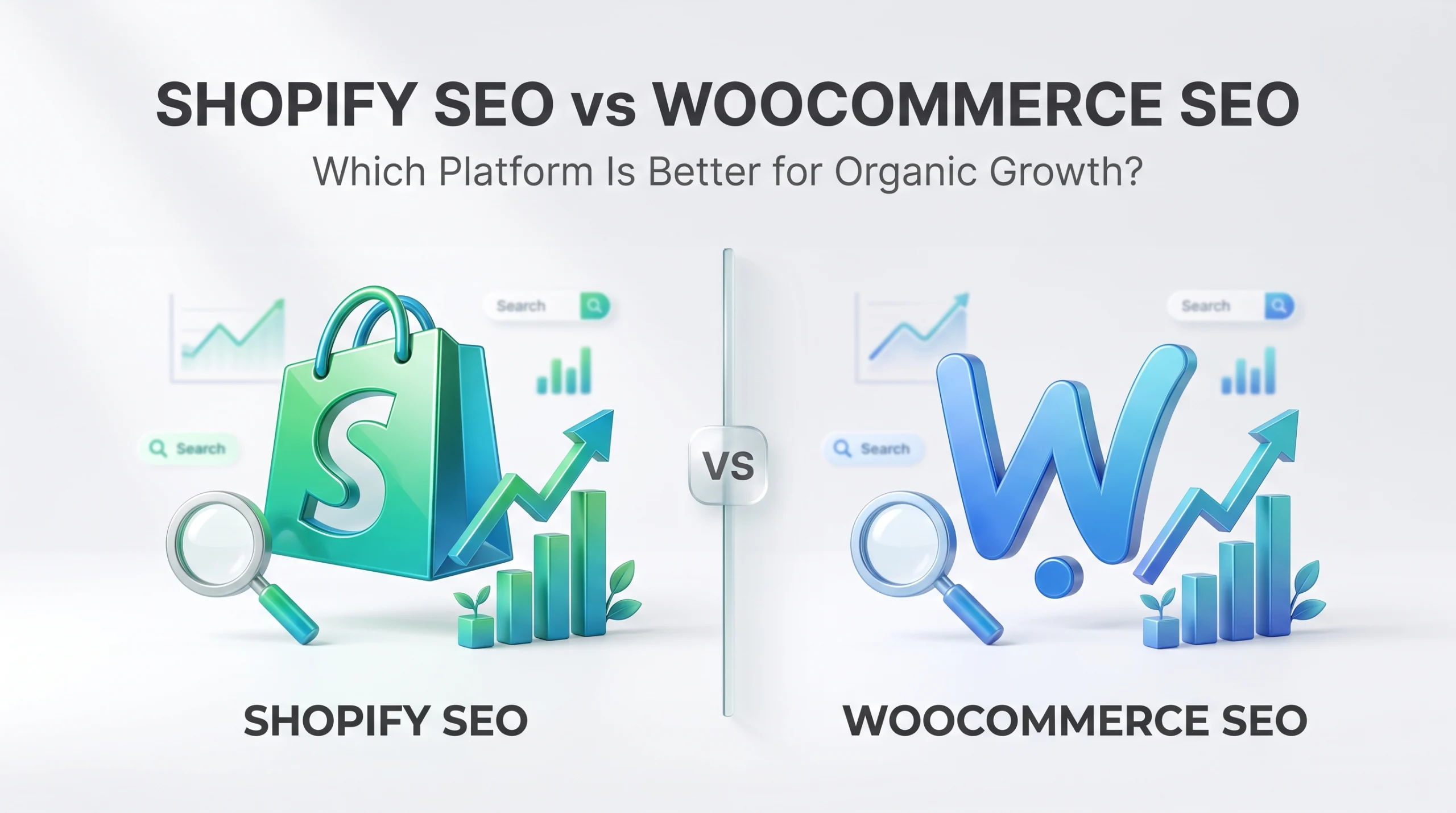
Shopify and WooCommerce can both support strong organic growth, but they offer different levels of control. Shopify suits businesses that want managed infrastructure, built-in SEO features, and lower maintenance. WooCommerce suits businesses that need greater control over URLs, hosting, content architecture, plugins, and technical SEO.
Neither platform has an automatic Google ranking advantage. Organic performance depends on content quality, crawlability, site structure, internal linking, performance, authority, and SEO execution. The better choice depends on your catalogue complexity, publishing needs, technical resources, and long-term growth goals.
Shopify SEO vs WooCommerce SEO: Quick Comparison
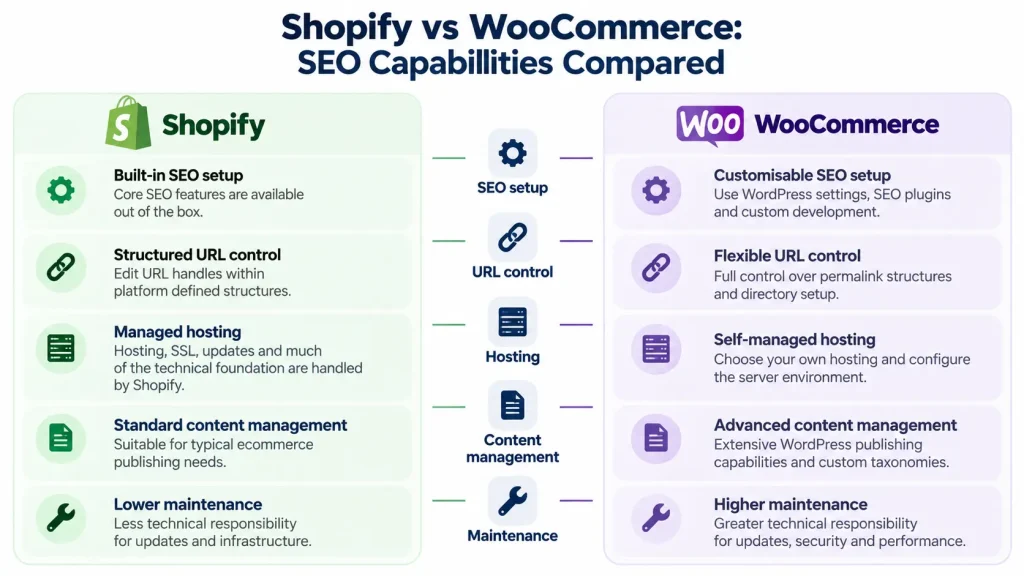
Shopify focuses on simplicity, while WooCommerce offers more technical flexibility. Shopify manages hosting, platform maintenance, XML sitemaps, canonical tags, and other technical foundations. WooCommerce runs on WordPress and gives businesses more control over hosting, permalinks, plugins, taxonomies, templates, servers, and content management.
Is Shopify or WooCommerce Better for SEO?
WooCommerce offers more SEO control. Shopify is easier to manage. WooCommerce suits businesses that need flexible URLs, advanced content architecture, custom technical settings, or greater server control. Shopify suits businesses that want strong SEO capabilities with less technical maintenance.
WooCommerce is valuable when a business has the expertise and resources to use its additional control effectively.
Shopify vs WooCommerce SEO Comparison Table
| SEO Area | Shopify | WooCommerce | Best Fit |
| SEO setup | Built-in essentials | WordPress settings, plugins, and custom development | Shopify for simpler setup |
| Technical control | Moderate to advanced | Extensive | WooCommerce for specialised needs |
| URL control | Editable handles within fixed structures | Flexible permalink structures | WooCommerce for custom architecture |
| XML sitemaps | Generated automatically | WordPress or SEO plugins | Shopify for simpler management |
| Canonical tags | Generated automatically | Managed through themes, plugins, or code | Depends on requirements |
| Hosting | Managed by Shopify | Selected by the business | Shopify for lower maintenance |
| Content management | Suitable for standard ecommerce publishing | Extensive WordPress capabilities | WooCommerce for content-heavy sites |
| Performance control | Managed infrastructure | Hosting, caching, theme, plugin, and server dependent | Depends on technical resources |
| Maintenance | Lower | Higher | Shopify for smaller technical teams |
| Customisation | More platform constraints | Extensive | WooCommerce for complex requirements |
How Shopify and WooCommerce Handle SEO
The main difference is platform architecture. The architectural difference has more SEO impact than the number of features each platform offers. Shopify is a hosted ecommerce platform that manages hosting, SSL, platform updates, server infrastructure, and several technical SEO foundations. WooCommerce runs on WordPress and gives businesses greater control over hosting, plugins, themes, caching, taxonomies, templates, and server configuration.
Shopify SEO Features and Built-In Optimisation Tools
Shopify provides core SEO functionality with minimal setup. Store owners can edit titles, meta descriptions, image alternative text, URL handles, redirects, product content, collections, and blog content. Shopify also generates XML sitemaps, canonical tags, and a default robots file. The platform reduces technical maintenance but limits parts of the URL structure. Product and collection pages use Shopify-defined directories, although the final URL handle can still be edited. This matters for businesses that require customised site architecture.
WooCommerce SEO Features and WordPress Flexibility
WooCommerce provides SEO flexibility through WordPress. Businesses can control permalink structures, taxonomies, templates, plugins, hosting, caching, and server settings. Tools such as Yoast SEO and Rank Math can extend metadata, canonical, sitemap, schema, and indexing controls. WordPress also supports custom post types and more complex editorial structures. The tradeoff is maintenance. WooCommerce businesses may need to manage hosting, updates, plugin compatibility, security, caching, and performance. That extra control is valuable only when the business has the resources to manage it effectively.
Shopify vs WooCommerce Technical SEO: Which Offers More Control?
WooCommerce provides more technical control, while Shopify automates more of the technical setup. That extra control matters most for stores with complex filters, regional versions, custom templates, specialised integrations, or unusual product relationships. Simpler catalogues may not need it.
URL Structure and Permalink Customisation
Shopify uses fixed directory structures such as:
- example.com/products/runningshoes
- example.com/collections/mensshoes
Businesses can edit the final handle, but the core directory structure remains platform-defined. WooCommerce supports more flexible permalink structures, such as:
- example.com/product/runningshoes
- example.com/shop/runningshoes
- example.com/shoes/runningshoes
It can also support custom product bases. This flexibility helps businesses with specific architecture requirements, but shorter URLs do not automatically rank better. Stable URLs, relevant content, internal linking, and correct redirects matter more.
Canonical Tags and Duplicate Content Management
Canonical tags identify the preferred version of similar pages. Shopify generates canonicals automatically for common page types. WooCommerce can manage them through themes, SEO plugins, or custom code.
Both require verification.
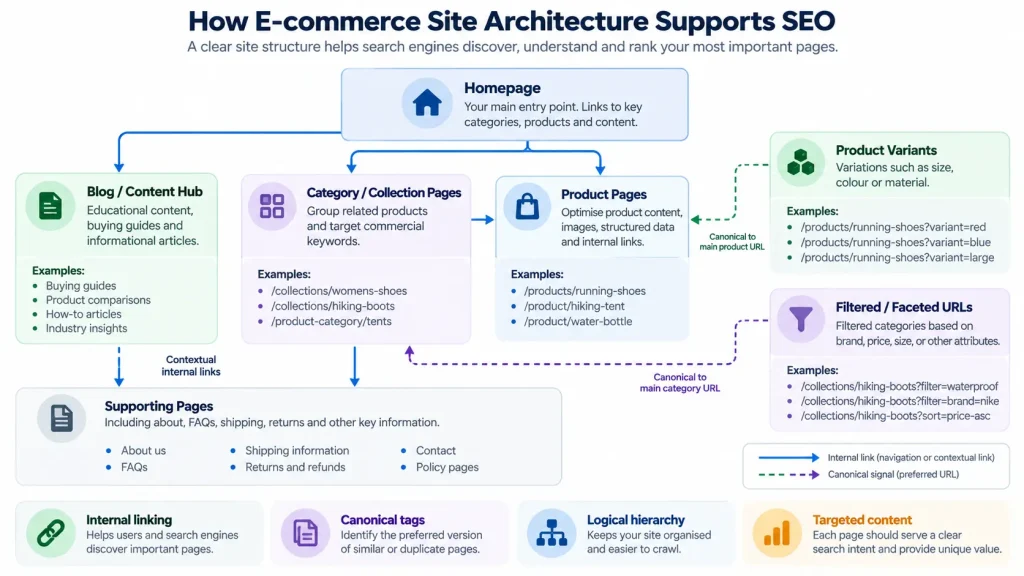
A product available through footwear, running, and sale sections should still send consistent canonical signals toward the preferred product URL. Duplicate URLs can also come from variants, filters, tracking parameters, pagination, internal search results, and plugins.
Businesses should compare rendered canonical tags with the canonical URLs Google selects in Search Console. Canonicals, redirects, internal links, sitemaps, and indexable URLs should support the same preferred page.
XML Sitemaps, Robots.txt, and Crawl Control
Shopify generates sitemap and robots files automatically. WooCommerce gives businesses more control through WordPress, plugins, hosting, and server settings. Large stores should prioritise index quality over index quantity. Search engines do not need every filter, sort order, tracking parameter, or low-value variation indexed. Faceted navigation can create large numbers of crawlable URLs with little independent value. Important pages should have clear search intent, useful content, stable value, and strong internal links.
XML sitemaps should support discovery rather than serve as the only discovery method. Robots rules require care. Blocking crawling does not remove a URL from search results and may prevent search engines from seeing a noindex directive. Crawl control and index control should therefore be managed separately.
Structured Data and Product Schema Markup
Product structured data helps search engines understand ecommerce content. Relevant entities include Product, Offer, AggregateRating where eligible, BreadcrumbList, MerchantReturnPolicy where applicable, and OfferShippingDetails where applicable. Shopify themes generate structured data, with apps and Liquid customisation extending it. WooCommerce uses themes, SEO plugins, or custom development. Validate structured data by checking that markup matches visible content, required properties are present, price and availability are accurate, and Search Console reports show no critical issues. Structured data can improve eligibility for enhanced search appearances, but it does not guarantee rich results or better rankings.
Product Variants, Filters, and Faceted Navigation
Variants and filters require careful indexation decisions. Businesses should decide which variants deserve separate search visibility, which filtered pages target real demand, which URLs should remain indexable, and which combinations create unnecessary crawl activity. A page targeting women’s waterproof hiking boots may deserve independent visibility because it serves a clear commercial query. A page created from an arbitrary mix of size, colour, rating, price, and sort order may provide little search value. The correct strategy depends on search demand, content uniqueness, catalogue architecture, and user intent.
Shopify vs WooCommerce Website Speed and Core Web Vitals
Performance depends on hosting, themes, plugins, apps, scripts, media, and technical optimisation.
| Area | Shopify | WooCommerce |
| Hosting | Managed by Shopify | Depends on the selected hosting provider |
| Infrastructure | Managed environment | Greater server and infrastructure control |
| Main performance risks | Heavy themes, apps, scripts, large media | Poor hosting, excessive plugins, inefficient code, weak caching |
| Optimisation control | Moderate | Extensive |
| Technical maintenance | Lower | Higher |
| Best fit | Businesses wanting managed performance infrastructure | Businesses with technical resources for deeper optimisation |
Core Web Vitals Comparison
| Metric | What It Measures | Good Threshold | Common Ecommerce Issues |
| Largest Contentful Paint | Loading performance | 2.5 seconds or less | Slow servers, large product images, delayed hero content |
| Interaction to Next Paint | Responsiveness | 200 milliseconds or less | Excessive JavaScript, complex theme features, third-party scripts |
| Cumulative Layout Shift | Visual stability | 0.1 or less | Unstable images, late-loading banners, dynamic widgets |
Google evaluates Core Web Vitals at the 75th percentile of page visits.
Shopify reduces infrastructure management, but heavy themes, apps, tracking tools, and media can still slow a store. WooCommerce offers optimisation control, but performance depends more on hosting, caching, plugins, database efficiency, and technical maintenance. Use PageSpeed Insights and Search Console field data to assess real performance. Strong Core Web Vitals support page experience but do not guarantee higher rankings.
Shopify vs WooCommerce for Product SEO and Content Marketing
Both platforms support strong product SEO and content marketing. WooCommerce offers more publishing flexibility through WordPress. Shopify keeps content management simpler.
Product Page SEO and On-Page Optimisation
Product SEO depends more on page quality than platform choice. Strong product pages should include:
- Clear product names and original descriptions.
- Useful specifications and purchasing details.
- Optimised images with descriptive alternative text.
- Accurate pricing and availability.
- Delivery and return information where relevant.
- Valid structured data.
- Internal links to related products and categories.
- Content aligned with commercial search intent.
Repeated manufacturer descriptions weaken differentiation on either platform. WooCommerce flexibility cannot compensate for weak content, and Shopify can still rank well with strong product information, architecture, and internal linking.
Collection Pages vs WooCommerce Product Categories
Shopify collections and WooCommerce product categories both target broader commercial intent. A footwear retailer may use a running shoes category or collection to target that query instead of relying on individual product pages. Strong category pages should include clear headings, useful introductory content, relevant products, filters, breadcrumbs, and contextual links. WooCommerce offers more structural flexibility through WordPress taxonomies, while Shopify requires less configuration. The best setup matches real customer search behaviour.
Blogging and Content-Led Organic Growth
WooCommerce has an advantage for businesses that rely heavily on editorial content. WordPress supports advanced taxonomies, custom post types, content hubs, specialised templates, and complex publishing workflows. Shopify can support buying guides, educational articles, comparisons, and other informational content through its native blogging system. WooCommerce is better when you need advanced publishing architecture. For most stores, content quality and search intent matter more than the number of publishing features available.
Internal Linking and Ecommerce Site Architecture
Internal links help users and search engines discover important pages. A strong ecommerce structure should connect:
- The home page to major categories.
- Categories to subcategories and products.
- Products to related products.
- Articles to relevant commercial pages.
- Commercial pages to supporting educational content.
Important product and category pages should not depend only on XML sitemaps for discovery. Businesses should identify orphan pages, broken links, weak navigation paths, and commercially important pages with insufficient internal link support.
Shopify vs. WooCommerce SEO for Large and International Stores
SEO complexity increases with catalogue size, localisation requirements, and technical integrations. Large stores need controlled taxonomies, consistent templates, internal linking rules, inventory policies, crawl management, and regular monitoring.
Managing SEO for Large Product Catalogues
Large catalogue SEO should prioritise index quality. Search engines do not need every filter combination or low-value variation indexed. Prioritise pages with clear search demand, unique commercial value, stable inventory, useful content, and strong internal links.
Businesses should also establish rules for discontinued products, unavailable inventory, seasonal pages, successor products, and category changes. Regular technical crawls can identify orphan pages, redirect chains, canonical conflicts, broken links, duplicate titles, thin categories, and unexpected indexable parameters.
- Shopify reduces infrastructure management.
- WooCommerce provides greater customisation.
The appropriate choice depends on catalogue complexity and technical requirements rather than product count alone.
Multilingual and International SEO Capabilities
International stores need clear language and regional signals. Shopify supports international selling through Shopify Markets and related localisation functionality. WooCommerce relies on WordPress multilingual solutions and custom configuration.
International SEO can require:
- Language-specific URLs.
- Accurate hreflang annotations.
- Localised product descriptions.
- Regional currency information.
- Local shipping information.
- Consistent canonicalisation.
- Appropriate regional navigation.
Neither platform guarantees correct international SEO automatically.
- Shopify provides a more managed environment.
- WooCommerce provides greater implementation flexibility.
Both require validation of regional URLs, hreflang relationships, canonical signals, internal linking, and indexability.
Shopify SEO vs WooCommerce SEO Costs and Maintenance
SEO costs should be measured through total ownership rather than a single subscription, app, or plugin fee.
Shopify SEO Costs: Apps, Subscriptions, and Development
Shopify costs may include the platform subscription, premium themes, apps, development, content production, technical audits, and ongoing SEO management. Managed infrastructure can reduce server administration, but heavy app usage can increase recurring costs and storefront complexity.
WooCommerce SEO Costs: Hosting, Plugins, and Maintenance
WooCommerce costs may include hosting, premium themes, SEO plugins, extensions, security, backups, development, performance optimisation, and ongoing maintenance. It can be cost-effective for businesses with WordPress expertise, but specialised development and infrastructure management can increase costs.
Total Cost of SEO Ownership: What Businesses Should Compare
| Cost Area | Shopify | WooCommerce |
| Platform | Recurring subscription | Core software is free |
| Hosting | Included | Separate cost |
| SEO tools | Built-in features plus optional apps | WordPress features plus optional plugins |
| Development | Theme and platform customisation | Theme, plugin, and server customisation |
| Maintenance | Lower infrastructure responsibility | Higher technical responsibility |
| SEO support | Optional | Optional |
| Migration | Depends on store complexity | Depends on store complexity |
Businesses should compare implementation, software, infrastructure, development, maintenance, SEO production, monitoring, and migration risk across 12 to 24 months. A platform with higher software fees may still cost less overall if it saves substantial development and maintenance time. WooCommerce may offer better value where a business already has strong WordPress expertise.
Should You Migrate from Shopify to WooCommerce or Vice Versa for SEO?
Do not migrate simply because one platform is considered better for Google. Migration changes URLs, templates, internal links, structured data, performance, and crawl signals. It makes sense only when the current platform creates limitations that materially restrict growth.
When an SEO Driven Platform Migration Makes Sense
Migration may be justified by persistent limitations involving content architecture, international SEO, integrations, catalogue management, publishing, technical configuration, or operational efficiency. Identify the exact limitation first. A technical audit may show that the real problem is weak content, poor category targeting, ineffective internal linking, duplicate pages, slow templates, or incorrect indexation. These are implementation problems that may be safer and cheaper to fix without changing platforms.
Common SEO Risks During Shopify and WooCommerce Migration
Key risks include:
- Important URLs returning 404 responses.
- Missing or incorrect permanent redirects.
- Broken internal links and redirect chains.
- Changed canonicals or indexing directives.
- Lost metadata, content, or structured data.
- Sitemap and crawl problems.
- Lost backlink value.
- Performance changes.
Search engines may need time to recrawl and process changed URLs, so short-term visibility changes should be monitored before concluding.
Essential SEO Migration Checklist
| Stage | Actions |
| Before launch | Crawl the existing site, record traffic and revenue baselines, identify high-value pages, map old URLs to new URLs, prepare redirects, preserve important content and metadata, validate canonicals and internal links |
| After launch | Test redirects, check 404 responses and redirect chains, submit updated sitemaps, confirm indexability, review selected canonicals, crawl the new site, monitor Search Console, conversions, and organic revenue. |
Shopify or WooCommerce: Which Platform Should You Choose for Organic Growth?
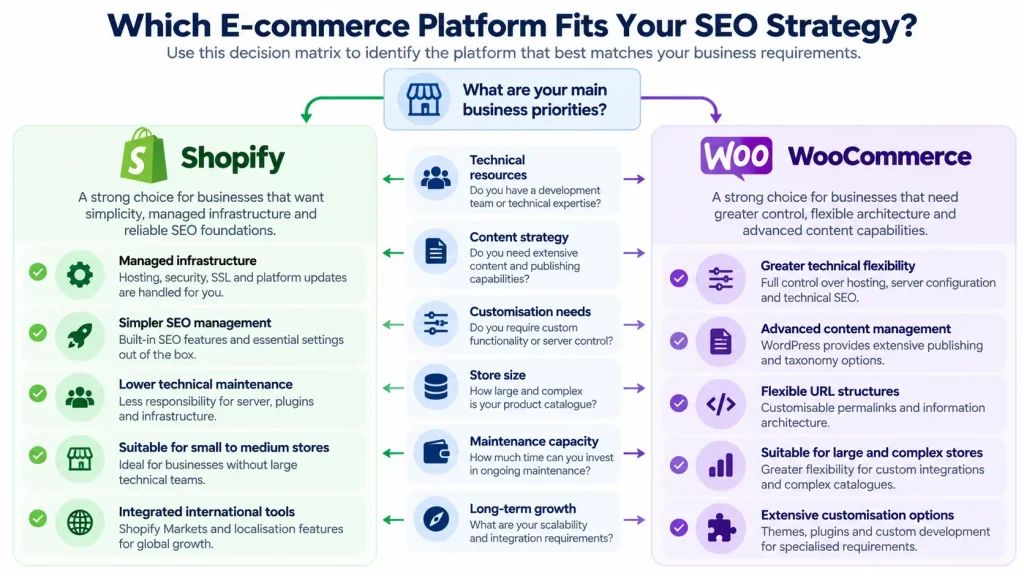
The better platform depends on your business model, technical resources, and growth requirements.
Best Platform for Small Ecommerce Businesses
Shopify is usually the simpler choice for businesses without dedicated technical teams. Managed infrastructure reduces maintenance while providing the SEO controls most small stores need.
WooCommerce can work well for businesses already using WordPress, working with developers, or requiring specialised functionality.
Best Platform for Content-Heavy Ecommerce Websites
WooCommerce is often better for businesses built around educational content, buying guides, custom publishing, and large content hubs. WordPress provides greater editorial flexibility, while Shopify remains suitable when content mainly supports ecommerce.
Best Platform for Large and Complex Online Stores
There is no universal winner for large stores. Shopify offers more predictable platform management. WooCommerce offers deeper customisation and infrastructure control. The decision should reflect catalogue complexity, integrations, international requirements, development resources, merchandising needs, and total ownership cost.
SEO Platform Decision Matrix: Shopify vs WooCommerce
| Business Need | Better Fit |
| Managed infrastructure | Shopify |
| Lower technical maintenance | Shopify |
| Faster operational setup | Shopify |
| Limited technical resources | Shopify |
| Extensive URL and server control | WooCommerce |
| Advanced WordPress publishing | WooCommerce |
| Custom technical architecture | WooCommerce |
| Complex content relationships | WooCommerce |
| Extensive development flexibility | WooCommerce |
How to Measure Organic Growth on Shopify and WooCommerce
Platform choice should be evaluated through measurable business outcomes. Google Search Console, Google Analytics 4, PageSpeed Insights, crawling software, and revenue reporting can show whether SEO improvements create meaningful growth.
SEO KPIs to Track on Both Platforms
Track metrics that connect visibility with commercial results:
- Nonbranded organic clicks and impressions.
- Organic click-through rate.
- Organic landing page sessions.
- Indexed product and category pages.
- Organic conversions and revenue.
- Product and category visibility.
- Core Web Vitals.
- Crawl and indexing errors.
Traffic growth alone is not sufficient evidence of ecommerce SEO success. A store can attract more informational visits without increasing conversions or revenue.
How to Evaluate SEO Performance Before Changing Platforms
Establish a performance baseline before considering migration. Review organic traffic, revenue by landing page, important search queries, indexation, crawl issues, Core Web Vitals, backlinks, content quality, internal linking, conversion performance, current platform costs, and expected migration costs. This analysis separates platform limitations from implementation problems.
That distinction should determine the next action. A business should not pay for migration when the larger opportunity lies in improving content, architecture, crawling, internal linking, or conversion performance on the existing platform.
Final Verdict: Is Shopify or WooCommerce Better for SEO?
Shopify is better for businesses that value managed infrastructure, simpler administration, built-in SEO foundations, and lower technical maintenance.
WooCommerce is better for businesses that need extensive technical control, flexible URL structures, advanced WordPress publishing, and custom infrastructure.
Neither platform guarantees superior rankings. The practical winner is the platform that allows a business to execute its SEO strategy consistently without creating unnecessary technical, operational, or financial complexity. Before investing in migration or major redevelopment, complete an ecommerce SEO audit. The audit should identify whether growth constraints come from the platform itself or from content, architecture, technical implementation, internal linking, performance, authority, or conversion effectiveness. A platform decision should follow that diagnosis rather than replace it.
Build an Ecommerce SEO Strategy That Supports Organic Growth
Choosing an ecommerce platform is only one part of improving organic visibility. A professional ecommerce SEO strategy can identify crawl issues, improve product and category pages, strengthen internal linking, refine indexation, improve content targeting, and uncover commercial search opportunities. Request an ecommerce SEO audit to identify the highest priority improvements and determine whether your current platform can support your long-term organic growth objectives.
Frequently Asked Questions About Shopify SEO vs WooCommerce SEO
Can Shopify Rank as Well as WooCommerce on Google?
Yes. Rankings depend on content quality, technical SEO, internal linking, authority, user experience, and competition rather than the platform itself.
Does Shopify or WooCommerce Handle Product Variants Better for SEO?
Neither is always better. Shopify simplifies variant management, while WooCommerce offers more technical flexibility. The best setup depends on URLs, canonicals, structured data, and search demand.
Which Platform Is Easier to Optimise Without a Developer?
Shopify is easier for most nontechnical teams because hosting, sitemaps, canonical tags, and platform maintenance are largely managed.
Is It Worth Migrating from Shopify to WooCommerce for SEO?
Only when WooCommerce solves a real business or technical limitation. Migration should not be done solely for potential ranking improvements.