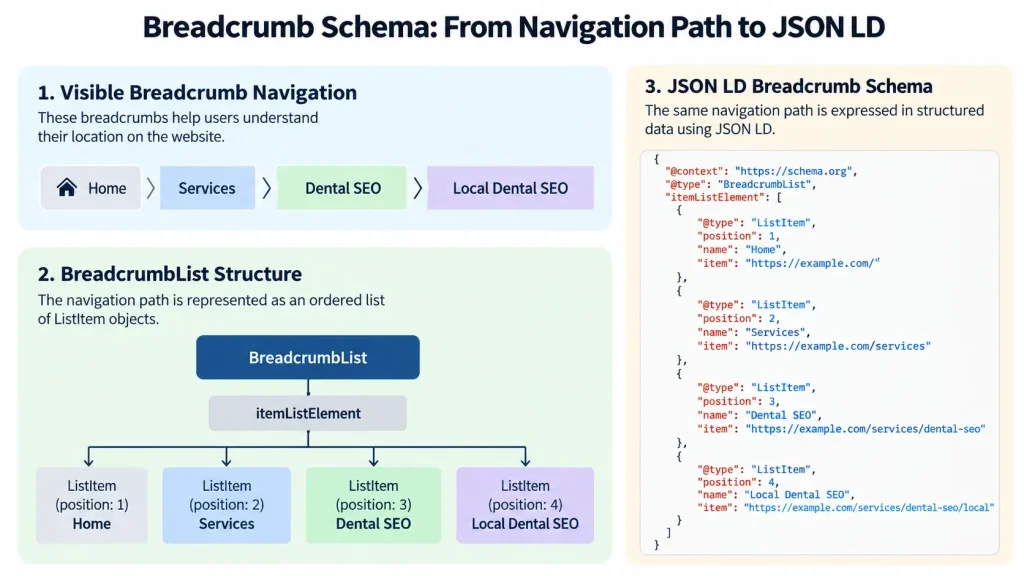
Breadcrumb schema is structured data that describes where a webpage sits within a website hierarchy. It uses the Schema.org BreadcrumbList type to represent an ordered navigation path such as Home › Services › Dental SEO › Local Dental SEO.
Google can use this markup to understand page relationships and present breadcrumb information in desktop search results. Correct implementation depends on an accurate navigation path, valid ListItem properties, consistent destination URLs, and controlled schema output.
This guide explains how Breadcrumb Schema works, how to implement it with JSON LD and WordPress, how to validate it, and how to fix common errors.
What Is Breadcrumb Schema in SEO?
Breadcrumb schema is structured data that represents the hierarchical navigation path leading to a webpage. The main Schema.org entity is BreadcrumbList. Each level of the path is represented by a ListItem.
Consider this navigation path:
Home › Services › Dental SEO › Local Dental SEO
It communicates four relationships.
- Home is the broadest level.
- Services is a section beneath Home.
- Dental SEO is a service category beneath Services.
- Local Dental SEO is the current page.
Breadcrumb schema does not create these relationships. It describes an existing website hierarchy in a format search engines can process.
Breadcrumb Navigation vs. Breadcrumb Schema Markup
How Breadcrumb Schema Appears in Google Search Results
Google can use breadcrumb structured data to categorize a page within desktop search results. A Local Dental SEO page might therefore appear within a path resembling:
Services › Dental SEO › Local Dental SEO
Google controls the final presentation. Structured data makes supported information available to Google, but its search systems decide how that information appears for individual queries.
How Does BreadcrumbList Structured Data Work?
BreadcrumbList represents an ordered breadcrumb trail. It contains itemListElement, which holds individual ListItem objects. Each ListItem represents one level of the navigation hierarchy. For this path:
Home › Services › Dental SEO › Local Dental SEO
The structured sequence is:
- Position 1: Home
- Position 2: Services
- Position 3: Dental SEO
- Position 4: Local Dental SEO
The position property defines the order explicitly. The name property provides the breadcrumb label, while item identifies the destination URL where it is used.
Understanding position, name, item, and Other Schema Properties
| Property | Purpose | Example |
| @context | Identifies the structured data vocabulary | https://schema.org |
| @type | Identifies the entity type | BreadcrumbList |
| itemListElement | Contains the breadcrumb entries | ListItem objects |
| position | Defines the numerical order of each breadcrumb | 1, 2, 3, 4 |
| name | Provides the breadcrumb label | Dental SEO |
| item | Identifies the destination represented by the breadcrumb | https://example.com/services/dentalseo |
| @id | Can identify a URL when item is represented as a Thing in JSON-LD | A page identifier |
@id is not required when item is supplied directly as a URL.
Position values should begin at 1 and continue in sequence. Names should describe their destinations, and item URLs should point to the intended current pages rather than obsolete, redirected, or parameter-based versions.
Google’s Breadcrumb Schema Requirements vs. Schema.org Properties
Schema.org defines the breadcrumb vocabulary, while Google adds requirements for breadcrumb eligibility in Google Search.
| Requirement | Schema.org | Google Search |
| BreadcrumbList | Defines the ordered breadcrumb list | Supported type for breadcrumb markup |
| Minimum entries | No Google-specific minimum | Requires at least two ListItem entries |
| position | Defines the order of each ListItem | Required to establish breadcrumb sequence |
| name | Provides the breadcrumb label | Must provide a readable breadcrumb name, either directly or through the Thing used as item |
| item | Identifies the represented destination | Normally identifies the destination URL |
| Final item | Can be included | May be omitted because the containing page URL can represent the final breadcrumb |
| Navigation path | Describes the breadcrumb hierarchy | Should represent a meaningful user path rather than simply copy URL segments |
The breadcrumb trail should represent the actual website hierarchy rather than reproduce the page URL mechanically.
Breadcrumb Schema JSON-LD Examples
JSON-LD lets you describe breadcrumb hierarchy separately from the visible HTML navigation. The structured trail should still represent the same logical path users encounter on the site.
Complete BreadcrumbList JSON-LD Example
Visible breadcrumb:
Home › Services › Dental SEO › Local Dental SEO
Corresponding JSON-LD:
{
“@context”: “https://schema.org”,
“@type”: “BreadcrumbList”,
“itemListElement”: [
{
“@type”: “ListItem”,
“position”: 1,
“name”: “Home”,
“item”: “https://example.com/”
},
{
“@type”: “ListItem”,
“position”: 2,
“name”: “Services”,
“item”: “https://example.com/services”
},
{
“@type”: “ListItem”,
“position”: 3,
“name”: “Dental SEO”,
“item”: “https://example.com/services/dentalseo”
},
{
“@type”: “ListItem”,
“position”: 4,
“name”: “Local Dental SEO”
}
]
}
- @context identifies Schema.org.
- @type declares the object as a BreadcrumbList.
- itemListElement contains the breadcrumb entries.
Each ListItem uses position to define its order and name to identify the breadcrumb label.
The first three entries include destination URLs. The final breadcrumb omits the item, which Google permits.
Breadcrumb Schema Examples for Blogs, Services, and Ecommerce
| Page Type | Example Breadcrumb Path |
| Blog article | Home › Blog › SEO Guides › Breadcrumb Schema |
| Service page | Home › Services › Dental SEO › Local Dental SEO |
| Ecommerce product | Home › Dental Equipment › Imaging Systems › Dental Scanner X |
Each path should reflect a meaningful content, service, or product hierarchy. Do not add categories simply to create a longer breadcrumb trail.
Can One Page Have Multiple Breadcrumb Trails?
Yes. A page can have multiple BreadcrumbList objects when it genuinely belongs to more than one navigation path. For example:
- Home › Dental Equipment › Imaging Systems › Dental Scanner X
- Home › Brands › Example Brand › Dental Scanner X
Each trail represents a different valid relationship.
Multiple breadcrumb trails are different from duplicate schema. Multiple trails describe distinct navigation paths, while duplicate generators repeat or conflict with the same breadcrumb relationship.
How to Add Breadcrumb Schema to Your Website
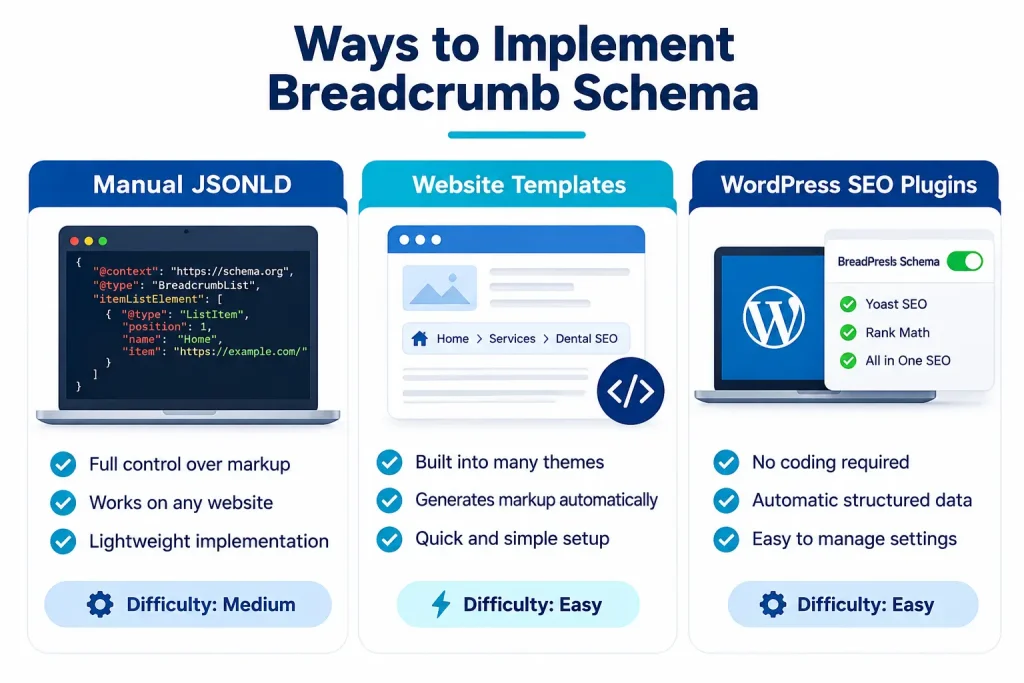
Breadcrumb schema is implemented manually, generated through templates, or produced through a CMS plugin. The best method depends on site size and how frequently page hierarchy changes.
Method 1: Add Breadcrumb JSON-LD Manually
Manual JSON-LD works best for small sites with stable page structures. Add a JSON-LD script to the page and populate it with the correct hierarchy.
<script type=”application/ld+json”>
{
“@context”: “https://schema.org”,
“@type”: “BreadcrumbList”,
“itemListElement”: []
}
</script>
Replace the empty array with the relevant ListItem entries before deployment. Manual markup provides direct control but becomes difficult to maintain across hundreds or thousands of pages.
Method 2: Generate Breadcrumb Schema Through Website Templates
Template generation is better suited to sites with predictable page relationships.
A template can generate breadcrumb values from parent pages, product categories, blog categories, custom taxonomies, and canonical URLs. This approach scales well because hierarchy changes can update many pages automatically.
The main risk is template logic. One incorrect rule can produce invalid or misleading breadcrumb paths across an entire section of the site.
Method 3: Add Breadcrumb Schema Using WordPress Plugins
WordPress SEO plugins such as Yoast SEO and Rank Math can generate breadcrumb structured data automatically. This reduces manual coding, but plugin settings alone do not confirm that the final markup is correct.
Inspect the generated BreadcrumbList on representative live pages. Verify the breadcrumb labels, positions, destination URLs, hierarchy, and final page entry.
| Method | Best Use | Main Advantage | Main Risk |
| Manual JSON-LD | Small static sites | Direct control | Manual maintenance |
| Template generation | Large structured sites | Scalable output | Template errors can affect many pages |
| WordPress plugin | WordPress sites | Automated implementation | Theme or plugin conflicts |
How to Add Breadcrumb Schema in WordPress
WordPress breadcrumbs come from themes, SEO plugins, WooCommerce functions, custom plugins, or custom code. The main goal is to identify which system controls the breadcrumb output and prevent accidental duplication.
How to Add Breadcrumb Schema With Yoast SEO
Yoast SEO includes breadcrumb information within its structured data system. Its breadcrumb schema represents the hierarchical position of a webpage within the website.
A practical implementation process is:
- Configure the correct page and taxonomy hierarchy in WordPress.
- Configure Yoast breadcrumb settings.
- Add visible breadcrumb output through the supported theme integration where needed.
- Open a representative child page.
- Inspect its generated BreadcrumbList.
- Verify parent labels, positions, URLs, and the current page entry.
- Test the live page with Google’s Rich Results Test.
Yoast commonly omits items from the final breadcrumb, which is compatible with Google’s documented breadcrumb requirements.
How to Add Breadcrumb Schema With Rank Math
Rank Math provides breadcrumb controls through its WordPress settings and supports frontend breadcrumb integration. After configuration, inspect the generated markup rather than relying only on the settings screen.
Check a representative page for the correct hierarchy, names, destination URLs, and positions.
Rank Math also provides developer filters that can modify breadcrumb items. Changes to breadcrumb logic can therefore affect visible breadcrumbs and structured data. Retest the schema after theme changes, plugin updates, or custom filter changes.
How to Add Breadcrumb Schema to WooCommerce Products
WooCommerce products often belong to several product categories, which creates a path selection problem.
Consider this product:
Dental Scanner X
Assigned categories:
- Dental Equipment
- Imaging Systems
- Digital Dentistry
Several breadcrumb paths are possible:
- Home › Dental Equipment › Dental Scanner X
- Home › Imaging Systems › Dental Scanner X
- Home › Digital Dentistry › Dental Scanner X
The site should use a deliberate taxonomy strategy rather than whichever category happens to be returned first. Choose a primary path that reflects actual navigation and category importance.
Where several paths are meaningful, multiple breadcrumb trails can be represented. Avoid unstable paths that change between visits, templates, or crawls.
How to Prevent Duplicate Breadcrumb Schema in WordPress
Duplicate breadcrumb markup appears when more than one system generates a BreadcrumbList.
| Possible Source | What to Inspect | Detection Clue | Resolution |
| Theme | Theme breadcrumb function and schema output | BreadcrumbList remains after SEO plugin breadcrumb output is disabled | Disable the theme schema or the competing plugin output |
| SEO plugin | Schema graph and breadcrumb settings | Breadcrumb output changes when the plugin is disabled | Assign breadcrumb generation to one plugin |
| WooCommerce integration | Product and category templates | Duplicate or conflicting paths appear mainly on shop pages | Standardize product taxonomy and breadcrumb logic |
| Custom code | Theme files, snippets, custom plugins, and injected scripts | Markup remains after theme and SEO plugin settings are changed | Remove obsolete custom schema output |
Two BreadcrumbList objects are not automatically incorrect. Keep multiple lists when they represent distinct and legitimate navigation paths. Remove markup when separate systems reproduce the same path or describe contradictory hierarchies.
How to Test and Validate Breadcrumb Schema
Breadcrumb validation should confirm Google compatibility, Schema.org correctness, live deployment, rendered output, and post-crawl reporting.
| Validation Step | Tool or Method | What to Check | Best Use |
| Test Google support | Google Rich Results Test | Detected BreadcrumbList, critical errors, positions, labels, and destination URLs | After implementation or markup changes |
| Validate Schema.org structure | Schema Markup Validator | Entity types, property relationships, and structured data syntax | Before or after deployment |
| Inspect live output | Live page and rendered HTML | Whether the expected BreadcrumbList appears in production and after rendering | After deployment |
| Monitor indexed pages | Google Search Console | Reported breadcrumb issues, affected URLs, and validation status | After Google crawls the pages |
A successful Rich Results Test confirms that Google can detect supported breadcrumb markup without critical structured data errors in the tested version. It does not guarantee breadcrumb presentation in search results.
Schema Markup Validator checks Schema.org structure, while Google’s Rich Results Test checks support for Google search features. Use both when validating important templates.
Inspect the production page because caching, JavaScript rendering, conditional templates, plugins, and deployment settings can change the final markup.
After major template changes, plugin updates, taxonomy changes, URL changes, or site migrations, review affected URLs in Google Search Console and revalidate representative pages.
Common Breadcrumb Schema Errors and How to Fix Them
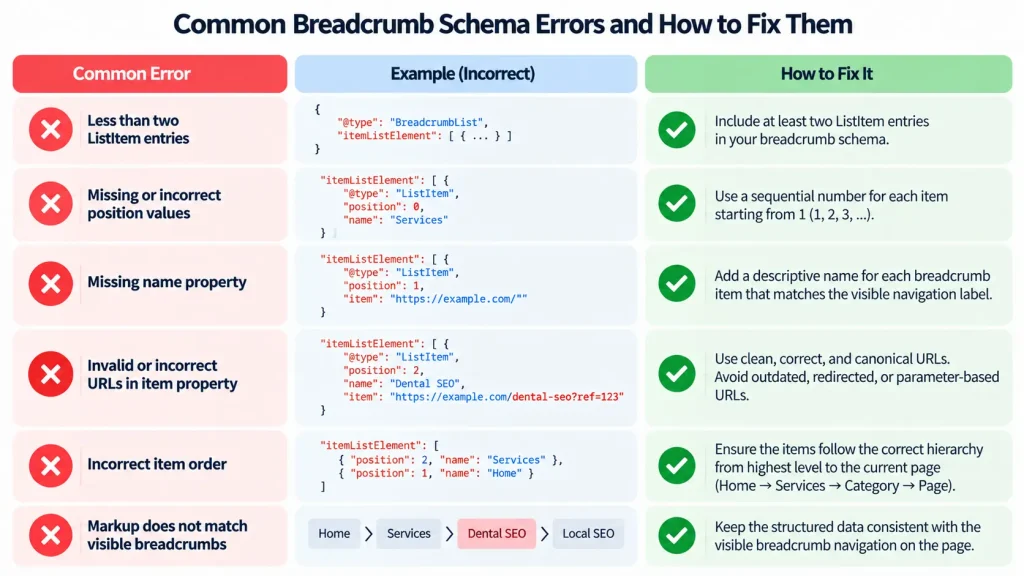
Most breadcrumb schema errors come from missing properties, incorrect ordering, invalid destination URLs, inaccurate hierarchy, or multiple systems generating conflicting markup.
| Error | Likely Cause | Fix | Retest With |
| Missing position | Incomplete ListItem output | Add sequential integer positions starting with 1 | Rich Results Test |
| Missing name | Breadcrumb label is absent | Add an accurate label for the destination | Rich Results Test |
| Invalid item | Destination URL is incorrect or malformed | Replace it with the intended page URL | Rich Results Test and live page inspection |
| Duplicate BreadcrumbList | Theme, plugin, or custom code generates the same schema | Identify each generator and remove accidental duplication | Rendered page inspection |
| Conflicting breadcrumb paths | Different generators describe different hierarchies | Keep the correct path or retain multiple paths only when both represent genuine navigation | Rendered page inspection |
| Incorrect hierarchy | Taxonomy or template logic selects the wrong parent | Update the breadcrumb path to match the real navigation hierarchy | Rich Results Test and live page inspection |
| Redirected breadcrumb URL | Old destination remains in the markup | Replace it with the current intended URL | URL Inspection and live page testing |
| Tracking or filtered URL | Breadcrumb points to a parameter-based page instead of the preferred destination | Replace it with the stable intended URL | Live page inspection |
| Valid markup but no Google breadcrumb | Page is not indexed, markup is not detected, or Google chooses another presentation | Check indexing, Rich Results Test, Search Console, and rendered markup | Search Console and Rich Results Test |
Google allows the final breadcrumb to omit the item, so a missing item on the last ListItem is not automatically an error.
Breadcrumb URLs should represent the intended current destinations rather than obsolete pages, unnecessary redirects, tracking parameter URLs, or filtered versions. Multiple BreadcrumbList objects are also not automatically incorrect. Keep them when they describe distinct, legitimate navigation paths. Remove them when several systems reproduce the same path or provide contradictory hierarchy information.
Valid structured data makes breadcrumb information available to Google but does not guarantee that Google will display it in search results.
Advanced Breadcrumb Schema Best Practices
Complex sites need additional breadcrumb controls when pages belong to multiple categories, languages, or changing URL structures.
Choose the Correct Breadcrumb Path for Multi-Category Pages
Use the breadcrumb path that best reflects the page’s real navigation context. A product assigned to several categories should not receive a parent based only on database order.
Use a defined primary taxonomy when the site needs one stable path. Represent multiple trails only when each path reflects a genuine navigation relationship.
Keep Breadcrumb Schema Consistent With Navigation and Canonical URLs
Breadcrumb markup should align with four elements:
- Visible breadcrumb labels
- Structured breadcrumb labels
- Breadcrumb destination URLs
- Canonical page relationships
The wording can vary slightly, but the underlying hierarchy should remain consistent. A page should not appear under Services in structured data while visible navigation places it under Blog.
Handle Breadcrumb Schema on JavaScript and Multilingual Websites
JavaScript-generated breadcrumb markup should appear in the rendered page that search engines can process. Test the rendered output after deployment.
Multilingual pages should use the correct labels and destination URLs for each language version. An English page should use its English navigation path, while a translated page should use the corresponding localized path where that structure exists.
Hreflang identifies language or regional alternatives. Breadcrumb schema describes navigation hierarchy. They serve different purposes and should remain independently accurate.
Maintain Breadcrumb Schema After Website Migrations
Website migrations can change URLs, parent pages, categories, templates, and taxonomy relationships.
Update breadcrumb logic whenever those relationships change. Check representative pages after migration to confirm that breadcrumb destinations point to current URLs rather than obsolete or redirected pages.
Revalidate the live markup and monitor Google Search Console after the migrated pages are recrawled.
Frequently Asked Questions About Breadcrumb Schema
Is Breadcrumb Schema Required for SEO?
No. Breadcrumb schema is not required for indexing or rankings. It helps search engines understand page hierarchy and can support breadcrumb presentation in Google Search.
Can You Add Breadcrumb Schema Without Visible Breadcrumbs?
Yes. Google does not require visible HTML breadcrumbs for BreadcrumbList eligibility. The markup should still reflect the site’s real navigation hierarchy.
Should the Last Breadcrumb Item Include a URL?
No. Google allows the final breadcrumb to omit the item and can use the containing page URL instead.
Is JSON-LD Better Than Microdata for Breadcrumb Schema?
JSON-LD is usually easier to maintain, but Google supports JSON-LD, Microdata, and RDFa for breadcrumb structured data.
Does Breadcrumb Schema Directly Improve Google Rankings?
No direct ranking benefit is documented by Google. Its main purpose is to describe page hierarchy and support breadcrumb presentation in search results.
Final Breadcrumb Schema Implementation Checklist
Use this checklist before considering the implementation complete.
- Define a real user navigation path.
- Generate a valid BreadcrumbList.
- Use at least two ListItem entries when targeting Google’s breadcrumb search feature.
- Check position, name, and item values.
- Keep breadcrumb destinations aligned with intended canonical pages.
- Remove accidental duplicate generators.
- Test the live rendered page with Google’s Rich Results Test and Schema Markup Validator.
- Recheck breadcrumb markup after taxonomy changes, URL changes, template updates, plugin changes, and site migrations.
Correct breadcrumb schema starts with an accurate website hierarchy.
Define the path first, represent each level with an ordered ListItem, keep destination URLs current, control which system generates the markup, and validate the deployed result. That process produces breadcrumb structured data that remains accurate as the website grows.