Crawl budget optimization improves how efficiently Googlebot discovers and revisits important URLs by reducing unnecessary crawlable inventory and technical constraints.
It matters most for large websites, frequently changing sites, and platforms where Google discovers many URLs but does not crawl important pages promptly.
The goal is not to increase Googlebot requests. The goal is to make crawling more useful by directing attention toward valuable products, categories, articles, listings, and other important URLs.
This guide explains how crawl budget works, how to confirm a genuine crawl problem, how to audit Googlebot activity, and how to improve crawl efficiency safely.
What Is Crawl Budget in SEO?
Crawl budget describes the URLs Google can and wants to crawl on a website. Google determines this through two main components:
- Crawl capacity
- Crawl demand
Crawl capacity represents how much crawling a host can support without becoming overloaded. Crawl demand represents how strongly Google wants to crawl known URLs.
A website with millions of accessible URLs may therefore receive very different crawl attention across its inventory. Frequently updated product pages may be revisited often, while duplicate parameter URLs or obsolete pages may receive less useful crawling activity.
Crawl budget optimization improves the efficiency of that allocation. It does not guarantee indexing or rankings.
Crawl Budget vs. Crawl Rate vs. Crawl Frequency
These terms describe different aspects of Googlebot crawling.
| Term | Meaning | Example |
| Crawl budget | The URLs Google can and wants to crawl on a website | Google prioritizes valuable product and category URLs within a large ecommerce inventory |
| Crawl rate | The intensity of requests a host can safely support | Googlebot reduces request activity when a server becomes slow or returns errors |
| Crawl frequency | How often Google revisits a specific URL | A frequently updated product page may be crawled more often than a rarely changed policy page |
Crawl frequency naturally varies by URL. A frequently changing page may receive more visits because Google has stronger demand to refresh it, while a stable page may need less frequent crawling.
How Googlebot Discovers and Processes URLs
Googlebot discovers URLs through internal links, external links, known URLs, redirects, and XML sitemaps. A typical ecommerce path might be:
Homepage → Category → Subcategory → Product
After discovery, Google decides whether and when to fetch the URL.
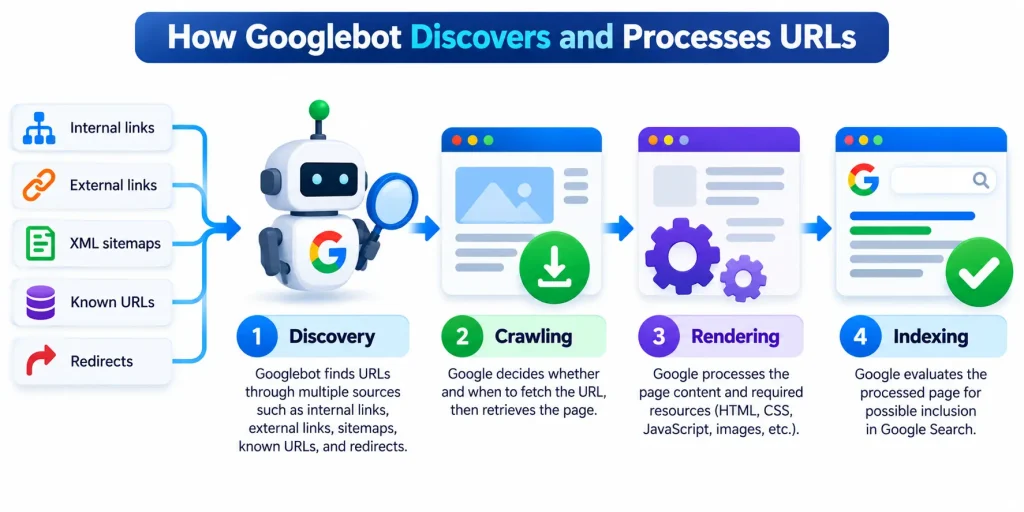
- Crawling retrieves the page.
- Rendering processes page content and required resources.
- Indexing evaluates the processed page for possible inclusion in Google Search.
These stages are separate.
- A URL may be discovered but not crawled.
- It may be crawled but not indexed.
- It may also be grouped with duplicates while another URL is selected as canonical.
That distinction is essential during diagnosis.
How Does Google Determine Crawl Budget?
Google determines crawl budget through crawl capacity and crawl demand. Capacity controls how much Googlebot can safely crawl, while demand influences how much Google wants to crawl.
| Factor | What It Means | Main Signals |
| Crawl capacity | How much crawling a host can support without performance problems | Server response time, HTTP 5xx responses, HTTP 429 responses, DNS availability, connection stability, robots.txt availability |
| Crawl demand | How strongly Google wants to crawl known URLs | Site size, update frequency, page quality, relevance, popularity, staleness, perceived URL inventory |
Crawl Capacity
Stable infrastructure can support greater crawling. Persistent latency, server errors, connection problems, or rate limiting can reduce crawl capacity.
Crawl Demand
Crawl demand reflects Google’s interest in discovering or revisiting URLs.
Perceived inventory is especially important for large sites. An ecommerce store may have 300,000 valuable product and category URLs while exposing millions of filter, tracking, sorting, and session variations.
Reducing unnecessary URL inventory can make crawling more efficient.
Why More Server Capacity Does Not Guarantee More Crawling
Greater server capacity removes infrastructure constraints but does not create crawl demand. A faster server may allow more requests, but Google may still crawl less if additional URLs have limited perceived value or freshness.
Prioritize infrastructure improvements when Search Console and server logs show that server performance is actually restricting Googlebot.
Does Your Website Actually Need Crawl Budget Optimization?
Most websites do not need dedicated crawl budget optimization. It becomes relevant when important URLs experience discovery or recrawl delays while unnecessary URL inventory or infrastructure limits consume crawler attention.
Websites Most Likely to Benefit
| Website Type | Why Crawl Budget May Matter |
| Large ecommerce stores | Products, filters, sorting, and parameters can create very large URL inventories |
| Marketplaces and classified sites | Listings are created, updated, and removed frequently |
| News publishers | New and updated content requires timely crawling |
| Enterprise websites | Complex architectures can expose duplicate or obsolete URLs |
| Sites with faceted navigation | Filter combinations can multiply crawlable URLs |
| Sites with many discovered but uncrawled URLs | Important inventory may not receive timely Googlebot attention |
Smaller and relatively stable websites usually gain more from improving content quality, internal linking, indexability, and site architecture.
Signs of a Possible Crawl Budget Problem
| Signal | Possible Issue |
| Important new URLs remain uncrawled | Discovery or crawl demand problem |
| Important updates receive slow recrawling | Low crawl demand or inefficient allocation |
| Googlebot frequently requests parameter URLs | Excessive URL inventory |
| Logs show repeated requests for obsolete URLs | Poor URL lifecycle management |
| HTTP 5xx or HTTP 429 responses increase | Crawl capacity constraint |
| Large duplicate URL spaces remain discoverable | Uncontrolled crawl inventory |
One signal alone does not prove a crawl budget problem. Look for patterns affecting important URL groups.
Crawl Problem vs. Indexing Problem
| Status | What It Means | What to Investigate |
| Discovered, currently not indexed | Google knows the URL but may not have crawled it yet | Discovery, crawl demand, capacity, and URL inventory |
| Crawled, currently not indexed | Google has already fetched the URL | Content value, duplication, canonicalization, and index eligibility |
A page that has already been crawled usually does not need more crawl allocation as the first solution.
Crawl Budget Decision Tree
Is the important URL being discovered?
- No → Review internal links, XML sitemaps, and navigation.
- Yes → Check crawl timing.
Is the URL being crawled promptly?
- Yes → Crawl budget is probably not the main issue.
- No → Review Googlebot request distribution.
Is Googlebot spending substantial activity on unnecessary URLs?
- Yes → Investigate URL inventory and crawl controls.
- No → Check server health.
Are server errors or latency restricting crawling?
- Yes → Investigate crawl capacity.
- No → Review crawl demand and discovery signals.
Has Google already crawled the affected URL?
- Yes → Prioritize indexing, canonicalization, or content investigation.
- No → Continue investigating crawl demand, discovery, and capacity.
This should lead to one of three actions:
- Dedicated crawl optimization
- Further technical investigation
- A different SEO priority
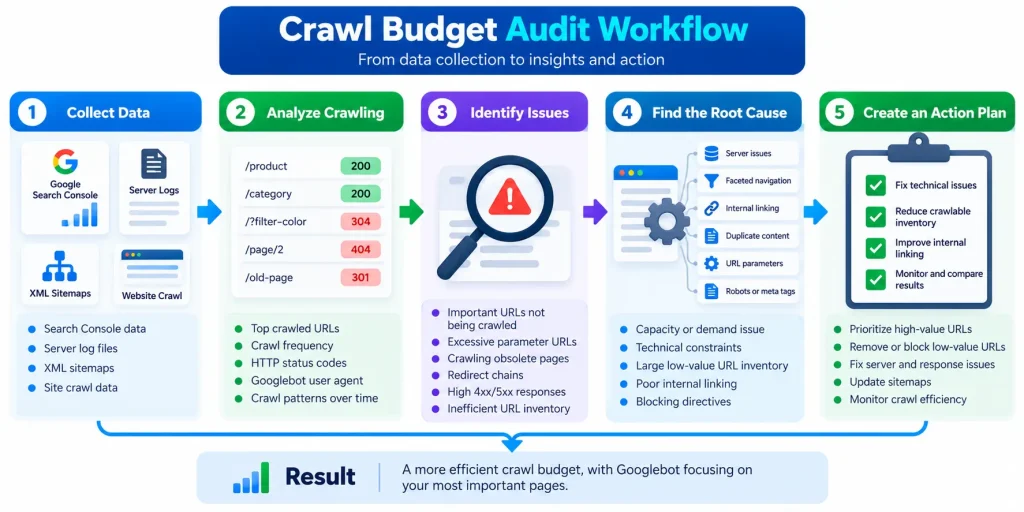
4. How to Audit Crawl Budget Using Search Console and Server Logs
A crawl audit should move from aggregate crawler behavior to URL level evidence.
Google Search Console shows overall patterns. Server logs show individual requests. URL classification reveals whether those requests went to valuable or unnecessary pages.
Step 1: Review Crawl Stats
Open the Crawl Stats report in Google Search Console.
Review:
- Total crawl requests
- Download size
- Average response time
- Host status
- Response categories
- File types
- Crawl purpose
- Googlebot type
Look for unusual changes, server errors, slower response times, and shifts toward low value URL classes. Do not judge success from total request volume alone.
Step 2: Build a URL Inventory
Collect URLs from:
- XML sitemaps
- Site crawler exports
- Content management systems
- Product databases
- Internal links
- Search Console examples
- Server logs
Classify them such as products, categories, articles, pagination, filters, sort URLs, tracking parameters, internal search pages, redirects, and error URLs. Assign each group:
- Indexability
- Canonical status
- Business priority
This classification turns raw crawl data into useful evidence.
Step 3: Analyze Verified Googlebot Requests
Use server logs to capture:
- Requested URL
- Timestamp
- Response status
- User agent
- Crawler address
- Response size
- Response duration where available
Do not rely on the user agent alone because it can be spoofed. Use a representative period that includes normal site activity and important publishing or catalog updates.
Step 4: Measure Crawl Distribution
Group verified Googlebot requests by URL class.
| URL Class | Example Request Share | Business Priority | Main Action |
| Product pages | 40 percent | High | Compare recrawl frequency with product changes |
| Filter combinations | 26 percent | Low | Review filter discovery and crawl controls |
| Tracking parameters | 12 percent | None | Remove unnecessary discovery sources |
| Legacy redirects | 7 percent | Low | Remove internal references and shorten redirect paths |
Also track:
- Priority URL request share
- Duplicate URL request share
- Parameter request share
- Redirect request share
- Error request share
- Discovery latency
- Recrawl interval
Step 5: Compare Crawling With Indexing Data
Cross-reference server logs with:
- Page Indexing data
- URL Inspection
- XML sitemap membership
- Canonical declarations
- Google selected canonical information where available
A frequently crawled URL that remains excluded needs indexing investigation rather than more crawl activity. A valuable sitemap URL missing from logs deserves deeper investigation into discovery, crawl demand, or server conditions.
Step 6: Classify the Bottleneck
| Bottleneck | What It Means | What to Investigate |
| Capacity problem | Server conditions restrict crawling | Response time, HTTP 5xx, HTTP 429, host stability |
| Demand problem | Google knows the URLs but shows limited interest in revisiting them | Freshness, importance, quality, internal discovery |
| Inventory problem | Too many duplicate, obsolete, or generated URLs remain crawlable | Parameters, facets, redirects, crawl traps |
Step 7: Establish a Baseline
Record these metrics before making changes.
| Metric | Why It Matters |
| Priority URL request share | Shows how much crawling reaches valuable pages |
| Unnecessary URL request share | Reveals crawl activity spent on low-value inventory |
| HTTP 5xx rate | Identifies server failures |
| HTTP 429 rate | Identifies rate limiting |
| Average response time | Helps detect capacity constraints |
| Discovery latency | Measures how quickly new URLs are first crawled |
| Recrawl interval | Shows how often important pages are revisited |
| Redirect request share | Reveals unnecessary redirect activity |
The baseline gives you a clear reference point for measuring improvement after technical changes.
What Causes Crawl Budget Waste?
Crawl budget waste happens when Googlebot repeatedly requests low-value, duplicate, obsolete, or technically inefficient URLs while important pages still need discovery or recrawling.
| Cause | How It Affects Crawling | Typical Examples |
| Duplicate and parameter URLs | Creates multiple crawlable versions of the same content | Tracking parameters, session IDs, referral parameters, campaign URLs |
| Faceted navigation and sorting | Expands crawlable inventory through large numbers of URL combinations | Brand, size, color, price, availability, sort order |
| Crawl traps | Creates extremely large or effectively unlimited URL spaces | Infinite calendars, arbitrary parameters, endless pagination |
| Redirects and obsolete URLs | Adds unnecessary requests and keeps outdated paths active | Redirect chains, expired URLs, legacy pages |
| Server and rendering problems | Reduces crawl capacity or delays access to important content | Slow responses, HTTP 5xx, HTTP 429, JavaScript-dependent links |
The main goal is to reduce unnecessary URL discovery, remove obsolete paths, control unbounded URL generation, and keep server responses stable so Googlebot can spend more useful crawling activity on important pages.
How to Optimize Crawl Budget
Fix the diagnosed constraint rather than applying every crawl control available.
Control Unnecessary Crawling With Robots.txt
Use robots.txt for large URL spaces Google does not need to crawl. Possible candidates include:
- Certain internal search patterns
- Redundant sort combinations
- Selected filter patterns
- Utility endpoints
Test rules because broad patterns can block valuable pages or resources.
Consolidate Duplicate URLs
Use canonical tags when duplicate pages need to remain accessible. Use permanent redirects when an old URL has permanently moved.
Keep internal links, sitemaps, redirects, and canonical signals consistent.
Maintain Clean XML Sitemaps
Include important canonical URLs. Remove:
- Redirects
- Error URLs
- Duplicate variations
- Unnecessary parameters
- Pages intentionally excluded from indexing
Use modification dates only for meaningful page changes.
Improve Internal Linking
Important pages should have crawlable internal links. Do not rely only on XML sitemaps for discovery. Strengthen paths from categories, collections, related products, and relevant editorial content.
Fix valuable orphan pages and reduce excessive crawl depth.
Fix Broken URLs and Redirect Chains
Use accurate response codes. Redirect genuine permanent moves. Return HTTP 404 or 410 when content no longer exists and has no suitable replacement.
Update internal links so they point to final URLs.
Improve Server Stability
Focus on:
- Reliable availability
- Faster application processing
- Database performance
- Appropriate caching
- Efficient responses
- Correct conditional requests
Stable infrastructure protects crawl capacity.
Make Important JavaScript Content Discoverable
Important links should be accessible through standard crawlable navigation. Do not require user interactions simply to reveal essential products or categories. Test rendered output to confirm that important links and content are visible.
Robots.txt vs. Noindex vs. Canonical Tags
These controls solve different technical SEO problems. Choose the mechanism based on whether you want to restrict crawling, exclude a page from search, consolidate duplicates, redirect an old URL, or retire removed content.
| Control | Primary Purpose | Effect on Crawling | Best Use | Main Risk |
| Robots.txt | Restrict crawler access | Prevents Googlebot from crawling matched URLs | Large unnecessary URL spaces | Accidentally blocking important pages or resources |
| Noindex | Exclude a page from search results | Google must crawl the page to process the directive | Accessible pages that should not be indexed | Blocking the page before Google can read the directive |
| Canonical tag | Signal the preferred version of duplicate content | Does not directly stop crawling | Duplicate or highly similar URLs | Conflicting canonical signals |
| Permanent redirect | Move an old URL to a relevant replacement | Sends crawlers to the destination URL | Permanently moved content | Redirect chains or irrelevant destinations |
| HTTP 404 or 410 | Retire a removed URL | Signals that the resource no longer exists | Removed content without a relevant replacement | Removing valuable URLs by mistake |
The key distinction is simple: use robots.txt for crawl access, noindex for index exclusion, canonical tags for duplicate consolidation, redirects for permanent moves, and HTTP 404 or 410 for removed URLs.
How to Optimize Crawl Budget for Ecommerce
Ecommerce sites can generate millions of filter, sorting, tracking, and search URLs from a much smaller product catalog. The safest approach is to classify these URLs by search value before applying crawl controls.
Classify Faceted URLs
| URL Type | Search Value | Recommended Approach |
| Indexable facets | High | Keep crawlable and indexable when they target meaningful search demand and provide a useful landing page |
| Utility states | Low | Keep accessible where needed, but prevent unnecessary indexing with the appropriate directive |
| Unnecessary combinations | None or minimal | Limit crawlable discovery through scoped robots.txt rules, link controls, parameter normalization, or application logic |
Protect valuable faceted landing pages from blanket blocking.
Control Unnecessary URL Combinations
Reduce crawlable inventory by removing links to useless combinations, normalizing parameters, consolidating duplicates, and preventing arbitrary URL generation.
Keep Pagination Crawlable
Important products should remain discoverable through standard crawlable links. Infinite scroll should expose persistent URLs and navigation paths for deeper inventory rather than relying only on user interaction.
Practical Ecommerce Crawl Budget Example
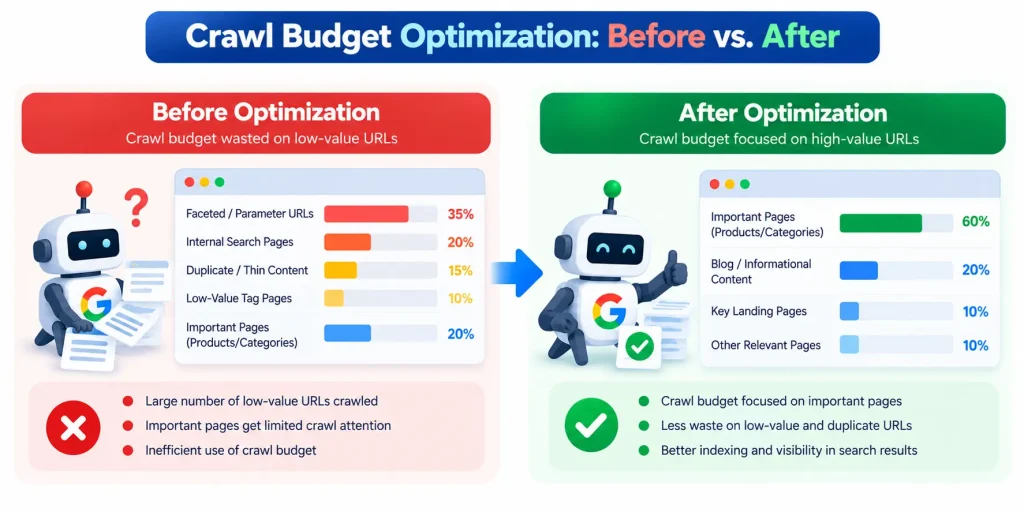
Consider a hypothetical ecommerce website with 420,000 useful product and category URLs. Its systems expose another 3.6 million URLs through filters, sorting options, tracking parameters, internal search, and expired products.
These figures are illustrative only.
URL Inventory
| URL Type | Volume | Value |
| Products | 360,000 | High |
| Categories and valuable facets | 60,000 | High |
| Unnecessary filters | 1,850,000 | Low |
| Sorting variations | 620,000 | Low |
| Tracking variations | 480,000 | None |
| Expired and legacy URLs | 350,000 | Low |
| Internal search and utility URLs | 260,000 | Low |
The useful inventory represents only a small share of the total exposed URL space.
Googlebot Request Distribution
| URL Type | Request Share | Interpretation |
| Priority products and categories | 39 percent | Valuable crawling |
| Filter combinations | 28 percent | Potential crawl waste |
| Sorting and tracking variations | 14 percent | Low value crawling |
| Expired URLs | 9 percent | Obsolete inventory |
| Redirects | 6 percent | Additional request overhead |
| Other resources | 4 percent | Supporting crawl activity |
The issue is not insufficient crawler activity. The problem is that a large share of requests reaches low value URL classes.
Priority Fixes
The team removes tracking parameters from internal links, restricts selected useless filter patterns, preserves valuable faceted pages, normalizes sorting URLs, removes redirect chains, cleans XML sitemaps, strengthens internal links, and keeps pagination crawlable.
Hypothetical Outcome
| Metric | Before | After |
| Priority URL request share | 39 percent | 68 percent |
| Unnecessary filter requests | 28 percent | 11 percent |
| Tracking and sorting requests | 14 percent | 5 percent |
| Redirect requests | 6 percent | 3 percent |
These figures do not represent expected performance. They show how crawl efficiency can be measured before and after optimization.
How to Measure Crawl Budget Optimization Success
Success means important URLs receive more efficient discovery and recrawling while unnecessary activity and technical constraints decline.
Track:
- Priority URL request share
- Unnecessary URL request share
- Discovery latency
- Recrawl latency
- HTTP 5xx responses
- HTTP 429 responses
- Server response time
- Redirect request share
- Indexing outcomes
Do not use total Googlebot requests as the primary KPI. A lower overall request count can still represent improvement if more crawling reaches valuable URLs. Review crawling after major technical changes such as:
- Site migrations
- Navigation changes
- Faceted search changes
- Large catalog additions
- URL structure changes
- robots.txt changes
- Canonical logic changes
Compare every review with the original baseline.
Common Crawl Budget Optimization Mistakes
| Mistake | Why It Causes Problems | Better Approach |
| Optimizing without evidence | Large site size alone does not prove a crawl budget problem | Confirm discovery delays, slow recrawling, crawl waste, or capacity constraints first |
| Blocking important URLs | Broad robots.txt rules can restrict valuable categories, products, pagination, or resources | Test rules against representative priority URLs before deployment |
| Using the wrong crawl control | Robots.txt, noindex, canonicals, redirects, and HTTP responses solve different problems | Match the control to the actual URL state and desired outcome |
| Treating more crawling as a ranking goal | More Googlebot requests do not improve weak or irrelevant pages | Focus on efficient discovery and recrawling of valuable URLs |
Crawl budget optimization should improve crawler efficiency, not maximize request volume.
Frequently Asked Questions About Crawl Budget Optimization
How Do I Check Crawl Budget in Google Search Console?
Google Search Console does not provide one number labeled crawl budget.
Use Crawl Stats to review crawler requests, response time, host status, response categories, crawl purpose, and Googlebot type. Combine this with server logs, URL inventory, Page Indexing data, and URL Inspection.
Should Every Parameter URL Be Blocked?
No. Some parameter-driven pages can provide search value, especially useful for e-commerce facets. Classify URLs before applying crawl restrictions.
Can Google Discover URLs That Are Not in an XML Sitemap?
Yes. Google can discover URLs through internal links, external links, redirects, and other known sources. XML sitemaps support discovery but are not the only discovery mechanism.
How Long Does Crawl Budget Optimization Take to Show Results?
There is no universal timeframe. The result depends on website size, existing crawl frequency, URL importance, implementation scope, and the type of technical change.
Use Search Console and server logs to measure progress rather than assuming a fixed period.
13. Final Crawl Budget Optimization Checklist
Use this sequence.
Diagnose
- Confirm crawl or discovery delays
- Separate crawling from indexing problems
- Review Crawl Stats
- Analyze verified Googlebot logs
Classify
- Build the URL inventory
- Identify priority pages
- Identify duplicates
- Identify parameters
- Identify crawl traps
- Identify obsolete URLs
Fix
- Restrict unnecessary crawling
- Consolidate duplicate URLs
- Clean XML sitemaps
- Improve internal linking
- Fix redirects and response codes
- Improve server stability
- Keep important JavaScript navigation discoverable
Measure
- Compare request distribution
- Track priority URL share
- Track unnecessary URL share
- Measure discovery latency
- Measure recrawl latency
- Monitor server errors
- Review indexing outcomes separately
Crawl budget optimization is about efficiency, not maximum crawler volume. The strongest approach is simple:
- Diagnose the real bottleneck.
- Classify where Googlebot spends requests.
- Apply the correct technical control.
- Measure whether important URLs receive better discovery and recrawling.
That turns crawl budget optimization into a repeatable technical SEO process rather than a collection of disconnected tactics.