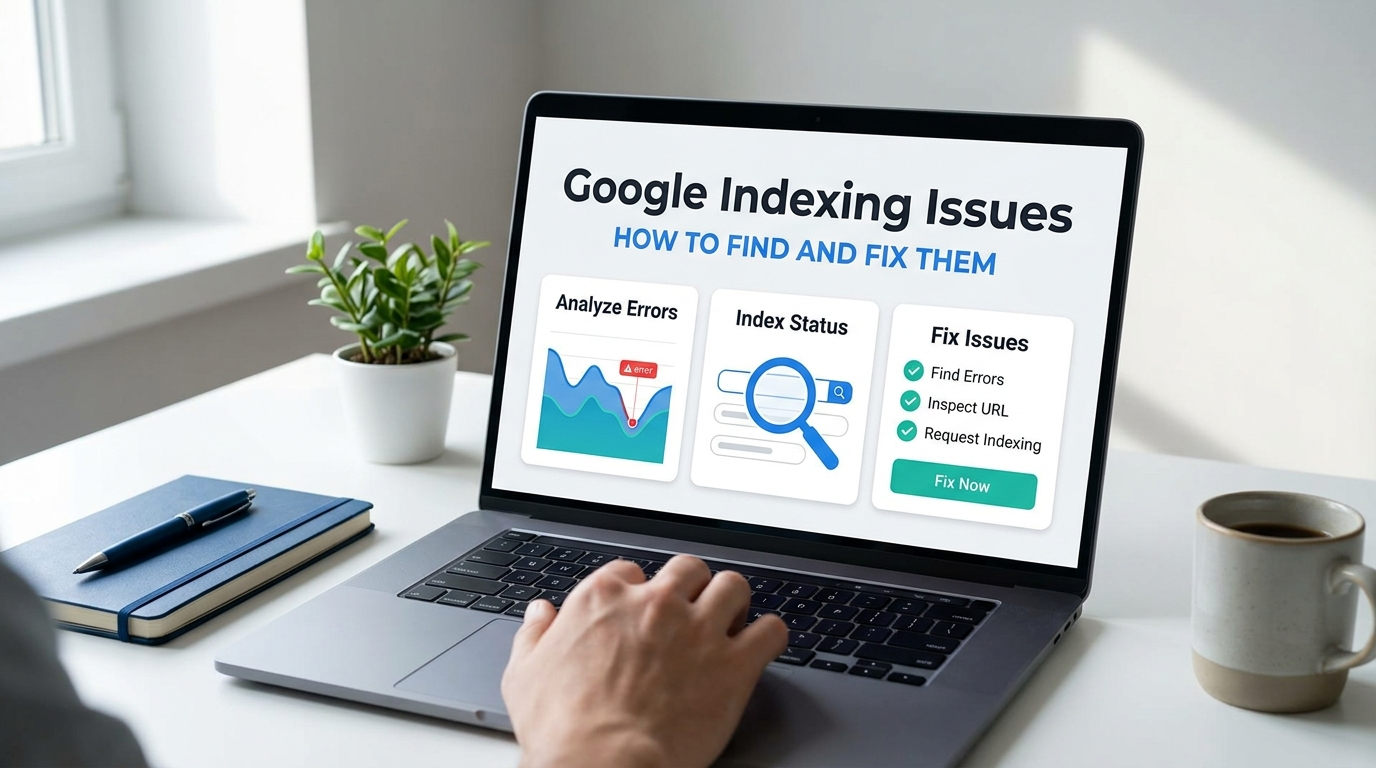
Google indexing issues occur when important webpages are unexpectedly absent from the Google index, or Google selects a different canonical URL than the one you intended.
Google Search Console provides the main evidence needed to diagnose these problems. The Page Indexing report reveals patterns across a website, while URL Inspection provides evidence for individual URLs.
The goal is not to index every URL. Redirects, duplicate variants, removed pages, and intentionally excluded utility pages often belong outside the index. The priority is making sure important canonical pages can be discovered, crawled, processed, and selected for indexing.
This guide explains how to find Google indexing issues, interpret common Search Console statuses, fix their causes, validate corrections, and monitor important pages afterward.
What Are Google Indexing Issues?
Google indexing issues occur when the actual indexing status of a URL does not match its intended purpose. A product page, service page, category page, location page, or informational resource may have an indexing problem if it should appear in Google Search but remains excluded. A duplicate parameter URL, redirected page, or intentionally removed resource may be non-indexed without representing a problem.
Google considers an indexed page one that has been processed and stored in the Google index. Indexing makes a page eligible to appear in Search, but it does not guarantee rankings or organic traffic. The first diagnostic question is:
Should this exact URL be indexed?
Investigate the URL as a problem only when the answer is yes.
How Google Discovers, Crawls, and Indexes Pages
Google moves through five stages:
Discovery, crawling, processing and rendering, canonical selection, indexing
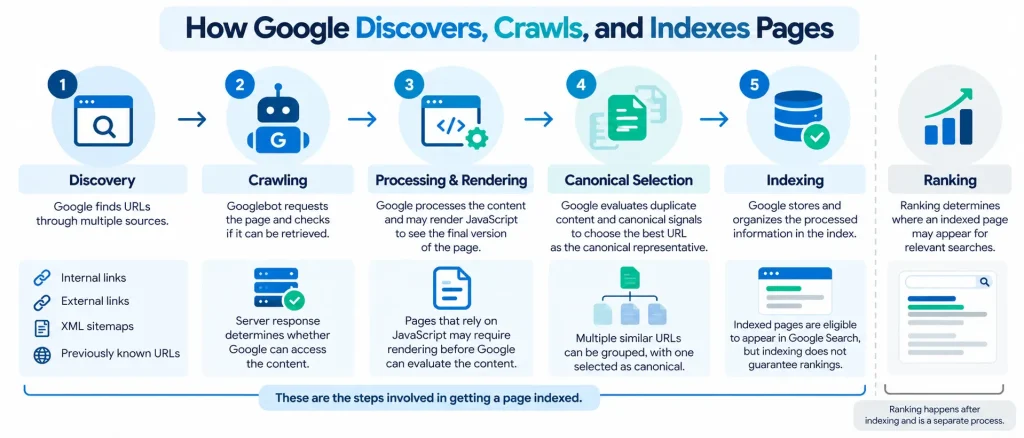
These processes differ from ranking.
- Crawling means Googlebot requested the resource.
- Indexing means Google processed the page and stored information about it.
- Ranking determines where an indexed page may appear for relevant searches.
A crawled page is not automatically indexed, and an indexed page is not automatically highly ranked.
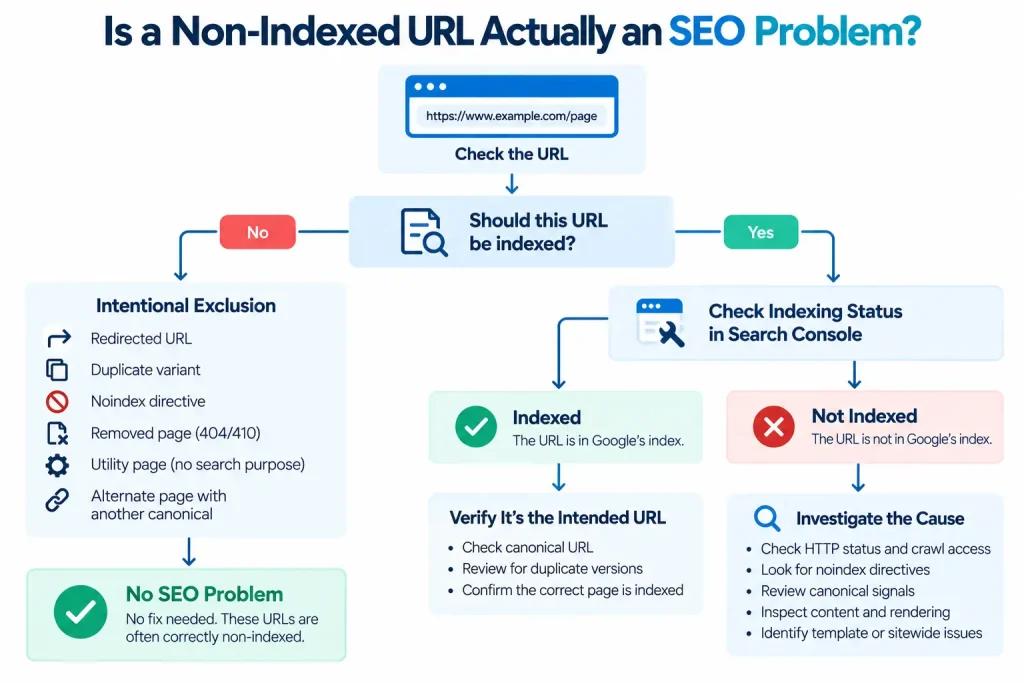
Why Not Every Non-Indexed URL Is an SEO Problem
Many non-indexed URLs are excluded correctly. Examples include:
- Redirected URLs
- Duplicate variants
- Pages carrying an intentional no-index directive
- Removed resources returning HTTP 404 or HTTP 410
- Utility pages with no independent search purpose
- Alternate pages represented by another canonical URL
Consider a product accessible through several filtered or tracking URLs. Google does not need to index every variation when one preferred URL represents the content. The same principle applies to removed pages. A legitimate HTTP 404 response is correct when the resource no longer exists and has no suitable replacement.
Confirm indexing intent before changing anything.
How to Identify Indexing Issues in Google Search Console
Use Search Console at two levels.
- The Page Indexing report reveals sitewide patterns.
- URL Inspection provides evidence about a specific URL.
Start with the report to identify patterns, then inspect important or representative URLs.
Use the Page Indexing Report to Find Affected URLs
Open Google Search Console and go to the Pages section under Indexing. The report groups URLs by indexing outcome and shows indexed and non indexed trends.
Review:
- Indexed URL trends
- Non indexed URL trends
- Individual indexing reasons
- Example URLs for each reason
Focus on unexpected changes rather than raw counts.
Thousands of intentional redirect URLs may require no action. A small number of important category pages carrying an accidental no-index directive may require immediate attention.
Use sitemap filters when you want to focus on URLs explicitly submitted for indexing. The report helps you spot patterns. One URL can reveal a page-level problem, but a sudden increase across hundreds of similar URLs points to a template, CMS, server, or configuration issue.
Inspect Individual URLs Using URL Inspection
URL Inspection provides page-specific indexing evidence. Review:
- Indexing status
- Last crawl
- Page fetch result
- Crawl permission
- Indexing permission
- User-declared canonical
- Google selected canonical
Search Console distinguishes indexed information from live test results.
- The indexed view reflects what Google’s indexing systems currently know about the URL based on previously processed data.
- The live test checks the current version of the page.
This distinction matters after a correction. A page may have contained a no-index directive during Google’s last crawl but be indexable now.
A successful live test does not prove that the URL has entered the Google index. It also does not guarantee that Google will select the same canonical URL declared on the page. Use the indexed view to understand Google’s recorded state and the live test to verify the current technical condition.
Compare Submitted Sitemap URLs With Indexed URLs
An XML sitemap should primarily contain preferred URLs that you want Google to discover and consider for indexing. Investigate important submitted URLs that remain unexpectedly non-indexed.
Check whether each URL:
- Returns the intended HTTP response
- Allows Googlebot access
- Allows indexing
- Uses the intended canonical
- Appears in relevant internal links
- Represents the preferred content version
Sitemap inclusion supports discovery and canonical consistency, but it does not guarantee indexing.
Identify Which Non-Indexed URLs Actually Need Fixing
Classify affected URLs into three groups.
- Intentionally excluded: The indexing outcome matches the purpose of the URL.
- Unexpectedly excluded: The URL should be indexed but is not.
- Requires investigation: The intended status or cause is unclear.
Prioritize important canonical pages such as service pages, product pages, category pages, location pages, and organic landing pages. Indexing intent plus actual status determines whether corrective action is needed.
Common Google Search Console Indexing Issues and How to Fix Them
Google Search Console’s Page Indexing report identifies unindexed URLs and explains why they’re excluded. Some statuses are expected, while others indicate technical, content, or canonicalisation issues that need attention.
The table below explains common indexing statuses, what to investigate, and the appropriate fixes.
| Indexing Issue | What to Check | How to Fix It |
| Discovered: currently not indexed | Internal links, XML sitemap, crawl activity, server availability, and excessive URL variations | Improve internal linking to important pages, maintain an accurate XML sitemap, resolve server accessibility problems, and reduce unnecessary crawlable URLs. |
| Crawled: currently not indexed | Rendered content, duplicate pages, content differentiation, and Google-selected canonical | Fix rendering issues, improve content that serves a distinct search intent, consolidate duplicates, and align canonical signals. |
| Excluded by ‘noindex’ tag | HTML meta robots tags, X-Robots-Tag headers, CMS settings, and SEO plugins | Remove unintended noindex directives and confirm through URL Inspection that Googlebot can crawl the page and indexing is allowed. |
| Blocked by robots.txt | Disallow rules, affected URL paths, and crawl restrictions | Remove or adjust rules blocking important pages. Use noindex rather than robots.txt when the goal is to prevent indexing and Google can access the page. |
| Duplicate or canonical issue | Canonical tags, redirects, internal links, sitemap URLs, and content similarity | Align canonical signals around the preferred URL. Consolidate unnecessary duplicates and verify Google’s selected canonical. |
| Page with redirect | Redirect destination, HTTP response, redirect chains, loops, and destination relevance | Correct broken or irrelevant redirects, eliminate unnecessary chains, and update internal links and sitemaps to point to the final destination. |
| Not found (404) or soft 404 | HTTP status, missing content, replacement URLs, and rendering failures | Restore accidentally removed pages, redirect to genuinely equivalent replacements, or retain a valid 404/410 when removal is intentional. Correct soft 404 responses. |
| Server errors (5xx) and access restrictions | Server logs, hosting performance, CDN rules, firewalls, authentication, and bot protection | Resolve server failures, correct restrictive security configurations, and verify that Googlebot can access the intended URLs. |
Which Indexing Issues Should You Fix First?
Prioritise issues affecting important pages that should appear in Google Search. Server failures, unintended noindex directives, and crawl restrictions require attention before content improvements or canonicalisation adjustments. Not every excluded URL needs fixing. Redirected pages, intentional duplicates, and legitimately removed URLs may have the correct status.
After making changes, use URL Inspection to verify individual URLs and monitor the Page Indexing report for changes. Crawling and indexing are separate processes, so successful recrawling does not guarantee index inclusion.
How to Troubleshoot Google Indexing Issues Step by Step
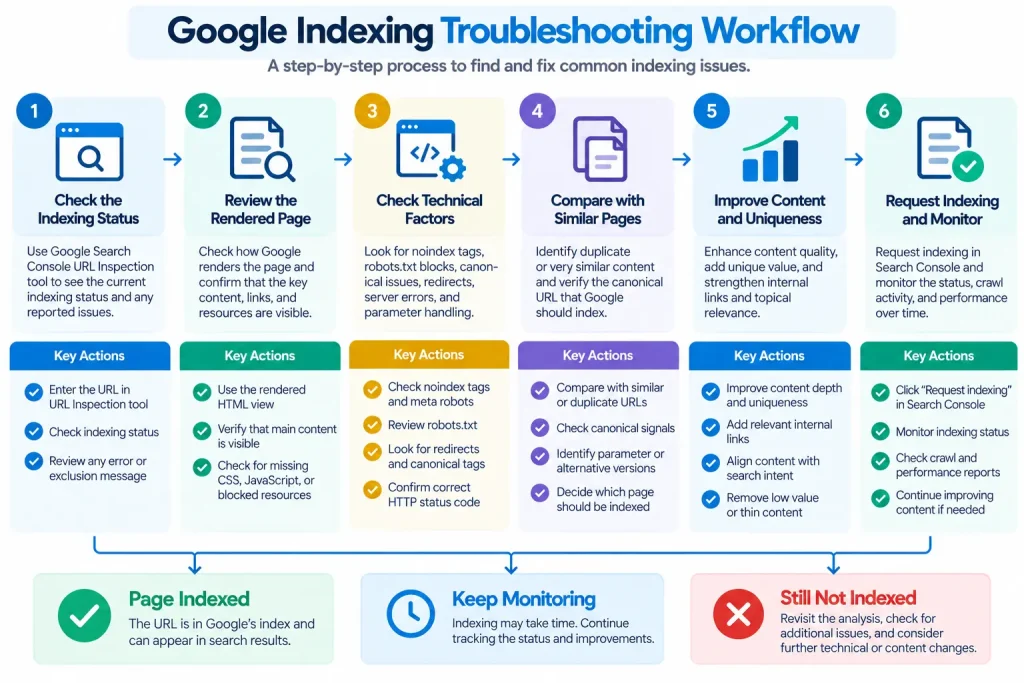
Use the same diagnostic order for important non-indexed URLs.
Step 1: Confirm the URL Should Be Indexed
Determine the purpose of the page. Confirm that users should find this exact URL through Search and that it is the preferred canonical version.
Do not troubleshoot redirects, duplicate variants, filtered URLs, or obsolete pages as if they were primary landing pages.
Step 2: Check HTTP Status, Crawl Access, and Indexing Directives
- Verify the HTTP response.
- Check robots.txt.
- Inspect meta robots and X Robots Tag instructions.
- Confirm that authentication, security systems, or server errors do not block Googlebot.
Resolve basic technical eligibility problems first.
Step 3: Verify Canonical Tags, Internal Links, and Sitemap Consistency
- Inspect the rel canonical annotation.
- Confirm that internal links, redirects, and sitemap entries reinforce the same preferred URL.
- Use URL Inspection to compare your declared canonical with Google’s selected canonical.
Step 4: Check Rendered Content and Indexing Relevance
- Inspect the rendered page.
- Confirm that important content is visible and complete.
- Compare the URL with similar pages and look for substantial duplication, empty templates, or weak differentiation.
This step is particularly important for Crawled Currently Not Indexed cases.
Step 5: Apply the Fix and Verify Technical Eligibility
- Correct the condition supported by the evidence.
- Run a live test.
- Verify that Googlebot can fetch the page, indexing is allowed, the content is available, and canonical signals are correct.
Request indexing after the underlying condition has been fixed.
How to Prioritize Indexing Issues Across a Website
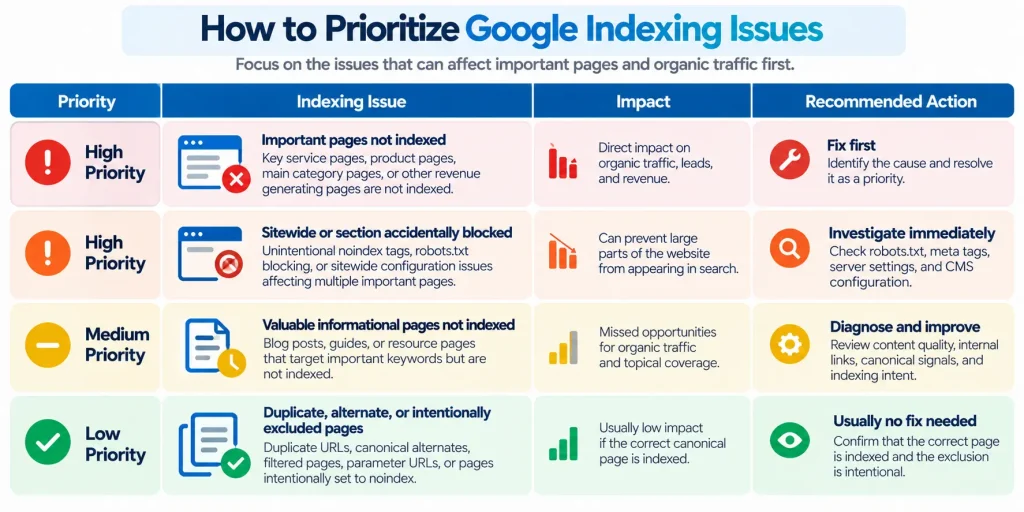
Prioritize affected URLs based on indexing intent, business importance, and issue scale rather than the number of excluded pages alone. Focus on pages that should be indexed, contribute to organic traffic or conversions, and belong to larger groups affected by the same technical problem.
Prioritize Important Canonical and Commercial Pages
Start with core service pages, active product pages, important categories, location pages, and established organic landing pages. A single excluded category page may have a greater impact on traffic and revenue than thousands of intentionally excluded parameter URLs.
Unintended noindex directives, robots.txt restrictions, and server errors affecting important pages should receive immediate attention. Valuable informational pages can follow based on their search demand and organic traffic potential.
Identify Sitewide and Template-Level Indexing Patterns
Repeated indexing issues across multiple URLs often indicate a shared technical or configuration problem. Group affected URLs by:
- Page type: Product, category, service, or informational pages
- Website structure: Directory, URL pattern, or CMS template
- Indexing configuration: Noindex directives and canonical rules
- Technical response: HTTP status codes, redirects, and crawl restrictions
- Sitemap source: Submitted URLs and their indexing status
Use Google Search Console exports to identify recurring patterns and estimate their impact.
For example, hundreds of important pages carrying the same unintended noindex directive may indicate a CMS template issue. Correcting the shared configuration can resolve the underlying problem across the affected pages.
Prioritize fixes that restore access to valuable pages or address widespread indexing barriers. Confirm that intentionally excluded URLs are behaving as expected before making unnecessary changes.
How to Request Indexing and Validate Fixes in Google Search Console
After resolving indexing issues, use Request Indexing or Validate Fix to ask Google to revisit affected URLs or verify reported corrections.
| Feature | Purpose | When to Use |
| Request Indexing | Requests recrawling of an individual URL | After fixing an important page or publishing new content |
| Validate Fix | Checks whether a reported issue has been resolved | After correcting a supported indexing issue |
Request Indexing for Individual URLs
Use the URL Inspection tool to request recrawling after correcting an important page.
- Enter the URL in Google Search Console.
- Select Test Live URL to check its current accessibility and indexing eligibility.
- Click Request Indexing if the URL is eligible.
For large groups of pages, maintain an accurate XML sitemap rather than submitting each URL manually.
Use Validate Fix for Supported Indexing Issues
After resolving a reported issue, select Validate Fix in the Page Indexing report when available.
Google checks affected URLs and updates their validation status as processing progresses. This may take several days or longer, depending on crawl activity and the number of affected pages.
Confirm Indexing and Canonical Selection
Once Google has recrawled the page, use URL Inspection to verify:
- Indexing status: Whether the intended URL is indexed.
- Google-selected canonical: Whether Google selected the preferred URL.
- Last crawl date: Whether crawling occurred after the correction.
- Processed content: Whether the inspected indexed version reflects the expected changes, where verifiable.
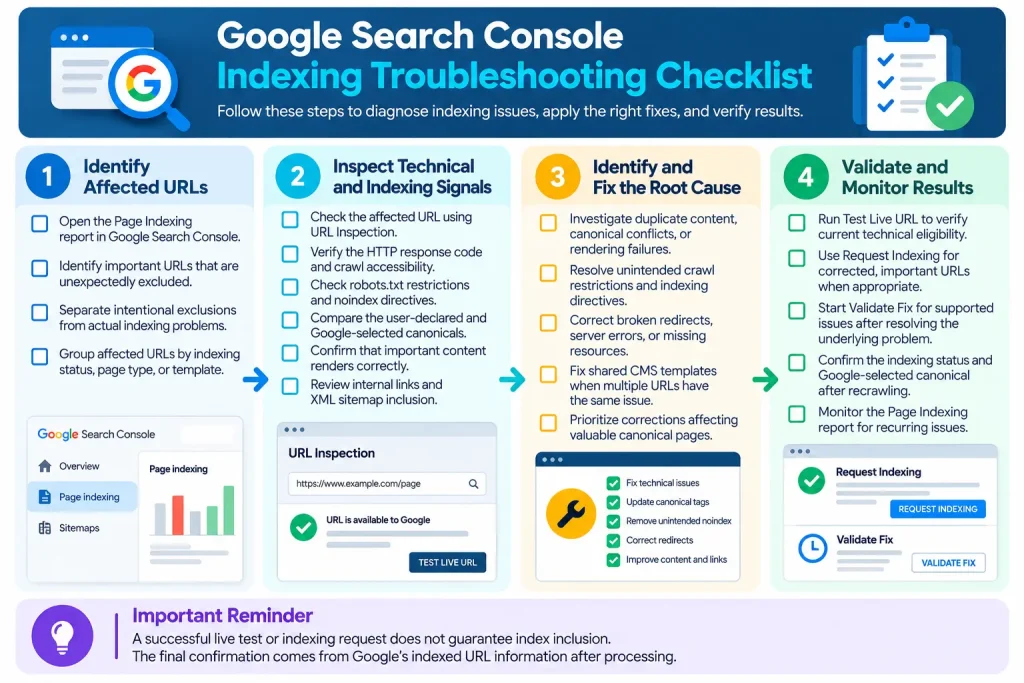
Important: A successful live test or indexing request does not guarantee index inclusion. Confirm the outcome using Google’s indexed URL information.
How to Monitor and Prevent Recurring Indexing Issues
Focus monitoring on unexpected changes affecting important pages.
Monitor Indexing Trends and Unexpected Changes
Establish a normal baseline for the site. Review Page Indexing trends and investigate changes such as:
- Important pages moving from indexed to excluded
- Sudden increases in noindex exclusions
- New robots blocking
- Unexpected canonical changes
- Server error increases
- Large increases in crawled but non-indexed pages
Unexpected change is usually more important than the absolute number of excluded URLs.
Verify Indexability After Publishing and Website Updates
Check important pages after:
- CMS updates
- Website migrations
- Redesigns
- Template changes
- SEO plugin updates
- Redirect changes
Verify the response status, indexing directives, canonical annotation, sitemap inclusion, and final redirect destination. Template changes deserve special attention because one configuration mistake can affect many URLs at once.
Google Indexing Troubleshooting Mistakes to Avoid
Incorrect troubleshooting practices can delay indexing, create conflicting signals, or lead to unnecessary changes. The following mistakes are worth avoiding when resolving issues in Google Search Console.
| Common Mistake | Potential Consequence | Recommended Correction |
| Repeatedly requesting indexing without fixing the cause | The underlying issue remains unresolved despite additional crawl requests. | Identify and correct the issue before requesting recrawling. |
| Trying to index every URL | Duplicate, filtered, redirected, and utility pages receive unnecessary attention. | Prioritize valuable canonical pages intended for indexing. |
| Blocking crawling while using noindex | Googlebot may be unable to access the noindex directive. | Allow crawling when Google needs to detect the directive. |
| Submitting noncanonical URLs in XML sitemaps | Sitemap entries conflict with the preferred canonical URLs. | Include intended canonical URLs consistently. |
| Redirecting removed pages to irrelevant destinations | Google may treat the redirect as a soft 404 or disregard it as a meaningful replacement. | Redirect only to relevant replacements; otherwise, use an appropriate 404 or 410 response. |
| Treating a successful live test as proof of indexing | Technical eligibility is mistaken for confirmed index inclusion. | Check the indexed URL information after Google processes the page. |
Effective indexing troubleshooting requires identifying the underlying issue, applying the appropriate correction, and verifying the outcome rather than relying on repeated submissions or unnecessary URL changes.
Final Takeaways: Diagnose the Cause Before Requesting Indexing
Effective Google indexing troubleshooting starts with identifying the underlying cause rather than repeatedly requesting indexing. Follow a structured process: review the Page Indexing report, inspect affected URLs, verify crawl accessibility and canonical signals, apply the necessary corrections, and confirm the results through URL Inspection.
Remember that not every non-indexed URL represents an SEO problem. Duplicate pages, redirects, and intentionally excluded URLs may have valid reasons for remaining outside Google’s index.
Prioritize valuable canonical pages that should appear in search results. If important pages remain excluded, Google selects unexpected canonicals, or indexing issues affect entire website sections, consider a comprehensive technical SEO audit.
Focus on resolving verified problems, monitoring indexing patterns, and maintaining a website structure that supports efficient crawling and accurate index selection.
Frequently Asked Questions About Google Indexing
Why Is My Website Not Showing Up on Google?
Your website may be missing from Google due to crawl restrictions, noindex directives, server errors, or canonical issues. Use Google Search Console to identify the cause.
How Long Does Google Take to Index a Page?
Google indexing can take a few days to several weeks or longer. There is no guaranteed timeframe, and some pages may never be indexed.
Why Is My Page Not Indexed After Requesting Indexing?
Requesting indexing does not guarantee inclusion. Google may exclude pages due to technical issues, duplicate content, or canonical conflicts.
Does an XML Sitemap Guarantee Indexing?
No. An XML sitemap helps Google discover URLs, but it does not guarantee crawling or indexing.
Should Every Website URL Be Indexed?
No. Focus on valuable canonical pages. Duplicate URLs, redirects, filtered pages, and utility pages generally do not need indexing.