Every webpage has a structure, whether intentionally designed or not. HTML heading tags (H1–H6) create that structure by organizing content into a clear hierarchy.
Headings help users scan content, assistive technologies navigate pages, and search engines understand relationships between topics. More than visual titles, they are semantic HTML elements that communicate meaning and document organization.
This guide explains how heading tags work, how to build a proper H1–H6 hierarchy, common implementation rules, SEO considerations, accessibility benefits, and modern best practices.
What Are Header Tags in HTML?
Definition of HTML Heading Tags (H1 to H6)
Header tags, also known as heading tags, are HTML elements used to define headings and subheadings within a webpage. These tags create a hierarchical structure that organizes content into logical sections.
HTML provides six heading levels:
- <h1>
- <h2>
- <h3>
- <h4>
- <h5>
- <h6>
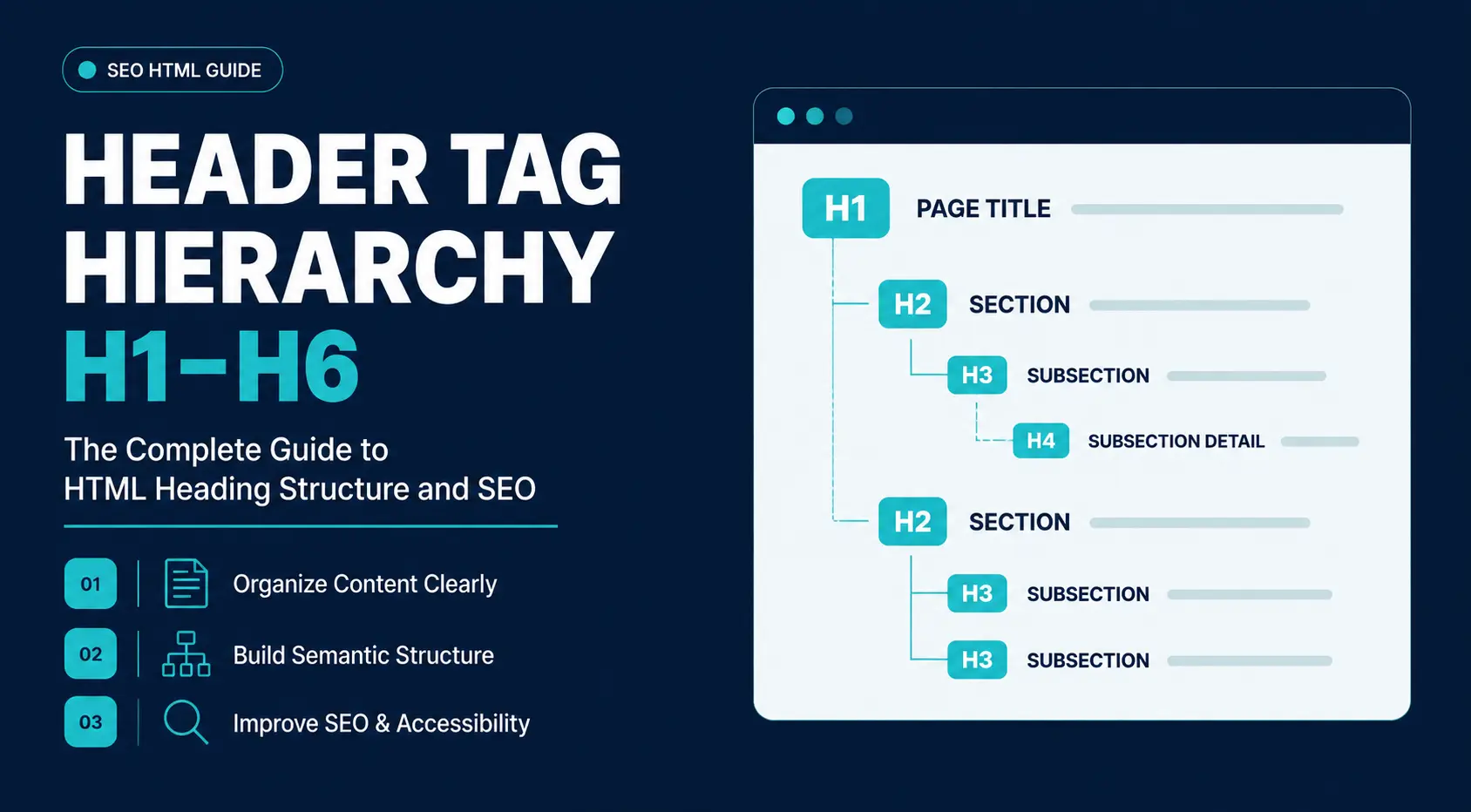
The hierarchy begins with the H1 tag, which represents the page’s primary topic. Each subsequent level represents increasingly specific subdivisions of content.
For example:
<h1>Digital Marketing Guide</h1>
<h2>SEO Fundamentals</h2>
<h3>Keyword Research</h3>
<h3>Technical SEO</h3>
<h2>Paid Advertising</h2>
In this example, the H1 defines the overall topic, H2 tags divide major sections, and H3 tags introduce supporting subsections.
Purpose of Heading Tags in Web Page Structure
Heading tags organize content into logical sections and create a predictable reading path.
They help users scan pages, reduce cognitive load, support accessibility tools, and provide structural context to search engines. Together, they form a semantic outline that makes content easier to navigate and understand.
Where Headings Fit Within HTML Document Architecture
Heading tags exist within the broader structure of an HTML document. A typical webpage contains multiple semantic elements that work together: The semantic HTML structure provides both organizational clarity and machine-readable meaning.
<body>
<header>
Site Navigation
</header>
<main>
<h1>Main Topic</h1>
<section>
<h2>Section Title</h2>
<p>Content…</p>
</section>
</main>
<footer>
Footer Information
</footer>
</body>
In this structure:
- Semantic containers define page regions.
- Heading tags define content hierarchy within those regions.
- Content is organized beneath the relevant heading level.
This distinction is important because heading tags work alongside HTML elements such as <main>, <section>, <article>, or <nav> to create a complete document architecture.
Understanding the Six Heading Levels
Each heading level represents a position within the content hierarchy:
| Heading | Purpose |
| H1 | Primary page topic |
| H2 | Major sections |
| H3 | Subsections |
| H4 | Supporting topics |
| H5 | Detailed subdivisions |
| H6 | Deepest level of organization |
The levels indicate relationships, not visual size. An H3 belongs within an H2 section, an H4 belongs within an H3 section, and so on. This hierarchy creates a logical document outline that helps users and search engines understand context.
Understanding Heading Hierarchy and Document Structure
How Heading Hierarchy Works
Heading hierarchy organizes content through parent-child relationships.
The H1 defines the primary topic of the page. H2 tags divide that topic into major sections, while H3-H6 tags introduce progressively more specific topics beneath their parent headings.
For example:
H1: Digital Marketing
H2: SEO
H3: Keyword Research
H3: Technical SEO
H2: PPC Advertising
In this structure, the H3 topics belong to the SEO section, while both H2 sections support the broader Digital Marketing topic. This hierarchy creates a logical document outline that helps users navigate content and enables search engines to understand relationships between topics.
Why Proper Hierarchy Improves Content Organization
Proper heading hierarchy creates benefits that extend beyond aesthetics.
For users, it:
- Improves readability
- Simplifies navigation
- Enables faster information discovery
- Supports skim-reading behavior
For search engines, it:
- Clarifies topic relationships
- Improves content interpretation
- Supports semantic analysis
- Helps identify major themes and subtopics
For accessibility tools, it:
- Creates navigable page landmarks
- Enables efficient screen reader navigation
- Improves content comprehension
When headings are used inconsistently, skipped randomly, or chosen solely for visual appearance, the document outline becomes fragmented. This makes it harder for users and machines to understand the page.
Breakdown of H1, H2, H3, H4, H5, and H6 Tags
H1 Tag — The Primary Page Topic
The H1 tag represents the highest-level heading within a document. It communicates the main subject of the page and serves as the root of the entire heading hierarchy.
Everything else on the page should relate directly or indirectly to the H1. For most webpages, the H1 functions similarly to a document title.
Examples include:
<h1>Beginner’s Guide to Technical SEO</h1>
<h1>Men’s Running Shoes</h1>
<h1>Pricing Plans</h1>
Purpose of the H1 Tag
The H1 serves several important functions.
It helps users:
- Confirm they landed on the correct page
- Understand the page’s primary purpose
- Establish context before reading further
It helps search engines:
- Identify the central topic
- Understand content relevance
- Interpret page intent
It helps accessibility tools:
- Announce the primary page subject
- Establish the starting point of the document outline
Why a Single H1 Is Generally Recommended
HTML5 introduced sectioning concepts that led to widespread discussion about whether multiple H1 tags are technically valid.
While multiple H1 tags can exist within certain document structures, most SEO professionals, accessibility specialists, and developers continue to recommend a single H1 per page.
Reasons include:
- Simpler document structure
- Clearer semantic hierarchy
- Better accessibility consistency
- Reduced implementation errors
- Easier auditing and maintenance
H2 Tag — Major Content Sections
H2 tags divide a page into its primary sections. Each H2 represents a major topic that supports the H1.
For example:
<h1>Technical SEO Guide</h1>
<h2>Site Crawling</h2>
<h2>Indexation</h2>
<h2>Structured Data</h2>
These sections create the primary navigation points readers use while scanning.
H3 Tag — Supporting Subsections
H3 tags break down H2 sections into more specific topics. They add detail without creating entirely new major sections.
Example:
<h2>Site Crawling</h2>
<h3>XML Sitemaps</h3>
<h3>Robots.txt Files</h3>
<h3>Crawl Budget Management</h3>
Each H3 inherits context from its parent H2 and creates meaningful topic clusters within the page.
H4, H5, and H6 Tags — Deep Content Nesting
H4 through H6 tags provide additional levels of hierarchy when content becomes highly detailed.
These levels are less common in standard marketing content but appear in:
- Technical documentation
- Software manuals
- Academic content
- Product specifications
- Large knowledge bases
When Deeper Heading Levels Become Necessary
Additional heading levels become useful when a subsection contains multiple independent concepts that require their own structure.
For example:
<h2>API Authentication</h2>
<h3>OAuth 2.0</h3>
<h4>Authorization Code Flow</h4>
<h4>Client Credentials Flow</h4>
The H4 headings provide further organization without disrupting hierarchy.
Common Use Cases for Nested Structure
Most blog posts rarely require headings deeper than H3. However, H4-H6 tags become valuable when documenting:
- Multi-step technical processes
- Product feature hierarchies
- Enterprise software systems
- Legal documentation
- Extensive reference materials
The key principle is that heading depth should reflect content complexity.
Rules for Building a Proper Heading Structure
Maintaining Logical Sequential Order
A proper heading hierarchy follows a logical sequence. Each heading level should be introduced when the content requires a deeper subdivision.
A common pattern looks like this:
H1
├─ H2
│ ├─ H3
│ └─ H3
├─ H2
│ └─ H3
└─ H2
The hierarchy should reflect topic relationships rather than visual preferences. Readers should be able to understand the structure simply by reviewing the headings.
Avoiding Skipped Heading Levels
One of the most common heading errors is skipping levels.
Incorrect:
<h1>Main Topic</h1>
<h2>Section</h2>
<h4>Subtopic</h4>
Correct:
<h1>Main Topic</h1>
<h2>Section</h2>
<h3>Subtopic</h3>
Skipping levels breaks the logical document outline and can create confusion for assistive technologies.
While browsers can render skipped headings without issue, semantic structure becomes less predictable.
When Multiple H1 Tags Are Acceptable
The HTML5 specification introduced sectioning elements that technically allow multiple H1 tags within different content sections.
In practice, however, multiple H1 implementations often create inconsistency across CMS platforms, frameworks, and accessibility tools.
A page may technically validate with multiple H1 tags, but that does not necessarily make it the best architectural choice.
For most websites:
- One H1 remains the preferred standard.
- Major sections should use H2 tags.
- Additional nesting should continue through H3-H6.
This approach minimizes ambiguity and improves maintainability.
Creating a Clean Document Outline
Before publishing content, review the heading structure independently from the body text.
Ask:
- Does the hierarchy tell a coherent story?
- Does every H3 belong to a relevant H2?
- Are deeper levels necessary?
- Is the page easy to scan?
A strong document outline should communicate the page’s meaning even if the paragraphs are removed.
HTML Syntax and Real Code Structure Examples
Basic H1–H6 HTML Syntax Example
HTML provides six heading elements:
<h1>Main Topic</h1>
<h2>Major Section</h2>
<h3>Subsection</h3>
<h4>Supporting Topic</h4>
<h5>Detailed Topic</h5>
<h6>Minor Topic</h6>
The syntax itself is simple. The challenge is using heading levels to accurately represent relationships between topics rather than choosing them for visual appearance.
Example of Proper Nested Document Structure
A properly nested structure might look like this:
<h1>Search Engine Optimization</h1>
<h2>On-Page SEO</h2>
<h3>Title Tags</h3>
<h3>Heading Structure</h3>
<h2>Technical SEO</h2>
<h3>Site Speed</h3>
<h3>Crawlability</h3>
This structure creates a clear semantic page outline that both users and search engine crawlers can interpret.
Real Webpage Heading Structure Example
A typical long-form article might follow this structure:
H1: Email Marketing Guide
H2: What Is Email Marketing?
H2: Building an Email List
└─ H3: Lead Magnets
└─ H3: Signup Forms
H2: Campaign Best Practices
└─ H3: Subject Lines
└─ H3: Personalization
Even without reading the content, the hierarchy reveals how information is organized. This predictability is the primary purpose of heading structure.
When to Use Each Heading Level
Understanding the purpose of each heading tag is only half the equation. Effective implementation requires knowing when a particular heading level is appropriate.
The goal is to create a structure that accurately reflects the depth and organization of the content.
Many pages function perfectly with only an H1, H2s, and a handful of H3s. Others, particularly documentation-heavy websites, may require deeper nesting. The correct hierarchy depends on the complexity of the information being presented.
Choosing Heading Levels Based on Content Depth
Heading levels should correspond to the relationship between topics, not the visual appearance of text. A useful way to think about heading selection is to ask a simple question:
Does this topic belong under the previous heading, or is it a new section?
For example:
H1: Project Management Guide
H2: Project Planning
H3: Defining Scope
H3: Setting Milestones
H2: Resource Allocation
“Defining Scope” and “Setting Milestones” are both components of project planning. They are not independent sections of the page, so H3 is appropriate.
In contrast, “Resource Allocation” introduces a new major topic. It deserves its own H2.
A common mistake is choosing heading levels based on font size preferences rather than content relationships. This often produces a confusing document outline even if the page appears visually attractive.
A good hierarchy reflects meaning first and presentation second.
Blog Article Structure Example
Most blog content follows a relatively shallow hierarchy.
Example:
H1: Technical SEO Checklist
H2: Crawlability
H3: XML Sitemaps
H3: Robots.txt
H2: Indexation
H3: Canonical Tags
H3: Noindex Directives
H2: Site Performance
H3: Core Web Vitals
In this structure:
- H1 defines the article topic.
- H2 tags create major sections.
- H3 tags explain individual concepts within those sections.
For many editorial websites, H3 is the deepest level required. This approach improves readability while keeping the document outline easy to follow.
Landing Page Structure Example
Landing pages often contain fewer informational sections but still benefit from a clear hierarchy.
Example:
H1: Marketing Automation Software
H2: Key Features
H3: Workflow Automation
H3: Lead Scoring
H2: Customer Success Stories
H2: Pricing
H2: Frequently Asked Questions
Because landing pages focus on conversion rather than education, they usually require fewer heading levels.
The hierarchy should still communicate relationships between sections while remaining concise and scannable.
Documentation and Knowledge Base Structure Example
Documentation websites frequently require deeper nesting.
Example:
H1: API Documentation
H2: Authentication
H3: OAuth Setup
H4: Creating Credentials
H4: Token Exchange
H3: API Keys
H2: Endpoints
H3: User Endpoint
H4: Request Parameters
H4: Response Examples
In technical documentation, additional heading levels help organize complex information without overwhelming users. The deeper hierarchy provides precision while maintaining a logical document outline.
Semantic HTML vs Visual Design
Heading tags are semantic HTML elements. Their purpose is to communicate structure and meaning. Visual appearance should be controlled separately through CSS.
Understanding this distinction is essential for creating accessible, maintainable, and search-friendly webpages.
Difference Between Semantic Structure and Visual Typography
Semantic structure and visual design serve different purposes.
Heading tags communicate meaning and relationships between sections, while typography controls how those headings appear on screen. An H2 remains a major section heading regardless of whether CSS makes it larger or smaller than an H4.
This distinction is important because search engines, browsers, and assistive technologies evaluate heading levels based on HTML structure rather than visual styling. Importance comes from hierarchy, not font size.
Why Heading Tags Should Not Be Used for Styling Alone
A common implementation mistake occurs when developers choose heading levels based on preferred font sizes. For example:
<h4>Contact Information</h4>
The developer may have selected H4 because it visually resembles the desired design.
However, if the content actually represents a major page section, H2 would be the correct semantic choice.
Using heading tags purely for appearance creates several problems:
- Broken document outlines
- Accessibility issues
- Confusing screen reader navigation
- Reduced semantic clarity
- Poor content organization
Using CSS to Control Appearance Independently
CSS allows designers to style any heading level however they choose.
For example:
h2 {font-size: 18px;}
h4 { font-size: 32px;}
This means an H4 can appear larger than an H2 without affecting the underlying document structure.
Similarly:
heading-large {font-size: 48px;}
<h2 class=”heading-large”> Services</h2>
The heading remains semantically correct while achieving the desired visual design.
This separation of concerns is a foundational principle of modern web development.
- HTML defines structure.
- CSS defines presentation.
- JavaScript defines behavior.
When each technology handles its intended responsibility, websites become easier to maintain and more accessible.
Why Header Tag Hierarchy Matters for SEO
Heading tags do not automatically push pages higher in search results. They play their role in helping search engines understand content structure, topic relationships, and page relevance.
A properly organized heading hierarchy improves content interpretation, which supports broader SEO objectives.
How Heading Structure Supports SEO
Heading tags help search engines understand page organization, topic relationships, and content scope.
Because headings summarize the content beneath them, they provide contextual signals that clarify section boundaries and semantic relationships. A logical hierarchy makes complex content easier to interpret and helps search engines identify major topics and supporting subtopics.
While heading tags are not considered a direct ranking factor on their own, they contribute to content clarity, topical relevance, and overall page quality. Well-structured headings also make it easier for search systems to process content for features such as featured snippets, People Also Ask results, and AI-generated summaries.
Header Structure in Modern Search Engines and AI Systems
Modern search engines and AI-powered search experiences rely on content structure to understand information.
Headings help define topic boundaries, establish relationships between sections, and organize content into meaningful units. This makes it easier for search systems to interpret, summarize, and extract information for search features such as featured snippets, People Also Ask results, and AI-generated answers.
Question-based headings can be particularly effective when they align with user intent because they clearly connect a question with the answer that follows. However, headings should always prioritize clarity and accurate topic description rather than optimization alone.
The primary goal is to create a structure that helps both users and search systems understand the content efficiently.
Accessibility Benefits of Proper Heading Structure
Heading hierarchy is often discussed in the context of SEO, but its accessibility benefits are equally important.
For many users, headings are not simply visual design elements. They serve as navigation mechanisms that make content usable and understandable.
A well-structured document helps people quickly locate information, understand relationships between sections, and move efficiently through a page. This becomes especially important for users who rely on assistive technologies.
How Heading Hierarchy Improves Accessibility
- Creates a structured document outline that assistive technologies can interpret.
- Enables screen readers to identify headings and organize content into navigable sections.
- Allows users to jump directly between sections without reading the entire page sequentially.
- Provides context and relationships between topics, making content easier to understand.
- Improves navigation efficiency, especially on long pages with multiple sections.
- Supports WCAG accessibility best practices by using semantic HTML to communicate document structure.
To maintain accessibility, avoid missing H1 tags, skipping heading levels, using empty headings, or choosing heading levels solely for visual styling. These issues can make content harder for assistive technologies to interpret.
Header Tags in Modern Web Development
Traditional static webpages make heading organization straightforward. Modern applications built with React, Vue, Next.js, Angular, and other component-based frameworks introduce new structural considerations.
Maintaining Heading Structure in Component-Based Frameworks
Component-based development encourages reuse. A single component might appear on dozens or hundreds of pages.
For example:
- Hero Component
- Feature Component
- FAQ Component
- Testimonial Component
If each component independently contains an H1 or H2 tag, combining them on a page may produce a broken hierarchy.
Consider:
- Hero Component → H1
- Feature Component → H2
- FAQ Component → H1
The result may technically render correctly but create semantic confusion.
Instead of allowing components to dictate heading levels, many development teams design components to accept heading levels as configurable properties.
For example:
<SectionHeading level=”2″>
Features
</SectionHeading>
This approach allows headings to adapt to the page context while preserving semantic structure.
Structural Challenges in Dynamic Frontend Applications
Single-page applications generate content dynamically. As content loads asynchronously, developers may focus on functionality while overlooking document hierarchy.
Common issues include:
- Multiple H1 tags generated automatically
- Missing heading levels
- Repeated section headings
- Inconsistent nesting across templates
- CMS-driven heading conflicts
These problems appear when different teams manage separate components without a shared content architecture.
A page can look visually polished while containing a fragmented semantic structure underneath.
Regular auditing becomes important in large applications where the heading hierarchy changes as components evolve.
Preserving Semantic Integrity in Modular Development
Modern frontend development encourages modularity. However, modularity should not come at the expense of semantic HTML.
Best practices include:
- Defining heading hierarchy at the page level
- Creating reusable heading components
- Establishing design-system rules
- Auditing rendered HTML regularly
- Testing accessibility alongside functionality
Many organizations now include semantic structure reviews within their development workflows.
This ensures that reusable components contribute to a coherent document outline regardless of where they appear.
Common Header Tag Mistakes to Avoid
Most heading issues arise because heading tags are treated as design elements rather than structural elements.
Avoiding a handful of common mistakes can significantly improve content organization, accessibility, and SEO clarity.
| Mistake | Why It’s a Problem | Best Practice |
| Multiple H1 Tags | Creates competing primary page topics and can complicate accessibility and maintenance. | Use one clear H1 per page. |
| Skipping Heading Levels | Breaks logical hierarchy and can confuse assistive technologies. | Follow a sequential structure (H1 → H2 → H3 → H4). |
| Keyword Stuffing | Reduces readability and provides a poor user experience. | Write natural, descriptive headings. |
| Generic or Empty Headings | Provides little context about the content that follows. | Use specific headings that clearly describe the section. |
| Broken Content Hierarchy | Creates an unclear document outline and weakens content organization. | Ensure every heading logically supports its parent heading. |
Best Practices for Optimizing Header Tags
Effective heading optimization focuses on clarity, organization, and usability. The goal is to create a structure that helps users and machines understand content efficiently.
Writing Clear and Descriptive Headings
Strong headings communicate exactly what a section covers.
Good headings:
- Set expectations
- Summarize content accurately
- Improve navigation
- Support scanning behavior
Examples:
- How Search Engines Interpret Heading Structure
- Benefits of Semantic HTML
- Common Accessibility Errors in Heading Hierarchy
Each heading identifies the purpose of the section. Users should not need to read surrounding content to understand what a heading means.
Including Keywords Naturally Without Over-Optimization
Relevant keywords often belong in headings because headings describe the topics being discussed. However, optimization should remain natural.
For example:
How Header Tag Hierarchy Improves SEO
is more useful than:
Header Tag Hierarchy SEO Header Tags SEO Heading Tags Optimization
Search engines evaluate context, relevance, and readability. Natural language creates stronger signals than repetitive keyword insertion.
Matching Search Intent Through Subheadings
Subheadings should reflect the questions users want answered.
For example, someone searching for header tag hierarchy often wants to know:
- What heading tags are
- How hierarchy works
- Whether multiple H1 tags are acceptable
- How headings affect SEO
- How to fix structural errors
Aligning headings with these informational needs improves relevance and content completeness. Question-based headings can also help capture answer-focused search behavior.
Examples include:
- Can a Page Have More Than One H1 Tag?
- What Happens If Heading Levels Are Skipped?
- How Do Screen Readers Use Headings?
Designing Headings for Better Readability and Scannability
Research consistently shows that users scan webpages before reading them. Headings serve as visual anchors that guide attention.
Effective headings are:
- Specific
- Concise
- Informative
- Easy to skim
Long, complex headings can overwhelm readers. Extremely short headings lack context. A balance between clarity and brevity produces the best results.
Maintaining Consistency Across Page Structure
Consistency strengthens both usability and semantic clarity.
Best practices include:
- Using one H1 per page
- Following logical nesting patterns
- Applying heading levels consistently
- Maintaining similar structures across related content
- Auditing templates regularly
For example, if every article on a website follows a predictable hierarchy, users can navigate content more efficiently.
Consistency also simplifies maintenance, auditing, and large-scale content management.
A structured approach to heading hierarchy creates benefits that extend across SEO, accessibility, UX, and content governance.
How to Audit and Fix Heading Structure Errors
Even websites built with good intentions can develop heading hierarchy issues over time. Content updates, CMS changes, template modifications, and component reuse introduce structural inconsistencies that go unnoticed.
Regular audits help ensure that heading tags continue to support usability, accessibility, and search engine understanding.
Detecting Missing or Incorrect H1 Tags
The first step in any heading audit is identifying the page’s primary heading.
Review each page and ask:
- Is there an H1 tag?
- Does the H1 clearly describe the page topic?
- Is there more than one H1?
- Does the H1 align with page intent?
Common issues include:
- No H1 present
- Multiple competing H1 tags
- Generic H1 labels
- H1 unrelated to page content
A strong H1 should act as the document’s primary topic statement.
For example:
<h1>Technical SEO Audit Checklist</h1>
Identifying Broken Heading Hierarchy
Once the H1 is validated, review the remaining heading structure.
Look for:
- Skipped levels
- Incorrect nesting
- Empty headings
- Repeated headings
- Sections that appear under the wrong parent topic
Problematic example:
H1
H2
H4
H2
H5
Improved example:
H1
H2
H3
H2
H3
One useful auditing technique is viewing headings independently from body content. The outline, not making sense on its own, needs hierarchical improvement.
Browser Inspection Methods for Manual Review
Simple manual reviews uncover many heading issues.
Using browser developer tools:
- Open the webpage.
- Right-click and select Inspect.
- Review the rendered HTML.
- Locate heading elements.
- Verify nesting and ordering.
Many browser extensions also generate a visual heading outline that displays:
- H1
- H2
- H2
- H3
- H2
- H3
This makes it easier to identify structural problems without manually examining source code.
Manual inspection remains valuable because it reveals how headings actually render after JavaScript execution and CMS processing.
SEO Tools for Heading Structure Audits
Large websites require automated auditing tools. These platforms identify hierarchy issues across hundreds or thousands of pages.
Google Search Console
Although it does not provide dedicated heading reports, Google Search Console can help identify pages with indexing, rendering, and usability issues that may warrant structural review.
Use Search Console to:
- Verify indexing status
- Review page performance
- Identify rendering concerns
- Monitor search visibility
Heading audits become more valuable when combined with broader technical SEO analysis.
Semrush Site Audit
Semrush Site Audit can detect common heading-related issues such as:
- Missing H1 tags
- Duplicate H1 tags
- Multiple H1 elements
- Empty headings
For large websites, this helps prioritize fixes at scale.
Rather than reviewing pages individually, teams can identify patterns affecting entire content sections.
Ahrefs Webmaster Tools
Ahrefs Webmaster Tools includes site auditing capabilities that can surface structural issues across a website.
Common findings include:
- Missing headings
- Duplicate headings
- Hierarchy inconsistencies
- On-page optimization opportunities
These reports provide an efficient starting point for larger remediation projects.
No automated tool should replace manual review entirely, but automated audits significantly reduce the time required to identify structural problems.
Heading Structure Examples by Website Type
The appropriate heading hierarchy depends on content complexity.
| Page Type | Typical Structure |
| Blog Article | H1 → H2 → H3 |
| Ecommerce Product Page | H1 → H2 |
| SaaS Landing Page | H1 → H2 → H3 |
| Documentation Page | H1 → H2 → H3 → H4 |
Most blog posts rarely require headings deeper than H3. Additional levels become more common in technical documentation, knowledge bases, and large reference resources where content requires deeper organization.
Final Checklist for Perfect Header Tag Hierarchy
Use One Clear Primary H1
✓ Create a single H1 that accurately describes the page topic.
✓ Ensure the H1 aligns with user intent.
✓ Make the H1 descriptive rather than generic.
Maintain Sequential Heading Order
✓ Follow a logical hierarchy.
✓ Move from broad topics to specific topics.
✓ Ensure every heading level has a clear parent heading.
Avoid Skipping Heading Levels
✓ Use H2 beneath H1.
✓ Use H3 beneath H2.
✓ Use H4 beneath H3 when deeper nesting is required.
✓ Let content structure—not design preferences—determine heading levels.
Separate CSS Styling from Semantic HTML
✓ Use heading tags to define meaning.
✓ Use CSS to control appearance.
✓ Never choose heading levels solely because of font size.
✓ Preserve semantic structure regardless of design requirements.
Optimize Headings for SEO and Accessibility
✓ Write descriptive headings.
✓ Include keywords naturally when relevant.
✓ Support screen reader navigation.
✓ Create meaningful section labels that accurately describe content.
✓ Match headings to search intent and user expectations.
Audit Structure Regularly for Errors
✓ Review heading hierarchy during content updates.
✓ Monitor template and CMS changes.
✓ Run periodic accessibility audits.
✓ Use SEO auditing tools to identify structural issues.
✓ Inspect rendered HTML rather than relying solely on visual design.
Conclusion
A proper header tag hierarchy helps users, search engines, and assistive technologies understand how content is organized. By using one clear H1, maintaining a logical H2–H6 structure, and separating semantic markup from visual styling, you create content that is easier to navigate, interpret, and maintain.
As structured content becomes increasingly important for search and AI systems, a well-organized heading hierarchy remains a foundational element of effective web development and SEO.
Frequently Asked Questions About Header Tags
How many heading tags should a page have?
There is no required number. Use as many headings as needed to organize content logically. Most pages use one H1, several H2s, and supporting H3s.
Should heading tags contain keywords?
Yes, when relevant. Include keywords naturally in headings if they accurately describe the section. Avoid keyword stuffing or forcing keywords into every heading.
Can I use H3 without an H2?
It’s technically possible, but not recommended. Heading levels should follow a logical hierarchy so users and assistive technologies can understand content relationships.
Do heading tags improve accessibility?
Yes. Screen readers use headings to create a navigable outline of a page, allowing users to jump directly to sections without reading everything sequentially.
Are heading tags the same as title tags?
No. A title tag appears in search results and browser tabs, while heading tags organize content within the page itself.
Can I style headings with CSS?
Yes. CSS controls appearance, while heading tags define structure. Choose heading levels based on hierarchy, then style them as needed.
Which heading levels are most commonly used?
Most webpages primarily use H1, H2, and H3 tags. H4–H6 are generally reserved for complex documents, technical documentation, or deeply nested content.
Should every page have an H1 tag?
Yes. An H1 helps define the page’s primary topic and serves as the starting point of the heading hierarchy.
Do heading tags help AI search engines understand content?
Yes. Clear headings help AI systems identify topic boundaries, summarize sections, and understand relationships between concepts.
What’s the easiest way to check heading hierarchy?
Use browser developer tools, SEO audit tools, or accessibility checkers to review the page outline and ensure headings follow a logical order.