Publishing dozens of articles about the same subject does not automatically create topical authority. What matters is how those pages relate to one another.
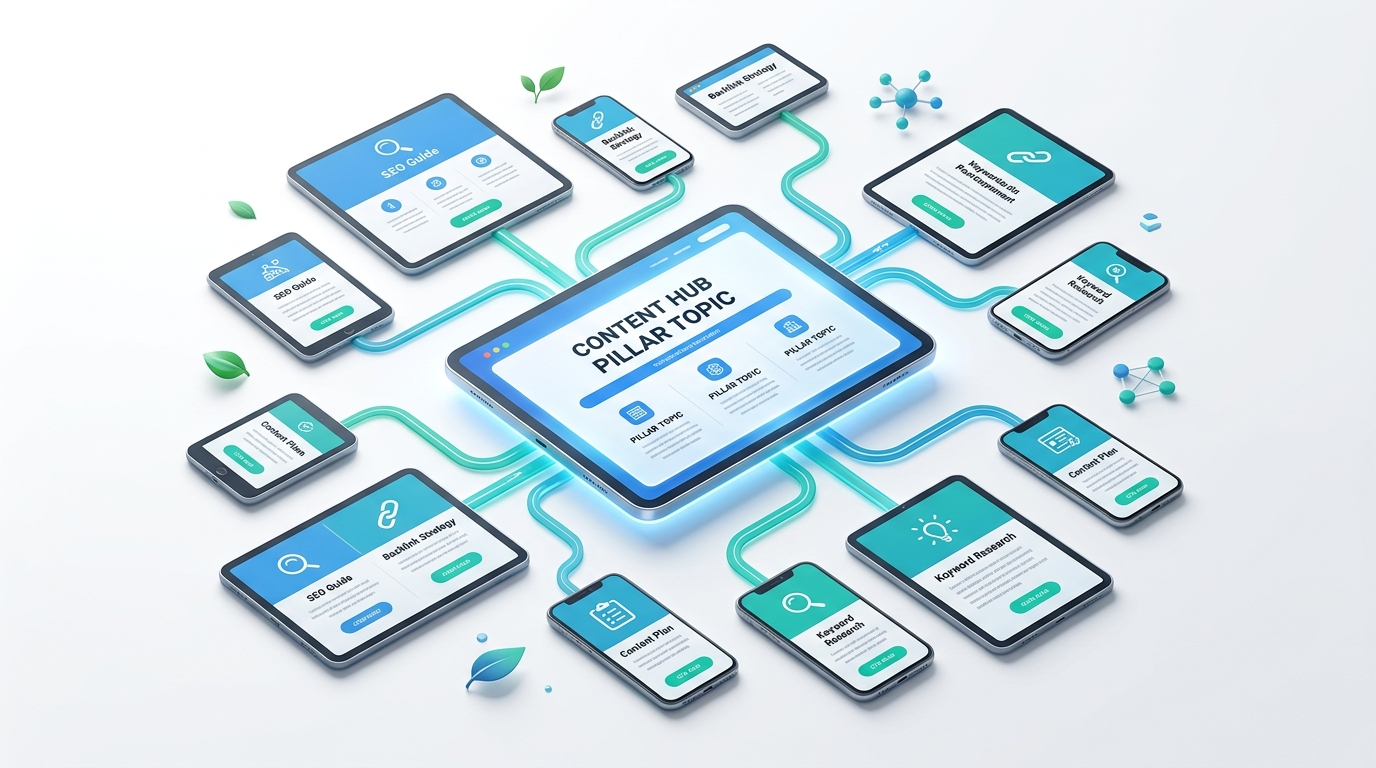
A pillar page covers a broad topic, while cluster pages address narrower subjects in greater depth. When you plan topic scope, search intent, URL structure, content boundaries, and internal links together, they form a coherent content architecture.
This guide explains how to decide whether a topic needs a pillar page, build its cluster, assign topics to URLs, structure the pillar, connect supporting pages, and maintain the architecture over time.
What Is a Pillar Page?
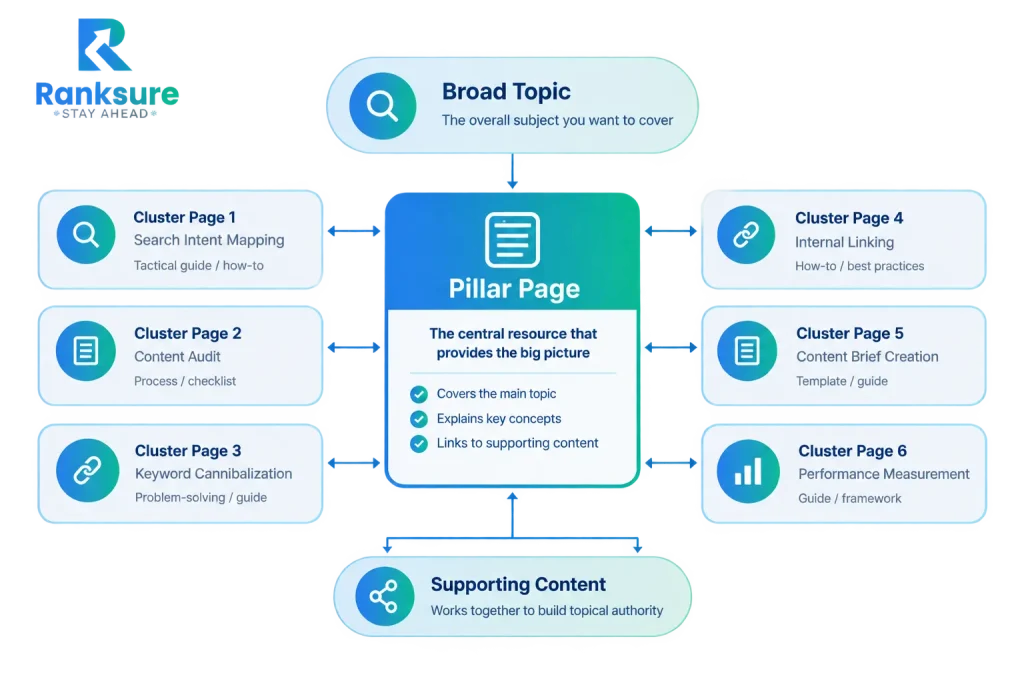
A pillar page is a comprehensive resource built around a broad topic and connected to more specific supporting pages. It establishes the main subject and its major components while cluster pages handle narrower questions, processes, use cases, or technical details.
The basic relationship is:
Broad topic → Pillar page → Cluster pages
The pillar should not attempt to answer every possible question in exhaustive detail. Its role is to provide the framework and direct readers to deeper resources where appropriate.
Pillar Page vs. Cluster Content
| Pillar page | Cluster page |
| Covers a broad topic | Covers a specific subtopic |
| Provides breadth | Provides depth |
| Connects major concepts | Explores one concept thoroughly |
| Acts as a central resource | Supports the broader topic |
| Links to relevant resources | Links back to the broader topic |
For example, a pillar about technical SEO could introduce crawling, indexing, structured data, internal linking, and technical audits. Separate cluster pages could explain XML sitemaps, canonical tags, crawl-budget management, or structured data in greater detail.
The relationship matters more than the labels. A collection of loosely related articles is not a topic cluster.
Pillar Page vs. a Standard Blog Post
A standard blog post addresses a narrower question or problem. A pillar page is built around a broader information architecture.
The main differences are:
- Scope: A pillar covers the major dimensions of a topic; a standard post usually focuses on one.
- Intent: A pillar commonly addresses broad informational needs, while supporting pages can target procedural, comparative, problem-solving, or resource-based intent.
- Depth: A pillar provides breadth and points readers toward deeper resources instead of duplicating them.
- Linking role: The pillar functions as a central resource within the cluster.
A long article is not a pillar page. Length does not create architecture.
When Does a Topic Need a Pillar Page?
Not every broad-looking keyword needs a pillar page. The topic should have enough semantic breadth and practical depth to support multiple useful resources.
Evaluate Topic Breadth and Subtopic Depth
Look for:
- Distinct subtopics
- Related but different search intents
- Recurring audience questions
- Connected entities and concepts
- Potential supporting resources
- Enough depth to justify multiple pages
For example, email marketing has greater cluster potential than a narrow query such as how to change an email signature in Outlook.
The goal is not to make the topic as broad as possible. It should be broad enough to support meaningful subtopics while remaining coherent.
Check Business and Audience Relevance
Search demand alone is not enough.
Ask:
- Is the topic relevant to the site’s audience?
- Does it connect to the site’s products, services, or expertise?
- Can the business provide useful information beyond what already exists?
- Will the cluster support meaningful user journeys?
A topic having substantial search interest can be a poor pillar if it has little connection to the site’s purpose.
Define Semantic Boundaries
A useful pillar has clear boundaries.
For example, content marketing could support clusters around content strategy, content planning, distribution, measurement, and optimization. A completely unrelated subject should not be added simply because it shares a keyword.
Before creating the page, define:
What belongs inside the topic? What belongs in supporting pages? What falls outside the cluster?
This prevents the pillar from becoming an unstructured collection of related terms.
Define Search Intent Before Assigning URLs
Search intent influences the role of every URL in the cluster. Start by identifying the primary intent behind the topic. Then identify secondary intents that deserve separate coverage.
The intent types include:
- Informational
- Procedural
- Comparative
- Commercial
- Problem-solving
- Resource-oriented
Map each intent to the page that satisfies it.
| Search need | Suitable URL role |
| Broad understanding | Pillar page |
| Specific process | Cluster page |
| Technical problem | Specialist page |
| Product comparison | Comparison page |
| Tool or template | Resource page |
| Commercial evaluation | Service/product page |
The key question is:
Does this need deserve its own URL, or should it be answered within an existing page?
Decide Whether a Topic Belongs on the Pillar or a Cluster Page
Use this simple test:
Keep it on the pillar when:
- It is necessary to understand the broader topic.
- It can be explained adequately at an overview level.
- It shares the pillar’s primary intent.
- Removing it would leave the overall explanation incomplete.
Move it to a cluster page when:
- It requires substantial independent depth.
- It has a distinct search intent.
- It represents a separate task or problem.
- Detailed treatment would make the pillar unfocused.
- Users would reasonably search for it as a standalone resource.
A useful rule is:
If removing the section would make the pillar incomplete, it may belong on the pillar. If answering it properly requires an independent resource, it probably belongs on a cluster page.
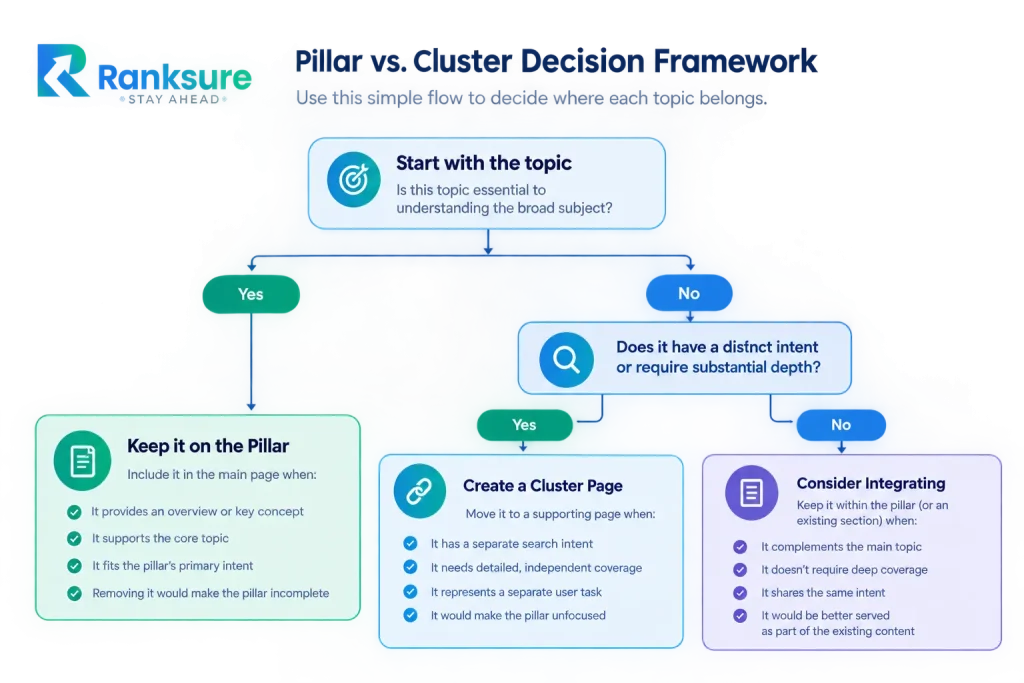
Create a separate page when the topic has a distinct intent, enough depth, and a clear reason to exist. Avoid creating separate URLs for minor keyword variations that satisfy the same need.
Audit Existing Content Before Building the Cluster
Building a new pillar without reviewing existing content creates duplication, cannibalization, and unnecessary URLs.
Map Existing Pages
Create an inventory of:
- Articles
- Guides
- Resources
- Commercial pages
- Category pages
- Existing hubs
- Older relevant content
Map each URL against its primary topic and intent. This shows whether the site already contains pieces of the proposed cluster.
Identify Overlap and Cannibalization
Compare pages that cover similar subjects.
Look for:
- Similar primary queries
- Similar page purposes
- Repeated explanations
- Competing titles and headings
- Multiple URLs targeting the same subtopic
- Cluster pages overlapping heavily with the pillar
Semantic similarity is normal. The important question is:
Do these URLs have distinct reasons to exist?
Decide What to Keep, Improve, Merge, Redirect, or Replace
| Action | When to use it |
| Keep | The page has a distinct purpose and useful coverage |
| Improve | The topic is valid but incomplete or outdated |
| Merge | Two pages substantially overlap |
| Redirect | An obsolete or consolidated URL needs a replacement |
| Replace | The resource no longer serves the intended audience or topic |
This prevents the new pillar from adding another layer to an already fragmented structure.
Identify Content Gaps
Compare existing coverage with the information users need.
Useful sources include:
- Competitor coverage
- People Also Ask questions
- Related searches
- Search suggestions
- Customer questions
- Sales and support conversations
- Missing subtopics
- Underdeveloped entities and concepts
Competitor research should identify coverage gaps, not encourage copying. The objective is to discover useful information the current site does not adequately cover.
Build the Topic Cluster Architecture
Once the topic, intent, and existing content are understood, design the cluster.
Map Subtopics, Entities, Questions, and Intents
A strong cluster is more than a list of keywords.
Map:
Core entity → major concepts → related entities → questions → search intents → URLs
For a cluster around pillar page creation, relevant subtopics include:
- Topic selection
- Search intent
- Existing-content auditing
- Cluster architecture
- Information architecture
- Content production
- Internal linking
- SEO
- Measurement
- Maintenance
Each subtopic should have a clear relationship with the parent topic and a reason for existing.
Separate Pillar Content From Cluster Content
The pillar should cover:
- Broad concepts
- Essential definitions
- Core processes
- Major components
- Overview-level information
- Navigation to deeper resources
Cluster pages should cover:
- Specialist topics
- Distinct search intents
- Detailed procedures
- Technical explanations
- Specific use cases
- Resources requiring substantial independent coverage
The pillar provides the map. Cluster pages provide the depth.
Assign Each Subtopic to a URL
Use a simple mapping framework:
| Subtopic | Primary intent | URL role |
| Core topic | Broad informational | Pillar |
| Specific process | Procedural | Cluster |
| Product evaluation | Commercial/comparative | Commercial or comparison page |
| Tool/template | Resource | Dedicated resource |
| Technical issue | Problem-solving | Specialist cluster |
For example:
Pillar: How to Build a Strong Topic Cluster
Cluster pages:
- How to Map Search Intent
- How to Audit Existing Content
- How to Identify Keyword Cannibalization
- How to Structure Internal Links
- How to Create Content Briefs
- How to Measure Topic Cluster Performance
Each page addresses a narrower need while the pillar explains how those pieces relate.
Prioritize Supporting Content
Do not publish every potential cluster page at once.
Prioritize according to:
- Business relevance
- Search intent
- Content gaps
- Audience value
- Strategic importance
- Existing coverage
A smaller group of useful pages is more valuable than a large network of thin articles.
Structure the Pillar Page
The pillar’s information architecture determines how easily users can understand and navigate a broad subject.
Build a Clear Information Hierarchy
Use:
Core topic → major subtopic → supporting detail
Each H2 should represent a meaningful branch of the main topic. H3s should develop that branch rather than introduce another version of the same subject.
Ask:
Can the purpose of every heading be explained in one sentence without overlapping another heading?
If two headings require the same explanation, merge them.
Organize the Content Around the User Journey
A broad pillar progresses through:
- Definition
- Fundamentals
- Components
- Process
- Implementation
- Problems or considerations
- Optimization
- Measurement
- Advanced considerations
The sequence can change by topic. The principle remains the same: introduce the subject before asking the reader to implement it.
Decide What Each Section Should Answer
Every section should satisfy a defined information need.
Before writing an H2, identify:
- What question does it answer?
- Who needs the information?
- Is the answer already covered elsewhere?
- Does the section need its own supporting page?
This keeps the pillar comprehensive without making every section unnecessarily long.
Use Supporting Elements
Long-form pages become difficult to navigate when they consist entirely of paragraphs.
Use:
- Examples
- Tables
- Lists
- Diagrams
- Evidence
- Jump links
- Table of contents
- Callouts
- Expandable sections where appropriate
These elements should improve comprehension.
Write the Pillar Without Duplicating Cluster Pages
The pillar should be comprehensive enough to stand on its own, but it should not reproduce the full content of every supporting page.
Answer the Core Question First
Give readers the main answer before expanding into details.
Avoid spending several paragraphs establishing context when a direct explanation can do the job.
Cover the entities and concepts necessary to understand the subject, but avoid reproducing entire cluster pages inside the pillar.
The distinction is:
Pillar = breadth and framework
Cluster = depth and specialist coverage
Use Information Gain
The pillar should organize information in a way that helps readers understand the whole subject.
Useful information gain can come from:
- A decision framework
- A topic-to-URL map
- A content-audit process
- A cluster architecture example
- A consolidation framework
- An implementation checklist
These elements are more useful than adding paragraphs simply to increase word count.
Build the Internal Linking Architecture
Internal links connect the pages and reinforce their relationships.
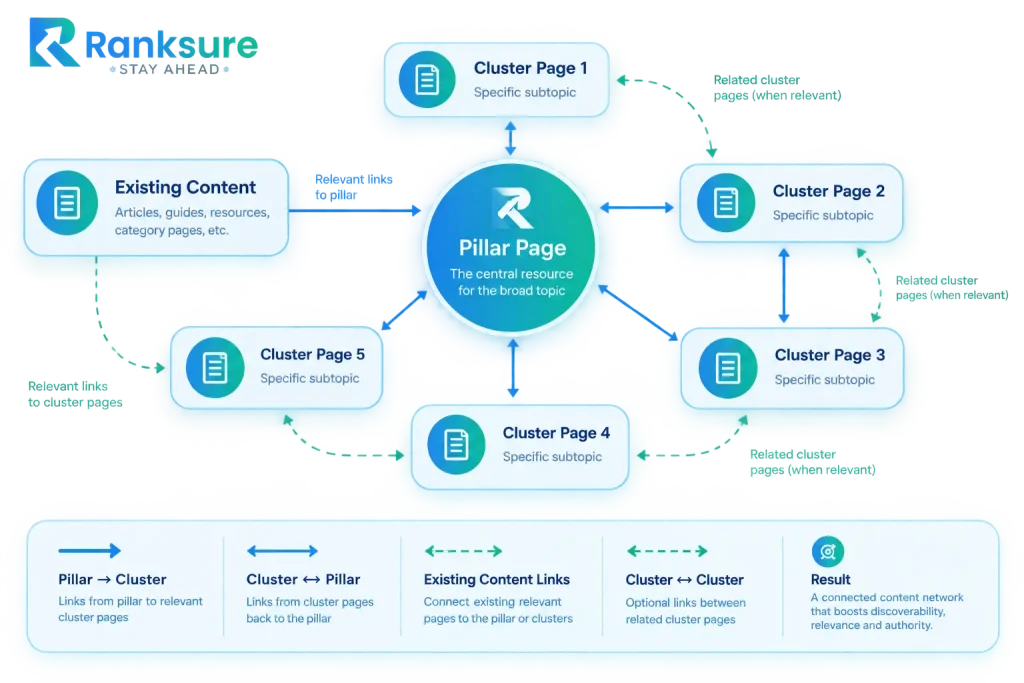
At minimum, establish these paths:
Pillar → Cluster
The pillar links to relevant supporting pages when readers need deeper information.
Cluster → Pillar
Supporting pages link back to the broader resource when readers may need the wider context.
Cluster → Cluster
Related supporting pages can link to one another when the relationship is useful, and the user journey supports it.
Use Descriptive Anchor Text
Anchor text should communicate what the linked page covers.
Avoid relying on vague phrases such as:
- Click here
- Read more
- Learn more
Instead, use concise descriptions that match the destination.
Connect Existing Content
Do not limit linking to newly published pages.
Review relevant existing content and add links where they improve navigation. This can also reveal:
- Orphaned pages
- Weakly connected content
- Duplicate topics
- Pages that should be consolidated
- Missing links to the pillar
The objective is a connected architecture, not simply a high number of internal links.
Optimize the Pillar for SEO, Search Features, and UX
A pillar page needs the fundamentals of good SEO.
Optimize Core On-Page Elements
Use the primary topic and relevant entities where they genuinely belong. Review:
- Title
- Meta description
- URL
- Heading structure
- Semantic coverage
- Internal links
- Relevant media
The title should communicate the broad topic. Headings should describe actual concepts. Metadata should represent what the page contains. Avoid keyword stuffing. Semantic coverage should come from explaining the topic clearly, not repeating terms.
Make Information Easy to Retrieve
Clear definitions, direct answers, descriptive headings, concise sections, and logical relationships make information easier for users and search systems to interpret.
Structure content around questions and concepts rather than forcing every section around a keyword variation.
Use Structured Data Where Appropriate
A useful pattern is:
Definition → explanation → supporting details → example → deeper resource
The objective is not to write for machines at the expense of people. Clear structure serves both. Structured data helps search engines understand eligible content, but it should represent the visible page accurately.
Do not add schema because a page is long or because structured data exists for a particular content type. Use the markup that applies to the page.
Design for Long-Form Usability
A 3,000-word resource with poor navigation can feel longer than a 5,000-word resource with strong information architecture.
Useful UX elements include:
- Table of contents
- Jump links
- Clear visual hierarchy
- Scannable sections
- Responsive tables
- Diagrams
- Callouts
- Sticky navigation where appropriate
A floating or sticky table of contents can be particularly useful on long pillar pages because it gives readers a persistent map of the resource.
Optimize for Mobile and Conversion
Mobile optimization should account for:
- Readable text
- Adequate spacing
- Responsive tables
- Touch-friendly navigation
- Usable jump links
- Media that does not overflow the viewport
CTAs should appear where they are contextually relevant.
A reader researching a technical topic does not necessarily need a sales banner after every section.
Publish and Validate
Before publishing, review four areas.
Content QA
Check:
- Topic coverage
- Search intent
- Accuracy
- Repetition
- Unsupported claims
- Heading hierarchy
- Content boundaries
On-Page QA
Check:
- Title
- Meta description
- H1
- H2/H3 structure
- Internal links
- Anchor text
- Images and alt text
- Relevant structured data
Architecture QA
Check:
- Pillar links to important cluster pages
- Cluster pages link back where useful
- Related cluster pages are connected
- No important pages are orphaned
- Duplicate pages have been addressed
- URLs have clear roles
Post-Publication Validation
After publishing, check the live page rather than assuming the implementation matches the draft.
Verify links, rendering, mobile usability, indexing status, and the relationship between the pillar and its supporting pages.
Measure and Maintain the Cluster
A pillar page should be maintained as the topic develops.
Measure Page-Level Performance
Review metrics such as:
- Organic impressions
- Clicks
- Rankings
- Organic traffic
- Engagement
- Conversions where relevant
These show how an individual URL is performing.
Measure Cluster-Level Performance
Look beyond the pillar itself.
Review:
- Performance across related URLs
- Coverage of important subtopics
- Internal-link relationships
- Pages receiving impressions but lacking adequate coverage
- Queries suggesting missing or weak subtopics
- Overlapping URLs
A cluster can have a successful pillar while supporting pages remain weak or disconnected.
Review Business Outcomes
Traffic alone does not establish whether the architecture is useful. Where appropriate, evaluate whether the cluster contributes to:
- Qualified traffic
- Leads
- Sales
- Resource usage
- Product or service discovery
Identify New Gaps and Cannibalization
The cluster should evolve as new information needs emerge.
Look for:
- New subtopics
- Missing resources
- Competing URLs
- Changed search intent
- Repeated content
- New customer questions
Cannibalization should be evaluated continuously rather than only when performance declines.
Refresh the Architecture
Review the cluster when:
- Search intent changes
- Important subtopics emerge
- Existing information becomes outdated
- New products or services are introduced
- Pages begin competing for the same intent
- Search data reveals new gaps
The maintenance process can be:
Monitor → identify gap or overlap → update/consolidate → relink → measure again
Use a maintenance cycle rather than waiting until content becomes visibly outdated.
| Review cycle | Focus |
| Continuous | Fix broken links and obvious inaccuracies |
| Monthly | Monitor important queries and emerging gaps |
| Quarterly | Audit cluster relationships and internal links |
| Major update | Refresh outdated sections, evidence, examples, and supporting pages |
Common Pillar Page Creation Mistakes
Pillar pages fail not because the content is too short, but because the underlying topic structure is poorly planned. The mistakes involve scope, search intent, content overlap, and internal linking.
| Pillar Page Mistake | Why It’s a Problem | What to Do Instead |
| Treating a Long Article as a Pillar | Word count alone does not create a topic cluster. A long article without supporting architecture is still a single page. | Build a central resource that connects to relevant specialist pages covering distinct subtopics. |
| Choosing the Wrong Topic Scope | An overly broad topic creates vague relationships, while an overly narrow topic leaves insufficient room for meaningful cluster coverage. | Choose a scope broad enough to contain meaningful subtopics but focused enough to maintain a coherent subject. |
| Ignoring Search Intent When Assigning URLs | Related keywords can have different intents and may require separate pages. Combining them can weaken relevance and page purpose. | Map search intent to the appropriate URL. Separate informational, comparison, commercial, and how-to intents when necessary. |
| Creating Thin or Unnecessary Cluster Pages | Adding pages simply to make a cluster larger can create low-value content and unnecessary URLs. | Create a cluster page only when it provides distinct intent, deeper information, a specific use case, or meaningful specialist coverage. |
| Duplicating Content Across the Pillar and Cluster | Repeating the same explanations reduces differentiation between pages and weakens the purpose of the cluster structure. | Let the pillar establish the broader framework and use cluster pages to explore individual areas in greater depth. |
| Building Internal Links Without a Clear Relationship | Random links create noise and make the site’s topical relationships less clear. | Link when the destination naturally extends, supports, or deepens the information in the current section. |
| Ignoring Existing Content | Existing pages may already cover relevant topics, compete for the same intent, contain useful internal links, or be suitable for consolidation. | Audit existing content before creating the pillar and cluster. Reuse, improve, redirect, consolidate, or reposition pages where appropriate. |
Pillar Page Creation Workflow
Use this sequence when building a new pillar:
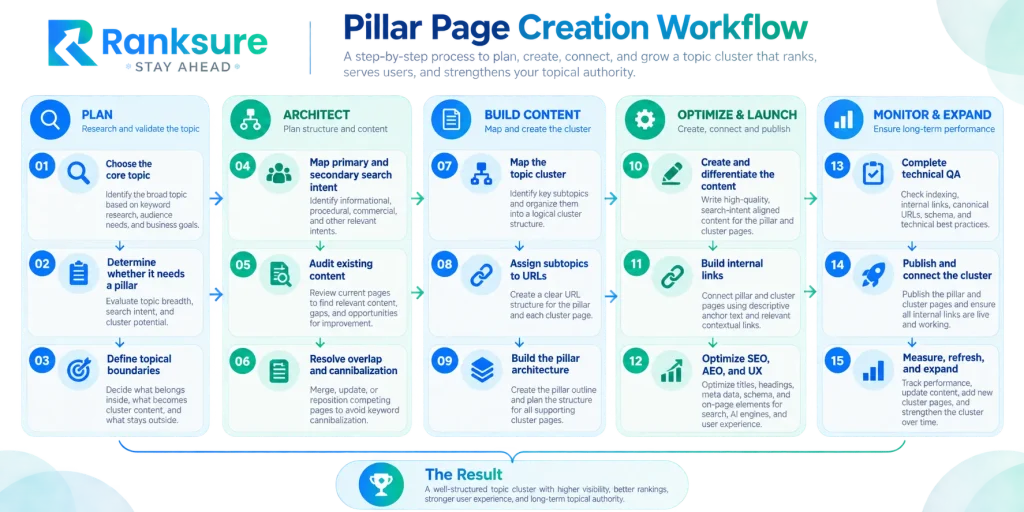
The sequence matters.
Topic selection comes before URL assignment. URL assignment comes before content production. Internal-link implementation comes after the relationships between pages are understood.
Final Takeaway
A strong pillar page gives a broad topic a clear structure. The supporting cluster pages provide the depth that the pillar cannot reasonably contain.
The process is:
Choose the right topic → define its boundaries → map search intent → audit existing content → identify gaps → assign URL roles → separate breadth from depth → build internal links → publish and validate → measure and maintain.
The quality of the cluster depends less on how many pages you publish and more on whether each URL has a clear purpose and meaningful relationship with the others.
FAQs
Can a website have multiple pillar pages?
Yes. A website can have multiple pillar pages when it covers distinct core topics with their own audiences, intents, and supporting content.
What is the difference between a topic cluster and a content silo?
A topic cluster connects related pages around a central pillar through contextual internal links. A content silo focuses more broadly on grouping and organizing related content within the site’s structure.
Should every cluster page link to every other cluster page?
No. Cluster pages should link to one another only when the relationship is relevant and useful to the reader.
Can one supporting page belong to more than one topic cluster?
Yes. A page can support multiple related topics, provided it has one clear primary purpose and is genuinely relevant to each cluster.
What should you do when a topic cluster starts covering too many subjects?
Review its topical boundaries. If the subjects have developed distinct intents and audiences, consider separating them into another pillar or cluster structure.