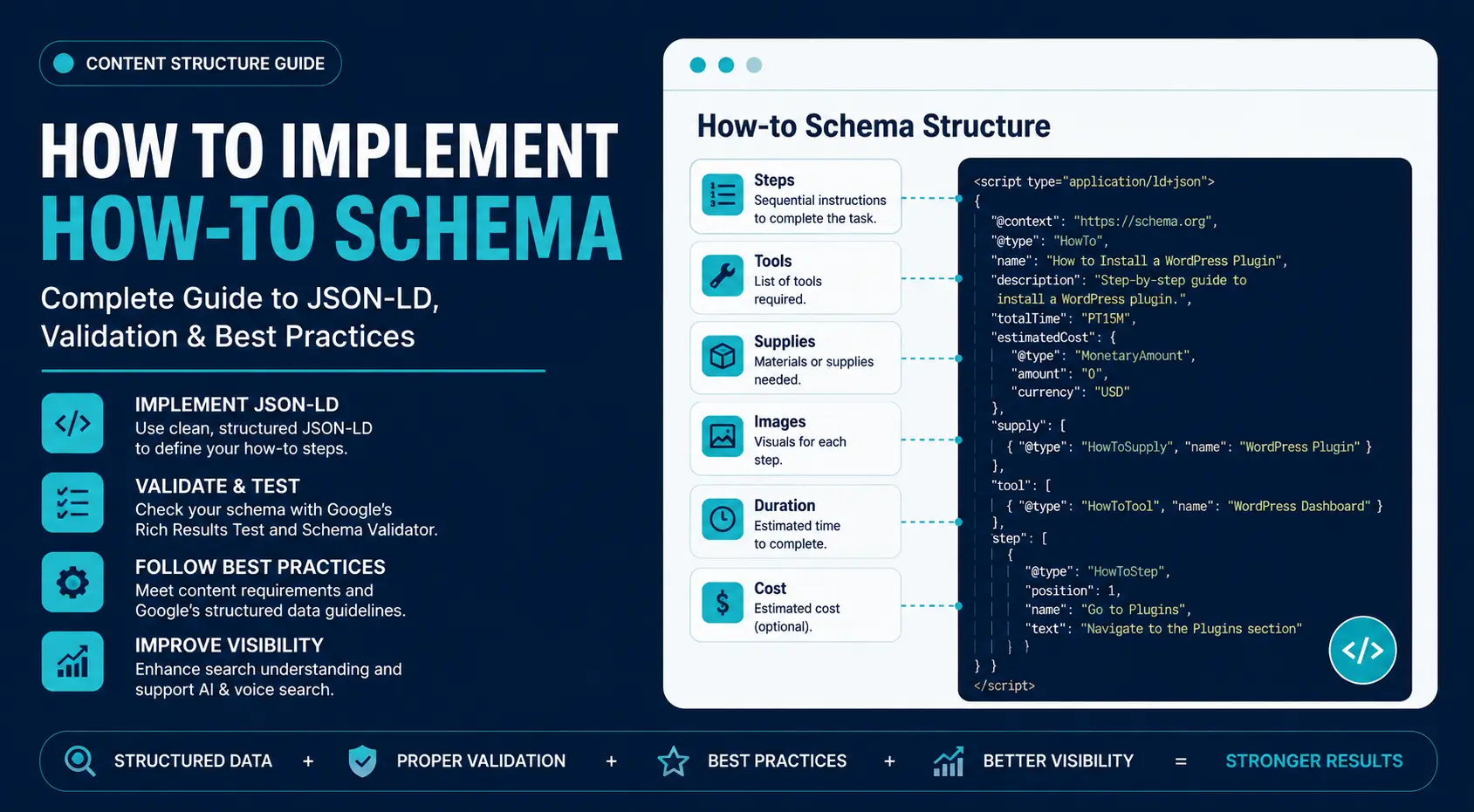
How-to Schema identifies 6 instructional elements: steps, tools, supplies, images, duration, and cost. It helps search engines and AI systems interpret the tutorial sequence.
How-to Schema applies to DIY guides, software tutorials, repair instructions, educational walkthroughs, and other pages that explain a process through sequential steps. Google displays traditional How-to rich results less frequently, but the structured data still improves content interpretation, strengthens semantic relationships, and support AI-powered search systems.
This guide explains how to implement How-to Schema using JSON-LD, prepare eligible content, validate the markup, deploy it across different platforms, and resolve implementation errors that affect structured data quality.
Understanding How-to Schema and When to Use It
What Is a How-to Schema?
How-to Schema is a Schema.org structured data type that describes instructional content through sequential steps. It explicitly identifies the tutorial structure instead of relying on search engines to interpret headings, paragraphs, and page layout.
A standard HowTo implementation can define 8 elements:
- Tutorial title
- Individual steps
- Step descriptions
- Images
- Tools
- Supplies or materials
- Estimated completion time
- Estimated cost
- Video demonstrations (optional)
JSON-LD is the recommended implementation format because it stores structured data in a separate <script> block without modifying the page HTML. The markup exists for search engines and AI systems, not for human visitors.
How How-to Schema Improves Instruction Understanding
How-to Schema defines the execution order and relationships between instructional steps. Without structured data, search engines infer the workflow from headings, HTML structure, and surrounding content.
The markup identifies 4 structural relationships:
- Tutorial start
- Step sequence
- Step relationships
- Supporting assets such as images and videos
This structured representation supports search indexing, AI retrieval, knowledge extraction, voice assistants, and content classification.
Modern search engines evaluate entities and relationships alongside keywords. How-to Schema strengthens those relationships through explicit structured data.
Pages That Qualify for How-to Schema
How-to Schema applies to pages that teach users to complete a task through sequential instructions.
Common examples include:
- Software installation
- WordPress setup
- API integration
- DIY repairs
- Home improvement projects
- Equipment assembly
- Photography tutorials
A qualifying page contains 5 characteristics:
- One defined objective
- Sequential steps
- One action per step
- A measurable completion point
- Visible instructional content
Users should be able to complete the task by following the tutorial from beginning to end.
Pages That Do Not Qualify
How-to Schema does not apply to pages that explain, compare, promote, or discuss a topic without procedural instructions.
Avoid using it on:
- Product comparisons
- Buying guides
- Service pages
- Landing pages
- News articles
- Opinion posts
- General educational articles
- Industry explainers
- Listicles without sequential actions
Examples:
- ❌ Best SEO Tools in 2026
- ❌ What Is Technical SEO?
- ❌ Why Website Speed Matters?
These pages provide information rather than step-by-step instructions.
How-to Schema vs. Other Schema Types
Each schema type describes a different content structure.
| Schema Type | Best Use | Primary Structure |
| HowTo | Step-by-step tutorials | Sequential actions |
| FAQ | Question pages | Question → Answer |
| Recipe | Cooking instructions | Ingredients + preparation |
| Article | Editorial content | Articles, blogs, news |
| VideoObject | Video pages | Video metadata |
Multiple schema types can describe different parts of the same page. A DIY tutorial, for example, can include Article, HowTo, and VideoObject schema, while an eligible FAQ section can use FAQ schema. Each schema should describe a distinct page element instead of duplicating the same information.
Eligible vs. Non-Eligible Content
| Eligible | Not Eligible |
| Software installation guides | Product comparison pages |
| WordPress setup guides | Service pages |
| API integration tutorials | News articles |
| DIY repair tutorials | Opinion posts |
| Equipment assembly guides | General educational blogs |
| Photography walkthroughs | Listicles |
| Home improvement projects | Industry trend reports |
Preparing Your Page Before Implementing How-to Schema
Preparing the instructional content determines the quality of the structured data. Well-structured tutorials produce accurate JSON-LD and improve validation, maintenance, and machine interpretation.
Structure Content Into Sequential Steps
Each HowToStep should describe one action in the order users perform it. Combining multiple actions into one step reduces readability and weakens the schema structure.
Instead of:
Step 1: Install WordPress, create the database, configure wp-config.php, upload files, install plugins, and configure permalinks.
Use:
- Step 1: Download WordPress
- Step 2: Create the database
- Step 3: Configure wp-config.php
- Step 4: Upload installation files
- Step 5: Run the installer
Smaller steps improve:
- Readability
- Schema accuracy
- AI interpretation
- Content maintenance
Prepare Required Schema Properties
Collect 6 instructional inputs before creating the JSON-LD: steps, images, tools, supplies, time, and cost.
Steps
Each step should include:
- One action
- A concise description
- A logical sequence
Replace vague instructions such as “Configure everything correctly.” with specific actions such as “Open Settings → Security and enable two-factor authentication.”
Images
Use images that illustrate the corresponding step.
Suitable examples:
- Screenshots
- Interface captures
- Assembly photos
- Wiring diagrams
- Process illustrations
Avoid stock photos, hero banners, and unrelated graphics.
Tools
List only the equipment required to complete the task.
Examples:
- Phillips screwdriver
- VS Code
- Docker Desktop
- Paint roller
- Torque wrench
Supplies
List consumable materials separately from tools.
Examples:
- Paint
- Wood screws
- Ethernet cable
- Sandpaper
- PVC adhesive
- Printer filament
Time
Estimate the total completion time using realistic averages.
Examples:
- 15 minutes
- 2 hours
- 3 business days
Cost
Include the project or licensing cost only when it applies.
Examples:
- $25
- $300
- Free
Pages without a project or licensing cost should omit estimatedCost.
Match Structured Data With Visible Content
Every JSON-LD property should match the visible page. Search engines compare structured data with on-page content during processing.
Verify that the page and schema contain the same:
- Steps
- Images
- Tools
- Supplies
- Time estimates
- Costs
- Videos
JSON-LD should represent the page exactly, not extend it with hidden information.
Verify Google’s Structured Data Requirements
Review the page before deployment to confirm that it:
- Teaches a complete task
- Displays every instructional step
- Follows a logical sequence
- Uses step-specific images
- Matches the JSON-LD with the visible content
- Uses accessible URLs and images
- Contains valid JSON-LD syntax
Meeting Schema.org requirements validates the markup. Meeting Google’s structured data requirements determines eligibility for supported search features.
Understanding the How-to Schema Structure
HowTo, HowToSection, and HowToStep define the tutorial hierarchy.
Required How-to Schema Properties
Every HowTo implementation requires 3 core properties: name, step, and text.
name
Defines the title of the tutorial.
Example:
How to Install WordPress on a VPS
Use the same or a closely matching title that appears on the page.
step
Defines the sequence of instructional actions. Each item in the step array is a HowToStep, and the order determines the execution flow.
text
Describes the action performed in each step. Keep the instruction specific, concise, and action-oriented.
Replace “Configure settings” with a specific instruction: “Open Settings → Notifications and enable email alerts.”
Recommended How-to Schema Properties
Optional properties provide additional context when they match the visible page content.
| Property | Purpose |
| image | Illustrates a step or the completed task |
| tool | Lists required equipment |
| supply | Lists required materials |
| totalTime | Specifies estimated completion time |
| estimatedCost | Specifies project or licensing cost |
| video | References an instructional video |
| url | Identifies the tutorial or individual steps |
Include only properties supported by the page. Omit empty, guessed, or placeholder values.
Understanding HowTo, HowToStep, and HowToSection
These entities define the hierarchy of the tutorial.
- HowTo — Represents the complete instructional guide.
- HowToStep — Represents one action in the process.
- HowToSection — Groups related steps into major stages without changing the execution order.
Use HowToSection for tutorials divided into phases such as:
- Planning
- Installation
- Configuration
- Testing
- Maintenance
Use Nested Sections Correctly
Add HowToSection only when the workflow contains distinct stages. Simple tutorials with a few sequential steps do not require nested sections.
Each section should preserve step order, assign one action to each step, use consistent names, and match the visible page.
A logical hierarchy improves structured data quality, simplifies content maintenance, and strengthens relationships between tutorial stages for search engines and AI systems.
How to Implement How-to Schema Step by Step
How-to Schema implementation follows 4 stages: select a method, create JSON-LD, add it to the page, and validate the published markup.
Step 1: Choose an Implementation Method
Select the implementation method based on your website architecture, publishing workflow, and maintenance requirements.
Manual JSON-LD
Manual JSON-LD provides complete control over every schema property.
Best for:
- Static HTML websites
- Small blogs
- Developer-managed websites
- Custom schema implementations
Pros
- Complete property control
- Clean JSON-LD output
- No plugin dependency
Cons
- Requires JSON-LD knowledge
- Manual updates for every page
CMS Plugins
Schema plugins generate JSON-LD automatically and suit websites that publish tutorials regularly or rely on non-technical editors. Many plugins support properties such as image, tool, supply, and totalTime without editing code.
Google Tag Manager
Google Tag Manager injects JSON-LD without modifying website files. Use it when direct code access is unavailable or marketing teams manage implementation. The injected markup must match the visible page.
Dynamic Schema Generation
Large websites generate JSON-LD from CMS or database fields instead of writing it manually.
Example mapping:
- Tutorial title → name
- Step list → HowToStep
- Featured image → image
- Estimated duration → totalTime
Template-driven generation improves consistency and reduces maintenance across large content libraries.
Step 2: Create the JSON-LD Markup
Build the JSON-LD with Schema.org vocabulary, starting with required properties before adding optional properties supported by the page.
Manual or Generated JSON-LD
Schema generators reduce syntax errors by converting inputs such as the tutorial title, steps, images, tools, supplies, time, and cost into JSON-LD. Review the generated output before deployment because automated tools do not always produce complete or optimized markup.
AI-Assisted Schema Creation
AI accelerates JSON-LD creation for large tutorials but should generate only the first draft.
Verify:
- Property names
- JSON syntax
- Step hierarchy
- URLs
- Images
- Schema type
Step 3: Add JSON-LD to the Website
HTML and CMS Websites
Place the JSON-LD inside a <script type=”application/ld+json”> block in the <head> whenever possible. CMS platforms typically support header injection, custom code blocks, theme settings, or schema plugins.
Publish only one authoritative HowTo object per page.
JavaScript Frameworks
Frameworks such as React, Next.js, Vue, Astro, and Nuxt should expose JSON-LD during server-side rendering (SSR) or static site generation (SSG) instead of relying solely on client-side rendering.
| Server-Side Rendering (SSR) | Client-Side Rendering (CSR) |
| JSON-LD included in initial HTML | JSON-LD generated after JavaScript execution |
| Easier for crawlers to process | Depends on successful rendering |
| Faster structured data discovery | Higher risk of delayed or missed markup |
Step 4: Validate the Implementation
Run 6 validation checks before publishing:
- JSON syntax is valid.
- Required properties are present.
- URLs resolve correctly.
- Images are crawlable.
- Steps follow the correct sequence.
- Structured data matches the visible content.
The post-publication process includes 4 actions: test the live URL, fix validation errors, request indexing when necessary, and monitor Google Search Console. These checks confirm that crawlers can access and process the markup.
Platform-Specific How-to Schema Implementation
How-to Schema uses the same JSON-LD vocabulary across platforms. The implementation process differs only in how the markup is generated, inserted, and maintained.
WordPress
WordPress supports HowTo JSON-LD through code blocks, theme files, plugins, or reusable templates. Confirm that only 1 HowTo object appears on the page.
Shopify
Shopify tutorials and knowledge base pages can implement How-to Schema through:
- Theme files
- Liquid templates
- Shopify apps
- Metaobjects
Review the published HTML to confirm the JSON-LD renders correctly.
Wix
Wix supports custom JSON-LD through its SEO settings.
For tutorial pages:
- Add custom JSON-LD.
- Match the markup to the visible content.
- Validate the published page instead of the editor preview.
Squarespace
Squarespace supports JSON-LD through page-level settings and Code Injection.
- Apply HowTo markup only to instructional pages.
- Avoid site-wide HowTo schema unless every page qualifies.
React, Next.js, and Headless CMS
Modern JavaScript frameworks generate JSON-LD programmatically from CMS content.
Typical workflow:
CMS Content → API → JSON Object → JSON-LD → Rendered HTML
Benefits include:
- Automatic updates
- Template consistency
- Scalable maintenance
Expose the JSON-LD during server-side rendering (SSR) or static site generation (SSG) instead of injecting it after client-side hydration.
Custom HTML Websites
Static websites require manual deployment.
Workflow:
- Create the JSON-LD.
- Add it to the HTML document.
- Upload the updated page.
- Validate the markup.
- Monitor indexing.
Static implementations simplify troubleshooting because the rendered HTML contains the complete structured data.
How-to Schema JSON-LD Examples
How-to Schema implementations range from single-step tutorials to multi-section workflows with optional properties such as images, tools, supplies, cost, duration, and video. Replace all placeholder values with content that matches the page before publishing.
Basic and Multi-Step JSON-LD Examples
Use one HowToStep for a single-action tutorial and multiple HowToStep objects for sequential instructions.
Single-Step Example
{
“@context”: “https://schema.org”,
“@type”: “HowTo”,
“name”: “Turn On Dark Mode”,
“step”: [
{
“@type”: “HowToStep”,
“text”: “Open Settings and enable Dark Mode.”
}
]
}
Multi-Step Example
{
“@context”: “https://schema.org”,
“@type”: “HowTo”,
“name”: “Install WordPress”,
“step”: [
{
“@type”: “HowToStep”,
“name”: “Download WordPress”,
“text”: “Download the latest version from wordpress.org.”
},
{
“@type”: “HowToStep”,
“name”: “Upload Files”,
“text”: “Upload all files to your hosting account.”
},
{
“@type”: “HowToStep”,
“name”: “Run Installation”,
“text”: “Open the installer and complete the setup.”
}
]
}
Multi-Section Tutorials and Optional Properties
Tutorials with phases such as preparation, installation, and testing use HowToSection to group related HowToStep objects while preserving the execution sequence.
HowTo
├── Preparation
│ ├── Step 1
│ └── Step 2
├── Installation
│ ├── Step 3
│ └── Step 4
└── Testing
├── Step 5
└── Step 6
Add optional properties only when the corresponding content appears on the page.
- image
- tool
- supply
- estimatedCost
- totalTime
- video
Instructional videos should demonstrate the same procedure described in the tutorial. Omit promotional or unrelated videos from the structured data.
Place JSON-LD Markup in HTML
Place the JSON-LD inside the <head> whenever possible.
<head>
<script type=”application/ld+json”>
{ JSON-LD }
</script>
</head>
Place the script near the end of the <body> only when required by the implementation. Ensure the JSON-LD is included in the initial HTML response and remains crawlable by search engines.
Validating and Troubleshooting How-to Schema
How-to Schema validation verifies that the JSON-LD is syntactically correct, follows Schema.org relationships, and meets Google’s structured data requirements.
Validate with Google Rich Results Test
Google Rich Results Test checks whether Google can parse the markup and determine its eligibility for rich results.
Validate:
- Live URLs
- Staging URLs
- Raw JSON-LD code
Run the test after updating the content, template, or JSON-LD implementation.
Validate with Schema.org Validator
Schema.org Validator verifies Schema.org vocabulary and structural relationships.
Use it to detect:
- Invalid properties
- Incorrect nesting
- Unsupported schema types
- Structural inconsistencies
Google Rich Results Test checks eligibility, while Schema.org Validator verifies schema structure. Use both during implementation.
Monitor Structured Data in Google Search Console
Google Search Console reports structured data issues after indexing.
Monitor:
- Valid pages
- Errors
- Warnings
- Enhancement reports
Review reports after CMS updates, template changes, or schema modifications.
Fix Errors Before Warnings
Errors prevent Google from interpreting the markup. Warnings indicate recommended improvements that do not invalidate the schema.
Common How-to Schema Errors and How to Fix Them
How-to Schema errors include missing required properties, invalid JSON-LD syntax, incorrect hierarchy, duplicate markup, hidden content, broken image URLs, JavaScript rendering delays, and unsupported page types. Fixing these issues improves structured data accuracy and crawlability.
| Error | Cause | Fix |
| Missing required properties | Required fields such as step, name, or image are missing. | Add every required Schema.org property. |
| Invalid JSON-LD syntax | JSON contains formatting or syntax errors. | Validate the markup and correct the syntax. |
| Incorrect step hierarchy | HowToStep or HowToSection objects are nested incorrectly. | Rebuild the hierarchy using HowTo → HowToSection → HowToStep. |
| Duplicate HowTo Schema | Multiple plugins or themes generate separate JSON-LD blocks. | Publish one authoritative HowTo object. |
| Hidden or mismatched content | Structured data contains content that does not appear on the page. | Match every schema property with the visible content. |
| Broken image URLs | Image files cannot be crawled or return an error. | Replace broken links with crawlable image URLs. |
| Client-side rendering | JavaScript injects JSON-LD after the initial page load. | Render the schema in the server-side HTML response. |
| Unsupported page type | The page does not contain instructional content. | Replace HowTo with the schema type that matches the page. |
Silent Validation Issues That Require Manual Review
Syntax validation misses 3 implementation problems: mismatched content, duplicate HowTo objects, and delayed client-side rendering.
Visible Content Does Not Match the JSON-LD
Visible page content should match every property in the structured data. Missing steps, different images, or inaccurate durations create inconsistencies between the page and the JSON-LD.
Multiple Plugins Generate Duplicate HowTo Objects
Multiple schema generators create overlapping HowTo objects with conflicting property values. Remove duplicate generators and keep one JSON-LD implementation.
Client-Side Rendering Delays Structured Data
Client-side rendering injects JSON-LD after JavaScript execution. Search engines do not always process delayed markup. Server-side rendering places structured data in the initial HTML response.
How-to Schema Best Practices for Better Implementation
A valid JSON-LD implementation does not guarantee high-quality structured data. Search engines evaluate whether the markup accurately represents the page, follows Schema.org relationships, and remains synchronized with the visible content.
Match Schema With Visible Page Content
Schema properties should reflect the exact information displayed on the page. Every step, image, tool, supply, or estimated duration included in the JSON-LD should be visible to users. Structured data that contains hidden or unsupported information creates inconsistencies between the page and the markup.
Write One Action Per Step
Each HowToStep should describe one task only. Breaking a procedure into individual actions improves readability and preserves the logical sequence.
Instead of:
- Install WordPress and configure your hosting account.
Use:
- Install WordPress.
- Configure the hosting settings.
One action per step makes the procedure easier for search engines to interpret and simplifies navigation for users.
Use Relevant Images for Each Stage
Images should illustrate the corresponding step rather than decorate the page. Every image should:
- Represent the action described in that step.
- Use a high-resolution source.
- Match the step through the image property.
- Display the same visual on the page.
Step-specific images improve the semantic relationship between the content and the structured data.
Preserve the Correct Schema Hierarchy
How-to Schema follows a parent-child relationship. Nest each entity correctly to maintain the execution order.
- HowTo → Entire tutorial
- HowToSection → Group of related steps
- HowToStep → Single action within a section
Incorrect nesting reduces the clarity of the workflow and weakens the structured data model.
Publish One Authoritative Schema Version
Each tutorial should expose one complete HowTo object. Multiple versions of the same schema, duplicate plugins, or conflicting JSON-LD blocks create ambiguity about which markup represents the page.
The final review should confirm that only 1 authoritative HowTo implementation exists.
Update Structured Data With Every Content Revision
Changes to the tutorial require matching updates in the JSON-LD. Review the schema whenever you modify:
- Steps
- Images
- Tools
- Supplies
- Estimated time
- Output or result
Keeping structured data synchronized with page content prevents outdated markup and preserves implementation accuracy.
Managing How-to Schema at Scale
Large documentation websites require automated schema management to maintain consistency across hundreds or thousands of pages. Standardized generation, routine validation, and centralized governance reduce manual effort and implementation errors.
Automate Schema Generation
Large websites generate JSON-LD programmatically instead of writing markup for every page. Common implementation methods include:
- CMS templates
- Dynamic JSON-LD generation
- API-driven implementations
These methods populate schema properties from existing content, improving consistency and reducing maintenance.
Manage Schema Across Large Websites
Standardized templates and reusable property mappings keep structured data consistent across large documentation libraries. Version-controlled schema updates and batch validation simplify maintenance and reduce implementation errors.
Best practices include:
- Standardizing templates
- Reusing property mappings
- Versioning schema updates
- Validating pages in batches
Audit Existing Markup
Audit HowTo markup every 3 months and after each CMS, template, or plugin update.
Review existing markup for:
- Broken URLs
- Missing images
- Deprecated properties
- Duplicate implementations
- Outdated instructional content
Monitor Structured Data Performance
Google Search Console helps identify structured data issues after deployment. Monitor validation trends instead of isolated reports to detect implementation problems early.
A sudden increase in errors commonly indicates:
- Template changes
- CMS updates
- Plugin conflicts
- Deployment issues
Resolve these issues promptly to maintain accurate structured data across the website.
How-to Schema and AI Search
How AI Systems Use Structured Data
AI systems use structured data to identify entities, instructional sequences, and relationships more accurately than unstructured content alone. How-to Schema provides machine-readable context that supports content interpretation without replacing high-quality instructional content.
Role of How-to Schema in AI-Powered Search
How-to Schema continues to improve machine understanding of instructional content even though traditional How-to rich results appear less frequently. Implement structured data as part of a semantic SEO strategy rather than for a single search feature.
Optimize Instructional Content for AI Retrieval
AI systems retrieve and summarize tutorials more accurately when the content follows a consistent instructional structure.
Include:
- Clear objectives
- Sequential steps
- Descriptive headings
- Supporting media
- Consistent terminology
- Complete instructions
A well-structured tutorial is easier for AI systems to interpret, summarize, and reference.
Optimize Tutorials for Voice Search
Voice assistants process concise, sequential instructions more reliably than long or ambiguous explanations.
Improve compatibility by:
- Writing one action per step
- Using descriptive headings
- Keeping the execution order clear
- Removing unnecessary digressions
Tools for Creating and Managing How-to Schema
The following tools support How-to Schema creation, validation, auditing, and ongoing maintenance.
| Tool | Primary Use |
| Schema Generators | Generate JSON-LD without manually writing every property |
| Google Rich Results Test | Validate eligibility for Google’s supported search features |
| Schema Markup Validator | Validate Schema.org syntax, properties, and entity relationships |
| Google Search Console | Monitor structured data errors, enhancements, and indexing status |
| Screaming Frog SEO Spider | Audit structured data across large websites and identify implementation issues |
Key Takeaways
- Use How-to Schema only for pages that teach a task through sequential, step-by-step instructions.
- Implement the markup in JSON-LD, the recommended format for maintainable and standards-compliant structured data.
- Include the required properties—name, step, and text—in every HowTo implementation.
- Match every schema property with the visible page content to maintain consistency.
- Validate the markup with Google Rich Results Test and Schema Markup Validator before publishing.
- Monitor Google Search Console for structured data errors, warnings, and indexing issues after deployment.
- Automate JSON-LD generation on large websites to standardize implementations and reduce maintenance.
- Treat How-to Schema as a semantic signal that improves machine understanding across search engines and AI-powered search systems.
Frequently Asked Questions
How do I implement How-to Schema?
Create JSON-LD using the HowTo type, define each instructional action as a HowToStep, add the markup to the page, and validate it before publishing.
What is the recommended format for implementing How-to Schema?
JSON-LD is the recommended format because it separates structured data from HTML, simplifies maintenance, and is supported by major search engines.
Can I implement How-to Schema without coding?
Yes. CMS platforms, schema plugins, and JSON-LD generators create valid How-to Schema without manual coding.
Does How-to Schema improve SEO rankings?
No. How-to Schema is not a direct ranking factor. It helps search engines interpret instructional content and supports eligible search features and AI-powered search experiences.
Does Google still support How-to Schema?
Yes. Google supports the HowTo structured data type, although traditional How-to rich results appear less frequently. The markup continues to improve machine understanding of instructional content.
Can How-to Schema be combined with FAQ or Article Schema?
Yes. Each schema type should describe a different part of the page without duplicating or conflicting with other structured data.
Why isn’t my How-to Schema eligible for rich results?
Common causes include:
- Ineligible page content
- Missing required properties
- Validation errors
- Duplicate markup
- JavaScript rendering issues
- Google’s decision not to display a rich result
How long does Google take to process schema changes?
Google processes schema changes after recrawling and reindexing the page. The timeframe typically ranges from a few days to several weeks.
Can AI generate valid How-to Schema?
Yes. AI can generate JSON-LD drafts, but every implementation should be reviewed for syntax, property accuracy, and consistency with the visible page.
How often should How-to Schema be updated?
Update the JSON-LD whenever the instructional content changes. Audit the markup regularly to identify outdated properties, broken assets, or implementation issues.