A website can look fine on an iPhone and encounter serious Mobile SEO problems. A responsive layout passes the visual test while Googlebot sees less content, users wait long for the main image, or JavaScript delays basic interactions.
By 2026, mobile optimization is not a separate SEO task. Google indexes the mobile version of a page, Core Web Vitals remain part of its page experience systems, and newer search surfaces such as AI features and Discover add more ways to measure mobile visibility.
The real question is no longer, “Is my website mobile-friendly?”
It is: Is the mobile version the strongest version of the page?
What Is Mobile SEO, and Why Does It Still Matter?
Mobile SEO is the process of making a website easy for search engines to crawl, understand, rank, and serve to people using smartphones and other smaller-screen devices.
It covers more than responsive CSS. A mobile SEO strategy involves technical indexing, content parity, navigation, internal links, structured data, images, JavaScript rendering, page speed, Core Web Vitals, intrusive overlays, forms, buttons, and conversion paths.
Google uses the mobile version of a site’s content for indexing and ranking. It recommends responsive design as the easiest mobile configuration to implement and maintain. If the desktop version has detailed content, internal links, FAQs, structured data, and useful images while the mobile version removes them, the mobile page will lose important context.
How Mobile-First Indexing Works in 2026
The key is understanding what Google crawls, processes, and uses from the mobile version, and where desktop and mobile differences create problems.
Does Google Still Have a Separate Mobile-First Index?
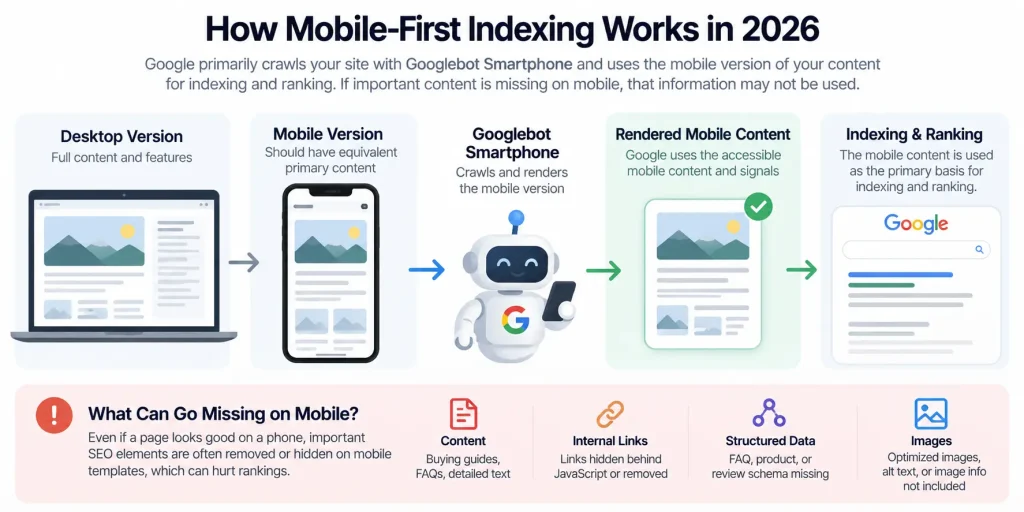
No. Google completed its transition to mobile-first indexing in October 2023. There is not a separate mobile index competing with a desktop index. Google primarily crawls sites with Googlebot Smartphone and uses the mobile version of content for indexing and ranking.
The mobile version needs to preserve the information Google needs to understand the page.
How Does Google Use the Mobile Version?
Googlebot Smartphone crawls the mobile version of a page and renders it when necessary. Google then uses the accessible mobile content and relevant signals as the primary basis for indexing and ranking.
If important content, links, structured data, or other signals exist on desktop but are missing from the mobile version, Google may not have the same information available when processing the page.
Mobile-First Indexing Mistakes That Quietly Hurt Rankings
Many mobile-first indexing problems come from differences between desktop and mobile templates.
For example, an ecommerce category page might contain buying guidance, crawlable links, structured data, optimized images, and FAQs on desktop. The mobile template might remove the content, hide links behind JavaScript, drop the FAQ, or use different structured data.
The page can still look polished while losing important SEO context. Google recommends keeping equivalent primary content, metadata, structured data, image information, and robots directives between mobile and desktop versions.
What Has Changed in Mobile SEO Recently?
Several developments are relevant to mobile SEO in 2026.
Google’s February 2026 Discover Core Update
On February 5, 2026, Google announced a dedicated Discover core update. Google said the update focused on more locally relevant content, reducing clickbait and sensational material, and surfacing more original, timely, in-depth content from sources demonstrating expertise.
For mobile-focused publishers, this expands SEO beyond traditional search results. A fast mobile page does not compensate for weak or derivative content. Performance supports the experience; it does not replace content quality.
Search Console Added Generative AI Performance Reporting
On June 3, 2026, Google announced Search Console reporting for visibility in generative AI experiences, including AI Overviews, AI Mode, and AI features in Discover.
The initial rollout includes metrics such as impressions, pages, countries, dates, and, within Search reporting, devices. The device dimension helps SEO teams identify differences between mobile and desktop visibility in newer search experiences.
INP Is the Responsiveness Metric That Matters
Some older SEO guides recommend optimizing First Input Delay (FID). FID was replaced by Interaction to Next Paint (INP) as a Core Web Vital in March 2024.
Unlike FID, which focused on the first interaction, INP evaluates responsiveness across interactions during a page visit. This matters on mobile because menus, filters, accordions, sliders, cart buttons, and forms can compete with JavaScript for main-thread resources.
Responsive Web Design: The Best Setup for Mobile SEO?
For most websites, responsive web design is the simplest option. Google supports three main mobile configurations:
- Responsive web design
- Dynamic serving
- Separate mobile URLs
Google recommends responsive design because the same URL and HTML can serve different devices while CSS controls the presentation.
Responsive Design vs Separate Mobile URLs vs Dynamic Serving
Responsive design requires less SEO maintenance because it avoids separate mobile URLs, alternate annotations, device-specific HTML, and additional redirects. Dynamic serving works but introduces opportunities for user-agent detection and content differences.
Separate mobile URLs also work, but they require additional management around canonicals, alternates, content parity, structured data, redirects, and crawling. For most new websites, responsive design is the practical default unless the product or infrastructure requires another configuration.
Common Responsive Web Design Problems That Affect Search
Responsive does not mean optimized. A mobile page can still load a large desktop image, multiple tracking scripts, several font families, chat widgets, review tools, heatmaps, and video.
The layout adapts, but the workload does not.
Good responsive design should adapt the presentation and the resources delivered to the device. That means serving appropriately sized images, limiting unnecessary JavaScript, preserving important content, and making navigation usable with touch input.
Core Web Vitals Optimization for Mobile Devices
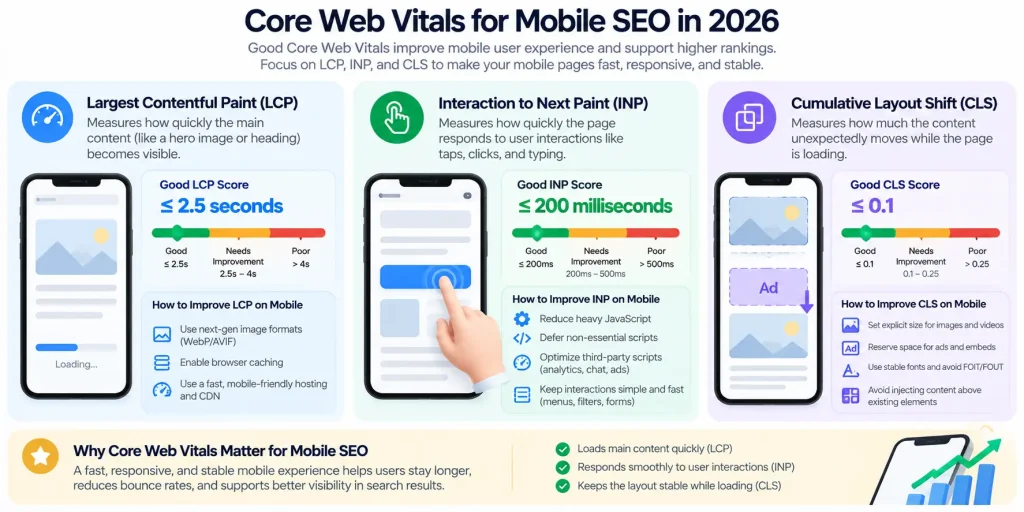
These thresholds are evaluated at the 75th percentile, so performance should be assessed across real users rather than a single high-end device.
How to Improve LCP on Mobile
Image optimization helps LCP, but it is not the only factor. Slow server response, render-blocking CSS, late resource discovery, client-side rendering, web fonts, third-party scripts, and poor loading priorities can all delay the largest contentful element.
For an ecommerce product page, check whether the primary image is discovered early, whether it is accidentally lazy-loaded, whether the server responds quickly, and whether unnecessary JavaScript delays its loading.
Google’s Vodafone case study reported a 31% improvement in LCP and an 8% increase in sales after performance work that included server-side rendering, reducing render-blocking JavaScript, and optimizing the hero image. That case does not mean every site will produce the same business result. It demonstrates why performance can be evaluated as a business metric rather than only an SEO score.
How to Reduce INP and Interaction Delays
INP problems appear after the page has loaded. A user taps Add to cart, nothing happens, and the interaction responds only after a delay.
Heavy JavaScript and long tasks are common causes. Analytics tags, recommendation engines, consent tools, third-party widgets, complex DOM updates, and oversized framework bundles can all compete for main-thread time. Start by identifying the slow interaction rather than removing scripts indiscriminately.
Real User Monitoring is useful because field data shows which interactions cause poor INP for actual visitors.
How to Prevent CLS on Smaller Screens
CLS is particularly noticeable on mobile. Reserve dimensions for images, videos, ads, banners, and other dynamic elements. Be careful with cookie notices and promotional bars that insert content above existing elements.
Fonts and components should also be implemented in ways that minimize layout movement after the page begins rendering.
Mobile Page Speed: How Fast Is Fast Enough?
There is no single loading time that guarantees higher rankings. Core Web Vitals provide useful targets because they measure loading, responsiveness, and visual stability. Google states that perfect page-experience scores do not guarantee top rankings.
Moving a page from a poor 4.8-second LCP to 2.4 seconds solves a meaningful performance problem. Moving from 2.4 to 2.2 seconds may be useful, but it should not take priority over serious content, internal-linking, or indexing problems.
SEO requires prioritization.
Why Your Mobile Site Is Slower Than Your Desktop Site
Desktop devices have stronger processors, more memory, and better connections. Mobile devices expose expensive JavaScript and poor asset decisions more quickly. A large homepage banner that seems acceptable on an office connection becomes a delay on a slower mobile connection.
This is why real-user data matters.
The Biggest Mobile Page Speed Killers
A mobile performance audit should examine:
- Oversized images
- Third-party scripts
- Tag managers
- Render-blocking CSS
- Excessive fonts
- Client-side rendering
- Large DOMs
- Unoptimized video
- Duplicate libraries
- Marketing and recommendation widgets
Third-party tags deserve particular attention because they can consume bandwidth and CPU resources needed for responsive interactions.
PageSpeed Insights vs Lighthouse vs Chrome UX Report
These tools answer different questions. Lighthouse is a lab test that simulates performance conditions and helps diagnose technical opportunities.
- Chrome UX Report (CrUX) provides field data from eligible real Chrome users.
- PageSpeed Insights (PSI) combines CrUX field data, where available, with Lighthouse-style lab diagnostics.
Google says PSI field data represents a trailing 28-day period and is updated daily, while the CrUX BigQuery dataset updates monthly.
If Lighthouse reports a strong score while Search Console reports poor Core Web Vitals, the tools are not necessarily contradicting each other. One is a controlled test; the other reflects real-user experiences. For SEO decisions, field data is essential.
Touch Target Sizing and Mobile UX: Does It Affect SEO?
A small button is not a ranking penalty. Google uses Core Web Vitals in its ranking systems, while other page-experience improvements do not directly guarantee higher rankings.
Touch target sizing should therefore be treated as a usability issue.
How Large Should Mobile Buttons and Links Be?
Google’s web.dev accessibility guidance recommends touch targets around 48 device-independent pixels, with approximately 8 pixels of spacing between targets where practical.
This is useful for:
- Menu icons
- Pagination
- Filters
- Close buttons
- Quantity selectors
- Footer links
The visible icon can be smaller if sufficient clickable padding surrounds it.
Mobile Navigation, Pop-Ups, Fonts, and Tap-Friendly Design
A page can load quickly and still be difficult to use. Check for:
- Full-screen interstitials
- Tiny text
- Overlapping sticky elements
- Hard-to-reach close buttons
- Horizontal scrolling
- Filters requiring excessive taps
- Navigation that depends on hover
Good mobile UX allows users to find and complete actions without unnecessary interaction.
AMP vs PWA: Does Either Still Matter for Mobile SEO?
Older SEO content gives these technologies more importance than they currently require.
Is AMP Still Worth Using?
AMP still exists and AMP pages appear in Google Search. However, AMP is not required for inclusion in Top Stories, and it is not a general ranking requirement.
AMP makes sense for organizations already invested in the framework or publishing workflows where its constraints are useful. It should not be adopted because AMP is assumed to provide a ranking advantage.
When a Progressive Web App Makes More Sense
A Progressive Web App (PWA) serves a different purpose. PWAs provide app-like capabilities such as installation, offline functionality, service-worker caching, and richer browser experiences. A PWA is not an automatic SEO improvement. Public content still needs crawlable URLs, accessible rendering, internal links, and good performance.
If a PWA puts important content behind complex client-side JavaScript, it can create additional SEO problems.
AMP vs PWA: Short Comparison
| Area | AMP | PWA |
| Main purpose | Constrained, performance-focused web pages | App-like web experience |
| Required for Google rankings? | No | No documented ranking bonus |
| Can support fast mobile experiences? | Yes | Yes, when built well |
| Installation/offline features | Not its main purpose | Core PWA use case |
| Best reason to adopt | Existing publishing/performance workflow | Product requires app-like capabilities |
For most marketing sites, blogs, service businesses, and ecommerce stores, a strong responsive website should come before either technology unless there is a specific business or technical requirement.
How JavaScript Can Break Mobile SEO
Google renders JavaScript, but important content still needs to be available in rendered HTML for Google to process it reliably. Google recommends checking rendered output with tools such as the URL Inspection Tool and Rich Results Test.
Rendering, Lazy Loading, and Hidden Mobile Content
Lazy-loading images is useful. Loading primary content after a user clicks, swipes, or types is different. Google specifically warns against requiring user interaction to load primary content because Googlebot does not perform those interactions simply to reveal content.
For example, a product listing might contain the first products in HTML while additional products load only after clicking Show more. If those products and links matter for discovery, test what Google receives and renders.
How to Check What Googlebot Smartphone Actually Sees
Use Search Console’s URL Inspection Tool and inspect the rendered HTML. Check for:
- Critical text
- Internal links
- Structured data
- Canonicals
- Product information
- Images
- Other content that should be present
A screenshot alone is not enough. The rendered HTML helps determine what Google actually processes.
Mobile SEO for Ecommerce and Content-Heavy Websites
Large websites have more complex mobile SEO problems than small brochure sites.
The issues include filters, faceted navigation, product grids, JavaScript rendering, pagination, ads, recommendation widgets, sticky banners, third-party reviews, personalization, and inconsistent templates.
Product Pages, Filters, and Mobile Navigation
Simplify the interface without simplifying the information. Product names, prices, descriptions, structured data, important reviews, canonical signals, internal links, and core images should remain accessible.
Filters require additional planning. Users need them to navigate large catalogs, while search engines need clear rules about which filtered combinations should be crawlable and indexable.
Poor filter architecture can create crawl and duplicate-URL problems.
Example: Fixing a Fast Desktop Site With Poor Mobile Rankings
Consider a fictional retailer whose desktop rankings remain stable while mobile organic traffic declines. An audit finds three problems:
- The mobile category template removes much of the introductory content.
- Product links after the first row are injected through JavaScript after interaction.
- A recommendation widget blocks the main thread when users open filters.
The solution is not another SEO plugin. The retailer restores equivalent content, makes product links crawlable in rendered HTML, and delays unnecessary recommendation code.
This illustrates how mobile SEO problems combine technical, content, and UX issues.
How to Audit Mobile SEO Step by Step
You do not need dozens of tools. You need the right checks.
1. Start with Search Console.
Review indexing issues, Core Web Vitals, performance data, and important URLs through URL Inspection.
2. Test representative templates.
Use PageSpeed Insights on product pages, category pages, articles, landing pages, checkout entry points, and JavaScript-heavy templates—not just the homepage.
3. Compare field and lab data.
Use real-user data alongside controlled performance tests.
4. Test the site on an actual phone.
Open navigation, submit forms, apply filters, dismiss pop-ups, add products to the basket, rotate the screen, and test slower connections when possible.
5. Compare mobile and desktop output.
Check content, links, metadata, structured data, images, canonicals, and functionality.
Google retired the Mobile-Friendly Test and Mobile Usability report in December 2023. Mobile usability still matters; those tools are simply no longer the primary assessment method.
Mobile SEO Mistakes to Fix First
When engineering resources are limited, prioritize problems that prevent Google or users from accessing important content. Fix:
- Missing mobile content before minor Lighthouse improvements
- Broken mobile canonicals before small file-size reductions
- Uncrawlable product links before animation changes
- Severe LCP problems before minor keyword-density adjustments
Mobile SEO generate an endless list of technically valid recommendations. The goal is to distinguish meaningful problems from minor improvements.
Practical Mobile SEO Checklist for 2026
Before calling a site mobile-optimized, check that:
- Mobile and desktop versions contain equivalent primary content.
- Important internal links are crawlable on mobile.
- Titles, meta descriptions, canonicals, robots directives, and structured data remain consistent where appropriate.
- Responsive layouts work without horizontal scrolling or overlapping elements.
- LCP is around 2.5 seconds or better at the 75th percentile.
- INP is around 200 milliseconds or better at the 75th percentile.
- CLS is 0.1 or better at the 75th percentile.
- Hero images are not accidentally lazy-loaded.
- Images are appropriately sized and compressed.
- Critical content does not require user interaction before Google can access it.
- Navigation, filters, forms, accordions, and cart actions respond quickly.
- Touch targets are sufficiently large and spaced.
- Third-party scripts are reviewed regularly.
- Search Console URL Inspection shows the expected rendered content.
- Core templates are tested with PageSpeed Insights.
- Real-user field data is monitored alongside lab testing.
- AMP is used only when it serves a specific business or publishing need.
- PWA functionality does not make public content harder to crawl or render.
- Mobile performance is reviewed separately from desktop where useful.
What Should You Prioritize First for Better Mobile Rankings?
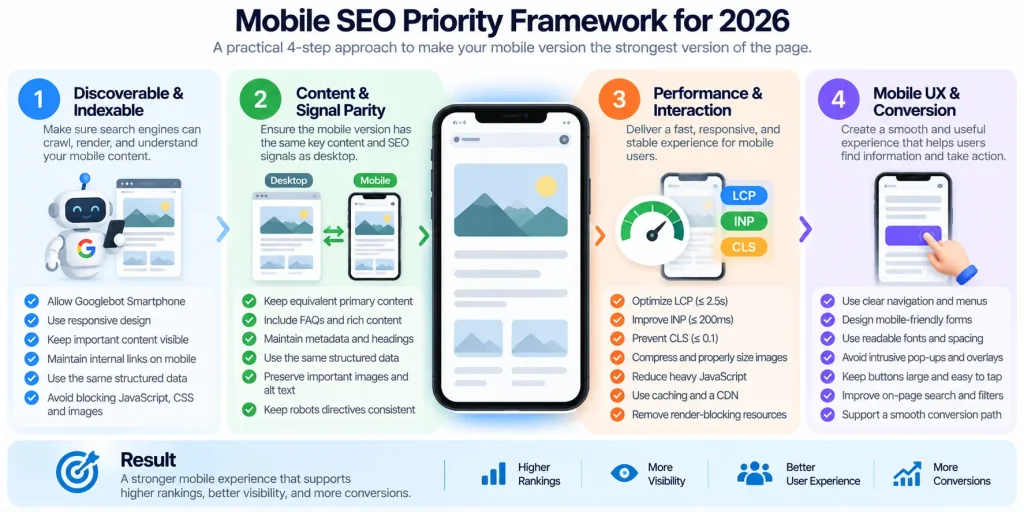
This prevents teams from spending weeks optimizing a page’s performance when Google cannot properly understand it. Google makes clear that page experience contributes to search success, but relevance matters. A technically strong page does not outrank a page that provides a useful answer.
Performance does have business value beyond rankings. Google and web.dev case studies report performance improvements linked to better engagement and conversion outcomes across companies including Vodafone, Tokopedia, and Ray-Ban.
Final Thoughts: Mobile SEO Is Now Just SEO
Mobile SEO should not be treated as a checklist added after the “real” website is finished. The mobile version is central to how Google indexes most sites and how a large share of users experience the web.
A strong mobile SEO strategy therefore combines indexability, content parity, performance, JavaScript rendering, responsive design, usability, and real-user data. The goal is simple: make the mobile version easy for both Google to understand and users to use.
Mobile SEO FAQs
Is Mobile SEO Different From Desktop SEO?
The fundamentals are similar: useful content, crawlability, relevance, links, site architecture, and technical accessibility still matter.
The difference is that Google primarily uses the mobile version for indexing, while mobile devices introduce additional constraints around screen size, processor resources, networks, touch interactions, navigation, and rendering.
Does Mobile Page Speed Affect Google Rankings?
Core Web Vitals are used by Google’s ranking systems, but page speed is not a shortcut to higher rankings.
Google states that good Core Web Vitals do not guarantee top rankings. Improve mobile performance to support users, conversions, and search performance rather than simply chasing a perfect Lighthouse score.
Is Responsive Web Design Required for SEO?
No. Google supports responsive design, dynamic serving, and separate mobile URLs.
Google recommends responsive web design because it is generally the easiest configuration to implement and maintain.
Is AMP Still Important for Google Search?
AMP pages can still appear in Google Search, but AMP is not required for Top Stories and is not a general requirement for organic visibility.
Use it when it solves a specific publishing or performance requirement rather than assuming it provides a ranking advantage.