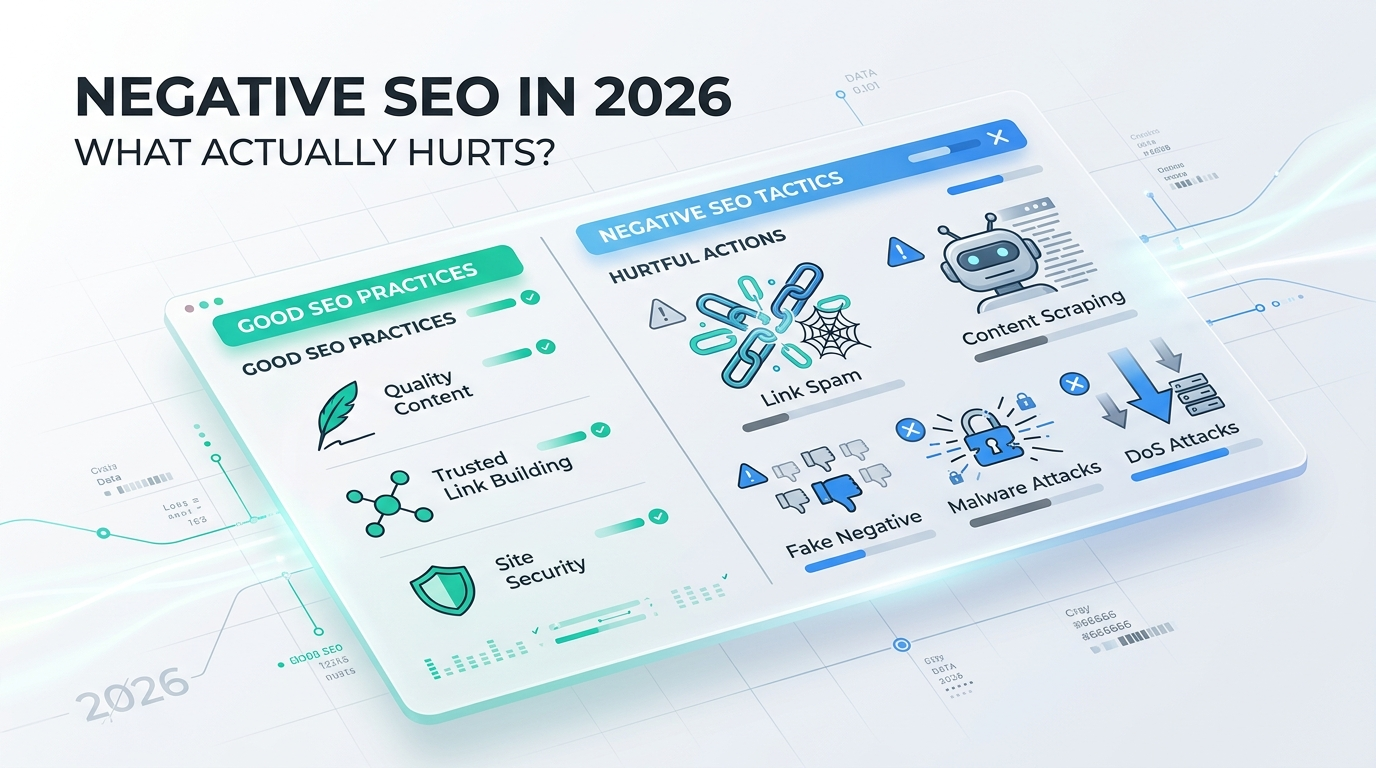
A competitor points 10,000 junk links at your website overnight. Your backlink tool flashes red warnings. Rankings move a few days later. Negative SEO is pointed out as the culprit.
Sometimes it is. But the backlink spike is distracting you from the real problem.
Google has spent years building systems that stop third-party link spam from damaging innocent sites, and its current guidance says most websites don’t need the Disavow Links tool. At the same time, hacked pages, injected content, aggressive scraping, fake redirects, and server abuse can create real SEO damage.
The useful question in 2026 isn’t simply, “Can negative SEO happen?”
It’s: which signals deserve action, and which ones should you stop panicking about?
Does Negative SEO Still Work in 2026?
Yes, negative SEO exists. But the version site owners fear most, i.e., someone buying thousands of terrible backlinks and instantly destroying a clean domain, isn’t the first scenario I’d investigate.
Google says that, in many cases, it can decide which links to trust without any help from site owners. Its disavow documentation says the tool is appropriate when a site has a large number of spammy or artificial links and those links have caused, or might cause, a manual action.
That doesn’t make incoming links completely irrelevant. Context matters.
A random spam network linking to you without permission isn’t the same as years of paid links, private blog network activity, manipulative guest-post campaigns, or links an SEO agency deliberately built on your behalf.
The second category looks more like participation. This is where negative SEO discussions go wrong. People see a ranking drop, open a backlink tool, find something ugly, and assume they have found the cause.
Ugly isn’t the same as harmful.
What’s Changed?
Google rolled out global spam updates in March and June 2026. It also expanded its spam policies in April 2026, making back button hijacking an explicit malicious practice.
Search spam isn’t limited to backlinks. Deceptive user experiences, hacked content, manipulation, and abusive site practices all deserve attention.
If rankings drop during a confirmed update window, investigate the update alongside technical, content, security, and backlink changes.
What Is Negative SEO and What Is Mistaken for It?
Negative SEO is an attempt by a third party to damage another website’s organic search performance. An attack targets links, content, crawl resources, site security, reputation, or indexing signals.
The tactics include:
- Building large numbers of spammy backlinks to a competitor’s domain.
- Creating links with manipulative or irrelevant anchor text.
- Hacking a website and injecting spam pages, hidden links, or redirects.
- Scraping and republishing content at scale.
- Sending fake link-removal requests to legitimate publishers.
- Generating huge numbers of junk URLs that waste crawl and server resources.
- Impersonating a company through fraudulent websites or copied brand assets.
- Flooding a site with automated requests that hurt availability or performance.
Google’s spam policies recognize hacked content, hidden links, injected pages, malicious redirects, scam sites, and other deceptive practices as problems that affect search visibility.
But several issues are mislabeled as negative SEO:
- A core or spam algorithm update.
- A technical deployment that accidentally adds noindex.
- A canonical pointing to the wrong URL.
- Lost high-quality backlinks.
- Server outages.
- A hacked plugin.
- Internal linking changes.
- Competitors publishing better pages.
- A website being reassessed after previously ranking above the quality its pages supported.
I’ve seen the same pattern enough to be wary of it: the SEO team starts investigating 3,000 bizarre backlinks while the real ranking problem is sitting inside the site.
 The Most Common Types of Negative SEO Attacks
Negative SEO isn’t limited to spammy backlinks. Attacks can target your backlink profile, content, website security, legitimate links, crawl resources, or brand reputation.
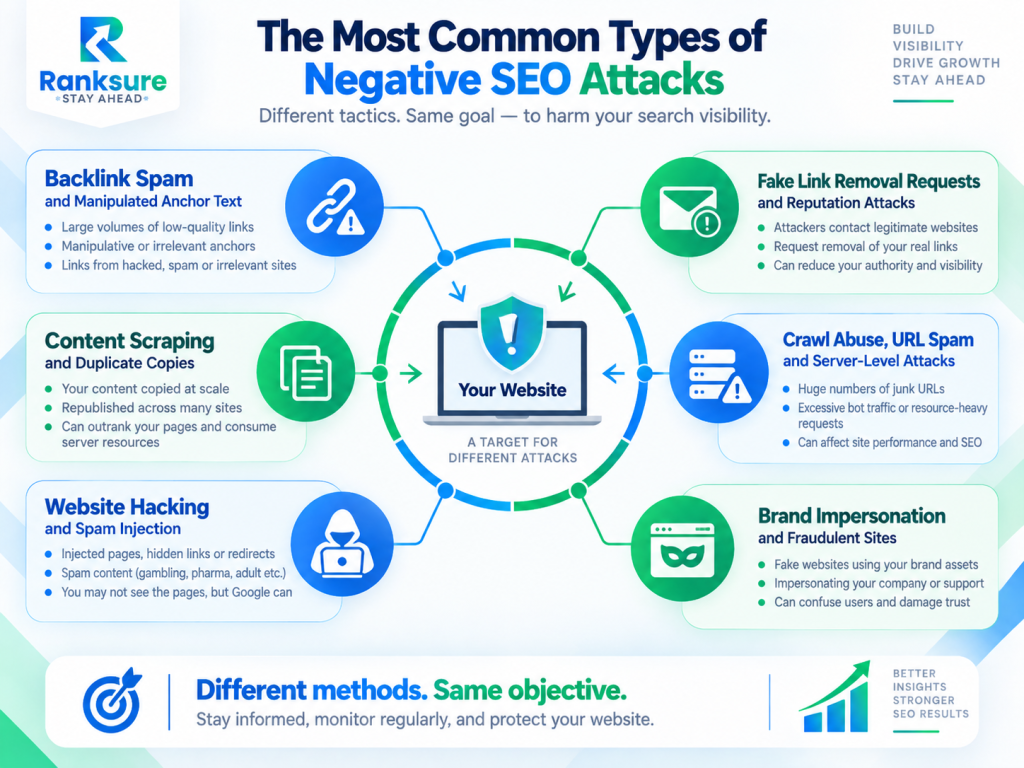
Website Hacking, Spam Injection, and Rogue Pages
Website compromise deserves more urgency than a routine spike in suspicious backlinks. Attackers might inject spam pages, hidden links, JavaScript, cloaked content, or malicious redirects without those changes appearing in normal site navigation.
If a legitimate business site generates URLs such as:
- /casino-bonus-34721/
- /cheap-pharmacy-online/
- /product?id=839201spam
That’s a different level of urgency from a few hundred weird backlinks.
How Google Handles Negative SEO and Link Spam
Google’s public guidance gives site owners an important clue: don’t assume every link pointing at you is treated as an endorsement you deliberately created.
Google works to determine which links are trusted and says most websites don’t need to use the Disavow Links tool.
Spam-policy violations, meanwhile, are detected through automated systems or human review and result in lower rankings, removal from search results, or manual actions.
The practical distinction is important: Google tries to distinguish spam happening around your site from spam being conducted by or for your site.
Why “Toxic Backlinks” Don’t Automatically Mean a Google Penalty
SEO platforms need ways to prioritize suspicious links, so they analyze signals such as domain quality, network patterns, anchors, traffic estimates, and link placement. It, however, cannot be claimed as a final verdict.
Treat link toxicity detection as triage. It tells you where to investigate, not what Google has decided.
| Tool Flag | Better SEO Question |
| 5,000 “toxic” links detected | Did rankings, manual actions, or link patterns change meaningfully? |
| 70% exact-match anchor text | Did we build these links, inherit them, or are they random automated spam? |
| Hundreds of new domains | Are they genuine websites, scraper copies, hacked pages, or one spam network? |
| High toxicity score | Is there evidence Google considers the profile manipulative? |
 That last column is where the real work begins.
How to Perform a Backlink Spam Analysis
A good backlink spam analysis isn’t “export everything marked toxic and disavow it.” Start with patterns.
Say your domain gains 80 to 120 referring domains a month. Suddenly it picks up 4,800 in nine days. That’s worth investigating.
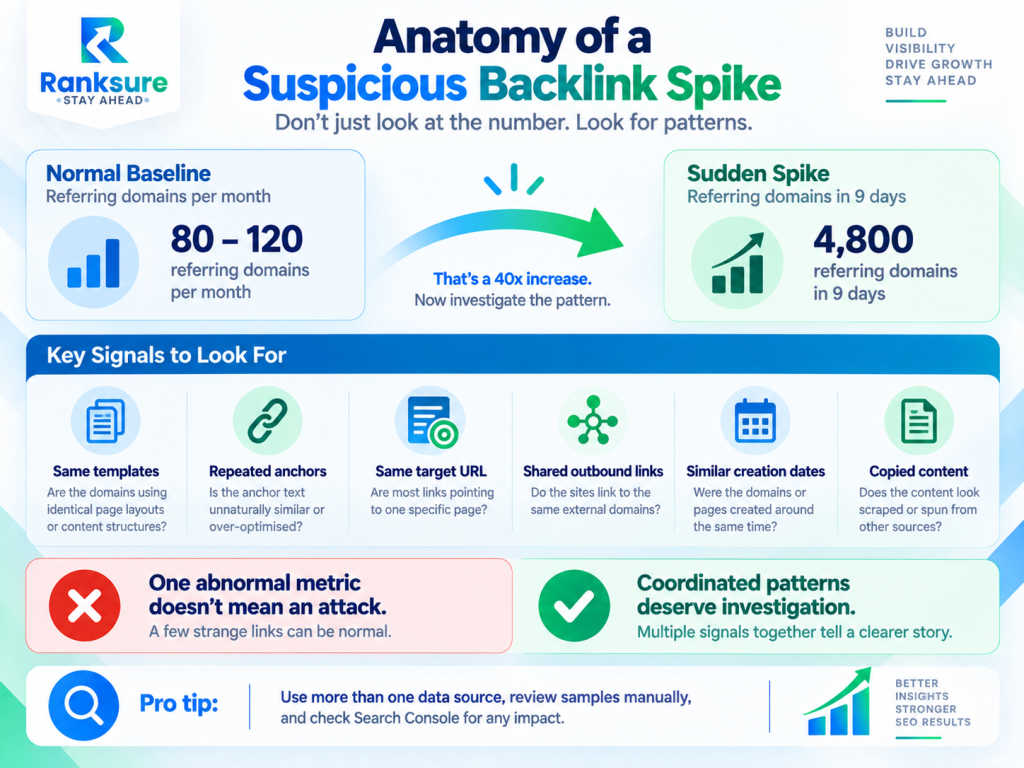
Now look deeper.
- Are 4,500 domains using the same page template?
- Do they share identical outbound links?
- Were they created around the same time?
- Are they all linking to one landing page?
- Is the anchor text unnaturally concentrated?
- Do the links appear inside copied content?
- Could some simply be legitimate syndicated citations or scraper copies?
Warning Signs That Deserve Investigation
Pay closer attention when several signals occur together:
- A large, abnormal rise in referring domains over a short period.
- Commercial or offensive exact-match anchors you never targeted.
- Links aimed disproportionately at one revenue-generating URL.
- Networks of near-identical pages or domains.
- Strong legitimate links disappearing at the same time.
- Ranking losses affecting the pages being targeted.
- A manual action mentioning unnatural links.
- Evidence that a previous SEO provider built questionable links.
- Hacked pages or redirects appearing alongside backlink anomalies.
A coordinated pattern plus Search Console evidence is worth investigation.
Google Search Console Monitoring for Negative SEO
Google Search Console monitoring should be your first-party checkpoint.
Search Console doesn’t show every backlink, so don’t use it as your only backlink database. Combine it with a crawler and an independent backlink index where necessary.
More importantly, don’t stop at the Links report.
| Search Console Area | What to Check | Why It Matters |
| Manual Actions | Unnatural links or other spam actions | Shows whether Google has manually acted against the site |
| Security Issues | Hacking, malware, phishing, or compromised pages | Identifies security problems that can affect users and search visibility |
| Performance | Clicks, impressions, position, pages, queries, countries, and devices | Helps isolate exactly where visibility declined |
| Indexing | Unexpected growth in discovered or indexed URLs | Can reveal injected pages or URL spam |
| URL Inspection | Indexing, canonicalization, and page-specific anomalies | Helps diagnose important affected URLs individually |
If 90% of a decline comes from one template, category, or directory, that changes the diagnosis.
A 300-page website showing thousands of unknown discovered or indexed URLs deserves a different investigation from a site that simply acquired several hundred strange backlinks.
Competitor Backlink Auditing: Attack or Normal Link Growth?
Competitor backlink auditing provides context, but it can’t prove who attacked you. Suppose you and three competitors all receive links from the same scraper network.
That probably isn’t a targeted attack.
If only your site receives thousands of links using an unusual commercial anchor aimed at one URL, the pattern deserves closer investigation. Still, focus on impact before motive.
When Should You Use Google’s Disavow Tool?
Google documentation sets a high threshold: a considerable number of spammy, artificial, or low-quality backlinks and evidence that those links have caused, or are likely to cause, a manual action.
If your monthly SEO process involves uploading every domain a third-party tool labels “toxic,” reconsider that process.
A Safer Disavow Tool Strategy
Use a disavow tool strategy based on evidence:
- Identify links you know were intentionally built, purchased, exchanged, or generated through manipulative campaigns.
- Separate those from random links you didn’t create.
- Review Manual Actions and historical SEO activity.
- Try to remove genuinely manipulative links where practical.
- Consider disavowal when the pattern meets Google’s stated criteria.
If you upload a new disavow file, remember that it replaces the previous file. Google may also take time to incorporate the changes as affected pages are recrawled and reprocessed.
When Disavowing Links Can Do More Harm Than Good
A weak-looking domain isn’t automatically a harmful domain. A third-party tool may classify a natural, editorial, harmless, or simply irrelevant link as toxic.
Blindly disavowing those links means asking Google to ignore links that may never have required intervention.
I’d rather spend two hours understanding a suspicious link cluster than five minutes exporting a software-generated blacklist.
Negative SEO Example: 10,000 Spam Links Appear Overnight
Consider a B2B software site that has ranked steadily for two years.
On Monday, its SEO platform reports 10,000 new backlinks from roughly 2,300 domains, many using casino-related anchors. Three days later, organic traffic drops 14%.
The instinct is obvious:
“We’re under attack. Disavow everything.”
But the timing alone doesn’t prove causation. Before blaming the backlinks, investigate the drop systematically.
Check whether the decline coincides with a Google update, which pages and queries actually lost visibility, and whether Search Console shows manual actions or security issues. Review recent technical changes, backlink patterns, link discovery dates, and server activity before deciding what caused the decline.
Negative SEO remains one hypothesis. It shouldn’t become the conclusion before the evidence arrives.
This is better because the 10,000 links / 2,300 domains / 14% decline scenario stays, which makes the example concrete, while the graphic replaces the repetitive six-step explanation.
Malicious Scraping Protection: How to Defend Your Content
Scraping has changed.
Automated systems crawl product catalogs, pricing pages, documentation, images, PDFs, and structured datasets at scale.
By August 2026, Cloudflare had documented scraping-specific behavioral detections designed to identify anomalous request patterns using factors including ASN and JA4 fingerprint. Its documentation recommends combining those signals with appropriate rules or managed challenges while allowing legitimate automated traffic where necessary.
That’s where malicious scraping protection is moving: behavior-based filtering rather than blocking every unfamiliar user agent.
Canonicals, Bot Controls, and Monitoring
Keep self-referencing canonicals correct on important pages. Canonicalization helps Google understand which URL you prefer when similar URLs exist. It doesn’t stop someone from copying your content.
For high-value content, also consider:
- WAF and bot-management controls.
- Rate limits on resource-heavy endpoints.
- Log monitoring for abnormal request volume.
- Protection for APIs and downloadable assets.
- Alerts when substantial portions of your content appear elsewhere.
- Search Quality reports when scraped pages appear to violate Google’s spam policies.
Don’t block legitimate search crawlers in the process. A scraper defense that keeps Googlebot away from your product pages is an impressive way to attack your own SEO.
How to Protect Your Website From Negative SEO Before It Happens
The strongest negative SEO defense isn’t a giant disavow file. It’s knowing what normal looks like.
Track typical referring-domain growth, indexed pages, key organic URLs, anchor-text patterns, server requests, and crawl activity. When those baselines suddenly change, anomalies are easier to spot.
Security matters too. Keep your CMS, plugins, frameworks, server software, and credentials secure. Use multi-factor authentication, restrict admin access, monitor unexpected file changes, and maintain restorable backups.
SEO and security overlap when a compromised site starts serving Google injected pages, hidden content, malicious JavaScript, or redirects.
Practical Negative SEO Monitoring Checklist
You don’t need to spend every morning hunting imaginary attackers. A focused monitoring routine is enough for most sites.
Focus on patterns rather than isolated warnings. A backlink spike, ranking fluctuation, or third-party toxicity score becomes more meaningful when it aligns with changes in indexing, security, traffic, or crawl activity.
And don’t use the Disavow Links tool purely because a third-party metric turns red.
Negative SEO Isn’t the First Thing I’d Blame
Negative SEO is real, but suspicious backlinks aren’t the biggest threat. The better approach is to investigate anomalies, protect the site, and follow the evidence before assuming an attack.
The best defense against negative SEO is knowing your website well enough to distinguish between an attack, an algorithm update, and your own technical mistake.
Frequently Asked Questions About Negative SEO
Can Spammy Backlinks Hurt My Google Rankings?
They can in some circumstances, but low-quality backlinks don’t automatically cause a penalty. Investigate the link pattern, its origin, Search Console evidence, and any history of manipulative link building before taking action.
How Long Does It Take to Recover From Negative SEO?
There is no fixed recovery period. It depends on what happened. Recovering from hacked pages, lost legitimate links, server abuse, or a manual action can involve very different timelines.
Can Negative SEO Cause a Manual Action?
A manual action is more relevant when Google believes manipulative activity is associated with the site. Random third-party spam links alone shouldn’t automatically be treated as evidence that a manual action is coming.
How Do I Know If a Competitor Is Using Negative SEO Against Me?
Attribution is difficult. Look for coordinated patterns such as abnormal link growth, unusual anchors, concentrated URL targeting, scraping, impersonation, or other suspicious behavior. Focus first on whether the activity is causing measurable harm.
Can Someone Copy My Content and Outrank My Website?
Another URL may rank for copied or highly similar material, but there is no automatic “duplicate content penalty.” Maintain clear canonical and internal signals, monitor important content, and investigate scraper activity when copied versions create genuine search, brand, legal, or infrastructure problems.