A page, despite looking perfect in a user’s browser, can be a problem for search engines. That’s the harsh truth behind JavaScript SEO and rendering: visual correctness doesn’t ensure that Googlebot discovers, renders, or indexes the content you care about.
The good news is that Google can process JavaScript. The bad news is that “Google can render JavaScript” has been stretched into a simple piece of advice. Rendering still introduces dependency chains, delays, resource requirements, and failure points that plain HTML pages largely avoid.
Why JavaScript SEO Still Causes Indexing Problems
Google’s current documentation describes JavaScript processing in three broad phases: crawling, rendering, and indexing. Googlebot executes JavaScript using a Chromium-based rendering environment, but that doesn’t mean every script, request, or rendering path succeeds in the same manner as it does for a logged-in human using a modern browser.
The important distinction is this:
JavaScript is supported. JavaScript dependency is still a technical SEO risk.
A content-heavy page that ships meaningful HTML at the start has fewer things that can go wrong than a page that requires JavaScript bundles, API calls, client-side routing, state restoration, and successful hydration before its primary content exists.
I’ve seen this happen repeatedly on JavaScript-heavy sites: the development team checks the page in Chrome, sees everything working, and assumes SEO is fine. Then someone compares the raw response, rendered HTML, and indexed content and discovers that the page title is present but the product description, internal links, or category text never made it into Google’s usable version of the page.
Google’s own guidance now makes an important nuance clearer: JavaScript itself is not inherently an SEO problem. In March 2026, Google removed outdated wording that implied loading content with JavaScript automatically made a site harder for Google Search. The real question is whether Google can successfully fetch the required resources and produce the critical rendered content.
How Does Googlebot Crawl, Render, and Index JavaScript?
A simplified JavaScript SEO pipeline looks like this:
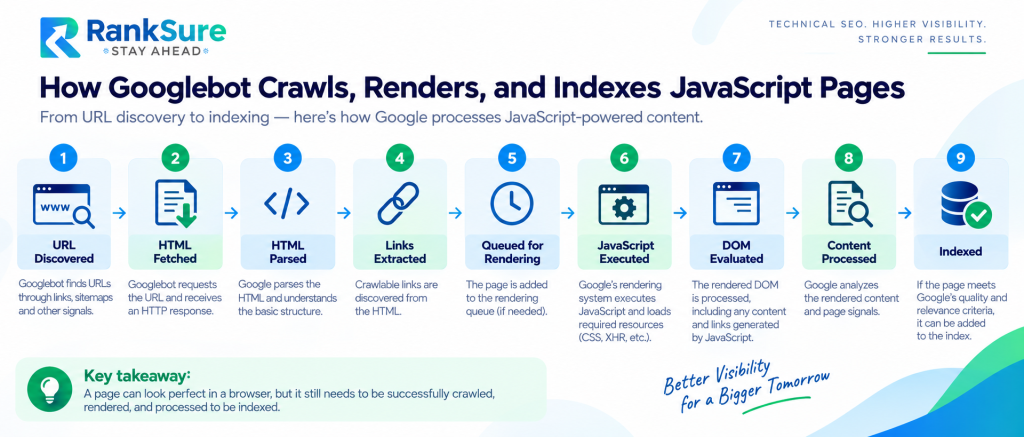
That sequence matters because a page can succeed at one stage and fail at another.
1. Googlebot Fetches the Initial HTML
Googlebot discovers URLs through crawlable links, XML sitemaps, redirects, and other signals. It requests the URL and receives an HTTP response.
At this point, a traditional HTML page already contains:
- The main heading
- Product or service content
- Internal links
- Metadata
- Structured data
- Images and supporting text
A client-side rendered application instead returns something closer to this:
<body>
<div id=”root”></div>
<script src=”/assets/app.js”></script>
</body>
The actual content may not exist until JavaScript runs. That doesn’t prevent indexing. However, it does make the rendering stage essential.
Google also documents a practical limitation that deserves more attention than it usually gets: Googlebot crawls the first 2 MB of a supported file type, and referenced JavaScript and CSS resources are fetched separately under the same general size limit. If critical code or content depends on bytes beyond that cutoff, Google may not receive them.
2. Google Parses the HTML and Discovers Links
Before rendering, Google can extract URLs from standard HTML links.
This is why a crawlable internal link should still look like an actual link:
<a href=”/services/technical-seo/”>Technical SEO Services</a>
This is much less reliable as a discovery mechanism:
<div onclick=”navigate(‘/services/technical-seo/’)”>
Technical SEO Services
</div>
Google specifically recommends crawlable <a> elements with href attributes and warns against fragment-based routing such as #/products for loading distinct content.
3. The Page Enters the Rendering Process
For JavaScript-dependent content, Google’s Web Rendering Service processes the page using a modern Chromium environment.
Google’s current documentation explains that pages with a 200 response are queued for rendering unless indexing directives indicate otherwise. Rendering may happen quickly, but site owners shouldn’t treat it as an instant, synchronous guarantee.
The renderer:
- Load JavaScript
- Load relevant CSS
- Execute client-side code
- Process XHR and similar requests needed to construct page content
- Evaluate the resulting DOM
A March 2026 Google Search Central post added more detail to this model. It explained that the Web Rendering Service processes JavaScript and CSS and can process XHR requests, but operates statelessly, clearing local storage and session data between requests. It also emphasized that the renderer can work with resources the crawler retrieves.
That creates a simple rule for technical SEO:
If your application requires persistent browser state, authentication, or an unreliable client-side sequence before the primary content appears, don’t assume Google sees the same page as your user.
4. Google Evaluates the Rendered DOM
After JavaScript executes, Google processes the rendered HTML.
This is where content generated by JavaScript becomes visible for indexing. Google also performs another pass for links discovered after rendering.
JavaScript-injected links therefore are crawlable, provided they appear as valid crawlable links in the rendered output.
5. Google Indexes the Content
Google then analyzes the textual content and important page signals to understand the document, determine canonicalization, and add the page to its index.
The pipeline is not:
Google sees browser → Google indexes page
It is closer to:
Google receives bytes → parses what it can → renders what is available → processes the resulting document
That difference explains many JavaScript SEO failures.
JavaScript SEO and Rendering: Where Things Actually Break
The obvious failure is an empty application shell.
For example:
<div id=”app”>
<div class=”loading-spinner”>Loading…</div>
</div>
JavaScript then requests:
/api/product/123
The browser receives the API response and displays a full product page.
But what happens if the API request fails, the JavaScript bundle doesn’t load, critical state is unavailable, or the application waits indefinitely for another dependency?
The rendered output available to Google may contain little more than:
Loading…
That’s a thin content identification problem, not necessarily a keyword or content-quality problem.
Warning Signs to Watch For
| Warning Sign | What It May Indicate |
| Empty root containers in the initial HTML | Critical content depends entirely on rendering |
| Important text appears only after API requests | API availability becomes an indexing dependency |
| Content requires a click or other interaction | Google may never trigger the required action |
| Infinite loading states | A dependency, API request, or rendering process may have failed |
| JavaScript console errors | Client-side execution may be incomplete |
| Raw and rendered content differ substantially | Important content or signals may be lost during rendering |
| Non-standard JavaScript navigation | URL discovery may be weakened |
| Lazy-loaded content requires scrolling or interaction | Content may not become available during rendering |
| Critical resources are blocked | Google may be unable to construct the intended page |
| Canonical or robots directives change after rendering | Search signals may become inconsistent |
Google explicitly recommends using the URL Inspection Tool or Rich Results Test to inspect rendered output, loaded resources, console output, and JavaScript exceptions when troubleshooting search-related JavaScript problems.
Client-Side Rendering vs Server-Side Rendering: What’s Better for SEO?
There is no universal winner. But for pages where organic visibility matters, the trade-offs are real.
| Rendering Method | Initial HTML Content | SEO Dependency on JS | Typical Strength |
| CSR | Minimal | High | Highly interactive applications |
| SSR | High | Lower | Dynamic SEO-focused pages |
| SSG | Complete | Very low | Content and marketing sites |
| ISR | Usually complete | Low | Large sites needing fresh content |
| Hydration | Depends on initial render | Varies | Adds interactivity to rendered HTML |
Client-Side Rendering (CSR)
With CSR, the server returns a basic HTML shell. JavaScript downloads and constructs the page in the browser.
Typical flow:
Request page → Receive HTML shell → Download JavaScript → Execute application → Request data → Build DOM
CSR works for Google. The problem isn’t that Googlebot can’t execute JavaScript. The problem is that the page depends on a longer chain of successful events before its important content exists.
CSR is reasonable for:
- Authenticated dashboards
- Internal applications
- Account areas
- Complex interactive tools with little search value
It’s a weaker default for:
- Product pages
- Category pages
- Editorial content
- Service pages
- Location pages
- Large content libraries
Server-Side Rendering (SSR)
SSR generates meaningful HTML on the server before sending the response. The initial response might contain:
<h1>Technical SEO Services</h1>
<p>
We audit crawling, indexing, rendering,
internal linking, and site architecture.
</p>
JavaScript can still load afterward to add interactivity.
The advantage is straightforward: the core content doesn’t need Google’s rendering system to exist.
Google’s current JavaScript SEO documentation still describes server-side and pre-rendering as useful approaches because they improve performance for users and crawlers while supporting bots that don’t execute JavaScript.
Static Site Generation (SSG)
SSG creates HTML during the build process.
For many SEO-focused sites, this remains one of the cleanest architectures available.
Examples include:
- Blog posts
- Documentation
- Service pages
- Evergreen landing pages
- Resource libraries
The content is available when the page is requested. That doesn’t mean the site can’t use JavaScript. It means JavaScript enhances the page rather than creating its fundamental content.
Incremental Static Regeneration (ISR)
ISR sits between fully static generation and request-time rendering. A page can be generated statically and refreshed on a schedule or after revalidation.
For large ecommerce or publishing sites, this provides:
- Fast HTML delivery
- Search-friendly initial content
- More manageable build times
- Content updates without rebuilding everything
The underlying SEO principle remains simple: important content should be available either in the document Google receives or through a reliable rendering path.
What Is Hydration, and Can It Cause SEO Problems?
Hydration is the process through which client-side JavaScript attaches interactivity to HTML that already exists.
A simplified example:
Server renders product page HTML → Browser displays product → JavaScript loads → Application hydrates components → Buttons, filters, and interactions activate
This is a stronger SEO architecture than sending an empty shell and expecting JavaScript to create everything from scratch.
But hydration introduces another category of problems: hydration mismatches.
React 19 improved reporting for hydration errors by showing clearer differences between server-rendered and client-rendered output. A mismatch can occur when server and client output differ because of values such as Date.now(), Math.random(), locale differences, changing external data, invalid HTML, or conditional browser-only logic.
For SEO teams, this matters because the server-rendered HTML and final client DOM shouldn’t contain conflicting versions of critical content.
A good architecture should answer this question:
If JavaScript fails, does the page still communicate its main purpose?
For a login dashboard, probably not. For a product page targeting commercial search queries, my answer is yes.
A Practical Rendering Architecture Comparison
 Consider a category page for running shoes.
CSR Approach
The initial response might contain only:
<div id=”root”></div>
<script src=”/app.js”></script>
JavaScript then fetches /api/category/running-shoes and generates the heading, product links, descriptions, filters, and pagination.
Every important SEO signal now depends on successful rendering.
SSR or SSG Approach
The initial response could instead contain:
<h1>Running Shoes</h1>
<a href=”/running-shoes/model-a/”>Model A</a>
<a href=”/running-shoes/model-b/”>Model B</a>
<p>
Compare running shoes for road, trail,
marathon, and everyday training.
</p>
JavaScript hydrates filters and other interactive elements afterward.
Both architectures function, but the second gives users and crawlers a useful document immediately.
That’s why client-side rendering vs server-side rendering shouldn’t become a framework debate. It’s an architecture decision based on what the page needs to accomplish.
What Is Dynamic Rendering, and Is It Still Recommended?
Dynamic rendering means serving one rendered version to bots and another version to users.
Google’s position is that dynamic rendering is a workaround rather than a recommended long-term solution. Server-side rendering, static rendering, or hydration are better architectural directions for new implementations.
Dynamic rendering appears in legacy environments where:
- Rebuilding the application is expensive
- A migration must happen gradually
- The existing framework has severe rendering limitations
But building a new site around separate bot-rendering infrastructure adds unnecessary complexity.
Don’t confuse dynamic rendering with cloaking either. Serving different implementations isn’t inherently cloaking if the content remains equivalent. The risk appears when the bot and user versions materially diverge.
Does Googlebot Have a Rendering Budget?
The phrase rendering budget is used by SEOs, but it shouldn’t be treated as a publicly documented numerical quota per page.
Google doesn’t provide site owners with a rule such as:
“Your website receives 30 seconds of JavaScript rendering per URL.”
What we know is more useful.
Google’s crawling and rendering systems have resource constraints. Pages enter processing and rendering systems, Googlebot fetches limited amounts of data, and the Web Rendering Service doesn’t behave exactly like an unlimited user browser. Google’s March 2026 documentation also emphasized byte limits and the fact that rendering depends on resources successfully retrieved.
The practical interpretation is straightforward:
The more unnecessary JavaScript, dependencies, network requests, and rendering work required before essential content appears, the more opportunities you create for failure or delay.
Don’t obsess over an imaginary score. Reduce the work needed to reveal your important content.
How to Audit JavaScript SEO and DOM Rendering
A proper audit compares multiple versions of the same page.
Step 1: Check the Raw HTML
Use a method that retrieves the original server response.
Ask:
 Is the H1 present?
- Is primary content present?
- Are internal links present?
- Are canonical and robots directives correct?
- Does the HTML contain only a loading shell?
If critical content is absent, that isn’t a problem. It means rendering has become a dependency.
Step 2: Inspect the Rendered Page
Use Google Search Console’s URL Inspection Tool and the Rich Results Test to examine how Google processes the page.
Google recommends these tools for reviewing rendered DOM output, resources, and JavaScript-related issues.
Check for:
- Missing text
- Missing links
- API failures
- Console errors
- Blocked scripts
- Broken structured data
Step 3: Compare Source HTML With Rendered DOM
This comparison reveals the real problem.
For example:
Raw HTML
<div id=”product”></div>
Rendered DOM
<div id=”product”>
<h1>Wireless Headphones</h1>
<p>Noise-cancelling headphones…</p>
</div>
That’s expected for CSR.
But if Google’s rendered HTML still shows:
<div id=”product”>
<span>Loading product…</span>
</div>
you have a rendering failure.
Step 4: Crawl With JavaScript Rendering
Tools such as Screaming Frog crawl pages using JavaScript rendering, letting you compare rendered and non-rendered output across a larger set of URLs.
Look for patterns rather than isolated errors:
- Thousands of pages missing descriptions
- Pagination links absent after rendering
- Category pages with zero rendered products
- React routes returning identical titles
- JavaScript errors concentrated on particular templates
A single broken page is a bug. The same rendering failure across 50,000 URLs is an organic search problem.
Step 5: Review Server Logs and Crawl Stats
Google recommends using the Crawl Stats report to monitor crawler activity rather than relying solely on client-side analytics for understanding Googlebot and Web Rendering Service behavior.
Browser analytics don’t necessarily tell you what Google’s systems successfully fetched or processed.
Yes. This section is actually better as a table because all five items follow the same problem → risk → fix structure. It will also reduce the repeated subheadings and make the article easier to scan.
I’d replace the entire section with:
How to Fix Common JavaScript SEO Problems
JavaScript SEO issues often come from how content, navigation, status signals, redirects, and resources are delivered rather than from JavaScript itself. Use this table to identify common implementation problems and the cleaner approach.
| Problem | Why It Causes Issues | Better Approach |
| Critical content loads only after user interaction | If important content appears only after a click or another interaction, it may not be available during rendering. | Load search-critical content without requiring interaction. Prefer including it in the initial server-rendered HTML where practical. |
| JavaScript-only navigation | Clickable <div> elements and fragment-based routes are less reliable for URL discovery than standard crawlable links. | Use standard <a href=””> links for important internal navigation. Google recommends crawlable anchor elements with href attributes. |
| Incorrect HTTP status codes in SPAs | A missing page that returns 200 OK while displaying “Not Found” through JavaScript can be interpreted as a soft 404. | Return meaningful HTTP status signals where possible and handle non-existent URLs appropriately. |
| JavaScript redirects | Google can process JavaScript redirects, but rendering must occur before the redirect can be detected. | Prefer server-side redirects when available. Google advises using JavaScript redirects when server-side or meta refresh alternatives aren’t possible. |
| Changing critical resources without versioning | Cached JavaScript resources can create inconsistencies when changed code continues to use the same filename. | Use fingerprinted asset names such as app.2bb85551.js rather than repeatedly changing code behind the same filename. |
Rendering Performance Optimizations That Help SEO
JavaScript performance and SEO overlap more than teams realize. Excessive JavaScript increases the work required before users and rendering systems reach the finished document.
Reduce Unnecessary Client-Side JavaScript
Ask a simple question about every component:
Does this need to run in the browser?
If the answer is no, keep it server-rendered or static.
This is relevant to modern React architectures. React 19 formally supports React Server Components, allowing components to render ahead of time in environments outside the client application, including build-time and request-time server environments.
The practical benefit is architectural, not fashionable: less browser-side code needed for content that doesn’t require interaction.
Prioritize Meaningful Content
Your primary content shouldn’t wait behind:
- Analytics libraries
- Chat widgets
- A/B testing scripts
- Personalization engines
- Non-critical animations
A useful rule is:
The content responsible for earning the ranking should not depend on the least reliable part of your front-end stack.
Implement Lazy Loading Carefully
Lazy loading improves performance, but poorly implemented lazy loading can hide content from crawlers. Google’s guidance is clear that lazy-loaded resources should remain discoverable through search-friendly implementation patterns.
For images, that means avoiding implementations requiring unusual user actions before the resource becomes available.
For textual content, don’t treat “load on scroll” as a default SEO strategy unless you’ve verified the rendered output.
React, Angular, and Next.js: Framework-Specific SEO Considerations
React
A traditional React single-page application defaults toward CSR.
That can be fine for applications. For SEO-driven pages, consider whether content should instead be:
- Server-rendered
- Pre-rendered
- Generated statically
- Delivered through a framework supporting server components
React 19’s Server Components and improved hydration diagnostics make server-first architectures more practical, but stable React features don’t automatically make every implementation SEO-safe.
The final output still needs testing.
Angular
Angular applications can be SEO-friendly, but a purely client-rendered application still has the same dependency chain:
HTML shell → JavaScript → application bootstrapping → data → DOM
For public, indexable pages, server-side rendering or pre-rendering can reduce that dependency.
Also verify route-level metadata, canonical tags, and HTTP responses. Don’t assume a framework plugin handles every SEO edge case.
Next.js
Next.js is popular because it supports multiple rendering models.
A site can combine:
- Static generation
- Server-side rendering
- Incremental regeneration
- Client-side components
That flexibility is powerful, but it also creates inconsistency.
One template may deliver complete HTML while another relies on a client-side data fetch for its primary content.
Audit by page type, not by framework name.
Saying “the site uses Next.js, so SEO is fine” is no more useful than saying “the site uses WordPress, so SEO is fine.”
The architecture and output matter.
Common JavaScript SEO Advice That Is Now Outdated
“Google Can’t Read JavaScript”
Outdated.
Google can execute JavaScript and render JavaScript-powered pages. Its March 2026 documentation update explicitly removed outdated framing suggesting that JavaScript-loaded content is inherently harder for Google Search.
The modern concern is reliability, architecture, and debugging.
“Google Indexes JavaScript Exactly Like Chrome”
Also misleading.
Google uses Chromium-based rendering, but the rendering environment has crawler-specific constraints. Google’s current documentation highlights resource-fetching limits and stateless behavior in the rendering system.
“Dynamic Rendering Is the Best SEO Solution for SPAs”
Outdated for most new projects.
It can be a transitional workaround, but SSR, SSG, pre-rendering, and modern hybrid rendering strategies are generally cleaner long-term options.
“If It Appears After JavaScript Runs, Google Will Definitely Index It”
No.
The JavaScript must execute successfully, required resources must be available, and the resulting content must exist in the rendered output Google processes.
Practical JavaScript SEO and Rendering Checklist
Before launching or auditing a JavaScript-heavy site, check the following:
- Important content is available in the initial HTML or reliably present in Google’s rendered HTML.
- Every indexable page has a unique, crawlable URL.
- Internal links use standard <a href=””> elements.
- Important routes don’t rely on #/ fragments.
- JavaScript errors don’t prevent primary content from rendering.
- API failures have graceful fallback behavior.
- Missing pages return appropriate status signals or are correctly prevented from indexing.
- Canonical and robots directives are consistent.
- Critical JavaScript and CSS aren’t blocked from Google.
- Large bundles and unnecessary dependencies have been reduced.
- Lazy-loaded content has been tested in Google’s rendering tools.
- Raw HTML and rendered HTML have been compared.
- Structured data is validated after rendering where applicable.
- Important templates are tested at scale, not just as individual URLs.
- Updated JavaScript assets use reliable cache-busting or content fingerprinting.
If you only remember one step, make it this one:
Compare what your server sends with what Google can render.
That single comparison catches an enormous number of JavaScript SEO problems.
Conclusion: JavaScript SEO Is an Architecture Decision
The biggest mistake in JavaScript SEO and rendering is treating search optimization as something added after the front end is finished. Rendering decisions affect crawling, link discovery, indexing reliability, performance, error handling, and debugging.
Use client-side JavaScript where users genuinely need client-side behavior, but don’t make search-critical content depend on unnecessary client-side work. SSR, SSG, ISR, and hybrid frameworks aren’t automatically SEO-safe either; implementation still matters.
Start with one important template. Compare its raw HTML with Google’s rendered output, inspect it in Google Search Console, and test it with a JavaScript-enabled crawler. That comparison will tell you far more about the site’s real JavaScript SEO health than the framework name ever will.
FAQ: JavaScript SEO and Rendering
Can Googlebot Crawl JavaScript Websites?
Yes. Googlebot can process and execute JavaScript using a modern Chromium-based rendering environment. However, resources still need to be accessible, and the final rendered content must be successfully generated.
Is Server-Side Rendering Better Than Client-Side Rendering for SEO?
For content that depends heavily on organic search, SSR or SSG often provides a more reliable starting point because meaningful HTML is available immediately. CSR can still work, but it introduces more rendering dependencies.
Does Google Index Content Loaded With JavaScript?
Yes, if Google successfully renders the page and the content appears in the rendered HTML. Google specifically recommends testing rendered output with tools such as URL Inspection and the Rich Results Test.
What Is a Rendering Budget in SEO?
There is no simple public numerical rendering budget assigned to each page. The term is better understood as a practical concern involving rendering resources, dependency complexity, file size, and the amount of work required before important content becomes available.
Can JavaScript SEO Problems Affect Only Some Pages on the Same Website?
Yes. Rendering behavior can vary by template, route, framework configuration, API dependency, or component. A site can have SEO-safe server-rendered pages alongside JavaScript-dependent templates with missing content or links.
Test representative URLs from every important page type rather than assuming one successful rendering test applies to the entire website.