A business ranks #1 when you search from outside its front door and disappears from the Local Pack a few kilometres away. That isn’t a reporting error, but how local search works.
This is why local rank tracking needs a different methodology from traditional SEO rank tracking. A single ranking position, one ZIP code, or a generic city-level report hides the exact areas where competitors are taking customers. If you’re serious about measuring local visibility, you need to track where rankings change, not just whether a keyword moved from position 7 to  position 4.
Why Traditional Rank Tracking Fails for Local SEO
Traditional rank trackers were built around a simple model: select a keyword, choose a location, and record the ranking. That model had some value for broad organic SEO, but is not reliable for measuring local intent.
Google’s local results change based on factors including the searcher’s location, the business’s location, relevance, and the competitive environment around the search point. A search for the same keyword from different parts of a city produces different Local Pack or Google Maps results.
A single-point report might tell you:
“Plumber near me; Position 3”
The obvious question is: position 3 from where?
If that position was recorded from one central ZIP code or a point very close to the business, it doesn’t represent visibility across the actual service area.
I’ve seen this become a reporting problem for agencies more than once: the dashboard looks excellent because the tracked ZIP code is favourable, while calls and leads from surrounding areas aren’t improving. The ranking wasn’t wrong. The measurement model was incomplete.
The biggest weaknesses of static local tracking
Generic rank tracking guides miss several problems:
- A single ZIP code cannot represent an entire city.
- Manual searches are influenced by location and personalisation signals.
- Rankings vary between Google Maps, the Local Pack, and organic results.
- Proximity creates sharp visibility changes in competitive markets.
- A business dominates one neighbourhood while being almost invisible in another.
- City-level averages can hide important gaps in local coverage.
BrightLocal’s current Local Search Grid documentation explicitly positions grid tracking as an alternative to relying on one ranking number for an entire city, showing rankings across individual points on a map instead.
The lesson is straightforward: a local ranking is not a universal ranking.
What Is Local Rank Tracking and How Does It Work?
Local rank tracking measures how a business appears in location-sensitive search results for selected keywords. Depending on the tool and configuration, this includes:
- Google Maps rankings
- Local Pack positions
- Local Finder visibility
- Local organic rankings
- ZIP or neighbourhood-level rankings
- Geo-grid ranking positions
- Competitor visibility
- Local Share of Voice
A basic Local SEO rank tracker might monitor a keyword from a selected ZIP code. A more  advanced system uses multiple simulated search locations across a defined geographic area.
For example, instead of tracking:
| Keyword | Location | Rank |
| emergency dentist | City centre | 4 |
A geo-grid report might reveal:
| Search Area | Rank |
| Near business location | 1 |
| North neighbourhood | 3 |
| East neighbourhood | 7 |
| South neighbourhood | 14 |
| West neighbourhood | Not in top results |
The second report is more useful.
It tells you where the business is competitive and where it needs optimisation.
Local Rank Tracking vs. Traditional Keyword Tracking
| Tracking Method | What It Measures | Main Limitation |
| Traditional rank tracking | One keyword position | Usually limited to one location |
| ZIP-level tracking | Rankings from a selected ZIP | Can miss variation within and beyond the ZIP |
| Local Pack tracking | Visibility in local results | Doesn’t always show organic performance |
| Google Maps rank tracking | Maps and local discovery visibility | Should not be treated as website ranking data |
| Geo-grid tracking | Rankings across multiple geographic points | Requires thoughtful grid configuration |
| Multi-location tracking | Performance across business locations | Needs strong location and keyword organisation |
The best approach isn’t about selecting one method and ignoring the rest. A mature local SEO reporting setup combines static tracking for consistency with geo-grid rank tracking for geographic visibility.
How Does Geo-Grid Rank Tracking Work?
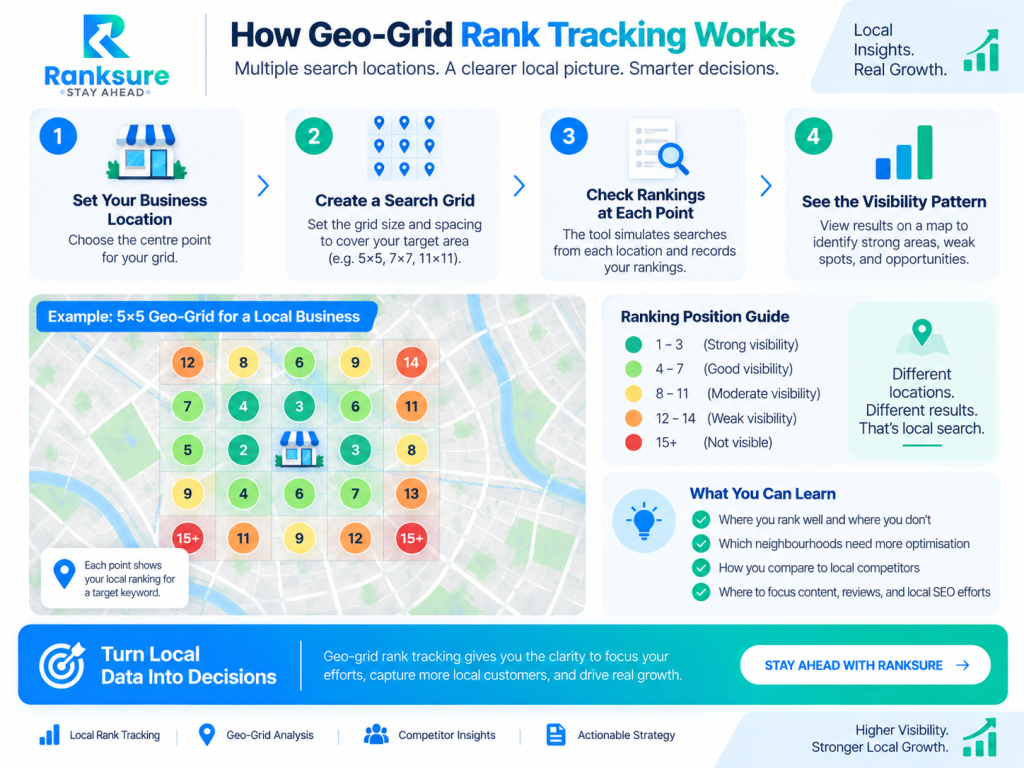
Geo-grid rank tracking divides a geographic area into multiple search points, with each point representing a simulated search location.
For example, a 5×5 grid around a dental clinic creates 25 ranking data points. The business might rank 1–3 in one part of the grid but fall beyond position 10 elsewhere, revealing geographic visibility patterns that a single ranking cannot show.
Semrush’s Map Rank Tracker uses this principle, allowing users to configure map pins, grid size, distance, keywords, and reporting schedules.
How Geo-Grid Tracking Works in Practice
A typical workflow is:
- Select the business location.
- Choose keywords with local intent.
- Define the target geographic area.
- Select the grid dimensions and spacing.
- Run an initial benchmark.
- Monitor rankings at consistent intervals.
- Compare visibility with competitors.
Record the baseline before changing categories, pages, reviews, citations, or local landing pages. Otherwise, it becomes harder to determine what actually influenced performance.
Choosing the Right Grid Size
There is no universal grid size. The right setup depends on the service area, competition, and level of geographic detail required.
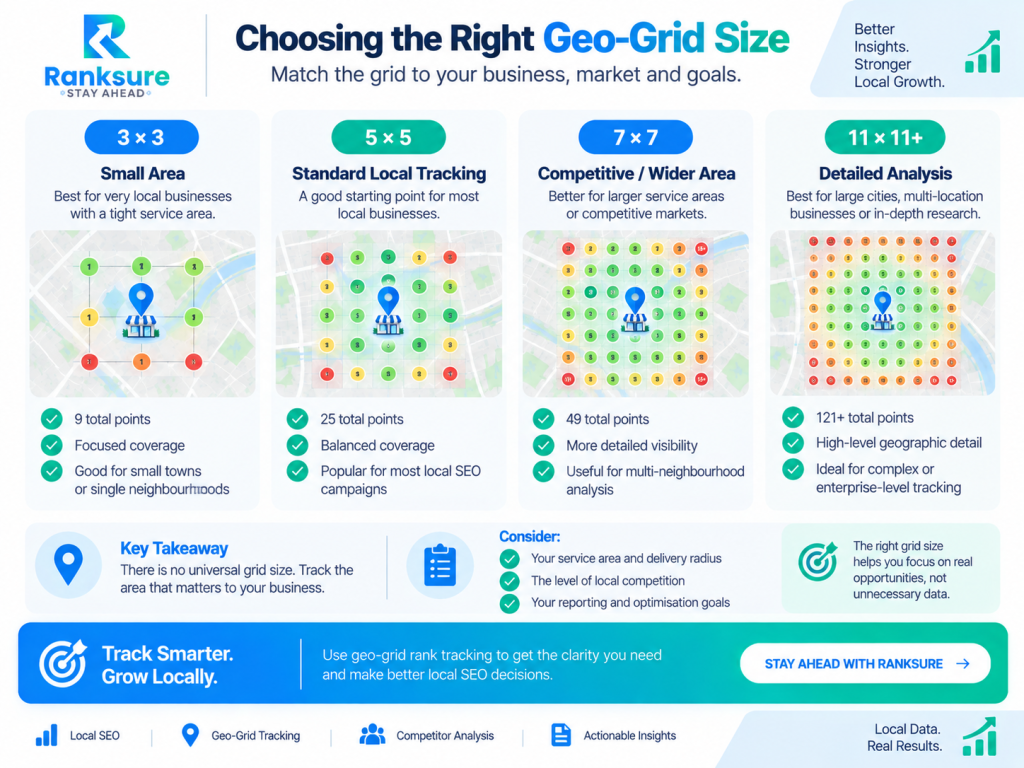
BrightLocal supports grid configurations including 3×3, 5×5, 7×7, 11×11, and 15×15, with adjustable distances between points. Its guidance suggests 5×5 as a practical starting point for many businesses.
Don’t choose a denser grid simply to collect more data. A 15×15 grid creates 225 points per keyword, which can quickly increase reporting complexity across multiple keywords and locations.
More data is useful when it supports a decision.
ZIP Codes, Radii, and Grid Density
One of the most outdated assumptions in local SEO is that tracking a keyword from a single ZIP code gives you “local rankings.”
It gives you a local ranking. That’s different.
ZIP-level tracking is useful for consistent benchmarking. Semrush, for example, supports local position monitoring down to ZIP-code level alongside Map Rank Tracker heatmaps. But a ZIP code can contain neighbourhoods with very different competitive conditions.
A practical example
Imagine a law firm serving a 10-kilometre area.
A single tracker reports:
Personal injury lawyer; Position 2
A 7×7 geo-grid scan shows:
- Average rank near the office: 1–3
- Eastern area: 4–7
- Northern area: 8–12
- Southern area: 15+
- Western area: competitor dominates positions 1–3
The agency now has a useful diagnosis. Instead of saying, “Rankings are good,” it investigates:
- Which competitors dominate the weak areas?
- Are those competitors physically closer?
- Do they have stronger category relevance?
- Are they using location-specific landing pages?
- Is the firm’s review profile weaker?
- Does the website lack content relevant to those locations?
That’s the difference between reporting numbers and actually analysing them.
How to Track Google Maps and Local Pack Rankings
Google Maps rank tracking and Local Pack tracking should be treated as separate but related measurements.
The Local Pack appears in Google’s main search results. Google Maps and the Local Finder operate within a more location-focused environment. Meanwhile, local organic results measure the performance of standard webpages.
A business performs differently across all three.
For example:
- Maps: Position 2
- Local Pack: Position 3
- Organic page: Position 11
If you only track one result type, you’re seeing part of the picture.
Semrush’s Local toolkit currently combines ZIP-level Position Tracking with Map Rank Tracker heatmaps, while its Map Rank Tracker reports metrics such as Average Rank, Share of Voice, and Rank Distribution.
Why Search Location and IP Bias Matter
This is where manual rank checking becomes unreliable. If you search for your own business from:
- the office
- your home
- your phone
- a VPN
- a specific neighbourhood
you will receive different results.
That’s why checking a keyword manually and declaring, “We’re number one,” is weak reporting methodology.
Location simulation tools aren’t perfect representations of every individual user’s results either. Search results remain dynamic. But a consistent tracking methodology across multiple predefined points is far more useful than repeatedly searching from your own browser.
The goal isn’t to discover the one “true” ranking. There isn’t one.
The goal is to create a repeatable measurement system that shows how visibility changes across the locations that matter to the business.
Key Metrics to Track in Local SEO
A strong local SEO report should measure geographic visibility alongside organic performance and business outcomes.
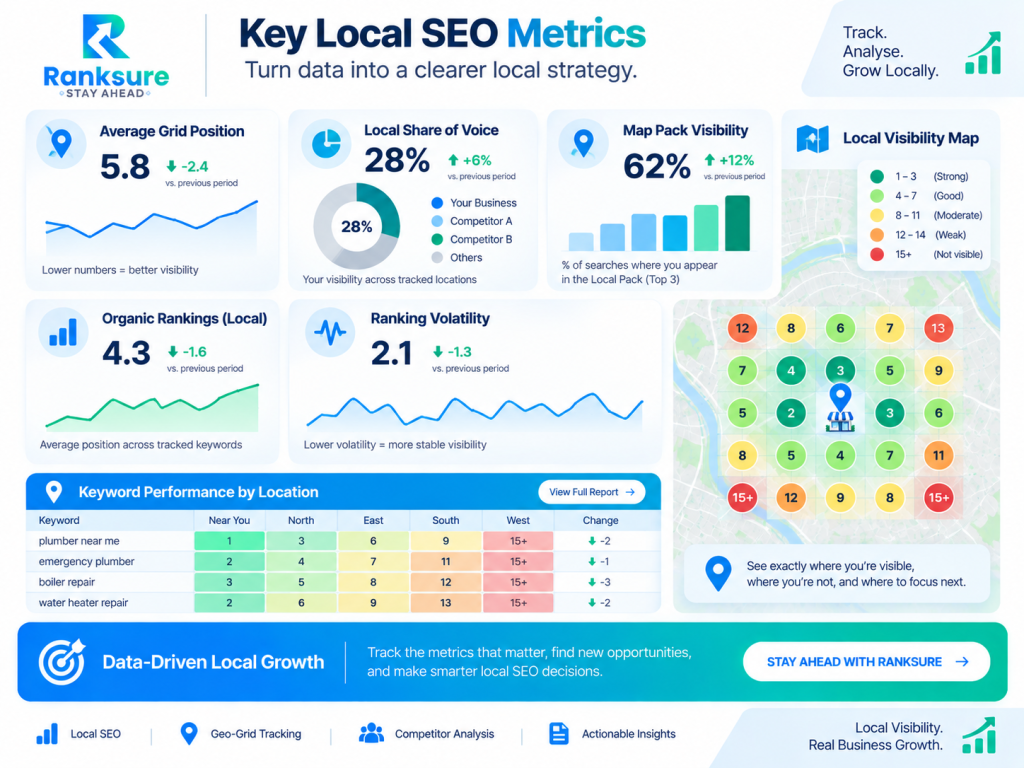
Average Grid Position
Shows overall ranking performance across grid points. Use it as a summary metric, but check the full grid because averages can hide weak neighbourhoods.
Local Share of Voice
Estimates your visibility relative to competitors across tracked searches, providing a broader view than individual keyword positions.
Map Pack Visibility
Measures how consistently the business appears in prominent local results across tracked locations. Increasing coverage can matter even without ranking #1 everywhere.
Organic Local Rankings
Track relevant service, location, and informational pages alongside Maps and Local Pack performance. Connect visibility with calls, leads, conversions, and other business outcomes.
Ranking Volatility
Monitor patterns rather than reacting to isolated movements. A competitor gaining visibility across an entire area matters more than a small change at one grid point.
How Often Should You Track Local Rankings?
Daily tracking isn’t necessary. The right frequency depends on the business, market, and campaign activity.
Recommended Tracking Frequency
Weekly: A good default for most local SEO campaigns.
Daily: Useful during high-volatility periods, major optimisation work, competitive campaigns, or short-term testing.
Monthly: Suitable for broader reporting but often too slow for diagnosing ranking changes.
BrightLocal supports ad hoc, weekly, and monthly Local Search Grid reporting, while Semrush allows Map Rank Tracker campaigns to be scheduled daily, weekly, monthly, or annually.
For most campaigns, a practical approach is to collect data weekly and analyse broader trends monthly. This provides enough data to identify meaningful changes without overreacting to short-term fluctuations.
How to Choose a Local SEO Rank Tracker
A tool should be evaluated based on methodology, not just the appearance of its heatmap.
1. Location Simulation
Can the platform track:
- ZIP codes?
- Neighbourhoods?
- Custom map areas?
- Specific geographic coordinates?
- Adjustable grid spacing?
If not, it may be too limited for competitive local campaigns.
2. Grid Customisation
Look for control over:
- Grid dimensions
- Distance between points
- Search area
- Custom point placement
- Historical comparisons
Current BrightLocal and Semrush offerings both provide configurable map-based tracking, although their grid and credit models differ.
3. Competitor Data
The best reports don’t simply show where you rank. They help answer:
Who is beating us there?
BrightLocal’s current Local Search Grid reports can show competitors at individual grid points and provide comparison data for tracked competitors.
4. Google Business Profile Integration
For local SEO campaigns, rankings shouldn’t live in isolation from Google Business Profile performance.
Look for the ability to connect ranking analysis with GBP data, reviews, categories, listings, and other local signals where relevant.
Semrush’s current Local plans, for example, include Map Rank Tracker alongside GBP-related data, bulk management, location grouping, and multi-location capabilities.
5. Multi-Location Management
For agencies and enterprise brands, the problem changes. You aren’t just asking:
How does this business rank?
You’re asking:
Which locations are underperforming, for which keywords, in which markets?
Your platform should support:
- Location grouping
- Keyword segmentation
- Bulk reporting
- Consistent grid templates
- Competitor comparisons
- Historical data
- API or reporting integrations where needed
Local SEO Rank Tracking for Multi-Location Businesses
Multi-location businesses should avoid one giant ranking report. Each location has its own competitive environment.
A restaurant in one city might compete against independent businesses. Another branch may compete against national chains with stronger review profiles and brand recognition.
Use a location hierarchy
A practical structure looks like:
Brand
→ Region
→ City
→ Business location
→ Keyword group
→ Grid or static tracking data
For each location, separate keywords into categories such as:
- Core commercial keywords
- Service-specific keywords
- “Near me” intent
- Neighbourhood modifiers
- City modifiers
- Brand terms
Don’t automatically assign the same keyword set to every location. That’s one of the easiest ways to create bloated reports filled with data nobody uses.
A Practical Geo-Grid Rank Tracking Example
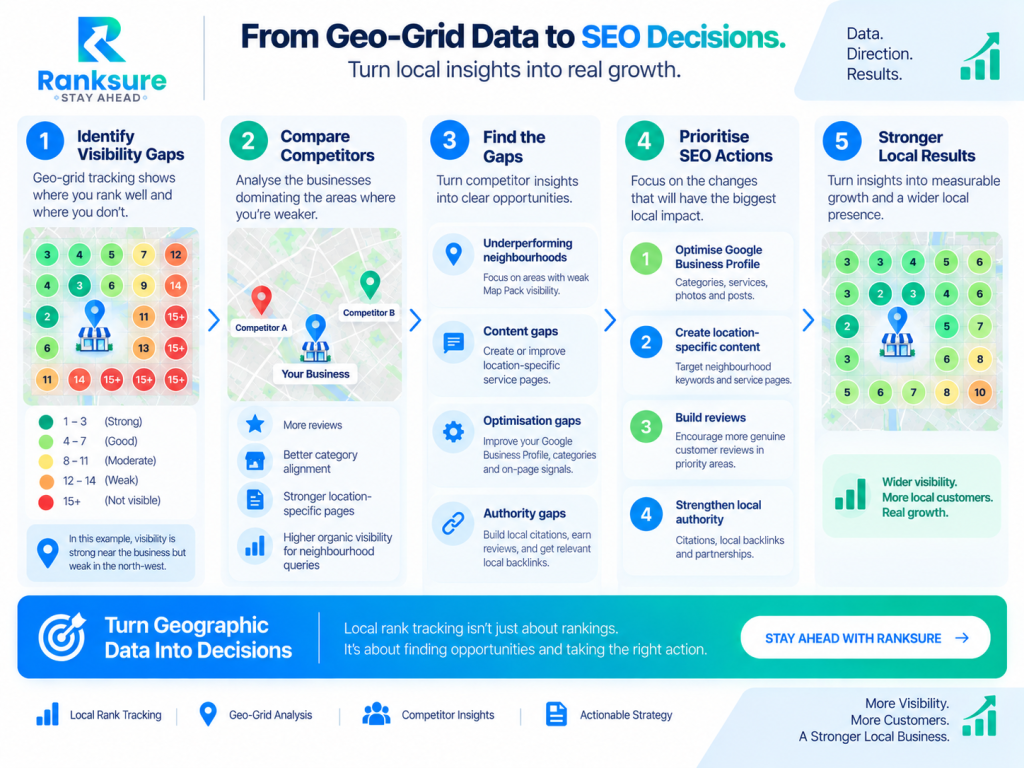
Imagine a home cleaning company serving customers within an 8-kilometre radius. A weekly 7×7 grid shows strong rankings near the office but weak Map Pack visibility in the north-west.
Competitor analysis reveals that businesses dominating the weaker area have more reviews, better category alignment, stronger location-specific service pages, and higher organic visibility for neighbourhood searches.
Instead of simply “doing more local SEO,” the agency now knows where visibility is weak and which competitive gaps deserve attention.
That’s what good local rank tracking should do: turn geographic data into decisions.
Common Local Rank Tracking Mistakes
Local rank tracking becomes less useful when the setup creates misleading or inconsistent data. These are the most common mistakes to avoid:
| Mistake | Why It Matters | Better Approach |
| Tracking only one ZIP code | A single ZIP provides a useful benchmark but can hide geographic visibility gaps. | Combine a consistent benchmark location with geo-grid tracking where broader coverage matters. |
| Using the same grid for every business | A grid suitable for a city-centre restaurant may not reflect the market of a regional service-area business. | Match the grid size and spacing to the actual service area. |
| Making the grid too large | Extending beyond the realistic market can make visibility appear weaker than it is. | Track the geographic area that actually matters to the business. |
| Changing grid settings constantly | Changing the centre point, spacing, or dimensions makes historical comparisons less reliable. | Keep the core benchmark consistent and run separate grids for diagnostic analysis. |
| Tracking too many keywords | Large keyword sets can create more data without improving decisions. | Prioritise terms connected to revenue, leads, and genuine local intent. |
| Ignoring organic results | Maps visibility alone doesn’t show the full local search picture. | Track relevant local organic rankings alongside Maps and Local Pack visibility. |
| Reacting to every ranking change | Small fluctuations can distract from meaningful geographic trends. | Focus on patterns, such as losing visibility across an entire neighbourhood. |
Practical Takeaway: Local Rank Tracking Checklist
Before launching your tracking campaign, check the following:
- Define the actual geographic service area.
- Separate Maps, Local Pack, and organic tracking where possible.
- Choose keywords based on commercial and local relevance.
- Set a consistent static location benchmark.
- Build a geo-grid that matches the business’s real market.
- Start with a practical grid density, such as 5×5 or 7×7.
- Record a baseline before major optimisation changes.
- Track important competitors across the same area.
- Review Average Rank alongside the actual map.
- Monitor Local Share of Voice where available.
- Collect data weekly unless a faster cadence is justified.
- Review trends monthly instead of reacting to every fluctuation.
- Keep grid settings consistent for historical comparisons.
- Connect ranking data with GBP actions, leads, calls, and conversions.
Conclusion: Better Local Rank Tracking Starts With Better Geography
Local rank tracking isn’t about finding one perfect ranking number. It’s about understanding where a business is visible, where it isn’t, and where competitors are gaining ground.
Instead of asking, “What position do we rank for?” ask, “Where do we rank, and does that visibility match where our customers are?” The strongest reporting combines consistent benchmarks with geo-grid analysis and real business outcomes. Rankings matter, but the geography behind them makes the data actionable.
Frequently Asked Questions
Does Geo-Grid Rank Tracking Affect Local Rankings?
No. Geo-grid tracking measures existing visibility from different search locations. It does not directly improve or change your rankings.
Why Do Local Rankings Change Within the Same City?
Local results can vary because proximity, relevance, competition, and the search location differ across neighbourhoods. This is why one city-wide ranking can be misleading.
What Is the Difference Between Local Rank Tracking and Local Search Visibility?
Rank tracking measures positions for selected keywords. Local search visibility looks more broadly at how consistently a business appears across locations, queries, and local search surfaces.
Should Service-Area Businesses Use Geo-Grid Tracking?
Yes, when visibility across a wider service area matters. The grid should reflect realistic customer locations rather than extending across an entire city unnecessarily.
Can Local Rankings Improve Without Moving the Business Location?
Yes. Proximity matters, but it isn’t the only factor. Improving relevance, website content, Google Business Profile signals, reviews, and local authority can strengthen visibility in relevant areas.