A URL communicates a page’s topic, location, and technical identity. Users read it to judge a destination, while search engines evaluate it alongside page content, internal links, canonical tags, and site architecture.
This guide explains URL components, slug rules, hierarchy design, duplicate control, and migration steps for creating stable, readable URLs.
URL Fundamentals
What Is a URL?
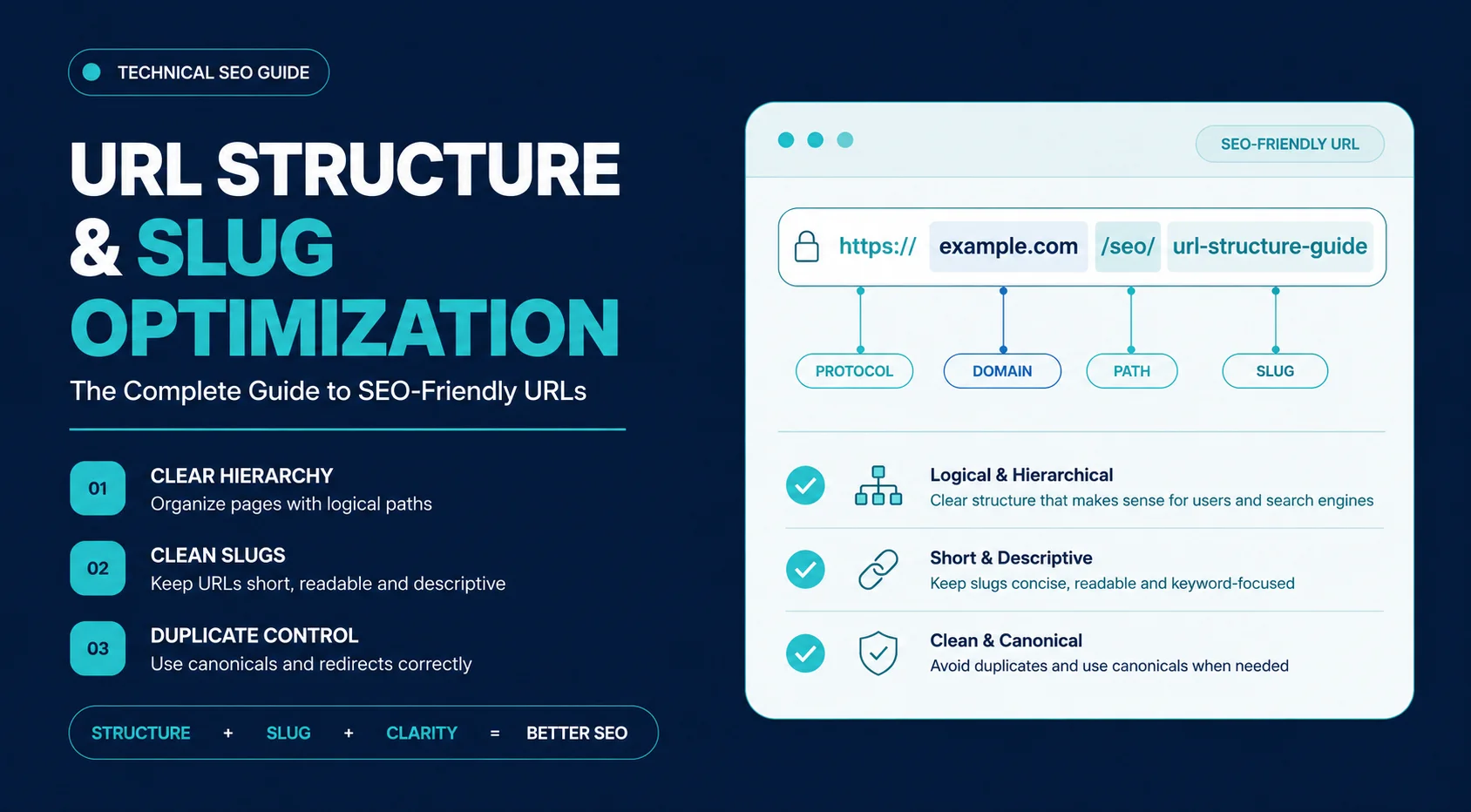
A Uniform Resource Locator (URL) is the unique web address that identifies a resource on the internet. A URL contains 6 core components: protocol, domain, path, slug, query parameters, and fragment. Each component performs a distinct technical or navigational function.
Example:
“https://example.com/seo/url-structure-guide?source=newsletter#checklist”.
Core Components
| Component | Example | Purpose |
| Protocol | https:// | Specifies how the browser communicates with the server. HTTPS encrypts data and is the standard for security and SEO. |
| Domain | example.com | The website’s primary address and brand identity. |
| Path | /seo/ | Represents folders or directories that organize content. |
| Slug | url-structure-guide | Identifies the individual page within its directory. |
| Query Parameters | ?source=newsletter | Query parameters pass tracking, filtering, search, or sorting instructions. Tracking parameters should not appear in the canonical URL. |
| Fragment | #checklist | Jumps users to a specific section of the page without creating a new document. |
Each component has a distinct role. Only the protocol, domain, path, and slug generally influence how search engines understand the page’s location within your site hierarchy.
URL Structure vs. URL Slug vs. Permalink
URL, slug, and permalink are commonly confused, but each term describes a distinct part of a web address.
| Term | Definition | Example |
| URL Structure | The complete organization of the page address, including folders and hierarchy. | /blog/on-page-seo/url-structure-guide |
| URL Slug | The final descriptive segment identifying the page. | url-structure-guide |
| Permalink | The permanent URL assigned to published content. | https://example.com/blog/url-structure-guide |
URL structure defines the address hierarchy. The slug identifies the individual page. The permalink is the complete permanent address assigned to that page.
Why URL Structure Matters for On-Page SEO
URL structure supports 4 outcomes: topic clarity, navigation, crawl consistency, and duplicate control. A descriptive slug identifies the page topic, while a logical directory connects the page to its parent category. URL structure supports SEO but does not replace content quality, internal links, or technical indexability.
Relevance Signals
Descriptive URLs reinforce page topics by aligning directory names and slugs with the content. A page about technical SEO is easier to interpret when its address reflects that topic instead of relying on generic identifiers.
Better
/technical-seo/url-structure
Poor
/page?id=4829
User Experience
Users frequently scan URLs before clicking. Short, readable addresses communicate trust and make navigation easier, especially when links appear in search results, emails, or social media.
Readable URLs also make sharing simpler because the destination remains obvious even outside its original context.
Click-Through Rate
A displayed URL or breadcrumb path helps users identify the page topic before clicking. Click-through rate still depends on the title, description, brand, search position, and alignment with the query.
Semantic Understanding
Folder names establish contextual relationships between pages.
For example:
/seo/
contains a broader topic than
/seo/on-page/
which is broader than
/seo/on-page/url-structure
This hierarchy provides additional semantic context beyond the page itself.
How Search Engines Interpret URLs
A keyword in the slug does not secure rankings. The URL provides supporting context within the website’s content, hierarchy, and internal-link structure.
URL Hierarchy as a Relevance Signal
Directory structures reveal relationships between topics.
Example:
example.com/services/local-seo/google-business-profile
The path communicates this hierarchy: Services → Local SEO → Google Business Profile.
Each level narrows the page’s subject. A logical hierarchy groups related pages under consistent directory paths.
URL Context and Topical Relationships
URLs should mirror your information architecture.
Example:
- /guides/: should contain guides.
- /products/: should contain products.
- /resources/: should contain educational content.
Mixing unrelated topics under the same folders weakens topical organization and creates unnecessary complexity.
A consistent directory tree supports stronger topic clusters and cleaner breadcrumb navigation.
Canonical URLs and Duplicate Content
The same content can often be reached through multiple addresses.
Examples:
- example.com/page
- example.com/page/
- example.com/Page
- example.com/page?ref=homepage
Search engines can discover several versions of one document through case changes, trailing slashes, parameters, protocols, or alternate paths. A canonical tag identifies the preferred version, while redirects consolidate URLs that should no longer remain accessible separately.
How AI Search Uses URL Context
AI retrieval systems treat a URL as supporting metadata rather than standalone evidence of relevance. A path such as /seo/on-page/url-optimization/ identifies the page topic, parent category, and document relationship already expressed through headings, page copy, internal links, and structured data.
A descriptive URL strengthens contextual consistency. It does not guarantee inclusion, citation, or ranking in an AI-generated response.
Building an SEO-Friendly URL Structure
URL planning becomes significantly harder after hundreds or thousands of pages are already indexed. Designing the structure before publishing avoids unnecessary redirects and architectural inconsistencies later.
Plan URL Structures Before Publishing
Start with the site’s taxonomy rather than individual pages.
Define:
- primary categories
- supporting categories
- content types
- future expansion
Planning prevents situations where URLs require major restructuring after the site grows.
Match URLs to Site Architecture
The URL hierarchy should reflect how users navigate the website.
Categories
Represent broad content groups.
Example:
- /seo/
- /blog/
- /services/
Subcategories
Organize closely related topics.
Example:
- /seo/on-page/
- /seo/technical/
Avoid creating unnecessary nesting simply because your CMS allows it.
Content Pages
The slug should describe only that page.
Example:
/seo/on-page/url-structure-guide
Each page should fit naturally beneath its parent category.
Flat vs. Hierarchical URL Structures
| Flat Structure | Hierarchical Structure |
| /url-structure-guide | /seo/on-page/url-structure-guide |
| Simpler URLs | Stronger topical context |
| Easier to manage on small websites | Better for large content hubs |
| Limited semantic grouping | Reflects site architecture naturally |
Flat structures work well for small sites with limited content.
Hierarchical URLs become more valuable as websites expand into multiple categories and topic clusters.
Folder Depth and Readability
Deep folder structures don’t automatically improve SEO.
- Poor example:
/blog/resources/marketing/seo/on-page/technical/guides/url-structure-guide
- Cleaner version:
/seo/url-structure-guide
Each additional folder should provide meaningful context rather than administrative organization.
A good rule: A folder is unnecessary if removing it does not change the page’s meaning or category relationship.
Maintain Consistent URL Patterns
Consistency matters more than creativity.
Mixed directory formats create inconsistent content paths:
- /blog/post-title
- /resources/seo-guide
- /articles/url-guide
Use one documented convention for each content type:
- /blog/post-title
- /blog/internal-linking
- /blog/schema-markup
Examples:
- /blog/post-title
- /blog/internal-linking
- /blog/schema-markup
Uniform patterns simplify crawling, internal linking, analytics, and future maintenance.
Align URL Hierarchy with Internal Linking
URLs shouldn’t exist independently of your navigation structure.
Parent-Child Relationships
Parent pages should link naturally to supporting content.
Example:
Technical SEO
├── Crawlability
├── XML Sitemaps
├── Canonical Tags
└── URL Structure
The URL hierarchy should reflect those relationships wherever practical.
Topic Clusters
Directories and internal links provide consistent organizational context when they reinforce the same topical structure.
Avoid placing unrelated subjects inside the same folder merely because they share a keyword.
Breadcrumb Consistency
Breadcrumbs, internal navigation, and URLs should tell the same story.
For example:
Home
→ SEO
→ On-Page SEO
→ URL Structure
should correspond to:
example.com/seo/on-page/url-structure-guide
Conflicting navigation paths create ambiguity for both users and crawlers.
URL & Slug Optimization Best Practices
A URL should describe the page accurately, remain stable over time, and fit naturally within the site’s architecture. Most optimization decisions are straightforward once those principles are established.
Write Clear, Human-Readable URLs
Users should understand the page topic before clicking. A URL that requires decoding needs revision.
| Good | Poor |
| /technical-seo/canonical-tags | /page?id=4528 |
| /medical-billing/montana | /cat5/post87 |
| /url-structure-guide | /seo_article_final_v3 |
Readable URLs also perform better when copied into emails, documents, and social media because they provide context without surrounding text.
Use Primary Keywords Naturally
Include the page’s primary topic where it fits naturally.
Good
/internal-linking-guide
Better
/technical-seo/internal-linking-guide
Avoid turning the slug into a list of search terms.
Poor
/best-seo-guide-best-seo-tips-seo-strategy-seo-services
One descriptive topic phrase gives the slug sufficient context. Repeated keyword variations add length without clarifying the page.
Prioritize Readability Over Keyword Density
Older SEO advice encouraged stuffing every possible variation into a slug. Keyword repetition adds text without improving the slug’s meaning.
Compare these examples.
- /seo-url-optimization
- /url-structure-guide
- /guide-to-optimizing-url-structure-for-search-engine-optimization-best-practices
The second example is descriptive, concise, and easier to remember. The third adds keywords without adding meaning.
Choose readability over keyword repetition.
Keep URLs Short Without Losing Meaning
Short URLs are easier to scan, share, and maintain.
A practical target is 3–5 descriptive words for the slug.
| Better | Too Long |
| /schema-markup | /complete-beginner-guide-to-schema-markup-for-search-engines |
| /url-structure-guide | /ultimate-guide-to-seo-friendly-url-structure-and-slug-optimization |
Don’t shorten so aggressively that the page loses context.
/urls
is less useful than
/url-structure-guide
Create Evergreen URLs
Dates, versions, and campaign names make URLs expire long before the content does.
Date-dependent URL:
/2026/url-guide
Evergreen URL:
/url-guide
An annually updated article retains the same URL while its content, examples, and publication details evolve.
Evergreen URLs reduce future redirects and preserve accumulated authority.
Keep URLs Stable Over Time
Changing a live URL always carries risk.
A page that has earned backlinks, rankings, and internal authority should keep its address unless there is a compelling reason to change it.
Minor improvements rarely justify migration.
Good URLs are designed once and maintained for years.
Use Hyphens and Lowercase Consistently
Hyphens remain the standard word separator because search engines and users can read them naturally.
Recommended
/technical-seo-guide
Avoid
/technical_seo_guide
/TechnicalSEOGuide
Lowercase URLs prevent duplicate versions on case-sensitive servers and reduce linking inconsistencies.
Handle Stop Words, Numbers, and Dates Correctly
Stop words aren’t automatically bad. Older SEO advice recommended removing words like and, to, or the. That isn’t always helpful.
Compare these slugs.
- /to-be-or-not-to-be
- /be
Removing stop words completely changes the meaning.
Stop words preserve the meaning of /terms-and-conditions, while /terms-conditions sounds incomplete.
Use stop words when they improve readability or preserve intent.
Numbers should remain in a slug when they identify product models, legal clauses, standards, or version-specific documentation.
Version numbers and publication years become outdated quickly, while product model numbers or legal references may be essential.
Avoid Special Characters and Unnecessary Parameters
Characters such as:
- &
- %
- $
- @
- !
create encoded URLs that are harder to read.
- Encoded URL: /seo%20guide
- Readable URL: /seo-guide
Tracking parameters such as utm_source, utm_medium, and utm_campaign should not appear in the canonical URL.
Example:
example.com/url-guide?utm_source=newsletter
The canonical URL should remain:
example.com/url-guide
Sorting, filtering, session IDs, and tracking parameters can multiply crawlable URLs if left unmanaged.
Optimize Category, Tag, and Archive URLs
Content hubs deserve the same attention as individual pages.
Good examples include:
- /technical-seo/
- /local-seo/
- /medical-billing/
Avoid creating hundreds of thin tag archives that contain only one or two posts.
Category pages should:
- group related content
- include descriptive introductions
- support internal linking
- help users discover related topics
Handle Trailing Slashes Consistently
A website can standardize either /services or /services/.
- example.com/services
- example.com/services/
The problem appears when both versions return a 200 OK response.
Both versions remain separately crawlable when the server returns 200 OK for each address.
Choose one standard across the entire website and redirect the alternative version.
Select one format, redirect the alternate version, and use the preferred format in internal links, canonical tags, and XML sitemaps.
URL Optimization Workflow
Building URLs becomes much easier when every page follows the same process.
Step 1: Define the Page’s Primary Topic
Every page should target one primary subject.
Ask:
- What problem does this page solve?
- Which entity is the page primarily about?
- Which category does it belong to?
The answers determine both the folder structure and the slug.
Step 2: Design the URL Hierarchy
Place the page within the appropriate directory.
Example:
SEO
└── On-Page SEO
└── URL Structure
Result:
/seo/on-page/url-structure-guide
Avoid creating folders solely because they sound organized.
Every directory should represent a meaningful topic.
Step 3: Write an Optimized Slug
Before publishing, verify that the slug:
- describes the page accurately
- uses lowercase letters
- separates words with hyphens
- excludes unnecessary dates
- avoids random IDs
- remains concise
- matches search intent
Treat the slug as the page’s permanent identifier rather than temporary copy.
Step 4: Validate URL Consistency
Compare the URL against the rest of the site.
Check for:
- consistent folder naming
- duplicate directory structures
- unnecessary nesting
- canonical conflicts
- parameter-based duplicates
Large websites benefit from documented URL conventions that every author follows.
Step 5: Publish and Monitor Performance
After publishing:
- confirm successful indexing
- inspect the page in Google Search Console
- monitor crawl errors
- verify canonical selection
- check internal links
- review rankings after several weeks
Publishing isn’t the finish line. Ongoing monitoring catches issues before they affect visibility.
Changing URLs Without Losing SEO
A URL change affects redirects, internal links, canonical tags, XML sitemaps, bookmarks, backlinks, and search-engine indexes. A direct 301 redirect connects the old address to its replacement. Incorrect mappings, redirect chains, loops, missing internal-link updates, or irrelevant destinations create crawl and traffic problems.
Reasons to Change an Existing URL
Change an existing URL to:
- correct a spelling error;
- represent a substantially changed page topic;
- support a domain migration;
- reflect a documented category restructure;
- implement a company or product rebrand;
- consolidate duplicate or obsolete paths.
These changes improve long-term organization enough to outweigh short-term migration costs.
Reasons to Keep an Existing URL
Cosmetic improvements do not justify changing an established URL that already receives internal links, backlinks, traffic, or search visibility.
Keep the existing URL when:
- a newly discovered keyword changes only the wording;
- the page topic remains unchanged;
- the publication date changes;
- the existing page receives backlinks;
- the proposed change affects appearance rather than architecture.
A stable URL almost always carries more value than a marginally improved slug.
Should You Change This URL?
| Situation | Recommendation |
| Grammar or spelling error | ✔ Change |
| Major page topic changed | ✔ Change |
| Site migration | ✔ Change |
| Brand name changed | ✔ Change |
| Better keyword discovered | ✖ Usually No |
| Publication date changed | ✖ No |
Implement 301 Redirects Correctly
Every old URL should point directly to its replacement.
Correct:
Old URL
↓
301 Redirect
↓
New URL
Avoid redirect chains.
Old
↓
New 1
↓
New 2
↓
Final
Each additional redirect adds another server request and delays access to the final destination.
Map each historical URL directly to the closest equivalent page. Send an old URL to the homepage only when the homepage provides the closest valid replacement.
Update Internal Links and XML Sitemaps
Redirects help users reach the correct page, but internal links should never depend on redirects permanently.
Complete 6 URL-migration tasks:
- Update navigation links.
- Update contextual links.
- Update breadcrumb links.
- Regenerate the XML sitemap.
- Replace canonical URLs.
- Revise URLs in structured data.
Search engines discover new URLs faster when the entire site references the updated address.
Validate Indexing After URL Changes
Migration isn’t complete until search engines recognize the new version.
Review:
- URL Inspection in Google Search Console
- indexing status
- crawl errors
- redirect responses
- canonical selection
- internal links
- traffic trends
- keyword rankings
Monitor indexing, crawl errors, canonical selection, traffic, and rankings after migration. Continuing losses require an audit of redirect mappings, destination relevance, internal links, canonical tags, sitemap entries, and server responses.
Common URL Structure & Slug Mistakes
Most URL problems aren’t caused by search engine algorithms—they stem from inconsistent publishing practices. These issues accumulate over time, making sites harder to crawl, maintain, and scale.
| Problem | Evidence | Required correction |
| Auto-generated path | /blog/post-5489?article=1287 | Replace IDs with a descriptive permanent slug |
| Keyword stuffing | /seo-url-guide-url-optimization-best-url-structure | Retain one clear topic phrase |
| Duplicate versions | HTTP/HTTPS, case, slash, parameters | Apply redirects and canonical tags |
| Inconsistent naming | underscores, capitals, mixed directories | Document one naming convention |
| Frequent changes | repeated redirects and sitemap updates | Retain the established URL without a technical reason |
| Broken redirects | chains, loops, 404s, irrelevant targets | Map each old URL directly to one relevant destination |
Auditing URL Structure & Slugs
A URL audit evaluates consistency, readability, crawlability, and indexation rather than looking only at keywords.
Conduct one before a site migration, after a redesign, or as part of regular technical SEO maintenance.
How to Audit URL Quality
Evaluate URLs from three perspectives: users, search engines, and site architecture.
Readability
Ask whether someone can understand the page before visiting it.
Example:
/technical-seo/xml-sitemaps
communicates more than
/page-437
Relevance
The slug should accurately represent the page.
A page discussing canonical tags shouldn’t use a slug focused on crawl budget simply because the keyword has higher search volume.
Consistency
Review naming conventions across similar pages.
Look for:
- mixed singular and plural folders
- inconsistent category names
- uppercase URLs
- multiple separators
- unnecessary directory depth
Duplicate Paths
Search for identical pages available through:
- alternate categories
- pagination
- filtered URLs
- tracking parameters
- protocol variations
Canonical tags and redirects should consolidate these versions.
Redirect Issues
Review every redirect after migrations.
Check for:
- redirect chains
- broken redirects
- soft 404s
- incorrect destination pages
One redirect should lead directly to the final URL.
Broken Links
Internal links pointing to deleted or redirected URLs waste crawl resources and degrade user experience.
Prioritize fixing broken navigation, breadcrumbs, and contextual links before updating less important references.
Orphan Pages
An orphan page has no internal links pointing to it.
An indexed orphan page remains disconnected from internal navigation and receives no internal-link path from related content.
Cross-reference crawl data with XML sitemaps to identify orphan pages and reconnect them to relevant topic clusters.
Recommended URL Audit Tools
| Purpose | Recommended Tools |
| URL Inspection | Google Search Console |
| Site Crawling | Screaming Frog SEO Spider |
| Technical Site Audit | Ahrefs, Semrush, Sitebulb |
| Redirect Validation | Redirection, HTTP Status Checker |
| URL Testing | Chrome DevTools |
Combine crawler data with Google Search Console. A crawler identifies duplicate paths, redirect chains, broken links, and orphan pages. Search Console reports indexing status, submitted URLs, and Google-selected canonicals.
URL Structure & Slug Optimization Checklist
Pre-Publication Checks
- URL reflects the page topic.
- Primary keyword appears naturally.
- Slug is concise and descriptive.
- Lowercase letters are used throughout.
- Words are separated with hyphens.
- Dates are excluded unless necessary.
- Special characters are avoided.
- URL matches the site’s hierarchy.
- The address reads naturally.
URL-Migration Preparation
- The change has a clear business or technical reason.
- A 301 redirect has been prepared.
- Internal links will be updated.
- XML sitemap will be regenerated.
- Canonical tags will reference the new URL.
- Redirect conflicts have been checked.
Post-Publication Checks
- Google has indexed the URL.
- Redirects return the correct status code.
- Crawl errors are monitored.
- Internal links point directly to the new URL.
- Rankings are tracked.
- Organic traffic is monitored.
- Canonical URL is recognized correctly.
URL Structure Examples
Before-and-After URL Improvements
| Page purpose | Poor URL | Improved URL | Improvement |
| Blog article | /blog/post-123?id=98 | /blog/url-structure-guide | Identifies the page topic |
| Service page | /service?id=42 | /services/local-seo | Connects the service to its category |
| Product category | /cat7/items | /products/office-furniture | Replaces IDs with descriptive entities |
| Documentation | /docs/page_v4 | /docs/api-authentication | Uses a stable technical topic |
| Knowledge base | /help/article-287 | /help/account-security | Clarifies the user problem |
| Evergreen guide | /2026/07/seo-guide | /seo-guide | Removes an unnecessary date |
Key Takeaways
- A URL should identify the page topic and its position within the site architecture.
- Use lowercase letters, hyphens, and the shortest slug that preserves meaning.
- Keep canonical URLs free from tracking parameters, duplicate paths, and unnecessary dates.
- Retain established URLs unless the page topic, brand, domain, or architecture requires a change.
- Connect every changed URL to its closest replacement through one direct 301 redirect, then update internal links, canonicals, and XML sitemaps.
Frequently Asked Questions
Should I remove stop words?
Remove stop words only when the remaining slug preserves the page meaning. Keep them in phrases such as /terms-and-conditions/, /how-to-code/, or /to-be-or-not-to-be/.
Can changing a URL hurt rankings?
Ranking and traffic losses occur when the migration contains missing redirects, incorrect destinations, redirect chains, outdated internal links, or conflicting canonicals. A direct 301 redirect signals that the resource has moved permanently, but the complete migration process determines the result.
What happens if I don’t use a 301 redirect?
A missing redirect sends visitors and backlinks to the old address, which returns a 404 response unless the server provides another route. Search engines must then discover and evaluate the replacement as a separate URL.
How do canonical URLs prevent duplicate content?
A canonical tag tells search engines which version of similar or identical URLs should be treated as the primary page, consolidating indexing and ranking signals.
How does AI search interpret URLs?
AI-powered search systems use URLs as supporting context rather than primary ranking factors. Clean, semantic URLs reinforce entity recognition, clarify topical relationships, and complement content, structured data, and internal linking during retrieval and ranking.