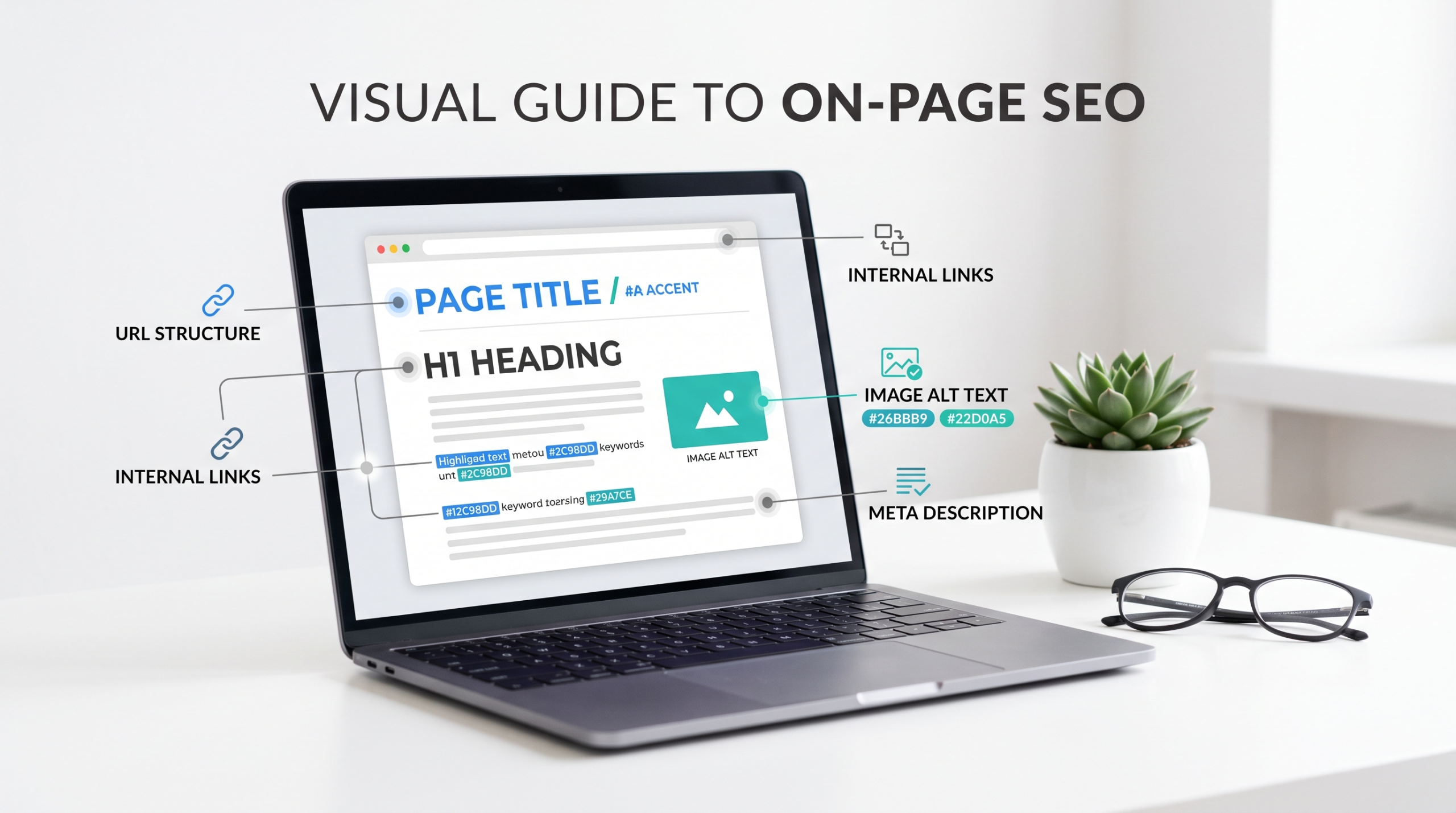
Most of the on-page SEO advice treats optimization like a placement exercise: put the keyword in the title, H1, URL, and a few paragraphs, then move forward. That model is too shallow.
A well-optimized page works like a map; every element, from the title tag to the internal links and supporting images, helps search engines and users understand the same underlying topic.
This visual guide to on-page SEO breaks that map into practical layers: keyword targeting, page architecture, heading hierarchy, visual content, internal links, and technical signals.
The goal isn’t to repeat a phrase in every available field. It’s to make the page’s purpose obvious.
Table of Contents
- What a visual approach to on-page SEO actually means
- The keyword targeting blueprint
- The keyword placement map
- Visual page architecture
- Heading structure and search intent
- Content formatting and information retrieval
- Visual search optimization
- Internal linking
- Technical on-page signals
- Common optimization failures
- A practical on-page SEO checklist
- A complete page example
- On-page SEO and AI search
- FAQs
- Final thoughts
What Is a Visual Approach to On-Page SEO?
A visual approach doesn’t mean replacing the article with an infographic.
It means treating the page as a system where every visible and invisible element supports the same topic.
Think of it like this:
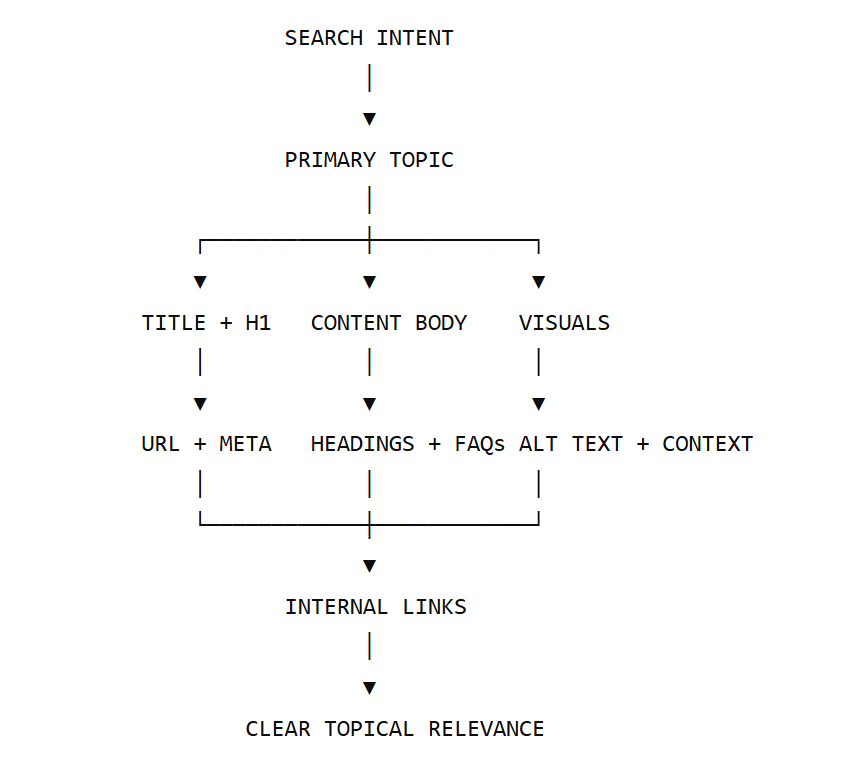
When these elements point in different directions, the page becomes harder to interpret.
For example, imagine a page targeting “keyword targeting guide.”
- The title says: Complete Keyword Targeting Guide
- The H1 says: How to Do SEO Research
- Half the article discusses PPC campaigns
- The images are named image-01.png
- The internal links point to unrelated marketing services
The page may contain useful information, but its topical signal is scattered.
A stronger version would make the intent consistent:
Title: Keyword Targeting Guide: How to Map Keywords to Pages
H1: How to Target Keywords Without Keyword Stuffing
H2s: Search intent, keyword mapping, placement, supporting terms
Visual: A keyword-to-page mapping diagram
Internal links: Keyword research, content clustering, search intent
That’s what an on-page SEO visual guide should help you build: alignment, not decoration.
Google’s guidance supports this broader view. Google uses multiple signals when generating title links, including the HTML title, visible page title, headings, prominent text, anchor text, and other page content. In other words, the <title> element isn’t operating in isolation.
The Keyword Targeting Blueprint: Start With Search Intent
The first mistake happens before anyone writes a title. They choose a keyword and immediately start looking for places to insert it.
Start somewhere else:
What is the searcher actually trying to accomplish?
A keyword can represent several layers of intent:
| Layer | Example |
| Primary query | visual guide to on-page SEO |
| Immediate intent | Understand how page elements should be optimized |
| Supporting questions | Where should keywords go? How should headings work? |
| Related needs | Image SEO, internal linking, meta tags, URLs |
| Outcome | Build or audit an optimized page |
This creates a much better content brief than simply listing 20 keywords.
A Simple Keyword Targeting Map
PRIMARY KEYWORD
Visual guide to on-page SEO
│
├── Keyword targeting guide
│ ├── Search intent
│ ├── Primary vs supporting terms
│ └── Keyword-to-page mapping
│
├── Keyword placement map
│ ├── Title
│ ├── H1
│ ├── Introduction
│ └── Relevant body sections
│
├── Visual search optimization
│ ├── Image context
│ ├── Alt text
│ └── Supporting captions
│
└── Technical on-page signals
├── URL
├── Metadata
├── Internal links
└── Crawlability
The goal is not to force every secondary keyword into an exact-match heading.
Use them where they describe a genuine section of the topic.
Primary, Secondary, and Supporting Terms
A practical page has three levels.
Primary keyword:
The central topic the page is built around.
Secondary keywords:
Closely related variations that deserve meaningful coverage.
Supporting concepts and entities:
Terms that help explain the subject completely.
For this article, the page shouldn’t just repeat a visual guide to on-page SEO. It should discuss:
- title tags
- search intent
- H1 and H2 hierarchy
- keyword placement
- internal linking
- image alt text
- meta descriptions
- URLs
- structured data
- content formatting
Those concepts help define what the topic means.
I’ve seen pages with excellent keyword density perform poorly because they never answer the obvious follow-up questions a real searcher has. Coverage beats repetition.
One Keyword Doesn’t Mean One Page
The idea that one keyword must equal one page is outdated when applied too literally.
A page should have one clear primary purpose, but that doesn’t mean it can only rank for one phrase.
A useful page about on-page SEO may rank for many related queries because it answers the surrounding questions naturally.
The better question isn’t:
How many keywords can this page target?
It’s:
Do these queries represent the same underlying intent and belong naturally on the same page?
If they do, separating them into multiple shallow pages can create unnecessary overlap rather than stronger optimization.
Keyword Placement Map: Where Keywords Actually Belong
Here’s the recommended visual model:
| URL /visual-guide-on-page-seo/ |
| TITLE TAG Visual Guide to On-Page SEO | Keyword Map |
| H1 Visual Guide to On-Page SEO |
| INTRODUCTION Establish topic + intent naturally |
| H2: KEYWORD TARGETING Explain primary and supporting terms |
| H2: KEYWORD PLACEMENT Show relevant placement examples |
| H2: VISUAL + IMAGE OPTIMIZATIONImage context, alt text, captions |
| H2: INTERNAL + TECHNICAL SIGNALSLinks, metadata, URLs, schema |
The keyword doesn’t need to appear mechanically in every box.
1. Title Tag
Your title tag should describe the page accurately and give searchers a reason to click.
Weak:
On-Page SEO | SEO | SEO Guide | Keywords
Better:
Visual Guide to On-Page SEO: Keyword Targeting Map
The second version is clearer because it identifies both the topic and the angle.
Google recommends descriptive, concise titles and may generate title links from several page signals, not only the <title> element.
2. H1
The H1 should make the primary topic immediately clear. You don’t need to create a strange sentence just to force an exact keyword.
For example:
Visual Guide to On-Page SEO: How to Target and Structure a Page
That works because the phrase is natural and the rest of the heading explains the benefit.
3. Introduction
Use the primary topic early if it fits naturally.
Don’t write:
On-page SEO is important for on-page SEO because on-page SEO helps your on-page SEO.
It sounds ridiculous when written that way, yet plenty of pages still use a more subtle version of the same tactic.
The introduction should establish:
- What the page covers
- Why the topic matters
- What problem the reader will solve
4. Headings
Use headings to organize questions and subtopics. Don’t turn every H2 into a keyword variation.
Poor structure:
- H2: On-Page SEO Guide
- H2: On-Page SEO Tips
- H2: On-Page SEO Strategy
- H2: On-Page SEO Checklist
Better:
- H2: How to Choose the Right Primary Keyword
- H2: Where Should Keywords Appear on a Page?
- H2: How to Structure Headings for Search Intent
- H2: What Makes an Image SEO-Friendly?
The second structure creates clearer information boundaries.
5. Body Content
Keywords belong where the topic requires them. A useful test is simple: remove the keyword and read the sentence.
If the sentence communicates the idea and the surrounding section remains relevant, you’re probably fine.
6. Image Alt Text
Alt text should describe the image’s content or function.
Bad:
on page SEO visual guide keyword targeting on page SEO checklist SEO
Better:
Diagram showing keyword placement across the title tag, H1, headings, body text, and image context
The second description explains what someone would miss if they couldn’t see the image.
7. Meta Description
A meta description isn’t a place to dump leftover keywords. Use it to summarize the page’s value.
Weak:
Learn on-page SEO, keyword targeting, keyword placement, on-page optimization, SEO guide and visual SEO.
Better:
Learn how to target keywords, structure pages, optimize visuals, and strengthen on-page SEO with a practical visual blueprint.
The second version gives the searcher an actual reason to investigate the result.
Visual Page Architecture: Build the Information in the Right Order
Placement is a part of the problem.
A page can have an optimized title, H1, URL, and headings and still frustrate the reader if the information arrives in the wrong order.
A useful sequence looks like this:
SEARCH QUERY
│
▼
TITLE + META
Sets expectation
│
▼
H1 + INTRO
Confirms relevance
│
▼
CORE ANSWER
Solves the main question
│
▼
SUPPORTING SECTIONS
Build depth and context
│
▼
EXAMPLES + VISUALS
Make concepts easier to apply
│
▼
RELEVANT NEXT STEPS
Continue the reader’s journey
The important part is the sequence. Don’t spend 800 words defining a topic before answering the question that brought the user there.
For informational queries, give the reader orientation early, answer the core need, then expand.
The First-Screen Test
When someone lands on your page, they should quickly understand:
- What is this page about?
- Is it relevant to my search?
- Where can I find the answer I need?
- Is this content worth continuing with?
A clear introduction, descriptive headings, and a useful table of contents solve this without any advanced SEO trick.
How Should Heading Structure Match Search Intent?
Headings are navigation labels. That’s their first job. A useful hierarchy looks like this:
H1: Visual Guide to On-Page SEO
│
├── H2: How Keyword Targeting Works
│ ├── H3: Choose a Primary Keyword
│ ├── H3: Identify Supporting Terms
│ └── H3: Map Keywords to Intent
│
├── H2: Where Should Keywords Be Placed?
│ ├── H3: Title and H1
│ ├── H3: Body Content
│ └── H3: Images and Alt Text
│
├── H2: How to Optimize Page Structure
│
└── H2: On-Page SEO Checklist
Notice that the hierarchy follows the reader’s learning path. That’s more useful than treating headings as extra keyword containers.
Don’t Use Headings to Hide Thin Content
A page with 20 H2s can still be thin.
For example:
H2: What Is Alt Text?
Alt text describes images.
Technically correct, but not useful. A stronger section would explain:
- what alt text should communicate
- when decorative images may not need meaningful descriptive text
- why surrounding page context matters
- an example of good versus bad implementation
The goal isn’t a high word count. It’s enough context to answer the question properly.
Google’s spam policies also focus on whether content provides value rather than whether a large amount of content exists.
Content Formatting for Users and Information Retrieval
Good formatting isn’t just cosmetic. It helps people find the specific part of a page that answers their question.
A page covering multiple concepts benefits from:
- descriptive headings
- short paragraphs
- comparison tables
- numbered processes
- concise definitions
- examples directly below complex concepts
- diagrams where relationships are difficult to explain in prose
Example: Paragraph Versus Structure
Instead of writing 300 words explaining keyword placement in one block, use a simple map:
| Page Element | Primary Role | Keyword Use |
| Title tag | Describe result | Natural primary topic |
| H1 | Confirm page subject | Clear topic alignment |
| Introduction | Establish relevance | Early contextual mention |
| H2s | Organize subtopics | Use only where relevant |
| Body | Explain the subject | Natural variations |
| Alt text | Describe visuals | Describe image meaning |
| Internal anchors | Build topical relationships | Use descriptive context |
This doesn’t mean every article needs a table every 300 words. The point is to change format when the information structure changes.
A comparison belongs in a table. A process may belong in numbered steps. A hierarchy may need a diagram.
Visual Search Optimization: Images Need Context, Not Just Alt Text
One of the weakest forms of image SEO is adding alt text and considering the job finished. Search engines and users get meaning from the whole image environment:
PAGE TOPIC
│
▼
SECTION HEADING
│
▼
EXPLANATORY TEXT
│
▼
IMAGE
/ │ \
▼ ▼ ▼
ALT TEXT CAPTION FILE CONTEXT
The image should reinforce the surrounding section.
Example
Imagine an infographic showing where keywords belong on a page.
Weak implementation:
File: seo-image-final-v3.png
Alt: SEO infographic
Text above: Unrelated paragraph
Text below: Nothing
Stronger implementation:
Heading:
Where Should Keywords Be Placed?
Intro:
The following keyword placement map shows the main locations where topical relevance can be established.
Image:
Keyword placement diagram
Alt text:
Diagram showing keyword placement in the URL, title tag, H1, headings, body content, and relevant image descriptions.
Supporting text:
Keywords don’t need to appear in every location. Each element should reinforce the page topic naturally.
That’s a complete information unit.
Bare Visuals Are a Content Gap
An infographic with no supporting explanation can become a dead end. The visual communicates the idea to a human, but the page should still contain useful text explaining:
- what the graphic shows
- why it matters
- how to apply it
This is important for technical diagrams and data-heavy graphics.
Internal Linking: Build Contextual Paths, Not Random  Connections
Internal links are added at the end of the writing process. That’s backwards. They should be part of the content architecture.
Imagine this topic as a pillar:
Each related article can support the others.
Anchor Text Should Describe the Destination
Weak:
Read more here.
Better:
Learn how to build a keyword-to-search-intent map before assigning terms to pages.
The anchor tells both the reader and the site architecture what the next resource is about.
Don’t force an exact-match keyword into every anchor. Natural descriptive anchors are more useful.
Technical On-Page Signals: URLs, Meta Tags, Schema, and Crawlability
Content quality doesn’t help much if the page is difficult to crawl, understand, or access.
URLs
Keep them readable and stable.
Less useful:
/example.com/blog/article?id=5829&topic=seo-guide
Clearer:
/example.com/visual-guide-on-page-seo/
You don’t need to include every target keyword in the URL. One descriptive phrase is enough.
Title Tags
Keep them concise and descriptive.
Don’t assume Google will always display them exactly as written. Google may generate title links using several signals from the page and references across the web.
That makes alignment between the title, visible H1, and page content important.
Meta Descriptions
Write them for searchers. They should communicate:
- the topic
- the value
- the likely scope
Google chooses different snippet text depending on the query, so obsessing over exact character counts is less useful than writing a clear, relevant summary.
Structured Data
Schema is not a shortcut to rankings. Use structured data when it represents the pages’ content and is supported by the relevant search feature.
For a guide, that might include appropriate Article markup and other valid structured data where applicable. Don’t add markup simply because a competitor has it.
Validate it and make sure the visible content supports what you’re marking up.
What Commonly Makes On-Page SEO Content Underperform?
Even technically optimized pages can underperform when individual elements don’t work together.
| Mistake | Why It Fails | Better Approach |
| Using images without enough context | A graphic or generic alt tag alone may not explain what the visual contributes | Add descriptive headings, supporting copy, meaningful alt text, and captions where useful |
| Creating thin sections only to target keywords | A heading exists, but the section adds little useful information | Merge overlapping sections or expand them with practical context |
| Writing generic meta descriptions | The searcher still doesn’t know what the page specifically covers | Explain the topic, value, and likely outcome |
| Repeating the target phrase mechanically | Readability suffers and the content begins to feel built around a checklist | Use natural terminology, related concepts, and direct answers |
| Misaligning the title and content | The search result creates an expectation the page doesn’t satisfy | Make sure the page delivers the depth and angle promised by the title |
| Treating every keyword variation as a separate content opportunity | Creates overlapping or shallow pages targeting nearly identical intent | Group queries where they genuinely belong together and separate them when intent differs |
The common thread is simple: optimization fails when an element exists for SEO rather than for the page’s actual purpose.
Practical Takeaway: On-Page SEO Checklist
Before publishing, run through this:
- Is the primary topic clear from the title and H1?
- Does the introduction quickly confirm search intent?
- Does each H2 answer a distinct question or cover a necessary subtopic?
- Are secondary keywords used because they add meaning rather than because they appear on a list?
- Does the page answer obvious follow-up questions?
- Are thin sections expanded, merged, or removed?
- Do images have meaningful contextual support?
- Does alt text describe the image rather than stuff keywords?
- Is the heading hierarchy logical?
- Do internal links lead to genuinely relevant pages?
- Is the URL readable and descriptive?
- Does the meta description clearly explain the page?
- Is any structured data accurate and supported by visible content?
- Can a reader scan the page and still understand its structure?
If several answers are “no,” adding more keywords won’t solve the problem.
Visual Guide to On-Page SEO: A Complete Page Example
Let’s map out a hypothetical article targeting:
Primary keyword: best keyword targeting strategies
A weak page might look like this:
TITLE
Best Keyword Targeting Strategies
H1
Best Keyword Targeting Strategies
PARAGRAPH
Keyword targeting is important for keyword targeting…
H2
Keyword Targeting Tips
IMAGE
seo.jpg
H2
Keyword Targeting Strategy
CONCLUSION
Keyword targeting is important.
It contains the keyword. It doesn’t demonstrate expertise.
Now compare that with a stronger page architecture:
TITLE
Best Keyword Targeting Strategies for Mapping Search Intent
│
▼
H1
How to Target Keywords to the Right Pages
│
▼
INTRODUCTION
Explain the common problem:
Multiple pages targeting the same intent
│
▼
H2: START WITH SEARCH INTENT
Informational vs commercial vs transactional signals
│
▼
H2: BUILD A KEYWORD MAP
Assign primary and supporting terms to page types
│
▼
H2: PREVENT KEYWORD CANNIBALIZATION
Example of two pages competing for similar intent
│
▼
H2: OPTIMIZE THE PAGE ITSELF
Title, H1, headings, content, visuals, internal links
│
▼
H2: AUDIT PERFORMANCE
Impressions, clicks, queries, engagement, conversion
The difference is structural. The stronger page doesn’t just mention the topic. It guides the reader through a problem, explains the system, and gives them a way to apply it.
What This Means for Content Teams
Don’t create one shallow page for every tiny keyword variation.
Instead, ask:
Can these queries be answered comprehensively on one page without making the content unfocused?
If yes, they may belong together.
If not, separate them and connect the pages through a logical internal linking structure.
That’s a more useful approach to topic clustering than publishing dozens of near-identical articles.
Why On-Page SEO Requires More Than a Keyword Checklist
Search is increasingly able to handle complex questions, follow-up queries, and multimodal inputs.
That doesn’t mean websites need a completely separate set of “AI SEO” rules.
Google’s guidance for AI features in Search continues to emphasize the same underlying foundations: useful and original content, technical accessibility, accurate supporting information, and established SEO best practices.
The practical lesson is straightforward:
Build pages that can stand on their own as useful resources.
Don’t write a paragraph because a keyword tool says the phrase has volume. Don’t add an infographic solely because a competitor has one.
Don’t publish dozens of near-identical pages simply to cover keyword variations.
The page should provide enough substance that its usefulness remains clear regardless of whether someone discovers it through a traditional search result, an image search, or an AI-assisted search experience.
Final Thoughts: Build the Map Before You Optimize the Page
The best visual guide to on-page SEO isn’t really about memorizing where to place a keyword. It’s about seeing how the pieces connect.
When the title, headings, content, visuals, internal links, and technical signals support the same search intent, optimization becomes much less mechanical. So stop auditing pages with only a keyword-placement checklist.
Start with the map instead.
Ask whether every major element helps solve the same searcher’s problem—and whether anything on the page exists only to satisfy an outdated SEO rule.
FAQ: Visual Guide to On-Page SEO
What Is the Best Way to Target a Keyword on a Page?
Start by matching the keyword to search intent. Then use the topic naturally in the title, H1, introduction, and relevant sections while covering the supporting questions a searcher would reasonably expect answered.
The goal is topical clarity, not exact-match repetition.
How Many Times Should a Keyword Appear for SEO?
There is no useful universal number.
Keyword repetition should not be treated as a ranking formula. Use the phrase when it helps describe the subject, then rely on natural language and relevant supporting concepts.
Should Every Image Have Keyword-Rich Alt Text?
No.
Alt text should describe the image or its function. Forcing keywords into every image description can make the content less useful and less accessible.
Does On-Page SEO Help With AI Overviews and AI Mode?
Yes, but not through a separate “AI keyword density” formula.
The same core practices- technical accessibility, useful content, clear page structure, relevant supporting information, and compliance with Search policies- remain important for AI features in Search.
Does Every Page Need to Target One Primary Keyword?
Not in the rigid sense of assigning exactly one phrase to every URL.
A page should have a clear primary purpose and search intent. A primary keyword can help define that focus, but the page may naturally answer many related queries.
The more important question is whether those queries belong to the same intent. If they do, they may work well together. If they require meaningfully different answers, separate pages may be more useful.