Search for something as simple as “best running shoes,” and you may see ads, product listings, maps, videos, images, questions, and traditional blue links, all on one page. That page is a SERP, or Search Engine Results Page.
The interesting part is that Google doesn’t build every SERP the same way. The query, search intent, device, location, and available search features all influence what appears.
If you’re doing SEO, understanding the SERP matters because rankings don’t happen in isolation. A page can rank highly and still receive fewer clicks if the results page is crowded with ads, AI-generated answers, shopping results, or other features.
What Is a SERP?
A SERP (Search Engine Results Page) is the page a search engine displays after a user enters a search query.
The search engine results page definition sounds simple, but the page itself contains different types of results. A Google SERP include:
- Paid search advertisements
- Organic website listings
- Featured Snippets
- People Also Ask questions
- Local Pack results
- Knowledge Panels
- Images
- Videos
- News results
- Shopping or product results
- AI Overviews
- Other specialized search features
So, when someone asks “what is a SERP?”, the useful answer isn’t just “the page with search results.”
A SERP is the complete search environment presented for a particular query. Think of it as the intersection between what the user searched for and what the search engine believes will satisfy that search.
That distinction is critical for SEO.
A person searching “what is technical SEO” needs a very different result page from someone searching “buy technical SEO audit.” The first query may produce definitions, guides, Featured Snippets, and People Also Ask questions. The second may produce service pages, commercial results, ads, and comparison content.
What Does SERP Mean in SEO?
In SEO, SERP meaning refers to the specific search results and search features that appear for a keyword or query.
SEO professionals don’t only ask:
“What position does this page rank at?”
They also ask:
“What does the SERP look like for this query?”
That second question is more useful.
If the first page contains ten traditional organic listings, you have one competitive environment. If it contains an AI Overview, four ads, a shopping carousel, a Local Pack, videos, and People Also Ask, the opportunity is different, even if the keyword has the same monthly search volume.
How Do SERPs Work?
A SERP starts with a search query. Google processes that query, identifies intent, retrieves relevant information from its index, ranks eligible results, and constructs a results page.
Google describes crawling, indexing, and serving results as separate parts of the Search process. Crawlers discover URLs, Google fetches resources, and its systems analyze and store information before relevant content can be returned in Search.
The simplified process looks like this:
Search query → Intent interpretation → Retrieval → Ranking → SERP generation → User interaction
Google isn’t simply selecting ten websites and putting them in a list. It can assemble different result types based on what it believes will best answer the query.
How Search Engines Choose What to Show
Suppose someone searches:
“best restaurants in Lahore”
The search engine has several possible ways to satisfy that query:
- Local businesses
- Maps
- Reviews
- Restaurant websites
- Images
- Videos
- Guides and listicles
For:
“how to change a tire”
the page may favor:
- Step-by-step content
- Videos
- Images
- Featured Snippets
- Related questions
The search engine is responding to the meaning behind the query, not just matching exact words.
This is why copying the keyword into a page repeatedly doesn’t guarantee visibility.
Why the Same Keyword Can Produce Different Results
SERPs also vary based on:
- Location
- Device
- Language
- Search history and personalization
- Query wording
- Search intent
- Time and current events
- Available search features
A local searcher and a user in another country may therefore see different results for what appears to be the same query.
Mobile and desktop results can also have different layouts and dimensions. That’s one reason SEO teams should inspect important SERPs on more than one device.
Anatomy of a Search Engine Results Page
There isn’t one fixed SERP template. Still, most traditional organic listings contain several recognizable components.
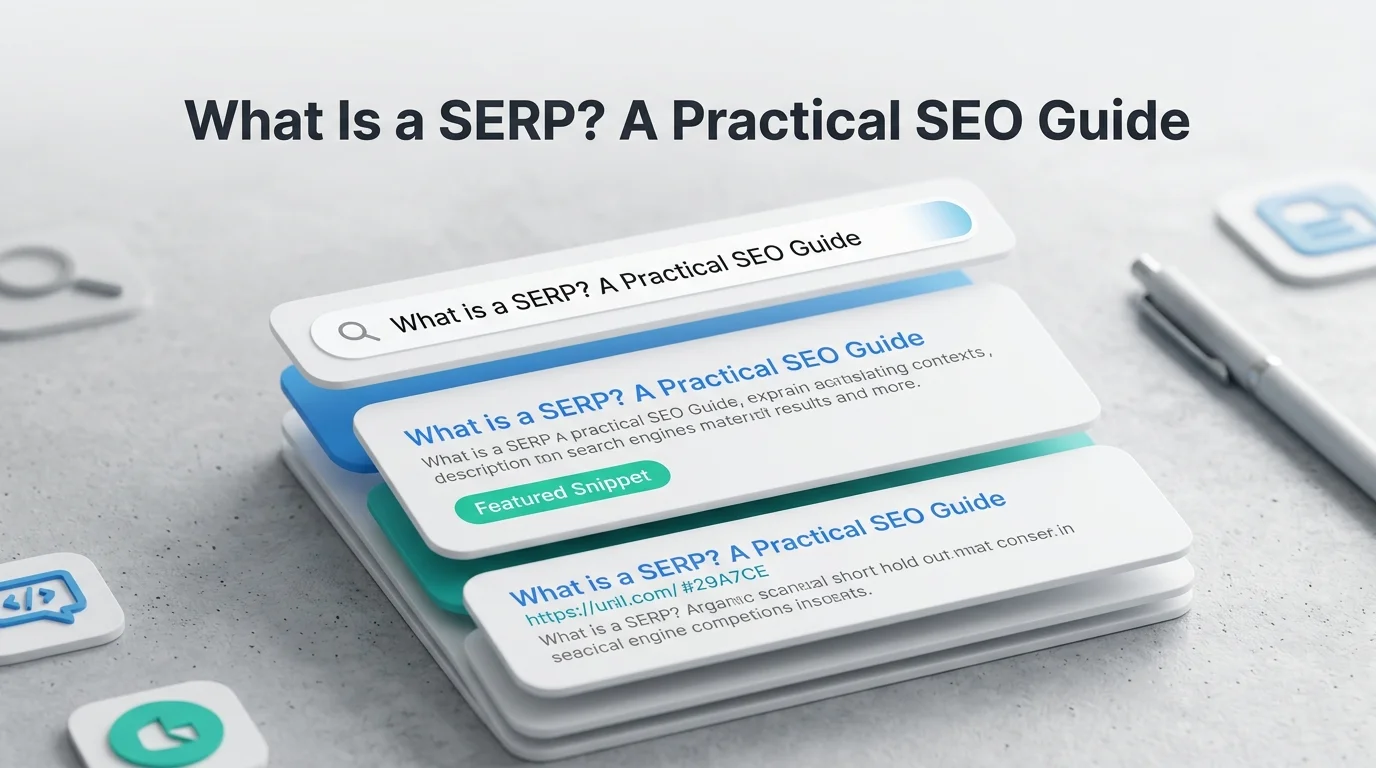
A simplified organic result looks like:
[Favicon] Website / URL
Blue title link
Short descriptive snippet explaining what the page contains.
Modern SERPs can place several other elements above, below, or between those organic listings.
Organic Search Results
Organic results are unpaid listings selected by Google’s ranking systems.
For example:
Title: What Is Technical SEO? Complete Guide
URL: example.com/technical-seo
Snippet: Learn what technical SEO is, why it matters, and how to audit…
The site doesn’t pay Google each time someone clicks this result. Its position is determined by Google’s search systems based on many signals and systems.
Organic visibility is the focus of traditional SEO.
Paid Search Results
Paid results are advertisements purchased through Google’s advertising system. They appear above or below organic listings and are labeled as advertisements.
A simple example:
Sponsored
SEO Agency Services
example-agency.com
Then below it:
Organic result
Technical SEO Services Guide
example.com/technical-seo
The distinction is straightforward: advertisers pay for ad placement; organic listings earn visibility through Google’s ranking systems.
That doesn’t mean paid listings are irrelevant to SEO. A crowded paid area changes how much attention an organic listing receives.
Title Links, URLs, Meta Descriptions, and Favicons
An organic result contains:
- Title link: The clickable headline.
- URL or breadcrumb: Helps users understand where the result leads.
- Snippet: A short description or excerpt that Google generates for the result. It isn’t necessarily identical to the page’s meta description.
- Favicon: The small site icon shown alongside some search results.
These elements influence how users perceive a result before clicking it.
That’s why SEO isn’t only about ranking. The result also needs to communicate relevance quickly.
Paid Ads vs. Organic Search Results: What’s the Difference?
| Element | Paid Search | Organic Search |
| Payment model | Advertiser pays for advertising | No payment required for ranking |
| Placement | Often prominent positions | Determined by organic ranking |
| Label | Marked as sponsored/ad | Usually no advertising label |
| Control | Advertiser controls campaign settings | Search engine determines ranking |
| Main SEO role | Paid acquisition | Organic visibility and traffic |
| Long-term effect | Stops when campaign ends | Can continue receiving traffic if rankings hold |
A common mistake is treating paid and organic search as competing versions of the same tactic.
They’re different channels.
A business might use paid ads to generate immediate visibility for “emergency plumber near me” while building organic content and local authority for longer-term visibility.
A SERP Features List: Common Elements You’ll See
The modern SERP features list is much longer than the classic ten blue links. The exact set changes over time, but several features appear frequently.
Featured Snippets
A Featured Snippet is a highlighted answer Google may display near the top of the results for certain queries.
It can appear as:
- Paragraph
- List
- Table
- Other structured answer formats
For example, a query such as:
“how long does SEO take”
may produce a short answer pulled from a relevant page.
Featured Snippets are often associated with the old phrase “Position Zero.” That term is still used in SEO conversations, but it’s better to think of a Featured Snippet as a specific search feature rather than a permanent ranking position.
The practical SEO lesson is simple: answer clear questions directly, use descriptive headings, and structure information so individual passages are easy to understand.
Don’t write awkward paragraphs just to chase a snippet.
People Also Ask
People Also Ask (PAA) displays related questions that users can expand.
For an SEO query, you might see:
- What is SEO?
- How does SEO work?
- Is SEO still relevant?
- How long does SEO take?
PAA is useful for both users and content strategists.
If several closely related questions repeatedly appear for a target topic, they can reveal the subtopics searchers expect a comprehensive page to address.
But don’t turn an article into a collection of disconnected questions simply because they appear in PAA.
Knowledge Panels
A Knowledge Panel is an information box that can appear for entities such as companies, people, places, organizations, and other well-known subjects.
It may contain:
- Entity description
- Images
- Facts
- Related entities
- Official websites
- Social profiles
- Other structured information
Knowledge Panels are particularly important for branded and entity-focused searches.
If someone searches for a major company, they may see the company’s information before conventional organic results.
Local Packs
A Local Pack appears when Google determines that local businesses are relevant to the query.
For example:
“dentist near me”
may produce a map and a group of nearby businesses.
Local results can include:
- Business name
- Category
- Reviews
- Location
- Hours
- Website
- Directions
- Other business information
This is why local SEO isn’t simply about getting a website to rank organically. A business may need visibility across Google’s local search ecosystem.
Image and Video Results
Some queries naturally call for visual information.
Searches such as:
- “how to install a ceiling fan”
- “Nike Air Max”
- “living room design ideas”
can trigger images, videos, or visual carousels.
For these searches, optimizing only the written webpage may leave visibility opportunities untouched.
Descriptive image filenames, useful alt text, relevant page context, accessible media, video metadata, and strong content can all support discoverability.
Rich Results and Rich Snippets
These terms are often mixed together, so here’s the cleaner distinction.
A rich result is an enhanced search appearance supported by structured data and Google’s eligibility systems.
A rich snippet is commonly used to describe additional information displayed with a standard result, such as review information or product details.
Google’s structured-data documentation lists supported features across areas such as articles, breadcrumbs, products, events, videos, recipes, and more.
But here’s an important misconception:
Adding Schema.org markup doesn’t guarantee a rich result.
Structured data can make a page eligible for certain appearances, but eligibility doesn’t guarantee that Google will display the feature.
That’s why “add schema and you’ll get rich snippets” is outdated advice.
Shopping and Product Results
Product searches can produce highly visual results containing:
- Product images
- Prices
- Ratings
- Availability
- Merchant information
- Product listings
For ecommerce brands, these results can occupy substantial SERP space.
The optimization work therefore extends beyond category-page keywords. Product information, feeds, structured data, images, and accurate merchant information can all matter.
How Search Intent Changes the SERP Layout
Search intent is one of the best ways to understand how SERPs work.
The query tells Google what the user typed. Intent helps determine what the user is trying to accomplish.
Informational Searches
Examples:
- What is a SERP?
- How does SEO work?
- What is a canonical tag?
These searches usually need explanations.
You may see:
- Featured Snippets
- People Also Ask
- Informational articles
- Videos
- Definitions
- AI-generated summaries
For informational keywords, a page that explains the subject clearly usually fits the SERP better than a sales-heavy landing page.
Navigational Searches
Examples:
- Ahrefs login
- Google Search Console
- Nike official website
The user already has a destination in mind.
Google may therefore show:
- Official website
- Sitelinks
- Knowledge Panel
- Brand information
- Related navigational elements
Trying to rank a generic informational article for a strongly navigational query usually misses the point.
Commercial Investigation Searches
Examples:
- best SEO tools
- Semrush vs Ahrefs
- best laptops for students
The user is researching before making a decision.
SERPs often contain:
- Comparison articles
- Reviews
- Product results
- Videos
- Commercial pages
- Forums or discussions
- Brand pages
This is where content quality and first-hand usefulness become especially valuable.
Transactional Searches
Examples:
- buy running shoes
- SEO audit service
- order flowers online
The user is closer to taking action.
The SERP may emphasize:
- Shopping results
- Product listings
- Service pages
- Local businesses
- Ads
- Transactional landing pages
A long educational article may rank poorly here simply because it doesn’t match the dominant intent.
Types of Search Results and Why They Matter
Different search results perform different jobs. Looking at them this way makes it easier to understand what Google is trying to accomplish with a particular SERP.
| Search Result Type | What It Does | Why It Matters for SEO |
| Organic results | Send users to webpages selected by organic ranking systems | Core opportunity for traditional SEO visibility and traffic |
| Paid results | Provide advertising placements | Can occupy prominent SERP space and affect organic click opportunities |
| Local results | Connect users with nearby businesses | Critical for location-based and “near me” searches |
| Visual results | Answer searches through images and videos | Create additional visibility opportunities beyond text-based pages |
| Entity results | Provide information about known people, companies, places, or concepts | Important for branded searches and entity recognition |
| Answer-oriented features | Provide direct information within the SERP | Can satisfy some searches without an immediate website visit |
| AI search features | Synthesize information while connecting users with supporting web content | Expand the search experience beyond conventional ranked links |
The key point is that not every search result competes for attention in the same way. Understanding which result types dominate a target SERP helps determine where an SEO team should focus its effort.
Why SERP Positioning Matters for SEO
A ranking report might tell you that your page moved from position 8 to position 4. That’s useful.
But it’s not the whole story.
Google Search Console reports impressions, clicks, CTR, and average position. These metrics provide more context than ranking position alone.
Rankings Are Only Part of the Story
Imagine two keywords:
Keyword A: Position 2 with a clean organic SERP.
Keyword B: Position 2 underneath an AI Overview, several ads, a shopping module, and other features.
Both are “position 2.”
They don’t necessarily represent the same traffic opportunity.
That’s why experienced SEO teams inspect the actual SERP instead of treating ranking position as the final KPI.
How SERP Features Can Affect Click-Through Rates
SERP features can change how much attention an organic listing receives.
A featured answer may satisfy the user before they visit a site. A shopping carousel can attract a product-search user before they reach traditional organic results. A Local Pack can dominate a local query.
This doesn’t mean every SERP feature automatically destroys organic traffic.
It means the search environment matters.
Search Console can help identify high-impression, low-CTR queries where the result may need a better title, snippet, or stronger alignment with search intent.
The Rise of AI and Zero-Click Search
AI-powered Search has made SERP analysis even more important.
Google’s AI Overviews and AI Mode can provide synthesized answers directly within Search while also surfacing links to supporting websites. In May 2026, Google reported that AI Mode had surpassed one billion monthly active users globally, with queries more than doubling every quarter since launch.
For SEO teams, the important point isn’t to invent a separate collection of “AI SEO hacks.”
Google’s guidance continues to emphasize established SEO fundamentals alongside useful, original, accessible content. Pages still need to be discoverable, indexable, relevant, and valuable to users.
The search interface may be changing quickly. The need to create something worth discovering hasn’t.
Desktop vs. Mobile SERPs: What Changes?
The underlying query may be the same, but the visual experience can differ. Desktop screens have more horizontal space. Mobile layouts are narrower and often stack elements vertically.
For example, a desktop SERP might display several elements side by side in a shopping or local module, while mobile may present them as a horizontally scrollable carousel.
Mobile also changes how much content a user sees before scrolling.
For SEO, this creates a practical rule:
Don’t optimize based only on a desktop screenshot.
Check important keywords on mobile as well, particularly for local, ecommerce, and high-volume queries.
How to Analyze a SERP Before Creating Content
Before writing an article, spend a few minutes looking at the actual results. This saves hours of producing content that doesn’t match the SERP.
1. Check the Search Intent
Ask:
What does Google believe the searcher wants?
Look at the current top results.
Are they:
- Guides?
- Product pages?
- Service pages?
- Comparison articles?
- Videos?
- Local businesses?
- Definitions?
The dominant format gives you a strong clue about intent.
2. Identify the Dominant Content Format
If nearly every result is a detailed guide, a thin 500-word page probably won’t compete well.
If most results are category pages, publishing another educational article may be the wrong move.
SERP analysis should influence the content format before you start writing.
3. Look for SERP Feature Opportunities
Check whether the query triggers:
- Featured Snippets
- People Also Ask
- Images
- Videos
- Local results
- Product results
- AI Overviews
- News
- Other specialized features
Then ask whether your content can genuinely satisfy the format.
4. Study What the Top Results Actually Do Better
Don’t just count words.
Look for:
- Information depth
- Original examples
- Clear structure
- Better definitions
- Images or diagrams
- First-hand experience
- Updated information
- Strong internal linking
- Better UX
I’ve seen SEO teams spend weeks adding more words to a page when the real problem was simpler: the page answered a different question from the one Google was ranking.
How to Optimize for SERP Features
There is no universal “SERP feature hack.” Start by identifying which features appear for your target query, then optimize the content for the format and intent behind them.
Featured Snippets
For queries that trigger Featured Snippets:
- Place a direct answer close to the relevant heading.
- Use concise paragraphs, lists, steps, or tables when appropriate.
- Structure headings around specific questions or subtopics.
- Expand on the direct answer with useful context.
- Keep the wording natural and aligned with search intent.
Don’t shorten an answer purely to chase a snippet. The page still needs to satisfy the broader query.
People Also Ask
Review the PAA questions appearing for your target keyword and identify those genuinely relevant to the topic. Answer them naturally within appropriate sections using clear headings and concise responses.
Use PAA to uncover follow-up intent and information gaps, not as a checklist of questions that must all become headings.
Local Pack Visibility
Keep your Google Business Profile accurate and complete, select relevant business categories, maintain consistent business information, earn genuine reviews, and support the profile with useful location-specific website content.
Treat your Business Profile and website as connected local SEO assets rather than optimizing either one in isolation.
Rich Result Eligibility
Add structured data that accurately represents the page and follows Google’s requirements for the relevant search feature. Use an appropriate supported format, such as JSON-LD, and validate the implementation with Google’s Rich Results Test and URL Inspection.
Remember that structured data creates eligibility, not guaranteed visibility.
Common SERP Optimization Mistakes
SERP optimization fails when ranking is separately treated from search intent and the actual results page. Here are the mistakes worth avoiding:
| Mistake | Why It Hurts | Better Approach |
| Targeting keywords without checking the SERP | Search volume doesn’t reveal the dominant intent or content format. | Review the SERP before deciding what type of content to create. |
| Chasing every SERP feature | Not every feature is relevant or realistically attainable for every query. | Prioritize features that match the query and your content. |
| Treating position as the only KPI | Ads, AI Overviews, Local Packs, and other features can affect organic clicks. | Evaluate rankings alongside impressions, clicks, CTR, and SERP layout. |
| Expecting schema to guarantee rich results | Structured data creates eligibility, not guaranteed visibility. | Implement accurate markup and follow Google’s requirements. |
| Copying what already ranks | Replicating competitors adds little new value. | Identify gaps and contribute stronger evidence, examples, experience, or insights. |
Best Tools for SERP Tracking and Analysis
You don’t need ten tools to understand a SERP. The right choice depends on whether you’re analyzing your own performance, researching competitors, tracking rankings, or interpreting the SERP manually.
| Tool | Best For | What It Helps You Analyze |
| Google Search Console | Your own search performance | Queries, pages, impressions, clicks, CTR, average position, search appearance, device, and country |
| Semrush | Competitive research and large SEO campaigns | Keyword rankings, SERP features, competitors, visibility trends, and SERP history |
| Ahrefs | Competitor and keyword analysis | Rankings, competing pages, SERP history, keyword opportunities, and visibility changes |
| Moz & other rank trackers | Ongoing rank monitoring | Keyword movement, ranking changes, and SERP feature tracking |
| Manual SERP analysis | Search intent and result interpretation | Dominant content formats, SERP features, competitors, intent, and differences between mobile and desktop |
Automated tools are valuable for tracking at scale, but they shouldn’t replace manual analysis. Use tools to measure what is changing, then inspect the SERP to understand why.
Recent SERP Developments SEO Teams Should Know
The SERP isn’t static. Several developments in 2026 reinforce that point.
1. AI Overviews and AI Mode Are Expanding
Google continues to integrate generative AI directly into Search.
In May 2026, Google reported that AI Mode had surpassed one billion monthly active users globally, only a year after its launch. Google also said AI Mode queries had more than doubled every quarter since launch.
For SEO teams, that means SERP analysis needs to consider how traditional organic results coexist with AI-generated responses and their supporting links.
2. Preferred Sources Are Extending Into AI Search
In May 2026, Google announced that Preferred Sources would extend into AI Overviews and AI Mode, allowing users to more easily identify links from websites they have selected as preferred sources.
Google also expanded its use of “Highly Cited” labels to highlight articles that have been widely referenced by other coverage.
For publishers, this strengthens the case for building recognizable, authoritative sources rather than producing interchangeable content.
3. Google Published New Guidance for Generative AI Search
Google has also expanded its guidance for website owners navigating generative AI features in Search.
The broader message remains familiar: established SEO fundamentals still matter. Technical accessibility, useful content, originality, clear site structure, and a strong user experience haven’t suddenly become irrelevant because AI is appearing in the SERP.
The practical takeaway is straightforward:
Don’t throw away your SEO fundamentals because the SERP now contains AI.
Practical SERP Analysis Checklist
Before targeting an important keyword, run through this quick checklist:
- Search the exact query manually.
- Identify the dominant search intent.
- Record the major SERP features.
- Check whether ads appear.
- Compare the top organic results.
- Identify the dominant content format.
- Check desktop and mobile.
- Look for Featured Snippet opportunities.
- Review People Also Ask questions.
- Check local, image, video, shopping, or news results where relevant.
- Compare your proposed page against the actual top results.
- Define the SERP feature or ranking opportunity you want to target.
- Track impressions, clicks, CTR, and ranking trends after publishing.
The key is to do this before producing the content, not after it fails to rank.
Common Misunderstandings About SERPs
Position #1 Doesn’t Guarantee the Most Clicks
Ranking first organically is valuable, but the visual position of that result still matters.
Ads, AI Overviews, Local Packs, shopping results, videos, and other features may appear before the first traditional organic listing. That’s why ranking data should be interpreted alongside impressions, clicks, CTR, and the actual SERP layout.
You Can’t Force Google to Show Every SERP Feature
You can optimize for eligibility. You can’t command Google to display a Featured Snippet, rich result, PAA listing, or other feature.
Structured data is a good example: correct implementation makes a page eligible for supported search appearances, but it doesn’t guarantee that Google will display them.
Rich Results and Rich Snippets Aren’t the Same Thing
These terms are used interchangeably in SEO discussions, but they’re not perfect synonyms.
A better approach is to use the terminology from Google’s documentation when discussing specific search appearances.
SERPs Are Not Static
A SERP can change because:
- User intent shifts
- New content enters the index
- Search features change
- Google changes its systems
- A query becomes newsworthy
- Shopping or local information becomes more relevant
- AI features alter the search experience
That’s why a SERP snapshot from six months ago shouldn’t automatically dictate today’s content strategy.
Conclusion: Understanding SERPs Is the Starting Point for Better SEO
A SERP is more than a list of websites. It reflects search intent, competing content, SERP features, and the formats Google considers most useful for a particular query.
That’s why SERP analysis should happen before you create or optimize content, not after rankings disappoint you. Search the target keyword, identify the dominant intent, examine the features competing for attention, and understand what the top results are doing well.
Rankings still matter, but they make more sense when viewed in the context of the entire results page.
The practical takeaway is simple: search the keyword before you write for it. Understand the SERP first, then create something that genuinely deserves a place there.
FAQs About SERPs
What is SERP volatility?
SERP volatility refers to frequent changes in search rankings and result features. It can reflect algorithm updates, changing search intent, or increased competition.
How does SERP analysis improve keyword research?
SERP analysis shows the actual competition, search intent, and content formats behind a keyword. This helps determine whether a keyword is worth targeting.
What is SERP similarity in SEO?
SERP similarity measures how much the ranking results for two queries overlap. High overlap can suggest that both keywords share similar search intent.
How does personalization affect SERP tracking?
SERPs can vary by location, device, language, and search context. This is why manual searches should be combined with reliable performance and rank-tracking data.
How can SERP analysis reveal content gaps?
Compare ranking pages to identify questions, examples, formats, or perspectives competitors haven’t covered well. These gaps can become opportunities to create more useful content.