
Google does not refresh every search result on one schedule. A breaking news page may be revisited quickly because the information changes rapidly, while an evergreen guide may remain unchanged in search much longer.
Refresh timing depends on the specific URL, crawl demand, page importance, server accessibility, internal linking, update history, content type, and whether the query requires current information.
A Google refresh refers to several separate events:
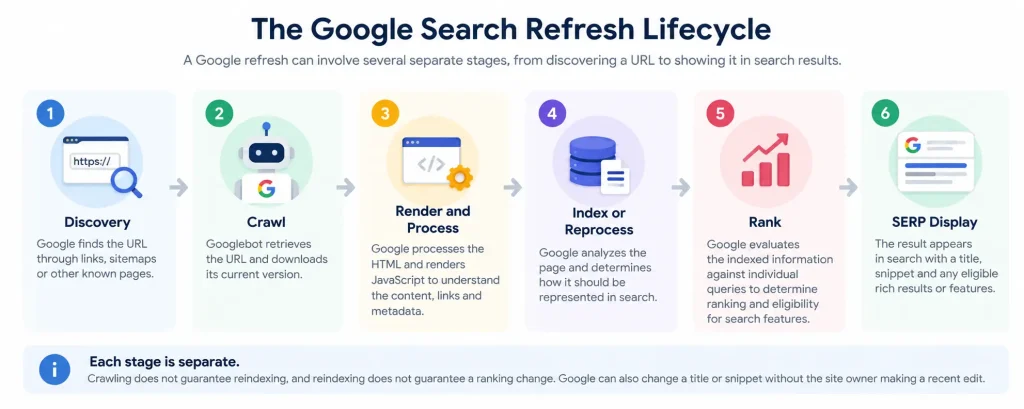
These stages do not complete at the same time. A page can be crawled without an immediate index change. A page can be reprocessed without a ranking change. Google can also change a title or snippet without the site owner making a recent edit.
What Does Refreshing Search Results Actually Mean?
A search result refresh can refer to crawling, processing, indexing, ranking, or a visible SERP change.
Crawling
Crawling happens when Googlebot retrieves a URL. For a new page, Google must first discover the URL through internal links, XML sitemaps, external links, or other known pages.
For an existing page, Googlebot revisits the URL to retrieve its current version. A successful crawl confirms retrieval only. It does not prove that Google has reindexed the page or changed its search result.
Rendering and Processing
Google processes the retrieved HTML and renders JavaScript where required. This stage allows Google to evaluate page content, links, metadata, structured information, and resources used to produce the final page.
Important information that depends on JavaScript must remain accessible to Google’s rendering systems.
Indexing and Reindexing
Indexing is where Google analyzes the page and determines how its information should be represented in search.
A new URL may go through initial indexing. An existing URL may be reprocessed after Google detects changes. Google can also group duplicate pages and choose a representative canonical URL during this process.
Ranking and SERP Serving
Google evaluates indexed information against individual queries. This can affect the ranking position, title link, snippet, rich result eligibility, and other search features. Google may generate a title link from the title element, visible headings, page text, anchor text, and other signals.
Snippets can also change by query because Google may select visible page text instead of the supplied meta description. The essential distinction is:
Crawl ≠ Process ≠ Index ≠ Rank ≠ SERP Display
SERP Refresh vs. Google Algorithm Update
Routine page processing is different from a Google algorithm update. Google can recrawl and reprocess an individual page without announcing an update.
A broader search system update can also change rankings even when the page itself has not changed. Ranking movement alone therefore does not prove that Google recently recrawled the URL.
How Often Does Google Refresh Search Results?
Google refreshes different URLs at different rates. There is no universal Google refresh interval for all pages or queries.
Why There Is No Fixed Google Refresh Schedule
Google cannot continuously recrawl every known URL. Its systems decide which URLs are worth revisiting based on crawl demand and available crawl capacity.
Google Search Central identifies factors such as page popularity, staleness, website size, update patterns, server health, and available crawl resources. Google also limits crawling when a server shows signs that additional requests could create problems. The result is a variable recrawl interval for each URL.
Why Some Search Results Refresh Faster Than Others
Google has more reason to process current information when the correct answer can change quickly.
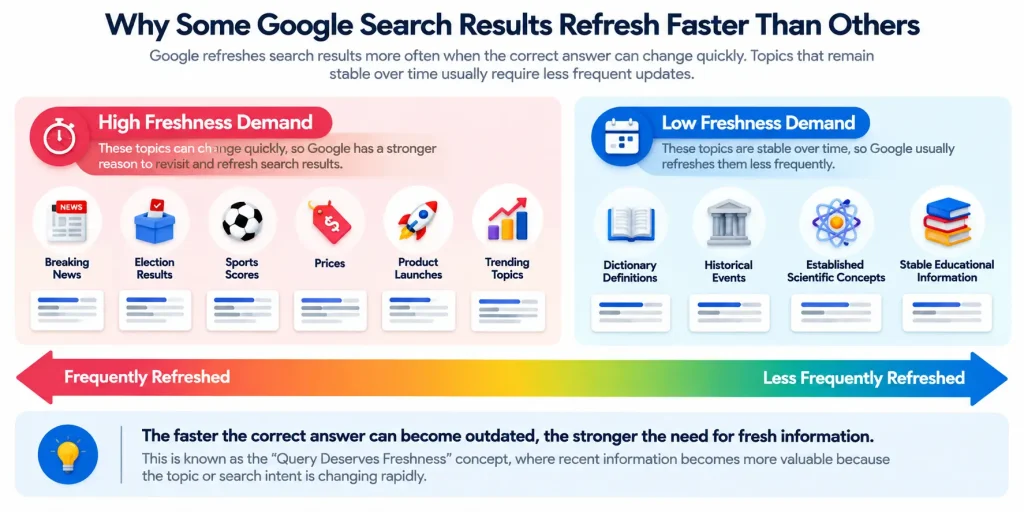
Query Deserves Freshness is an information retrieval concept used to describe situations where recent information becomes valuable because the topic or search intent is changing on regular basis.
Typical Refresh Expectations by Content Type
The following expectations describe relative behavior, not guaranteed timelines.
| Content Type | Refresh Expectation | Practical Meaning |
| Breaking news and trending content | Very frequent | Google has strong reason to revisit rapidly changing information |
| Frequently updated pages | Frequent | Meaningful changes can increase the value of another crawl |
| Ecommerce product pages | Variable | Price, stock, and product changes can create greater refresh demand |
| SaaS and product pages | Variable | Feature and plan changes may prompt another crawl |
| Local and service pages | Moderate or variable | Business information usually changes less often |
| Seasonal pages | Demand dependent | Refresh demand can rise with seasonal search interest |
| Evergreen content | Often less frequent | Stable topics usually need less frequent refreshes |
| New URLs | Variable | Google must first discover, crawl, process, and consider the page for indexing |
Google does not guarantee a particular refresh interval for any category.
How Google Refreshes an Updated Page in Search Results
An updated page must pass through several stages before its visible search result can change.
Step 1: Google Discovers the New or Updated URL
Google must know that a URL exists or remains worth revisiting. Discovery can come from existing knowledge of the URL, internal links, XML sitemaps, external links, or other crawlable references.
A new page requires discovery. A known page requires another visit.
Step 2: Googlebot Crawls or Recrawls the Page
Googlebot retrieves the current version from the server. Different URLs receive different crawl frequencies because Google assigns different levels of crawl demand.
Persistent server errors, slow responses, or availability problems can reduce Google’s ability to retrieve pages efficiently.
Step 3: Google Renders and Processes the Content
Google processes the HTML and renders JavaScript where necessary. This allows Google to identify updated content, links, metadata, structured information, and other resources.
Information that cannot be accessed or rendered may not be understood correctly.
Step 4: Google Reindexes or Reprocesses the Page
Google analyzes the latest version and updates its existing understanding where appropriate.
For a new URL, this can lead to initial indexing. For an existing URL, Google may update previously processed information. Google can also evaluate canonical signals and choose which URL should represent a duplicate group.
Step 5: Google Reassesses Ranking and Search Appearance
Updated information can affect query relevance, ranking evaluation, title link selection, snippet generation, and rich result eligibility.
One completed stage does not guarantee an immediate change at the next stage. A reprocessed page may keep the same ranking. A changed meta description may not appear exactly as written. Valid structured data may create rich result eligibility without producing a rich result.
What Determines How Quickly Google Refreshes a Page?
Google refresh timing depends on crawl demand, site structure, sitemap signals, server accessibility, rendering requirements, and how quickly the information becomes outdated.
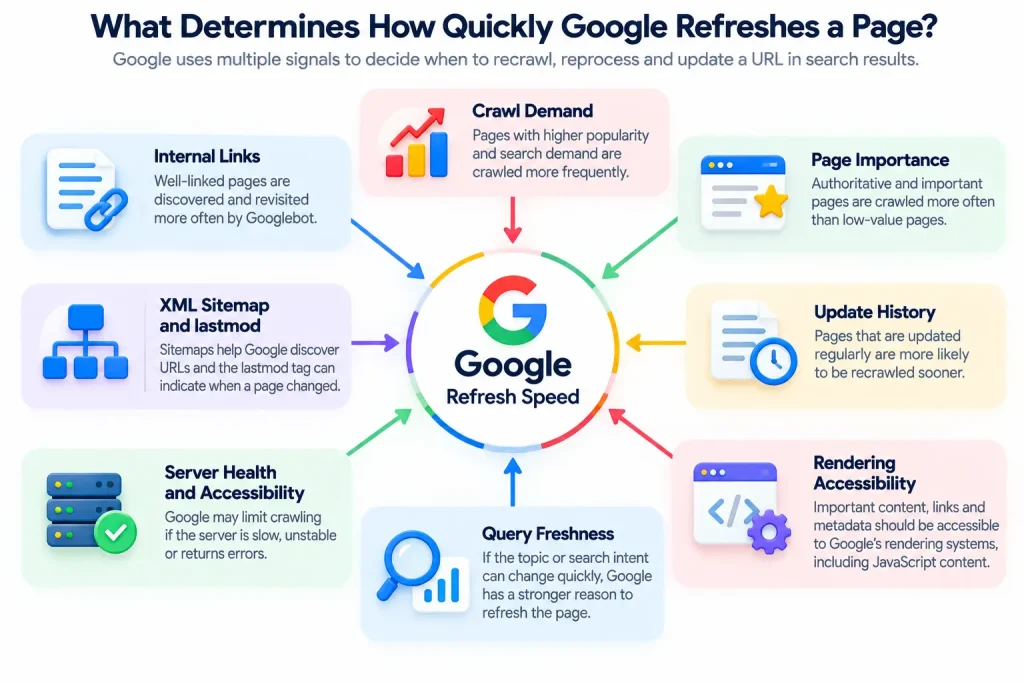
Google does not assign a fixed refresh interval to any of these factors. They influence whether and how efficiently Google can revisit and process a particular URL.
How Long Does Google Take to Show Website Changes?
There is no guaranteed timeline for Google to show a website change.
Google Search Central explains that crawling after a request can take several days to several weeks in some cases. Title link changes can also take time because Google must recrawl and reprocess the page.
New Pages vs. Updated Existing Pages
A new page follows this sequence:
Discover → Crawl → Process → Consider for Indexing
An existing page follows:
Recrawl → Process → Update Existing Information
An existing URL is already known, but Google still decides when to revisit it.
Content Changes
Meaningful content changes follow this sequence:
Recrawl → Process → Reindex or Reprocess → Potential SERP Change
Examples include corrected facts, updated statistics, revised service information, new product details, and expanded explanations. Processing an update does not guarantee a ranking increase.
Title and Meta Description Changes
Google must recrawl and reprocess a page before it can evaluate updated title information. Google can also generate a different title link from visible headings, prominent page text, anchor text, and other signals.
Meta descriptions behave differently. Google often creates snippets from visible page content and may show different snippets for different queries.
An unchanged snippet therefore does not prove that Google failed to refresh the page.
Structured Data Changes
Google must process updated structured data before it can affect search features. Valid markup creates eligibility. It does not guarantee rich result appearance.
Indexing and rich result display are separate decisions.
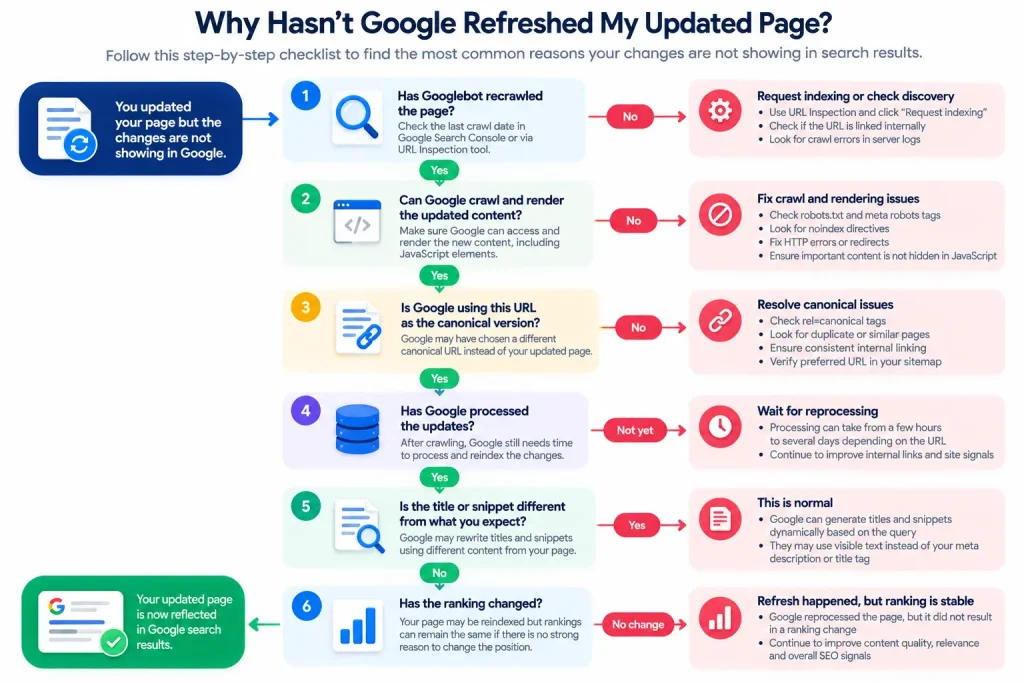
Why Hasn’t Google Refreshed My Updated Page?
A delayed refresh can originate at a specific stage in the pipeline.
How to Check Whether Google Has Refreshed Your Page
The useful checks separate crawl activity from indexing and search performance.
Inspect the URL in Google Search Console
Use URL Inspection to review indexing status, crawl information where available, the Google selected canonical, live URL accessibility, and whether Google can access the current page.
The live test checks the current version. Indexed information reflects what Google has already processed. A recent page update can create differences between those two views.
Compare Google’s Information With the Live Page
Compare the current page with the information available through Search Console and Google Search. Check the main content, title information, canonical signals, structured data, indexing directives, and redirect behavior. A mismatch can show whether the problem is related to crawling, processing, canonicalization, or SERP presentation.
Monitor Search Performance
Search Console can show impressions, clicks, queries, pages, and average position trends. These metrics can show how visibility changes after an update. They cannot identify the exact time Googlebot crawled the URL.
Manual searches should not be the only check because visible results can vary by query, location, device, and context.
Check Googlebot Activity in Server Logs
Server logs can confirm whether Googlebot requested a specific URL. They can show crawl time, requested URL, HTTP response code, crawl frequency, repeated server errors, and resource requests.
This separates two questions:
- Has Google crawled the page?
- Has Google processed and reflected the new version?
How to Help Google Refresh Updated Content Faster
You cannot guarantee a faster refresh, but you can remove barriers that delay discovery, crawling, or processing.
Request Indexing in Google Search Console
Use URL Inspection after an important change to an individual page. Request Indexing tells Google that the URL should be considered for another crawl. It does not guarantee immediate crawling, indexing, or ranking changes.
Repeated requests for the same unchanged URL do not guarantee faster processing.
Keep XML Sitemaps and <lastmod> Accurate
Include important canonical URLs in your XML sitemap. Use modification dates that match real changes.
Update <lastmod> after meaningful revisions, not cosmetic edits.
Strengthen Internal Links to Updated Pages
Link important updated pages from relevant category pages, topic hubs, related articles, or navigation areas where appropriate. Remove orphan page conditions.
The purpose is to give Google clear crawl paths back to the updated URL.
Fix Crawl, Indexing, Rendering, and Server Issues
Correct robots.txt restrictions, accidental noindex directives, canonical conflicts, redirect problems, HTTP errors, inaccessible resources, rendering failures, and server instability.
The objective is simple: Google must be able to retrieve and understand the current version.
Make Substantive Content Updates
Update facts, statistics, instructions, product information, service details, and explanations when they are outdated or incomplete. Do not change publication dates or make insignificant edits solely to create the appearance of freshness.
Can You Force Google to Refresh Search Results?
No. Website owners can request another crawl and improve discovery, but Google controls the refresh process.
What Request Indexing Actually Does
Request Indexing asks Google to consider revisiting the URL. It does not command Google to crawl, index, rank, or display the page immediately.
Why Indexing Requests Don’t Guarantee Immediate Updates
The normal sequence still applies:
Request → Crawl → Process → Index → Rank and Serve
A request does not bypass any stage. Indexing also does not guarantee a ranking change.
Can You Control Googlebot’s Crawl Frequency?
Site owners cannot set a universal crawl frequency for ordinary pages. They can improve crawl conditions through reliable servers, clear internal linking, accurate sitemaps, accessible content, and controlled duplication.
Google still decides when another crawl is warranted. HTTP 304 Not Modified responses can reduce unnecessary data transfer for unchanged resources.
They improve crawl efficiency but do not force faster ranking or SERP changes.
When the Google Indexing API Is Applicable
The Google Indexing API is not a general submission tool for ordinary pages. Google documents limited supported use cases, including certain job posting pages and livestream content.
Standard blog posts, landing pages, service pages, and ordinary product pages should rely on normal discovery methods such as Search Console, XML sitemaps, and internal links.
Frequently Asked Questions
Does Google Refresh Search Results Every Day?
Some results can change several times in one day. Others can remain stable much longer. There is no universal daily refresh cycle.
Does Updating Content Make Google Crawl a Page Again?
Not immediately. Google decides when to revisit known URLs based on crawl demand and the value of another crawl. Meaningful updates and strong discovery paths are more useful than repeated cosmetic edits.
Does Google Favor Recently Updated Content?
Not automatically. Freshness matters when current information improves the answer. A sports score or software release requires current information. A historical explanation remains useful without frequent updates.
How Long Does Google Take to Remove Outdated Search Results?
There is no universal removal timeline. Google may need to recrawl a changed page, discover that a URL is gone, process a new indexing directive, or regenerate the visible search result.
A deleted page, updated page, changed snippet, and changed canonical follow different processing paths.
Final Takeaway
Google does not refresh all search results on one schedule. The useful model is:
Discovery → Crawl → Render and Process → Index or Reprocess → Rank → SERP Display
Site owners can improve discovery and processing through accurate sitemaps, internal links, reliable servers, accessible content, meaningful updates, and Search Console indexing requests.
They cannot guarantee an immediate SERP refresh. Being crawled does not necessarily mean being reindexed. Being reindexed does not guarantee a ranking change. A SERP change does not mean Google just recrawled the page.