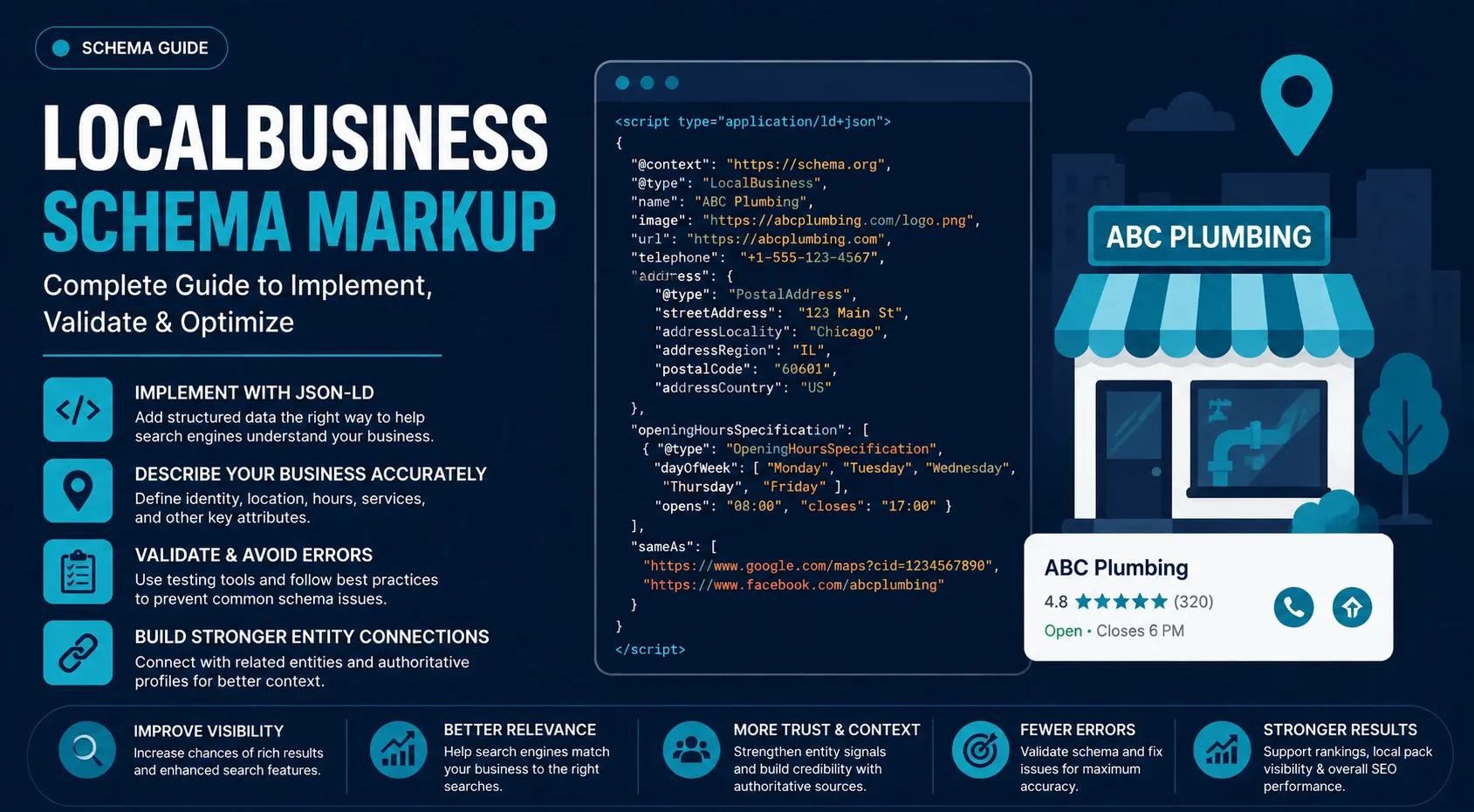
Search engines need to understand more than a business’s name and location. They need to connect its identity, services, address, hours, and other real-world attributes. LocalBusiness schema markup provides a standardized way to communicate those details through structured data.
Schema can improve machine understanding and support eligibility for certain search features, but it does not directly guarantee higher local rankings, Map Pack visibility, or a Knowledge Panel. Google Business Profile and other local SEO signals still play separate roles.
This guide covers LocalBusiness schema implementation, JSON-LD, entity relationships, multi-location and service-area businesses, validation, and common errors.
What Is Local Schema Markup?
Local schema markup is structured data that helps search engines interpret a local business as a real-world entity, including its identity, location, contact details, operating hours, services, and other relevant attributes.
Local Schema Markup vs. LocalBusiness Schema
These terms are related but not identical:
| Term | Meaning |
| Schema markup | The practice of adding structured, machine-readable information to a webpage. |
| Schema.org | The vocabulary that defines entities, properties, and relationships used in structured data. |
| Structured data | The machine-readable representation of information on a webpage. |
| LocalBusiness | A Schema.org type used to describe a local business or branch. |
| JSON-LD | A format used to express structured data, and Google’s recommended format for most implementations. |
The relationship is:
Schema.org vocabulary → LocalBusiness type → JSON-LD implementation
“Local schema” is a common shorthand. LocalBusiness structured data is the more precise technical term.
What LocalBusiness Schema Actually Describes
LocalBusiness schema represents the business itself rather than simply adding local keywords to a page. It can describe:
- Business identity and name
- Business type
- Website, logo, and images
- Physical address and coordinates
- Phone and email
- Opening and special hours
- Services or products
- Service area
- Departments
- Reviews and ratings, where applicable
- Relationships with related entities
- Authoritative external profiles
For example, a dental practice can be represented as a Dentist entity with its name, website, address, coordinates, hours, and relevant business information.
The purpose is straightforward: give search engines structured context about what the business is and how its attributes relate to that entity.
Where LocalBusiness Fits in the Schema.org Hierarchy
Schema.org organizes entities through types and inheritance. At a simplified level:
Thing → Organization / Place → LocalBusiness → Specific subtype
LocalBusiness therefore combines organizational and location-based characteristics. More specific types, such as Restaurant, Dentist, or Hotel, can provide a more precise classification when they accurately describe the business.
The rule is simple: use the most specific valid type, not the most elaborate one.
What Does LocalBusiness Schema Help Search Engines Understand?
LocalBusiness schema organizes a business into four connected dimensions:
| Dimension | What it establishes |
| Identity | Which real-world business the data describes |
| Location | Where the business or branch is located |
| Operations | How and when the business operates |
| Offerings & coverage | What it provides and where it serves customers |
Together, these dimensions create a machine-readable representation of the business.
Identity
The identity layer connects the markup to a specific business through attributes such as its name, canonical URL, @id, logo, and sameAs references.
Its primary role is entity disambiguation: helping systems distinguish one business from another and connect its website with corresponding external representations.
Location
The location layer describes the physical characteristics of a business or branch, including its postal address and geographic coordinates.
For multi-location organizations, each branch should be represented as its own identifiable location rather than treating every branch as the same entity.
Operations
Operational data describes how the business functions, including contact details and opening schedules.
openingHoursSpecification can represent different hours by day, season, holiday, or department.
Offerings and Coverage
LocalBusiness data can also connect the business with its products, services, and geographic coverage.
The relationships can be thought of as:
Business → provides → Service
Business → serves → Geographic Area
This distinction becomes particularly important when modeling Service Area Businesses and multi-location organizations.
Choosing the Right LocalBusiness Type
Google recommends using the most specific LocalBusiness subtype that accurately describes the business. The type should represent the entity being marked up, not the keyword you want to target.
When to Use a Specific Subtype
Use a specific subtype when it genuinely matches the business, such as:
- Restaurant
- Dentist
- Hotel
- Store
- DaySpa
- HealthClub
- MedicalBusiness
These types sit within the broader Schema.org hierarchy and inherit relevant properties from their parent types. A dental practice, for example, should use Dentist rather than an unrelated type chosen for SEO purposes.
When LocalBusiness Is the Appropriate Fallback
Use LocalBusiness when no suitable, more specific subtype accurately describes the business.
Specificity helps only when it is correct. An inaccurate subtype provides worse semantic information than a valid general classification.
Can a Business Have Multiple Types?
Yes. Multiple types can be used when they genuinely describe the same entity:
“@type”: [
“LocalBusiness”,
“Restaurant”
]
Google’s LocalBusiness documentation supports type arrays and does not recommend using additionalType as a substitute for this purpose.
Don’t combine unrelated types simply to make the markup appear more comprehensive.
Why Choosing a More Specific Type Matters
A specific subtype gives search engines a more precise semantic classification of the business. It improves the description of the entity without turning schema into a ranking shortcut.
Choosing Dentist instead of LocalBusiness, when appropriate, does not guarantee higher rankings or greater local visibility. The benefit is more accurate entity representation.
LocalBusiness Schema Properties: What to Mark Up and Why
Use this section as the technical property reference rather than repeating the entity concepts explained above.
Core Properties
| Property | Purpose |
| @context | Defines the Schema.org vocabulary |
| @type | Identifies the business type |
| @id | Provides a stable entity identifier |
| name | Business name |
| legalName | Official legal name, when different |
| url | Canonical business URL |
| description | Business description |
| image | Representative business image |
| logo | Business or organization logo |
| sameAs | Links to matching external entity profiles |
Location Properties
| Property | Purpose |
| address | Business address |
| PostalAddress | Structured address object |
| streetAddress | Street address |
| addressLocality | City or locality |
| addressRegion | State, province, or region |
| postalCode | Postal or ZIP code |
| addressCountry | Country |
| geo | Geographic coordinates |
| latitude | Latitude |
| longitude | Longitude |
| hasMap | Associated map URL |
Contact and Operating Properties
| Property | Purpose |
| telephone | Business phone number |
| Business email | |
| openingHoursSpecification | Detailed operating hours |
Use openingHoursSpecification when schedules vary by day, season, holiday, or department.
Business-Specific Properties
Some properties are relevant only to particular business types:
| Property | Typical use |
| servesCuisine | Restaurant cuisine |
| menu | Restaurant menu |
| priceRange | General pricing information |
| paymentAccepted | Accepted payment methods |
| currenciesAccepted | Accepted currencies |
| amenityFeature | Facilities or amenities |
Only include properties for which the business has accurate, supportable information.
Reviews and Ratings
| Property | Purpose |
| review | Individual review information |
| aggregateRating | Aggregate rating information |
Use genuine review and rating data only. Google’s review guidelines impose additional restrictions on LocalBusiness review markup and eligibility for review snippets.
Property Selection Rule
You do not need every available Schema.org property.
Use properties that accurately describe the business and are relevant to the entity; omit fields for which reliable data does not exist.
This keeps the structured-data graph accurate, maintainable, and semantically useful.
How to Build LocalBusiness Schema in JSON-LD
JSON-LD is Google’s generally preferred structured-data format because it keeps machine-readable data separate from the visible HTML and is easier to implement and maintain. Google also supports Microdata and RDFa when they are implemented correctly.
Start With the Entity, Not the Properties
Build the markup around the real-world business entity first:
- Identify the business or location being represented.
- Select the most specific, accurate @type.
- Assign a stable @id.
- Connect the entity to its canonical URL.
- Add verified business and location data.
- Add operating information that applies to that entity.
- Add relevant business-specific properties.
- Connect related entities where appropriate.
- Validate the markup.
- Test the deployed page.
This prevents property dumping, adding dozens of fields without first defining what the structured-data node actually represents.
Basic LocalBusiness JSON-LD Structure
 A minimal implementation looks like this:
{
“@context”: “https://schema.org”,
“@type”: “Dentist”,
“@id”: “https://example.com/#business”,
“name”: “Example Dental”,
“url”: “https://example.com/”,
“telephone”: “+1-416-555-0100”,
“address”: {
“@type”: “PostalAddress”,
“streetAddress”: “123 Main Street”,
“addressLocality”: “Toronto”,
“addressRegion”: “ON”,
“postalCode”: “M5V 2T6”,
“addressCountry”: “CA”
}
}
This provides the basic entity, type, identifier, URL, contact information, and location. Expand it only with information that genuinely describes the business.
Complete LocalBusiness JSON-LD Example
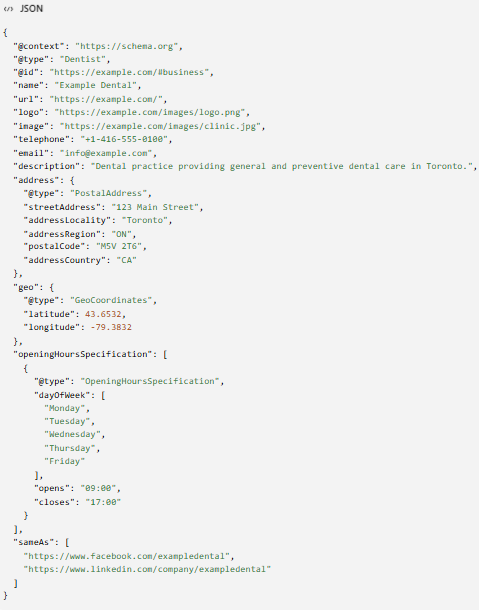
A fuller implementation might look like this:
{
“@context”: “https://schema.org”,
“@type”: “Dentist”,
“@id”: “https://example.com/#business”,
“name”: “Example Dental”,
“url”: “https://example.com/”,
“logo”: “https://example.com/images/logo.png”,
“image”: “https://example.com/images/clinic.jpg”,
“telephone”: “+1-416-555-0100”,
“email”: “info@example.com”,
“description”: “Dental practice providing general and preventive dental care in Toronto.”,
“address”: {
“@type”: “PostalAddress”,
“streetAddress”: “123 Main Street”,
“addressLocality”: “Toronto”,
“addressRegion”: “ON”,
“postalCode”: “M5V 2T6”,
“addressCountry”: “CA”
},
“geo”: {
“@type”: “GeoCoordinates”,
“latitude”: 43.6532,
“longitude”: -79.3832
},
“openingHoursSpecification”: [
{
“@type”: “OpeningHoursSpecification”,
“dayOfWeek”: [
“Monday”,
“Tuesday”,
“Wednesday”,
“Thursday”,
“Friday”
],
“opens”: “09:00”,
“closes”: “17:00”
}
],
“sameAs”: [
“https://www.facebook.com/exampledental”,
“https://www.linkedin.com/company/exampledental”
]
}
The example demonstrates how the business entity, location, operating information, and external entity references are assembled into one JSON-LD node.
The actual properties should vary according to the business type, page purpose, location model, and information genuinely available.
JSON-LD vs. Microdata vs. RDFa
JSON-LD, Microdata, and RDFa are formats for expressing structured data. They are not different Schema.org vocabularies.
| Format | Implementation approach |
| JSON-LD | Structured data is provided separately from the visible HTML |
| Microdata | Schema properties are embedded into HTML elements and attributes |
| RDFa | Linked-data properties are expressed through HTML attributes |
Google supports all three formats but recommends JSON-LD for structured-data implementation.
For large local SEO programs, maintainability becomes a practical advantage. A site with hundreds of locations is easier to manage when schema is generated systematically through templates, CMS fields, or application data rather than manually adding markup to individual HTML elements.
Implementation Rule
Build the entity first, add only relevant data, keep the values synchronized with the visible page, then validate the deployed markup.
The next step is handling more complex structures such as nested services, multi-location entities, and Service Area Businesses rather than simply adding more properties to the same basic object.
Where Should LocalBusiness Schema Go?
Schema placement should follow what the page represents. The markup on a URL should describe the primary entity or entities genuinely represented on that page.
Homepage vs. Location Page
For a single-location business, the homepage can represent the primary business entity.
For a multi-location business, separate the parent organization from its individual locations. The main corporate site can represent the organization, while dedicated location pages represent individual branches.
Dedicated Location Pages
A location page should have its own identifiable business or branch entity when it represents a distinct physical location.
For example:
- /locations/chicago/
- /locations/dallas/
- /locations/denver/
The location entity should use the information that actually belongs to that branch, such as its:
- location-specific URL
- name
- address
- coordinates
- telephone number
- opening hours
- local business information
Each page should contain genuinely location-specific information. Replacing the city name in an otherwise identical template does not create meaningful location relevance.
Service Pages vs. Business Entity Pages
A service page primarily represents what the business offers; a business page represents the business itself.
For example:
Business: Example Plumbing
Service: Emergency Plumbing
A service page can represent the service using Service and associate it with the relevant business entity. It should not create a second LocalBusiness entity simply because the service has its own URL.
Should the Same LocalBusiness Schema Appear on Every Page?
Not necessarily.
Markup should correspond to the entities represented by each page:
| Page | Primary schema focus |
| Homepage | Primary business or organization |
| Location page | Specific business location |
| Service page | Service offered by the business |
| About page | Organization or business information, where appropriate |
| Contact/location page | Relevant business location |
Repeating a large, identical LocalBusiness object across every URL does not strengthen entity signals. It can also create conflicting or outdated data when location-specific details change.
The rule is simple: mark up the entity the page represents, and connect related entities rather than duplicating the same entity everywhere.
LocalBusiness Schema for Different Business Models
The appropriate schema structure depends on the business’s physical presence, organizational relationships, and service model.
| Business model | Entity structure | Key implementation | Important consideration |
| Single-location business | One business → one physical location | Use one LocalBusiness entity with a stable @id, accurate address, operating hours, contact information, and relevant business properties. | The business entity and its primary location can be represented together when there is only one location. |
| Multi-location business | Parent organization → Location A, B, C | Give each location its own URL, address, coordinates, local information, and unique entity @id. | Do not use one LocalBusiness entity to represent multiple physical locations. |
| Franchise or chain | Brand/parent organization → franchise operation → individual location | Represent the corporate or brand entity separately from individual franchise locations and relate them appropriately. | A branch-level query concerns a specific location, while a brand-level query may concern the parent organization. Avoid collapsing these entities. |
| Business with departments | Business → departments | Use the department property when departments are genuinely distinct within the business and have relevant differences in information or operating schedules. | For example, a store may contain retail, pharmacy, and optical departments with different hours or functions. |
| Service-area business | Business → service coverage | Represent the business identity separately from its geographic coverage. Use areaServed where appropriate to describe the areas served. | Do not create or publish a storefront address that does not represent how the business actually operates. |
| Businesses sharing a location | Business A + Business B → same physical address | Model each legitimate business according to its actual organizational identity and relationship. | Shared address or coordinates do not mean two businesses are the same entity. |
Entity relationships for multi-location businesses
For a multi-location organization, the relationship can be visualized as:
Parent Organization
│
├── Location A
├── Location B
└── Location C
Each location can have a distinct identifier, such as:
This makes the entities distinguishable rather than treating every location as the same LocalBusiness.
Connecting LocalBusiness Schema With Other Entities
LocalBusiness works as part of an entity graph rather than as an isolated collection of properties. Connecting it with related entities helps search engines distinguish the business, the page describing it, its offerings, and external representations.
LocalBusiness + Organization
Distinguish the physical business/location from a parent organization when they represent genuinely different entities. A local location can be connected to its broader organization without being treated as the same entity.
LocalBusiness + WebPage
A webpage is a digital resource; the business is the real-world entity it describes. Connect them so the relationship is clear:
WebPage → about → LocalBusiness
This prevents the document and the entity from being conflated.
LocalBusiness + Service
Connect a business to the services it provides rather than creating separate LocalBusiness entities for individual offerings:
LocalBusiness → offers → Service
Use separate business entities only when there are actually separate businesses or locations.
LocalBusiness + BreadcrumbList
BreadcrumbList describes the page’s position within the website hierarchy, while LocalBusiness describes the business represented by that page. They serve different purposes and can coexist on a location page.
LocalBusiness + Review / AggregateRating
review and aggregateRating can associate genuine review or rating information with the appropriate business entity. The underlying data must be accurate and meet Google’s applicable guidelines; markup does not guarantee review stars or other search enhancements.
LocalBusiness + sameAs
Use sameAs to connect the business with authoritative URLs that represent the same entity, such as an official social profile. A page that merely mentions the business is not automatically an appropriate sameAs target.
Core principle: connect entities based on their real-world and semantic relationships, not simply because they share a name, address, or webpage.
LocalBusiness Schema and Google Business Profile Are Not the Same Thing
LocalBusiness schema and Google Business Profile both describe a business, but they serve different functions within Google’s ecosystem.
| LocalBusiness Schema | Google Business Profile | |
| What it is | Structured data published on a website | A business profile managed within Google’s local ecosystem |
| Primary purpose | Helps search engines interpret the business and related webpage information | Manages the business’s presence across Google Search and Maps |
| Where it exists | On the business’s website | Within Google’s business-profile system |
| Who controls the information | Website owner/developer | Business owner or authorized manager through Google |
| Main role | Machine-readable representation of the business and its relationships | Local presence and business information management |
| Ranking control | Does not directly control rankings or Local Pack placement | Provides information used within Google’s local ecosystem but does not guarantee rankings |
| Search appearance | Can support eligibility for certain structured-data features where applicable | Can influence how business information is presented across Google’s local surfaces |
| Relationship to the other | Can reinforce and clarify information about the business on the website | Provides Google’s own business-profile representation |
How They Complement Each Other
They can represent the same real-world business from different systems:
Real-world business
↓
Website
↓
LocalBusiness structured data
Real-world business
↓
Google Business Profile
↓
Google Search / Maps
The goal is consistent, accurate entity information, not identical fields across every platform.
What LocalBusiness Schema Cannot Control
LocalBusiness schema does not directly determine:
- Google rankings
- Local Pack position
- Google Maps visibility
- Knowledge Panel appearance
- whether a rich result appears
- how Google ultimately displays the business
Structured data can help Google understand eligible content, but it does not guarantee a particular search feature or ranking outcome.
LocalBusiness Schema, Local SEO, and Entity Consistency
LocalBusiness schema is one component of a broader local entity system. Its value depends on how accurately it represents the business and how well that information aligns with the website, Google Business Profile, citations, and other authoritative sources.
Schema and NAP Consistency
NAP means Name, Address, and Phone. These core business details should remain accurate and consistent across the website, structured data, Google Business Profile, directories, and other authoritative profiles.
If the visible website information says one phone number while the schema specifies another, technically valid markup does not make the inconsistency useful.
Schema and Local Citations
The distinction is straightforward:
Schema = first-party structured information published on your website
Citations = external references to the business
Schema communicates what the website says about the business, while citations provide external references that can support discovery and entity consistency. Neither replaces the other.
Schema and Local Rankings
Avoid presenting LocalBusiness schema as a standalone Local Pack ranking factor. Its defensible role is to structure business information, clarify entity relationships, support eligible search features, and reinforce consistency.
Local search visibility depends on a broader set of signals and systems.
Schema Within the Local Entity System
A useful mental model is:
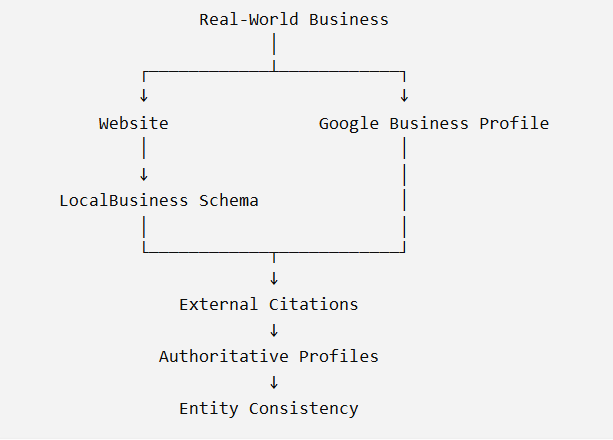
The strategic objective is therefore not simply to “add LocalBusiness schema for local SEO.” It is to maintain an accurate, connected, and consistent representation of the real-world business across the systems that describe it.
How to Validate and Audit LocalBusiness Schema
Publishing JSON-LD is not the finish line. Validation should confirm syntax, implementation accuracy, Google eligibility, and consistency with the real business.
Validate the Structured Data
Use Google Rich Results Test to evaluate eligibility for Google’s supported search features and the Schema.org Validator to check Schema.org vocabulary and structure. They serve different purposes, so passing one does not replace the other.
Check How Google Sees the Page
Use Google Search Console to inspect the deployed URL, review relevant structured-data reports, and check indexing status. A markup implementation can be technically valid while the page itself remains uncrawled, unindexed, or otherwise inaccessible to Google.
Audit Business Information Across Sources
Compare the information across these layers:
| Layer | What to verify |
| Visible page | The business information shown to users is accurate. |
| JSON-LD | The structured data accurately represents the visible content and entity. |
| Google Business Profile | Public business information aligns with the website. |
| External profiles | Authoritative references identify the same business consistently. |
This catches entity and consistency problems that syntax validators cannot detect.
Separate Validation From Eligibility
A successful audit should answer three different questions:
- Valid syntax: Does the JSON parse correctly?
- Correct implementation: Does the markup accurately describe the page and business?
- Search eligibility: Does Google support the relevant feature, and does it choose to display it?
A valid result does not guarantee a search enhancement or ranking change.
Monitor After Deployment
Reaudit the markup when the business changes its address, phone number, hours, locations, URLs, services, departments, or other core information, and after website migrations, template changes, or schema/CMS plugin replacements.
Allow time for Google to recrawl and reindex updated pages before evaluating the effect of a deployment.
Common Local Schema Markup Mistakes
Most LocalBusiness schema problems come from inaccurate entity modeling, inconsistent information, duplication, or treating structured data as a ranking shortcut.
| Common mistake | Why it is a problem | Better approach |
| Using generic LocalBusiness when a specific type exists | Loses useful specificity when a legitimate subtype applies. | Use the most specific applicable LocalBusiness subtype. |
| Marking up information not represented on the page | Structured data can misrepresent what users actually see. | Ensure marked-up information accurately reflects the page content. |
| Incorrect address or coordinates | Even a small error can associate the entity with the wrong location. | Verify address, postal code, latitude, and longitude against reliable business information. |
| Incorrect or stale opening hours | Copied hours may conflict with current, seasonal, holiday, or department-specific schedules. | Keep openingHours or openingHoursSpecification aligned with current business hours. |
| Reusing one entity for multiple locations | Different physical locations are being incorrectly represented as one entity. | Give each genuine location its own entity identity and location information. |
| Creating duplicate LocalBusiness entities | Plugins, templates, or multiple implementations can create indistinguishable duplicate objects. | Audit the rendered markup and consolidate duplicate representations of the same entity. |
| Adding fake or unsupported reviews/ratings | Fabricated or ineligible review data can violate Google’s guidelines and misrepresent the business. | Mark up only genuine, eligible review and rating information. |
| Treating areaServed as a physical address | A service area describes geographic coverage, not a storefront. | Keep the actual business location separate from its service area. |
| Assuming valid schema guarantees rankings or rich results | Validation does not guarantee rankings, Local Pack visibility, or search features. | Treat structured data as an interpretive and eligibility aid, not a ranking control. |
| Adding every possible property without reliable data | Bloated markup increases the chance of inaccurate, outdated, or fabricated information. | Prioritize relevant properties supported by reliable business data. |
Local Schema Markup for Common CMS Platforms
The implementation route varies by platform, but the audit principle stays the same.
| Platform | Typical implementation | What to verify |
| WordPress | SEO/schema plugin or custom JSON-LD | Plugin-generated type, duplicate markup, location data |
| Shopify | Theme/app-generated structured data or custom implementation | Store details, templates, duplicate entities |
| Wix | Built-in structured-data capabilities or custom configuration | Generated markup and business information |
| Webflow | Custom JSON-LD or integration | Placement, entity data, rendering |
| Custom website | Hand-coded JSON-LD, CMS hook, API, or JavaScript | Deployment, rendering, scalability |
Plugins save development time, but they also generate generic or duplicated schema.
A custom implementation gives control but requires technical ownership.
Google supports dynamically generated structured data, including JavaScript-based implementations, provided the markup can be properly processed.
The workflow should therefore be:
implementation → inspect generated markup → compare with visible content → validate → monitor
Don’t stop at “the plugin says schema is enabled.”
LocalBusiness Schema Implementation Workflow
Use this workflow to deploy LocalBusiness schema systematically, starting with the real-world entity rather than the code.
1. Identify the Real-World Entity
Determine what the markup represents: parent organization, local business, branch, department, service, or practitioner. Start with the entity, not the JSON-LD.
2. Choose the Business Type
Use the most specific valid LocalBusiness subtype. If no accurate subtype applies, use LocalBusiness.
3. Collect Authoritative Business Data
Gather reliable information such as the business name, canonical URL, address, phone, email, coordinates, hours, logo, images, services, service area, and authoritative external profiles. Do not invent missing values.
4. Map Properties to the Correct Types
Attach properties to the entity that actually owns the information:
Business
├── address → PostalAddress
├── geo → GeoCoordinates
├── review → Review
└── offers → Service / Offer
This prevents incorrectly attaching properties or creating unnecessary entities.
5. Define the Entity Relationships
Determine the legitimate relationships between the business and WebPage, Organization, Service, department, Review, AggregateRating, and authoritative external profiles. Build a coherent graph rather than disconnected objects.
6. Generate the JSON-LD
Create the markup from the verified data. Use stable @id values and include only relevant properties supported by reliable information.
7. Place the Markup on the Appropriate Page
Match the entity to the page’s purpose. A location page can represent a location, a service page can describe a service, and a corporate page can represent the broader organization.
8. Validate and Inspect
Validate the structured data with the appropriate tools, then inspect the deployed URL through Google Search Console to verify how Google can access and process the page.
9. Check Entity Consistency
Compare:
Visible page ↔ JSON-LD ↔ Google Business Profile ↔ authoritative external profiles
Investigate contradictions before considering the implementation complete.
10. Monitor and Update
Treat schema as maintained entity data, not a one-time SEO installation. When the real-world business changes, update the corresponding structured data and revalidate the affected pages.
Key Takeaways
- LocalBusiness schema represents a real-world local business or physical branch as a structured entity.
- Use the most specific valid subtype and model the entity around accurate business information.
- Keep physical location, service coverage, parent organizations, and individual branches conceptually distinct.
- Use stable entity identifiers and connect related entities instead of creating duplicate business objects.
- Keep structured data consistent with visible page content, Google Business Profile, and authoritative business information.
- Validate both the structured data and the deployed page, then monitor it as business information changes.
- Structured data supports entity understanding and feature eligibility; it does not guarantee rankings or specific Google search appearances.
Local Schema Markup FAQs
1. Can LocalBusiness schema help Google understand a business entity?
Yes. It provides machine-readable information that helps search engines interpret the business and its relationships with related entities.
2. What properties are most important for LocalBusiness schema?
Prioritize accurate core information such as the business name, URL, address where applicable, phone, hours, coordinates, and relevant business-specific properties.
3. Can LocalBusiness schema be combined with other Schema.org types?
Yes. It can be connected with appropriate types such as Organization, WebPage, Service, PostalAddress, Review, and BreadcrumbList when those relationships genuinely exist.
4. How often should LocalBusiness schema be updated?
Update it whenever important business information changes, including the address, phone, hours, services, URLs, or locations.
5. How can I tell whether LocalBusiness schema is implemented correctly?
Check that the markup represents the page and business, uses appropriate types and relationships, contains reliable data, and passes relevant validation and inspection checks.